Establishing secure connection…Loading editor…Preparing document…

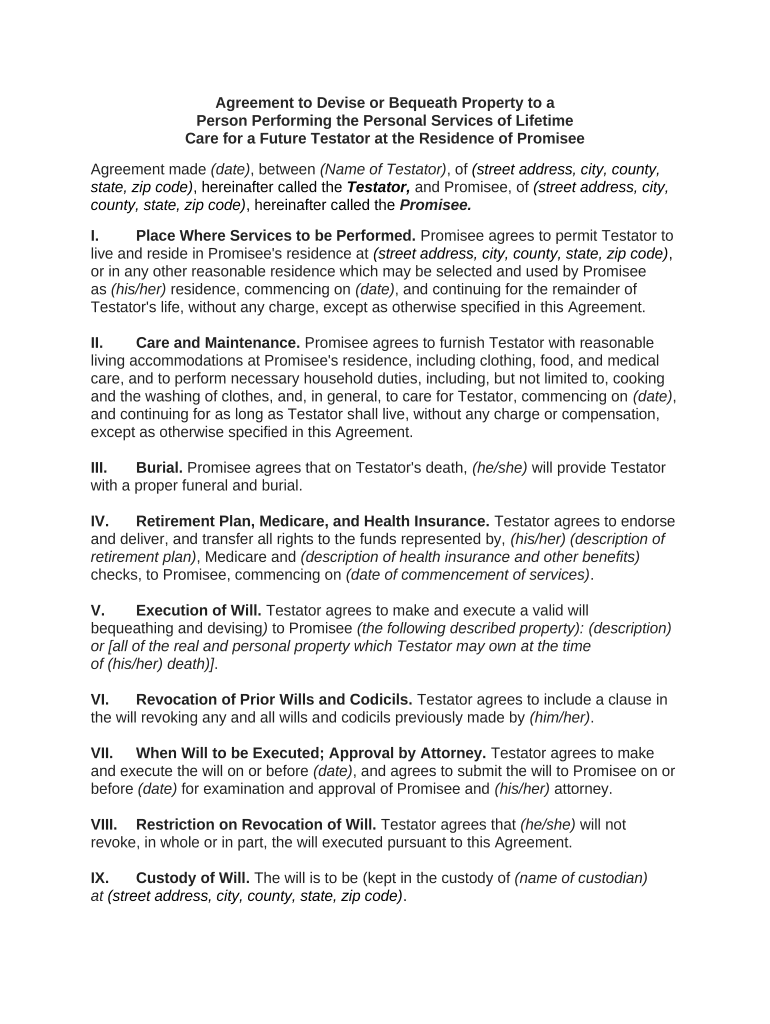
Agreement to Devise Property for Personal Care Services

This template is fully customizable. Edit the text, fill out the fields, and send it for signature. Give it a try!
Agreement to Devise Property for Personal Care Services

What the Agreement to Devise Property for Personal Care Services Is

An Agreement to Devise Property for Personal Care Services is a written contract where an owner transfers or promises property to another person in exchange for caregiving, housing, or personal support services. It documents obligations, the property or interest being conveyed, and the duration or conditions of care. These agreements are used in eldercare and long-term support planning, can interact with estate documents, and may affect benefits eligibility; parties should clarify whether the arrangement is a lifetime conveyance, a testamentary devise, or a conditional transfer.

Why a Formal Agreement Matters

A written agreement clarifies expectations, documents consideration, and protects both parties by recording obligations and property interests in writing.

Why a Formal Agreement Matters

Who Commonly Prepares and Signs This Agreement

Typical users include property owners arranging long-term care and caregivers receiving property in exchange for services.

  • Elder homeowner arranging in-home care and property transfer
  • Family member or informal caregiver accepting property for services
  • Estate planning attorney or fiduciary documenting a care-for-property arrangement

Step-by-step completion checklist

Follow this sequence to prepare, review, and finalize the Agreement to Devise Property for Personal Care Services.

  • 01
    Draft terms: Describe parties, property, services, consideration, and duration.
  • 02
    Verify title: Confirm owner has authority to convey the stated interest.
  • 03
    Review with counsel: Have an attorney check enforceability and benefit effects.
  • 04
    Execute and record: Sign, notarize if required, and record deed or instrument as applicable.

How to configure a secure digital signing workflow

Set up fields and authentication so signatures are attributable and records are preserved.

Field Configuration
Signer Authentication Use email + SMS code or higher for identity verification
Notarization Flag Include a notary acknowledgment field if recording will be required
Conditional Fields Show recording instructions only if deed is conveyed
Audit Trail Enable full event logging and certificate of completion

Technical considerations for digital execution and submission

Choose a platform that supports required authentication, audit trails, and any applicable HIPAA or BAA needs.

  • Integrations: Salesforce, NetSuite, Microsoft 365 support
  • Document formats: PDF and DOCX with preserved signatures
  • Notarization support: Remote Online Notarization compatibility

Ensure the provider supports the export formats and record retention policies necessary for recording or probate review.

Typical online signing flow for this agreement

A standard eSigning sequence ensures clear attribution and a reproducible record of execution.

  • Upload document: Sender uploads the finalized agreement PDF or DOCX.
  • Place fields: Add signature, date, initial, and notary fields as needed.
  • Send to signers: Distribute via email link or secure signing invite.
  • Capture audit: System records timestamps, IPs, and completion certificate.

Security and compliance details to verify

Encryption: TLS 1.2/1.3 in transit
Data at rest: AES-256 encryption
HIPAA support: BAA available
Audit logs: Comprehensive event history
Standards: SOC 2 Type II, ISO 27001
ESIGN / UETA: Compliant frameworks

Common legal and financial risks to avoid

Unrecorded transfer: Clouds title
Improper witnessing: May void conveyance
Benefits impact: Affects Medicaid eligibility
Incomplete description: Creates ambiguity
No notarization: Prevents recording
Tax reporting: Gift or estate tax issues

Pitfalls people commonly run into

  • Using informal property descriptions that don’t match deed records
  • Failing to document the caregiver’s exact duties and schedule
  • Neglecting to assess effects on public benefits like Medicaid
  • Skipping legal review for testamentary or tax consequences

Vendor pricing and feature snapshot for eSigning this agreement

Compare per-user costs and core capabilities for common eSignature providers when executing the Agreement to Devise Property for Personal Care Services.

signNow DocuSign Adobe Sign PandaDoc HelloSign
Starting Price $8/user/mo $15/user/mo $14/user/mo $19/user/mo $15/user/mo
Free Trial 7-day free trial Varies by plan Varies by plan Varies by plan Varies by plan
Bulk Send Yes Yes Yes Yes Varies by plan
Audit Trail Yes Yes Yes Yes Yes
HIPAA Compliant Yes Yes Yes No No

Real-world examples of this agreement in use

Two concise examples show typical scenarios where the Agreement to Devise Property for Personal Care Services is employed.

Family Care Arrangement

An elderly homeowner agrees to transfer a life estate

  • caregiver provides daily in-home support and transportation
  • the written agreement specifies caregiving duties, timing, and recording steps to avoid later probate disputes and clarify Medicaid impact.

Formal Contracted Care

A property owner conveys a rental unit in exchange for assisted living services

  • a licensed caregiver signs a detailed services schedule
  • attorney-reviewed contract and recorded deed language preserve title clarity and protect both parties.

Practical tips to ensure a defensible agreement

Adopt these best practices to improve enforceability and reduce future litigation or benefits challenges.

Use precise property language
Cite the deed or parcel ID and avoid informal descriptions to prevent title disputes.
Document services clearly
List tasks, schedules, and measurable standards so obligations are enforceable.
Consult legal and tax advisors
Confirm estate, gift, and benefits implications before finalizing the transfer.
Record and notarize when required
Complete notary acknowledgments and record deeds to protect third-party rights.

Frequently asked questions about execution and validity

Answers to common questions about enforceability, signatures, notarization, and interactions with benefits or estate law.


Need help? Contact support

be ready to get more
Join over 28 million airSlate SignNow users