Establishing secure connection…Loading editor…Preparing document…

Disclaimer Property Form

This template is fully customizable. Edit the text, fill out the fields, and send it for signature. Give it a try!
Disclaimer Property Form

What the Disclaimer Property Form Is

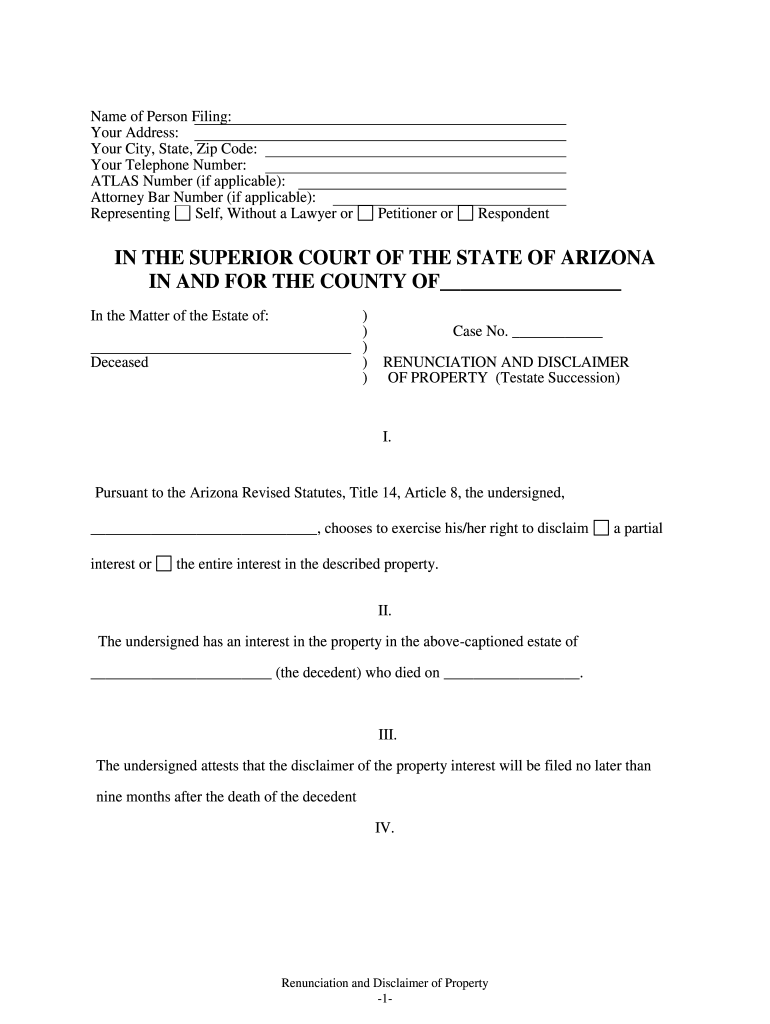
A Disclaimer Property Form is a legal document used to decline ownership, interest, or inheritance of specified real property or an interest in property. It records a party's voluntary and irrevocable renunciation of rights to real property, transfers those rights according to the instrument or governing law, and helps avoid unintended acceptance of title or liability. Typical uses include estate distributions, beneficiary renunciations, and title-clearance events tied to probate or transfer proceedings.

Why a Disclaimer Property Form Matters

Completing a properly drafted Disclaimer Property Form clarifies ownership, prevents automatic acceptance of property that could bring taxes or liabilities, and preserves alternate distribution paths set by wills, trusts, or statutes. It is a narrowly focused tool: use it only when decline of interest is desired and legally permitted.

Why a Disclaimer Property Form Matters

Who typically completes this form

Identify the legal capacity in which you sign (individual, guardian, conservator, or fiduciary) and consult counsel if the decision affects tax, Medicaid eligibility, or creditor claims.

  • Beneficiaries and heirs who choose not to accept property interests to allow alternate estate distributions or tax planning.
  • Personal representatives, estate attorneys, or title officers who prepare, review, and record the disclaimer in probate or real estate records.
  • Lenders or trustees in specific mortgage or trust contexts where a beneficiary's refusal affects lien priority or trust vesting.

Representative signer profiles

Individual Heir

A named beneficiary who signs to decline property interest. Should confirm identity, relationship to decedent, and understand tax and creditor consequences before signing; attorney review is common for complex estates.

Estate Representative

A personal representative or executor preparing or filing the disclaimer on behalf of an estate. Responsible for ensuring the disclaimer meets state probate rules and is filed or recorded where required to affect title.

Key parts of a professional Disclaimer Property Form

A complete form addresses the who, what, when, and how of the renunciation and includes attestation and delivery provisions so courts and recorders can rely on the document.

Signer identification

Full legal name, address, relationship to decedent or grantor, and capacity (e.g., individual, guardian). Precise identification prevents ambiguity and supports recording or probate filings.
Property description

Legal description or specific identification of the property or interest being disclaimed, including parcel number if available, to avoid overbroad renunciations.

Statement of disclaimer

Clear, unambiguous language stating the signer irrevocably declines the specified property interest and will not accept benefits, rights, or proceeds.

Effective date

The exact date the disclaimer takes effect, typically formatted MM/DD/YYYY; this can determine tax and distribution timing under state law.

Notary and witnesses

Notary acknowledgment and witness attestations as required by state statute or county recorder for recordation and to prevent later challenges.

Delivery and acceptance

How and when the disclaimer is delivered or recorded, and any statements about intended recipients (probate court, county recorder, trustee).

Required data fields at a glance

Signer Name: Full legal name
Signer Capacity: Individual or fiduciary
Property ID: Parcel or legal description
Effective Date: MM/DD/YYYY
Notary Block: Acknowledgment details
Delivery Instructions: Recipient and filing method

Step-by-step: completing the Disclaimer Property Form

Follow these essential steps to prepare, sign, and record a valid disclaimer so it achieves the intended transfer without introducing uncertainty.

  • 01
    Gather documents: Collect deed, will, trust, and title records to identify the exact interest being disclaimed.
  • 02
    Confirm authority: Verify signer capacity and any statutory limits on disclaimers under state law.
  • 03
    Complete form: Enter identifications, legal description, effective date, and precise disclaimer language.
  • 04
    Notarize and file: Obtain required notarization/witnesses and deliver to probate court or county recorder as applicable.

How to customize and complete the form online

Digital completion reduces errors and speeds recording when you follow a consistent workflow with validation and eSignature controls.

Field Recommended configuration
Signer Name Required | autofill from profile
Property Description Required | multiline text with character limit
Effective Date Required | date picker MM/DD/YYYY
Notary Block Optional | placeholder for recording office

Where to file and how the process flows

Disposition depends on whether the disclaimer affects title, probate distribution, or trust vesting; follow the routing below.

  • Prepare document: Draft or use a state-compliant template with the exact property description.
  • Sign and notarize: Signer signs before a notary; witnesses if state law requires them.
  • Deliver to recipient: Send to probate court, trustee, or county recorder per local practice.
  • Record if required: Record the disclaimer with the county recorder to affect public title records when necessary.

How to share and distribute the form securely

Preserve copies for the estate record, provide recipients with recorded copies when required, and log delivery methods for proof.

  • Email with encryption: Send PDF attachments over encrypted mail for drafts
  • Secure portal: Upload to a document portal for controlled access
  • eSignature platforms: Use an eSignature tool with audit trail

Timing considerations and effective deadlines

Timing affects tax treatment and proper redirection of property; note statutory or plan-based deadlines when choosing to disclaim.

Statute-based deadlines:

Some jurisdictions require disclaimers within 9 months of the decedent's death for tax-free treatment

Probate deadlines:

File with probate court according to local rules to ensure distribution follows the disclaimer

Recording windows:

Record promptly when title effects are intended to preserve public notice

Tax-year timing:

Effective date can affect estate or gift tax reporting for the relevant tax year

Trust terms:

Follow any trust-specified timeframes for beneficiary disclaimers

Common mistakes to avoid

  • Using imprecise property descriptions that lead to disputes or invalidation of the disclaimer.
  • Failing to verify whether the signer has the legal capacity to disclaim (minors, incapacitated persons).
  • Missing notarization or witness requirements required by state law or county recorder rules.
  • Assuming a verbal or informal renunciation is enforceable without a signed, dated, and properly executed instrument.

Risks and legal consequences of errors

Invalid disclaimer: May result in unintended property acceptance
Tax exposure: Incorrect timing can trigger gift or estate tax consequences
Probate delay: Improper filing can extend probate administration
Creditor claims: Creditors may still assert claims if renunciation is incomplete
Title defects: Failure to record can leave public records inconsistent
Contested validity: Improper execution invites litigation risk

eSignature vendor comparison for completing and filing this form

Select an eSignature provider that supports required authentication, notarization workflow, and secure storage. The table compares starting price and common enterprise features.

signNow DocuSign Adobe Sign PandaDoc HelloSign
Starting Price $8/user/mo $15/user/mo $14/user/mo $19/user/mo $15/user/mo
Free Trial 7-day trial Varies Varies Varies Varies
Bulk Send Yes Yes Yes Yes No
Audit Trail Yes Yes Yes Yes Yes
Envelope Cap No cap 100 envelopes/user/year Varies Varies Varies

Real-world examples of when a disclaimer is used

Two concise illustrations show typical fact patterns and outcomes for a Disclaimer Property Form.

Estate Renunciation

A beneficiary declines a cottage to allow proceeds to pass to siblings

  • The heir signs a notarized disclaimer within the required period
  • The executor records the disclaimer with probate and adjusts distributions accordingly, avoiding property sale complications.

Title Clearance

An heir renounces an unintended interest appearing on a deed

  • The heir signs and records the disclaimer with the county recorder
  • Title company updates the policy and issues clear title, preventing issuance delays for a pending sale.

Practical tips for accurate and efficient completion

Follow these practices to reduce rework and ensure the disclaimer has the intended legal effect.

Use exact legal descriptions
Copy the parcel identifier or deed language exactly to avoid ambiguity when recording or presenting to courts.
Confirm statutory limits
Check state law for timing or formality requirements before signing to preserve tax benefits and enforceability.
Avoid pre-signing notary blocks
Do not sign until a notary is present and prepared to complete the acknowledgment.
Keep originals accessible
Store signed originals and certified recorded copies in the estate file and with counsel for at least the recommended retention period.

Frequently asked questions about Disclaimer Property Forms

Answers to common questions about validity, notarization, and the effects of signing a Disclaimer Property Form.


Need help? Contact support

be ready to get more
Join over 28 million airSlate SignNow users