Establishing secure connection…Loading editor…Preparing document…

Louisiana Motion and Order to Expunge

This template is fully customizable. Edit the text, fill out the fields, and send it for signature. Give it a try!
Louisiana Motion and Order to Expunge

What the Louisiana Motion and Order to Expunge Is

The Louisiana Motion and Order to Expunge is a court filing that requests sealing or destruction of criminal arrest and conviction records under Louisiana law. The motion sets out the petitioner’s identity, the case number, the disposition or arrest details, and the legal basis for relief. If granted, the resulting court order directs courts, law enforcement, and certain agencies to remove or seal records from public indexes and background check systems. Procedures, eligibility, and required attachments vary by parish and case type, so filings must follow local court rules and statutory criteria.

Why a Properly Prepared Motion Matters

A clear, complete Motion and Order improves the chance the court grants sealing, reduces processing delays, and helps restore employment, housing, and licensing opportunities while limiting future background-search disclosures.

Why a Properly Prepared Motion Matters

Who Prepares and Files This Motion

The Motion is typically prepared by petitioners or their attorneys and routed through court clerks for filing and entry.

  • Individuals with eligible arrests or convictions seeking record relief.
  • Criminal defense attorneys drafting and submitting the motion for clients.
  • Court clerks or prosecutors who process filings and prepare the order for entry.

Parties should confirm local court procedures, required attachments, and service rules before filing to avoid dismissal or delay.

Step-by-Step: Preparing and Filing the Motion

Follow these core steps to assemble and submit a clean, court-ready Motion and Order.

  • 01
    Gather Records: Collect disposition, arrest reports, and ID documents.
  • 02
    Draft Motion: Complete caption, case facts, and statutory basis.
  • 03
    Attach Proof: Include certified disposition and any affidavits.
  • 04
    File and Serve: File with clerk and serve required parties.

Configuring an Online Workflow for the Motion

Set up a digital workflow so fields, signatures, and notifications are automatic and auditable.

Field Mapping Map PDF fields to form data for repeated use.
Signer Order Define signer sequence: petitioner, counsel, judge if required.
Authentication Choose email or SMS code to confirm signer identity.
Notifications Enable filing confirmation and signed-copies distribution.
Audit Trail Capture timestamps, IPs, and certificate of completion.

Where to File and How the Order Is Distributed

Understand the routing steps after filing so record systems are updated once the order is entered.

  • File with Clerk: Submit the motion to the parish court clerk for docketing.
  • Serve Prosecutor: Provide the district attorney or city prosecutor the required notice or copy.
  • Clerk Enters Order: Clerk signs and files the court order after any hearing.
  • Agencies Notified: Order is sent to law enforcement and record repositories for sealing.

Digital Signing and Technical Requirements

Use a platform that preserves an audit trail, supports PDF forms, and meets applicable compliance needs.

  • Document Formats: PDF and DOCX supported
  • Security Standards: TLS in transit; AES-256 at rest
  • Integrations: Salesforce, Microsoft 365, NetSuite

Typical Timelines and What to Expect

Processing times vary with court backlog and whether a hearing is required; plan for measurable milestones when tracking a petition.

Filing to Clerk Docketing:

Often 1–14 business days depending on clerk workload

Hearing Scheduling:

If needed, hearings can be scheduled 30–90 days after filing

Order Entry:

Clerk entry and signed order typically 7–30 days after granting

Agency Updates:

Record repositories update within 30–90 days after order entry

Appeal Window:

Opposing party deadlines vary; check local court rules

Risks and Consequences of Errors

Incorrect Caption: May result in clerk rejection
Missing Attachments: Can cause dismissal or continuance
False Statements: May expose petitioner to perjury charges
Improper Service: Leads to procedural delays
Wrong Jurisdiction: Case may be transferred or dismissed
Untimely Filing: May forfeit eligibility under statute

Common Mistakes to Avoid When Preparing the Motion

  • Using an incorrect or incomplete case number that prevents the clerk from matching the motion to the underlying file and causes processing delays.
  • Failing to attach a certified disposition or arrest report when the court requires documentary proof of the outcome or grounds for relief.
  • Not serving the district attorney or other required parties according to local rules, which can lead to continuances or denial.
  • Submitting unsigned or improperly dated signature blocks, or using initials where full signatures are required for verification.

Core Components of a Court-Ready Motion and Order

A professional Motion and Order contains specific labeled sections and precise language to meet court standards.

Caption and Case ID

Complete court caption, party names, and accurate docket number so the clerk can identify the underlying file without ambiguity.
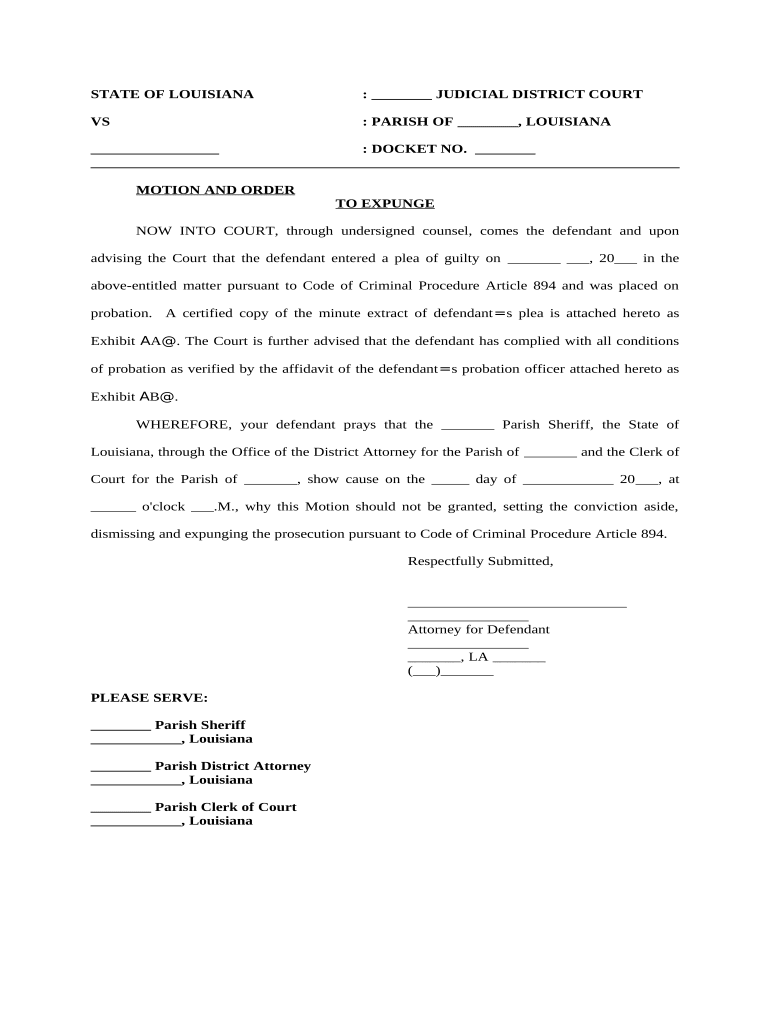
Statement of Facts

Succinct chronology of arrest, charge, disposition, and any relevant rehabilitation or sentence completion facts supporting expungement.

Legal Basis

Cite the statutory or rule authority for expungement, and state how the facts satisfy statutory eligibility criteria for relief.

Relief Requested

Clear order language that instructs the court and agencies which records to seal, destroy, or withhold from public dissemination.

Supporting Exhibits

Attach certified disposition, arrest records, identification, and any affidavits showing completion of sentence or eligibility.

Proposed Order

Include a separate, judge-ready order with precise sealing directives and distribution instructions to agencies and repositories.

Download Formats and Supporting Documents to Include

Prepare both the motion and accompanying exhibits in preserved formats and include certified records to support your petition.

Preferred Formats

Provide final motion and proposed order as PDF/A for archiving; keep an editable DOCX master for revisions and template generation.

Certified Disposition

Attach a certified court disposition or clerk-stamped document proving case outcome; uncertified copies may be rejected.

Arrest Report

Include the arrest report or booking record when required by local practice to establish the underlying event details.

Identification

Attach a copy of government-issued ID to confirm petitioner identity when the court requests verification.

Comparing eSignature Vendors for Filing and eSubmission

Choose a provider that supports secure PDF handling, an auditable trail, and the authentication level your court accepts; pricing and features vary by vendor and plan.

signNow DocuSign Adobe Sign PandaDoc HelloSign
Starting Price $8/user/mo $15/user/mo $14/user/mo $19/user/mo $15/user/mo
Free Trial 7-day free trial Trial available Trial available Trial available Trial available
Bulk Send Yes Yes Yes Yes No
Audit Trail Yes Yes Yes Yes Yes
HIPAA Compliant Yes Yes Yes No No
Envelope Cap No cap 100 envelopes/user/year Varies by plan Varies by plan Varies by plan

Practical Tips for Accurate, Efficient Filings

Adopt consistent practices to reduce rejection risk and cut processing time.

Validate Case Data
Confirm docket numbers and disposition dates with the clerk before filing to avoid mismatches.
Use Certified Records
Attach certified dispositions and avoid uncertified photocopies when courts require originals.
Maintain an Audit Trail
Record who signed and when; preserve timestamped copies in case of administrative follow-up.
Follow Local Rules
Check parish filing guides for required forms, fees, and service procedures before submission.

Frequently Asked Questions About Filing an Expungement Motion in Louisiana

Answers to common process, eligibility, filing, and technical questions encountered when preparing a Louisiana Motion and Order to Expunge.


Need help? Contact support

be ready to get more
Join over 28 million airSlate SignNow users