Establishing secure connection… Loading editor… Preparing document…
Navigation

Fill and Sign the Farmers Market Application and Rules and Regulations Form

Fill and Sign the Farmers Market Application and Rules and Regulations Form

How it works

Select the market form and open it.
Fill out the form and add an eSignature.
Save the farmers market sign up, print, or email it.

Rate template

4.4
67 votes
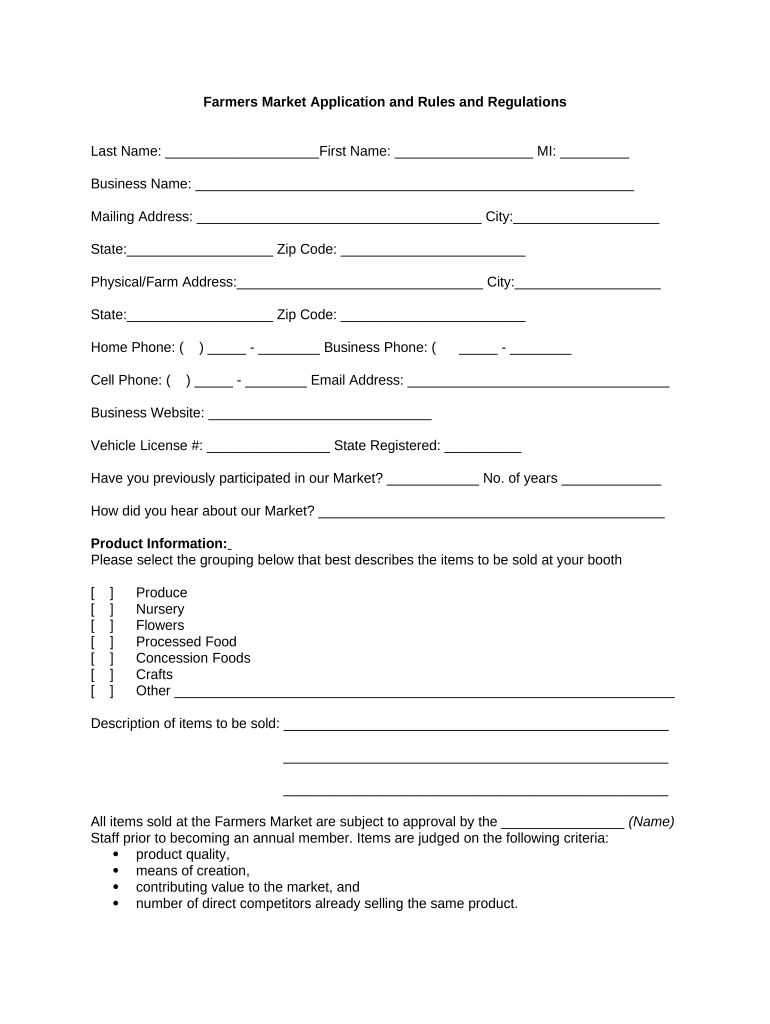
Farmers Market Application and Rules and Regulations Last Name: ____________________First Name: __________________ MI: _________ Business Name: _________________________________________________________ Mailing Address: _____________________________________ City:___________________ State:___________________ Zip Code: ________________________ Physical/Farm Address:________________________________ City:___________________ State:___________________ Zip Code: ________________________ Home Phone: ( ) _____ - ________ Business Phone: ( _____ - ________ Cell Phone: ( ) _____ - ________ Email Address: __________________________________ Business Website: _____________________________ Vehicle License #: ________________ State Registered: __________ Have you previously participated in our Market? ____________ No. of years _____________ How did you hear about our Market? _____________________________________________ Product Information: Please select the grouping below that best describes the items to be sold at your booth [ ] Produce [ ] Nursery [ ] Flowers [ ] Processed Food [ ] Concession Foods [ ] Crafts [ ] Other _________________________________________________________________ Description of items to be sold: __________________________________________________ __________________________________________________ __________________________________________________ All items sold at the Farmers Market are subject to approval by the ________________ (Name) Staff prior to becoming an annual member. Items are judged on the following criteria:  product quality,  means of creation,  contributing value to the market, and  number of direct competitors already selling the same product. Permit Requirements Have you received or applied for a current applicable permit? Yes ______ No _______ If yes, which permit(s) have you applied for? ___________________________________ Are you providing a copy of the approved permit enclosed with this application? Yes ______ No _______ If No, when will you have an approved permit to submit to the Market Manager? __________ Booth Information: Stalls will be assigned weekly by category priority and consistent attendance. Vendors who commit on a weekly basis will be given first priority on stall locations. Vendor may reserve stalls for the upcoming week by noting a request on the bottom of the Daily Sales Report submitted at the end of each Market day. All other vendors must contact the Market Manager no earlier than Wednesday of each week to place a stall request for the upcoming Market. Spaces will be assigned per availability. Reservations can only be placed by Vendors who have submitted this application. Vendor Booth Location Preference: [ ] Inside Stall [ ] Outside Stall [ ] Booth requires electricity Which of the 20____ Market Dates listed below will be your first day of participation? _____________________ _____________________ _____________________ _____________________ 20___ Fees:  $_______ Non-Refundable Annual Vendor Membership Fee (Required with Application)  $_______ Weekly Booth Fee - (Paid upon weekly Market entry) Cash and/or checks accepted. Please make checks payable to: ________________________ All weekly booth requests and/or reservations not cancelled within 24 hours of each Market opening will remain responsible for the $_____ Daily Fee. ____________________________________________________________________________ Staff Use Only [ ] Amount Received: $ ________ [ ] Cash Check Membership Approved By: ______________________________________________ ___________________________________________________________________________ Mission: The mission of the ___________________ (Name) Farmers Market is to provide a dynamic Market to benefit the (describe) _________________________________ ___________________________________ area, Community, Customers and Vendors. ___________________________________________________________________________ Rules and Regulations 1. The Rules and Regulations of the _______________________ (Name) Farmers Market (the Market) are established to maintain a standard that will make the Market enjoyable and profitable to all. Vendors must read and abide by the annual Rules and Regulations of the Market. Any vendor who does not follow the Rules and Regulations of the Market may be asked to leave and may lose any further privileges at the Market. 2. The Market is an outlet for farmers, crafters, food processors and food concessionaires to sell their wares directly to the public. The Market is an outlet for local non-profit organizations to provide information to the public through displays, performances, handouts, personal contact and fundraising. _____ stalls in the Market will be set aside each week for non-profit organizations. Please see Page 3 for more information on Non-Profit booths. The Market is also an outlet for area musicians and artists to perform for the enjoyment of the public. An area will be set-aside at the Market for this purpose. All performers and musicians must register each week to be a part of the Market activities. Call _________________. 3. Fees and Payments A. All vendors at the Farmers Market must register annually with the Market. The annual non-refundable membership fee for all vendor categories is $___________. Each vendor must fill out an application and pay the annual fee to be considered eligible for a stall assignment. New vendors must have their items juried before being accepted into the Market. Volunteer musicians and entertainment, approved by the Market Manager, will be exempt from the annual fee as will non-profit organizations for advertising purposes. B. Daily rental fees of $_________ per stall are due payable upon arrival and before booth set-up. Please have payment ready for the Manager on duty in the envelopes provided. Any vendor that fails to pay the appropriate fee will not be allowed to participate in the Market that day. Make all checks payable to __________________. Checks or exact cash are preferred. Credit card and/or debit cards are not accepted. 4. Market Dates and Hours The Market will be open from ______ (time) to ______ (time) every _____________ (day of week) beginning on ______________ (date) thru _____________ (date) . Market staff will open for set-up at ________ (time) . All vendors must be ready for business by _______ (time) each _______________ (day of week) . The Market opens at _________ (time) sharp. Absolutely no sales before _________ (time) or after closing at _________ (time) . Vendor booths and product must be removed from the facility and its grounds by ________ (time) to allow for incoming rental events. Violators will be suspended from the Market. 5. Stall Set-up Vendors who have reserved their stall in advance may begin their stall set-up at ________ (time) . Vendors who do not have a reserved stall will be assigned a stall at the Market office on a priority and first come basis beginning shortly after __________ (time) . Market Manager will give a Vendor’s past support of the Market consideration during stall assignment. Due to limited space, vendors are asked to unload their vehicles and park in the designated lot before unpacking boxes or beginning to arrange displays. Please be considerate of other vendors trying to unload. Vendors daily rental fee must be paid before set up can be performed. No Vendors can set up after ________ (time) . All vehicles must be removed from the Market selling area by _________ (time) and parked in the __________ parking lot. All vendors are required to remain until closing. Vendors are not allowed to close down prior to the _______ (time) closing time. Vendors will be allowed ________ (time) for take down. On dates when special events are scheduled after the Market, vendors will be notified at check-in that take down must be accelerated. Most always, an event will be coming in at _______ (time) after the Market. Market hours may be extended during special events related to the Market and vendors will be notified weeks in advance . 6. Stall Take Down At the end of the selling day vendors are not to enter the Market area with vehicles until all products have been boxed and ready to load, and no earlier than _______ (time) . No vehicles shall enter the Market area after ________ (time) or before ________ (time) for the safety of customers. Times may change on days with extended Market times. All exceptions to this policy must be approved in advance by the Market Manager. All vendor material must be removed from the property at the end of each Market day. No early take downs are allowed. No exceptions. 7. Stall Clean Up Each vendor is responsible for cleaning his/her stall area and the immediate surrounding area. Dumpster and recycle containers are available on-site. Recycle materials are to be placed in the appropriate containers. No vendor material may be left at the Market for the next week. The Market is not responsible for any items left on the premises. Brooms, rakes, and tools needed for clean-up will be provided. Your cooperation is much appreciated. A cleaning fee will be accessed for any stalls that need to be cleaned at the end of the Market day 8. Daily Sales Report Each vendor will fill out and return a sales report at the end of each Market day. This report will be used to track Market volume. Figures compiled will also be used in educating the public about the Market and developing support from possible advertisers. Please fill out the report as accurately as possible. Vendors are to complete their sales report just prior to beginning stall take down. Reservations for the following week can also be noted on the sales report. 9. Cancellation Penalties Vendors will be charged and held responsible for paying the $_______ _____________ (day of week) booth fee for any weekly reservation previously made and not canceled by ____________ (time) on _________________ (day of week) . The $________ cancellation fee will be due at entry of the next attended Market, in addition to that $________ daily booth fee, before entry is permitted. If another Market is not attended after the cancellation is made, the vendor will be invoiced for balances due. 10. Selection of Vendors Selection of vendors at the Market is at the discretion of the Market Manager. In an effort to control the quality and variety of items sold at the Market, new vendors must have items juried (approved) by the Market Manager before registering and acceptance to the Market. Jurying is done during the Annual Vendor’s Meeting and then by appointment only with the Market Manager. Please contact ________________________________ (name and telephone number) to schedule your appointment. All vendors will be selected on the basis of quality of workmanship, originality, artistic resume, market enhancement (how items will complement other vendors and the overall market environment) and skills needed to produce their products. The Market Manager has the right to refuse rental of stalls to any vendor who does not comply with the guidelines of the Market. 11. Stall Assignments Stalls will be assigned to Vendors based on the following product priority : A. Farmers who grow fresh produce; B. Nurseries that grow (e.g., plants and trees) C. Flower vendors who sell floral arrangements D. Food Processors who sell commercially prepared foods or items used for cooking and sold in original packaging E. Concession Food Vendors who prepared food on-site F. Crafters who sell personally created pieces such as artwork, jewelry, soaps, etc. G. Non-Profit Groups (501C-3 qualified) who will be advertising their cause to the public Vendors may reserve a stall in advance by notifying the Market Manager on the weekly sales report form or by contacting the Market Manager at _______________ (phone number) or __________________ (e-mail address) on _____________ (day of week) each week. All vendors must grow, craft or process what they sell. All products offered for sale at the Market shall be subject to inspection and approval by the Market Manager. If any items are deemed unsuitable or unsafe for family usage, or have not been grown or produced by the vendor, the vendor may be asked to remove such items. Vendors must comply with such requests or they will be asked to immediately leave the Market. 12. Non-Profit Groups will be restricted to _____ visit(s) each month and only _____ spaces per ________________ (day of week) will be made available. If a Non-Profit Organization is conducting a fundraising or profit generating booth, they must also register and pay appropriate membership and daily booth fees as any other vendor would. If a Non-Profit Organization is conducting a free service or advertising activity, with no fundraising or profit generation, they will not be charged the membership fee or the daily booth fee, although these spaces are limited and on an “as available” basis. 13. Stall Details Each stall will be approximately (e.g., 10’x10’) __________ . The Market Manager will assign indoor and outdoor space for specific needs. If a vendor’s stall covers more than one stall area, the vendor will be charged accordingly. A maximum of ______ stalls ($________ each) can be purchased per vendor each Market on a space available basis. Vendors are asked to be present in their stalls each week they attend. An exception may be granted to farmers and processors offering perishable products that attract regular weekly customers. Such farmers and processors may be allowed to have a designated representative selling their items at the Market, with prior approval. 14. Signage All vendors must have a sign at their site. The sign must have the farm or business name, and contact person listed. Signs, banners, objects, and the like are to be attached only to the vendor’s booth and may not exceed the size of the booth. 15. Printed Material Vendors are allowed to display in their booths only educational materials that directly relate to the products they are selling or materials related to the Market. Vendors may not display products, materials or literature for other businesses, organizations or individuals. 16. Amplified Music Amplified music or paging systems cannot be used by vendors. No generators are allowed. 17. Temporary Structures and Tables The Market Manager must approve any temporary structures or tables that are used by a vendor, including awnings or tarps. All temporary structures, tables, and equipment will be removed from the Market site by the vendor responsible for their installation at the end of the selling day. All awning or tents must be secured with sandbags only to prevent being blown away and to prevent damage to property or people. Staking into the ground is not permitted. All vendors are responsible for providing, maintaining and handling their own tables, awnings, equipment and product. Equipment (such as tables, tents, awnings, hand washing stations, etc.) is not provided by the Market. Vendors are responsible for purchasing and transporting their own equipment. A. No tape, nails, paint or markers are allowed to be used on the walls, floors or ceiling of the facility. B. Music is allowed only in the designated area(s) of the facility. C. No lighted candles or lamps are allowed in the facility. D. Broken glass must be deposited in the dumpster and not in regular trash containers. 18. Outside the facility A. No stakes, poles, signs, etc. will be permitted to be adhered to the ground or the exterior of any building. Items may be adhered only to the vendor’s own equipment. B. Marking or painting on the asphalt or gravel is prohibited. C. Burning barrels, fires, BBQs, generators, gas engines, lighted candles or lamps are not allowed on the grounds. D. All regular trash must be put inside the designated trash containers. E. No dumping of chemicals, hay/straw, ashes, grease or foreign items is allowed on the property. F. All awnings must be secured with proper weights to prevent blowing away and causing damage. G. Broken glass must be placed in dumpster and not in regular trash containers. A fee may be charged for any damage caused by a vendor to the facility, grounds or equipment. 19. Vendor Parking All vendors must park their vehicles in the upper ( e.g., South) __________ parking lot, leaving the ( e.g., North) __________ parking lot for Market customers. The first _____ rows of the South parking lot are for Market customers. The only vehicles permitted in the Market area will be those designated by the Market Manager as vehicle selling spaces. Parking will be monitored very closely each week and violators will be asked to leave the Market. Due to the limited number of handicap parking spaces, vendors with handicap parking permits are kindly asked to also park in the South lot. Vendors with valid handicap stickers will be allowed to park in the front row of the South lot. 20. Dress Code All vendors are asked to wear clothes that are non-offensive and help promote a professional atmosphere at the Market. On special events and occasions vendors may be asked to wear clothing to compliment the Market theme. 21. Smoking Policy No smoking or any kind of open flame by vendors or customers is allowed in vendor stall areas. Smoking in vendor booths inside or outside or in customer sales areas is not allowed 22. Drug and Alcohol Possession Policy The unlawful possession or use of illegal drugs and/or alcohol on the Market site will not be tolerated and subject to dismissal. 23. Health Practices All vendors must adhere to sanitary procedures as outlined by the ________________ (name) County Public Health Department. All processed food vendors and samplers are responsible for obtaining proper Health Permits for their booth, and each booth representative handling the food must have a current Food Handler’s Permit. Any vendor found selling contaminated food products or produce shall be suspended from selling operations until satisfactory clearance has been obtained from the ______________ (name) County Health Department. Processed foods must be produced at an approved kitchen and proof of kitchen certification must be shown. Food labeling requirements also must be met. Food permits for potentially hazardous food items can only be obtained during the first _____days of Market operation, then only _____ weeks prior to your opening operation up until the half way date of the season. For information on permits, registration and requirements please call the _________________ (name) County Public Health Department area representative, _________________ (name) , at _______________ (phone number) or _________________ (e-mail address) or visit their website ____________________________ (website address). Note: the Market Manager will be inspecting the stalls of food concessionaires and samplers weekly to ensure that appropriate health practices are used at all times and that all permits are in evidence. 24. Organic and Raw Milk Labeling Use of the phrase “organic” in produce sales shall be governed and regulated in accordance with ______________ (name) State Department of Agriculture regulations. All vendors are required to provide proof of their organic certification and advertise truthfully to customer’s questions in a like manner. Raw Milk booths must post a consumer advisory warning at their booth and packaging must be labeled “raw milk.” 25. Pricing Pricing of goods sold at the Market and any applicable taxes are the sole responsibility of the individual vendor. The advertising of discounted prices and promoting of other Non- Market locations is not permitted on the Market site. Produce vendors must have prices clearly displayed. 26. Licenses and Taxes Unless exempt, Vendors are responsible for obtaining appropriate licenses and reporting and paying all taxes needed to do business in the _____________________________ (name of city and state). 27. Vendor or Customer Complaints or Suggestions should be discussed with the Market Manager or person in charge of the Market that day. Suggestions or criticism can also be mailed to the ______________ (name) Farmers Market, _________________________ __________________________________________________ (street address, city, state, zip code). Grievances must be in writing. The written statement needs to include a clear and specific description of the problem and/or the name(s) of the person(s) involved. A copy of the statement needs to be given to the Manager in charge the day the grievance is made. 28. Animals in the Market No animals will be allowed in the vendor areas. The distribution, sale or giving away of animals on the Market site is forbidden. The only exceptions to this policy are service animals including trained seeing-eye dogs or dogs for the hearing-impaired. 29. Code of Conduct The Market Manager has the right to remove any vendor whose conduct is disruptive or harmful to the integrity of the Market customers, staff and other vendors. Disruptive or harmful behavior can be described as an act of assault, abusive language, fighting and acting in an unprofessional manner. If a vendor’s behavior is negatively affecting the market atmosphere or reputation, they also may be removed. Also, misrepresentation of products sold at the market shall be considered cause for dismissal from the Market. 30. Market Expectation All vendors of the Market are public relations representatives of the Market. All vendors are asked to become knowledgeable in the history of Market, and also keep up to date on the activities at the Market. Please encourage customers to come back each week to upcoming events at the Market. Your enthusiasm and knowledge can be a great selling point to the Market. Materials and event schedules will be provided to each vendor. The Management of the Issaquah Farmers Market reserves the right to cancel the privileges of any vendor who, in the opinion of Management, has willfully violated the Rules and Regulations governing the Market. The Market Management will enforce the above rules and regulations. 31. Changes in Rules and Regulations These Rules and Regulations are subject to change only after each vendor has been contacted of such change. 32. Indemnification and Hold Harmless Agreement The undersigned vendor shall indemnify and hold the Market and its agents, employees, and/or officers, harmless from and shall process and defend at its own expense, any and all claims, demands, suits, at law or equity, actions, penalties, loss, damages, or costs, of whatsoever kind or nature, brought against the Market and/or its agents, employees, and/or officers, arising out of, or in connection with, or incident to, said vendor’s participation in the Market. 33. Use of Photo or Video for Advertising The undersigned vendor hereby authorizes the Market to record his/her picture and voice on photographs, films, audio and videotapes, to edit same at his discretion, and to incorporate these photographs, recordings, vendor’s likeness, voice, biographical information, or other information in connection therewith, into media form for advertising, including the unrestricted use for purposes of publicity, advertising and sales promotion. The undersigned do hereby agree to the Rules and Regulations set forth above. WITNESS our signatures as of the day and date first above stated. ____________________________ (Name of Farmers Market) ________________________ By:_________________________ (P rinted name) (P rinted name & office) ________________________ _________________________ (Signature of Vendor) (Signature of Officer)

Valuable tips for finalizing your ‘Farmers Market Application And Rules And Regulations’ online

Are you fed up with the inconvenience of dealing with documentation? Look no further than airSlate SignNow, the premier eSignature platform for individuals and businesses. Bid farewell to the lengthy procedure of printing and scanning files. With airSlate SignNow, you can easily complete and sign documents online. Utilize the robust features built into this user-friendly and cost-effective solution and transform your method of document management. Whether you need to authorize forms or collect eSignatures, airSlate SignNow takes care of everything effortlessly, with just a couple of clicks.

Adhere to this detailed guide:

  1. Access your account or sign up for a complimentary trial with our service.
  2. Press +Create to upload a file from your device, cloud storage, or our template collection.
  3. Open your ‘Farmers Market Application And Rules And Regulations’ in the editor.
  4. Select Me (Fill Out Now) to set up the form on your end.
  5. Insert and assign fillable fields for additional participants (if needed).
  6. Continue with the Send Invite settings to solicit eSignatures from others.
  7. Store, print your version, or transform it into a reusable template.

No need to worry if you wish to collaborate with your teammates on your Farmers Market Application And Rules And Regulations or send it for notarization—our solution provides you with everything needed to achieve such tasks. Register with airSlate SignNow today and enhance your document management to new levels!

Here is a list of the most common customer questions. If you can’t find an answer to your question, please don’t hesitate to reach out to us.

Need help? Contact Support
Farmers market application and rules and regulations pdf
NYC farmers market vendor application
Farmers market application and rules and regulations texas
Farm stand regulations NY
What permits do I need to sell at a farmers market
Farmers market rules for vendors
How to sell at farmers market NYC
Do you need a permit for a farm stand
market application
farmer application form
farmers market application form
black farmers application pdf

The best way to complete and sign your farmers market application template

Save time on document management with airSlate SignNow and get your farmers market application template eSigned quickly from anywhere with our fully compliant eSignature tool.

How to Sign a PDF Online How to Sign a PDF Online

How to fill out and sign documents online

In the past, working with paperwork took pretty much time and effort. But with airSlate SignNow, document management is quick and simple. Our powerful and user-friendly eSignature solution lets you easily complete and electronically sign your farmers market application and rules and regulations form online from any internet-connected device.

Follow the step-by-step guide to eSign your farmers market application and rules and regulations form template online:

  • 1.Sign up for a free trial with airSlate SignNow or log in to your account with password credentials or SSO authorization option.
  • 2.Click Upload or Create and add a form for eSigning from your device, the cloud, or our form library.
  • 3.Click on the file name to open it in the editor and utilize the left-side menu to fill out all the empty areas accordingly.
  • 4.Put the My Signature field where you need to eSign your form. Provide your name, draw, or upload a photo of your regular signature.
  • 5.Click Save and Close to accomplish editing your completed document.

Once your farmers market application and rules and regulations form template is ready, download it to your device, save it to the cloud, or invite other individuals to electronically sign it. With airSlate SignNow, the eSigning process only takes a few clicks. Use our powerful eSignature solution wherever you are to manage your paperwork productively!

How to Sign a PDF Using Google Chrome How to Sign a PDF Using Google Chrome

How to complete and sign forms in Google Chrome

Completing and signing paperwork is easy with the airSlate SignNow extension for Google Chrome. Installing it to your browser is a quick and beneficial way to deal with your forms online. Sign your farmers market application and rules and regulations form sample with a legally-binding electronic signature in just a couple of clicks without switching between tools and tabs.

Follow the step-by-step guide to eSign your farmers market application and rules and regulations form in Google Chrome:

  • 1.Navigate to the Chrome Web Store, find the airSlate SignNow extension for Chrome, and install it to your browser.
  • 2.Right-click on the link to a form you need to approve and select Open in airSlate SignNow.
  • 3.Log in to your account using your password or Google/Facebook sign-in option. If you don’t have one, you can start a free trial.
  • 4.Use the Edit & Sign toolbar on the left to complete your template, then drag and drop the My Signature option.
  • 5.Upload a picture of your handwritten signature, draw it, or simply type in your full name to eSign.
  • 6.Make sure all data is correct and click Save and Close to finish editing your paperwork.

Now, you can save your farmers market application and rules and regulations form template to your device or cloud storage, email the copy to other people, or invite them to electronically sign your form with an email request or a protected Signing Link. The airSlate SignNow extension for Google Chrome enhances your document processes with minimum effort and time. Start using airSlate SignNow today!

How to Sign a PDF in Gmail How to Sign a PDF in Gmail How to Sign a PDF in Gmail

How to complete and sign documents in Gmail

Every time you get an email with the farmers market application and rules and regulations form for approval, there’s no need to print and scan a document or download and re-upload it to another program. There’s a better solution if you use Gmail. Try the airSlate SignNow add-on to quickly eSign any documents right from your inbox.

Follow the step-by-step guidelines to eSign your farmers market application and rules and regulations form in Gmail:

  • 1.Navigate to the Google Workplace Marketplace and look for a airSlate SignNow add-on for Gmail.
  • 2.Install the tool with a related button and grant the tool access to your Google account.
  • 3.Open an email containing an attached file that needs approval and utilize the S symbol on the right sidebar to launch the add-on.
  • 4.Log in to your airSlate SignNow account. Choose Send to Sign to forward the document to other parties for approval or click Upload to open it in the editor.
  • 5.Place the My Signature field where you need to eSign: type, draw, or upload your signature.

This eSigning process saves time and only requires a few clicks. Take advantage of the airSlate SignNow add-on for Gmail to update your farmers market application and rules and regulations form with fillable fields, sign paperwork legally, and invite other parties to eSign them al without leaving your inbox. Boost your signature workflows now!

How to Sign a PDF on a Mobile Device How to Sign a PDF on a Mobile Device How to Sign a PDF on a Mobile Device

How to complete and sign forms in a mobile browser

Need to rapidly complete and sign your farmers market application and rules and regulations form on a mobile phone while working on the go? airSlate SignNow can help without needing to set up additional software applications. Open our airSlate SignNow solution from any browser on your mobile device and add legally-binding eSignatures on the go, 24/7.

Follow the step-by-step guidelines to eSign your farmers market application and rules and regulations form in a browser:

  • 1.Open any browser on your device and go to the www.signnow.com
  • 2.Sign up for an account with a free trial or log in with your password credentials or SSO authentication.
  • 3.Click Upload or Create and import a file that needs to be completed from a cloud, your device, or our form library with ready-to go templates.
  • 4.Open the form and fill out the blank fields with tools from Edit & Sign menu on the left.
  • 5.Put the My Signature area to the sample, then type in your name, draw, or upload your signature.

In a few simple clicks, your farmers market application and rules and regulations form is completed from wherever you are. Once you're finished editing, you can save the document on your device, create a reusable template for it, email it to other individuals, or ask them to eSign it. Make your documents on the go fast and productive with airSlate SignNow!

How to Sign a PDF on iPhone How to Sign a PDF on iPhone

How to complete and sign forms on iOS

In today’s corporate environment, tasks must be completed quickly even when you’re away from your computer. Using the airSlate SignNow app, you can organize your paperwork and approve your farmers market application and rules and regulations form with a legally-binding eSignature right on your iPhone or iPad. Set it up on your device to conclude contracts and manage documents from anywhere 24/7.

Follow the step-by-step guide to eSign your farmers market application and rules and regulations form on iOS devices:

  • 1.Open the App Store, search for the airSlate SignNow app by airSlate, and set it up on your device.
  • 2.Launch the application, tap Create to import a template, and select Myself.
  • 3.Opt for Signature at the bottom toolbar and simply draw your autograph with a finger or stylus to eSign the form.
  • 4.Tap Done -> Save after signing the sample.
  • 5.Tap Save or utilize the Make Template option to re-use this document in the future.

This process is so simple your farmers market application and rules and regulations form is completed and signed in just a couple of taps. The airSlate SignNow app works in the cloud so all the forms on your mobile device are kept in your account and are available any time you need them. Use airSlate SignNow for iOS to boost your document management and eSignature workflows!

How to Sign a PDF on Android How to Sign a PDF on Android

How to complete and sign paperwork on Android

With airSlate SignNow, it’s simple to sign your farmers market application and rules and regulations form on the go. Install its mobile app for Android OS on your device and start boosting eSignature workflows right on your smartphone or tablet.

Follow the step-by-step guidelines to eSign your farmers market application and rules and regulations form on Android:

  • 1.Navigate to Google Play, find the airSlate SignNow application from airSlate, and install it on your device.
  • 2.Sign in to your account or register it with a free trial, then add a file with a ➕ option on the bottom of you screen.
  • 3.Tap on the uploaded file and select Open in Editor from the dropdown menu.
  • 4.Tap on Tools tab -> Signature, then draw or type your name to eSign the template. Fill out empty fields with other tools on the bottom if necessary.
  • 5.Utilize the ✔ key, then tap on the Save option to end up with editing.

With a user-friendly interface and total compliance with primary eSignature standards, the airSlate SignNow application is the perfect tool for signing your farmers market application and rules and regulations form. It even operates without internet and updates all form changes when your internet connection is restored and the tool is synced. Complete and eSign forms, send them for approval, and make re-usable templates anytime and from anywhere with airSlate SignNow.

Sign up and try Farmers market application and rules and regulations form
  • Close deals faster
  • Improve productivity
  • Delight customers
  • Increase revenue
  • Save time & money
  • Reduce payment cycles