Establishing secure connection… Loading editor… Preparing document…
Navigation

Fill and Sign the For Diversity Cases Only Form
Fill and Sign the For Diversity Cases Only Form

How it works

Open the document and fill out all its fields.
Apply your legally-binding eSignature.
Save and invite other recipients to sign it.

Rate template

4.8
47 votes
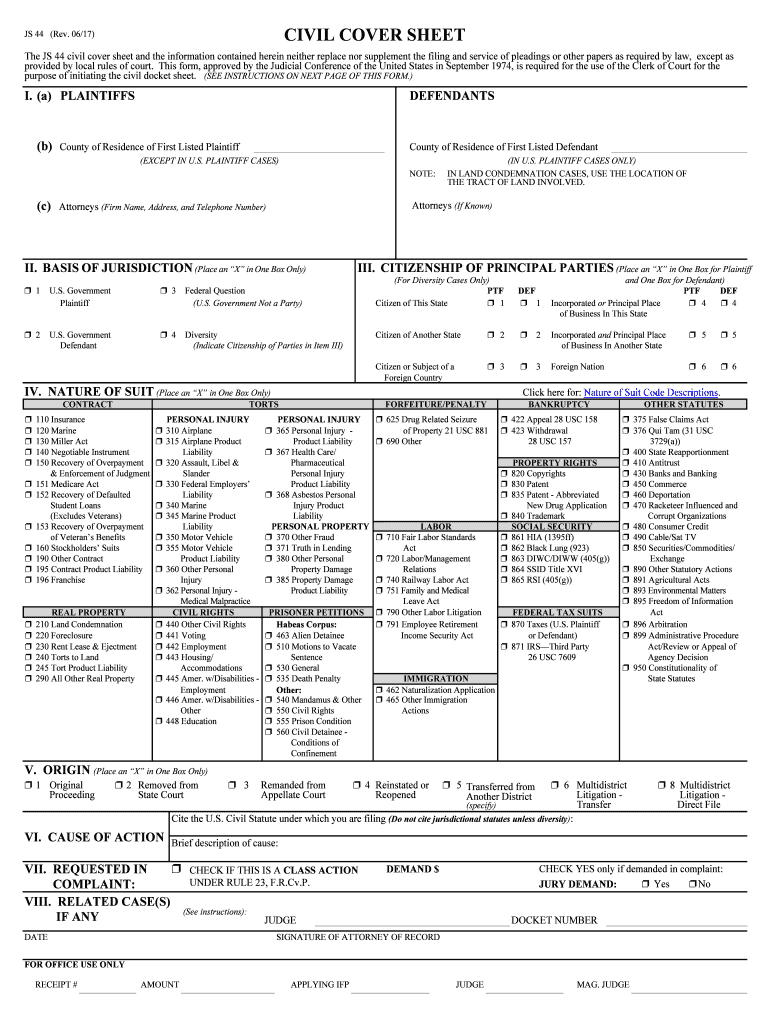
JS 44 (Rev. 06/17) CIVIL COVER SHEET The JS 44 civil cover sheet and the information contained here in neither replace nor supplement the filing and service of pleadings or other papers as required by law, except as provided by local rules of court. This form, approved by the Judicial Conference of the United States in September 1974, is re quired for the use of the Clerk of Court for the purpose of initiating the civil docket sheet. (SEE INSTRUCTIONS ON NEXT PAGE OF THIS FORM.) I. (a) PLAINTIFFS DEFENDANTS (b) County of Residence of First Listed Plaintiff County of Residence of First Listed Defendant (EXCEPT IN U.S. PLAINTIFF CASE S) (IN U.S. PLAINTIFF CASES ONLY) NOTE: IN LAND CONDEMNATION CASES, USE THE LOCATION OF THE TRACT OF LAND INVOLVED. (c) Attorneys (Firm Name, Address, and Telephone Number) Attorneys (If Known) II. BASIS OF JURISDICTION (Place an “X” in One Box Only) III. CITIZENSHIP OF PRINCIPAL PARTIES (Place an “X” in One Box for Plaintiff (For Diversity Cases Only) and One Box for Defendant) ’ 1 U.S. Government ’3 Federal Question PTF DEF PTF DEF Plaintiff (U.S. Government Not a Party) Citizen of This State’1 ’ 1 Incorporated or Principal Place ’4 ’4 of Business In This State ’ 2 U.S. Government ’4 Diversity Citizen of Another State’2 ’ 2 Incorporated and Principal Place ’5 ’5 Defendant (Indicate Citizenship of Parties in Item III) of Business In Another State Citizen or Subject of a ’3 ’ 3 Foreign Nation ’6 ’6 Foreign Country IV. NATURE OF SUIT (Place an “X” in One Box Only) Click here for: Nature of Suit Code Descriptions . CONTRACT TORTS FORFEITURE/PENALTY BANKRUPTCY OTHER STATUTES ’ 110 Insurance PERSONAL INJURY PERSONAL INJURY ’ 625 Drug Related Seizure ’422 Appeal 28 USC 158 ’375 False Claims Act ’ 120 Marine ’310 Airplane ’365 Personal Injury - of Property 21 USC 881 ’423 Withdrawal ’376 Qui Tam (31 USC ’ 130 Miller Act ’315 Airplane Product Product Liability ’690 Other 28 USC 157 3729(a)) ’ 140 Negotiable Instrument Liability ’367 Health Care/ ’400 State Reapportionment ’ 150 Recovery of Overpayment ’320 Assault, Libel & Pharmaceutical PROPERTY RIGHTS’ 410 Antitrust & Enforcement of Judgment Slander Personal Injury ’820 Copyrights ’430 Banks and Banking ’ 151 Medicare Act ’330 Federal Employers’ Product Liability ’830 Patent ’450 Commerce ’ 152 Recovery of Defaulted Liability ’368 Asbestos Personal ’835 Patent - Abbreviated ’460 Deportation Student Loans ’340 Marine Injury Product New Drug Application ’470 Racketeer Influenced and (Excludes Veterans) ’345 Marine Product Liability ’840 Trademark Corrupt Organizations ’ 153 Recovery of Overpayment Liability PERSONAL PROPERTY LABOR SOCIAL SECURITY ’ 480 Consumer Credit of Veteran’s Benefits ’350 Motor Vehicle ’370 Other Fraud ’710 Fair Labor Standards ’861 HIA (1395ff) ’490 Cable/Sat TV ’ 160 Stockholders’ Suits ’355 Motor Vehicle ’371 Truth in Lending Act ’862 Black Lung (923) ’850 Securities/Commodities/ ’ 190 Other Contract Product Liability ’380 Other Personal ’720 Labor/Management ’863 DIWC/DIWW (405(g)) Exchange ’ 195 Contract Product Liability ’360 Other Persona l Property Damage Relations ’864 SSID Title XVI ’890 Other Statutory Actions ’ 196 Franchise Injury ’385 Property Damage ’740 Railway Labor Act ’865 RSI (405(g)) ’891 Agricultural Acts ’ 362 Personal Injury - Product Liability ’751 Family and Medical ’893 Environmental Matters Medical Malpractice Leave Act ’895 Freedom of Information REAL PROPERTY CIVIL RIGHTS PRISONER PETITIONS ’ 790 Other Labor Litigation FEDERAL TAX SUITS Act ’ 210 Land Condemnation ’440 Other Civil Rights Habeas Corpus:’ 791 Employee Retirement ’870 Taxes (U.S. Plaintiff ’896 Arbitration ’ 220 Foreclosure ’441 Voting ’463 Alien Detainee Income Security Act or Defendant) ’899 Administrative Procedure ’ 230 Rent Lease & Ejectment ’442 Employment ’510 Motions to Vacate ’871 IRS—Third Party Act/R eview or Appeal of ’ 240 Torts to Land ’443 Housing/ Sentence 26 USC 7609 Agency Decision ’ 245 Tort Product Liability Accommodations ’530 General ’950 Constitutionality of ’ 290 All Other Real Property ’445 Amer. w/Disabilities - ’535 Death Penalty IMMIGRATION State Statutes Employment Other: ’ 462 Naturalization Application ’ 446 Amer. w/Disabilities - ’540 Mandamus & Other ’465 Other Immigration Other ’550 Civil Rights Actions ’ 448 Education ’555 Prison Condition ’ 560 Civil Detainee - Conditions of Confinement V. ORIGIN (Place an “X” in One Box Only) ’ 1 Original Proceeding ’ 2 Removed from State Court ’ 3 Remanded from Appellate Court ’ 4 Reinstated or Reopened ’ 5 Transferred from Another District (specify) ’ 6 Multidistrict Litigation - Transfer ’ 8 Multidistrict Litigation - Direct File VI. CAUSE OF ACTION Cite the U.S. Civil Statute under which you are filing (Do not cite jurisdictional statutes unless diversity): Brief description of cause: VII. REQUESTED IN COMPLAINT: ’ CHECK IF THIS IS A CLASS ACTION UNDER RULE 23, F.R.Cv.P. DEMAND $ CHECK YES only if demanded in complaint: JURY DEMAND:’ Yes ’No VIII. RELATED CASE(S) IF ANY (See instructions): JUDGE DOCKET NUMBER DATE SIGNATURE OF ATTORNEY OF RECORD FOR OFFICE USE ONLY RECEIPT # AMOUNT APPLYING IFP JUDGE MAG. JUDGE JS 44A REVISED June, 2009 IN THE UNITED STATES DISTRICT COURT FOR THE WE STERN DISTRICT OF PENNSYLVANIA THIS CASE DESIGNATION SHEET MUST BE COMPLETED PART A This case belongs on the ( Erie Johnstown Pittsburgh) calendar. 1. ERIE CALENDAR - If cause of action arose in the counties of Crawford, Elk, Erie, Forest, McKean. Venang or Warren, OR any plaintiff or defendant resides in one of said counties. 2. JOHNSTOWN CALENDAR - If cause of action arose in the counties of Bedford, Blair, Cambria, Clearfield or Somerset OR any plaintiff or defendant resides in one of said counties. 3. Complete if on ERIE CALENDAR: I certify that the cause of action arose in County and that the resides in County. 4. Complete if on JOHNSTOWN CALENDAR : I certify that the cause of action arose in County and that the resides in County. PART B (You are to check ONE of the following) 1. This case is related to Number . Short Caption . 2. This case is not related to a pending or terminated case. DEFINlTIONS OF RELATED CASES: CIVIL: Civil cases are deemed related when a case filed relates to property included in another suit or involves the same issues of fact or it grows out of the same transactions as another suit or involves the validity or infringement of a patent involved in another suit EMINENT DOMAIN: Cases in contiguous closely located groups and in common ownership groups which will lend themselves to consolidation for trial shall be deemed related. HABEAS CORPUS & CIVIL RIGHTS: All habeas corpus petitions filed by the same individual shall be deemed related. All pro se Civil Rights actions by the same individual shall be deemed related. PARTC I. CIVIL CATEGORY ( Select the applicable category). 1. Antitrust and Securities Act Cases 2. Labor-Management Relations 3. Habea s corpus 4. Civil Rights 5. Patent, Copyright, and Trademark 6. Eminent Domain 7. All other federal question cases 8. All personal and property damage tort cases, including maritime, FELA, Jones Act, Motor vehicle, products liability, assault, defamation, malicious prosecution, and false arrest 9. Insurance indemnity, contract and other diversity cases. 10. Government Collection Cases (shall include HEW Student Loans (Education), V A 0verpayment, Overpayment of Social Security, Enlistment Overpayment (Army, Navy, etc.), HUD Loans, GAO Loans (Misc. Types), Mortgage Foreclosures, SBA Loans, Civil Penalties and Coal Mine Penalty and Reclamation Fees.) I certify that to the best of my knowledge the entries on this Case Designation Sheet are true and correct Date: ATTORNEY AT LAW NOTE: ALL SECTIONS OF BOTH JS 44 Reverse (Rev. 06/17)INSTRUCTIONS FOR ATTORNEYS COMPLETING CIVIL COVER SHEET FORM JS 44 Authority For Civil Cover Sheet The JS 44 civil cover sheet and the information contained herein neither replaces nor supplements the filings and service of pleading or other papers as required by law, except as provided by local rules of court. This form, approved by the Judicial Conference of the United States in September 1974, is required for the use of the Clerk of Court for the purpose of initiating the civil docket sheet. Consequently, a civil cover s heet is submitted to the Clerk of Court for each civil complaint filed. The attorney filing a case should complete the form as follows: I.(a) Plaintiffs-Defendants. Enter names (last, first, middle initial) of plaintiff and de fendant. If the plaintiff or defendant is a government agency, use only the full name or standard abbreviations. If the plaintiff or defendant is an official within a government agency, identify first the agency and then the official, giving both name and title. (b) County of Residence. For each civil case filed, except U.S. pl aintiff cases, enter the name of the county where the first listed plaintiff resides at the time of filing. In U.S. plaintiff cases, enter the name of the county in which the first listed defendant resides at the time of filing. (NOTE: In land condemnation cases, the county of residence of the "defendant" is the location of the tract of land involved.) (c) Attorneys. Enter the firm name, address, telephone number, and attorney of record. If there are several attorneys, list them on an attachment, noting in this section "(see attachment)". II. Jurisdiction. The basis of jurisdiction is set forth under Rule 8(a), F.R.Cv.P., which requires that jurisdic tions be shown in pleadings. Place an "X" in one of the boxes. If there is more than one basis of jurisdiction, precedence is given in the order shown below. United States plaintiff. (1) Jurisdicti on based on 28 U.S.C. 1345 and 1348. Suits by agencies and officers of the United States are included here. United States defendant. (2) When the plaintiff is suing the United States, its officers or agencies, place an "X" in this box . Federal question. (3) This refers to suits under 28 U.S.C. 1331, where jurisdiction arises under the Constitution of the Unite d States, an amendment to the Constitution, an act of Congress or a treaty of the United St ates. In cases where the U.S. is a party, the U.S. plaintiff or defendant code takes precedence, and box 1 or 2 should be marked. Diversity of citizenship. (4) This refers to suits under 28 U.S.C. 1332, where partie s are citizens of different states. When Box 4 is checked, the citizenship of the different parties must be checked . (See Section III below ; NOTE: federal question actions take precedence over diversity cases. ) III. Residence (citizenship) of Principal Parties. This section of the JS 44 is to be completed if diversity of citizenship was indicated above. Mark this section for each principal party. IV. Nature of Suit. Place an "X" in the appropriate box. If there are multiple natu re of suit codes associated with the case, pick the nature of suit code that is most applicable. Click here for: Nature of Suit Code Descriptions . V. Origin. Place an "X" in one of the seven boxes. Original Proceedings. (1) Cases which originate in the United States district courts. Removed from State Court. (2) Proceedings initiated in state courts may be removed to the district courts under Title 28 U.S.C ., Section 1441. When the petition for removal is granted, check this box.Remanded from Appellate Court. (3) Check this box for cases remande d to the district court for further action. Use the date of remand as the filing date. Reinstated or Reopened. (4) Check this box for cases reinstated or reopened in the district court. Use the reopening date as the filing date. Transferred from Another District. (5) For cases transferred unde r Title 28 U.S.C. Section 1404(a). Do not use this for within district transfers or multidistrict litigation transfers.Multidistrict Litigation – Transfer. (6) Ch eck this box when a multidistrict case is transferred into the district under autho rity of Title 28 U.S.C. Section 1407. Multidistrict Litigation – Direct File. (8) Check this box when a multidistrict case is filed in the same district as the Master MDL docket. PLEASE NOTE THAT THERE IS NOT AN ORIGIN CODE 7. Origin Code 7 was used for historical records and is no longer relevant due to changes in statue. VI. Cause of Action. Report the civil statute directly related to the cause of action and give a brief description of the cause. Do not cite jurisdictional statutes unless diversity. Example: U.S. Civil Statute: 47 USC 553 Brief De scription: Unauthorized reception of cable service VII. Requested in Complaint. Class Action. Place an "X" in this box if you are filing a class action under Rule 23, F.R.Cv.P. Demand. In this space enter the actual dollar amount being demanded or indicate other demand, such as a preliminary injunction . Jury Demand. Check the appropriate box to indi cate whether or not a jury is being demanded. VIII. Related Cases. This section of the JS 44 is used to reference related pending cases, if any. If there are related pending cases, insert the docket numbers and the corresponding judge names for such cases. Date and Attorney Signature. Date and sign the civil cover sheet.

Valuable advice on preparing your ‘For Diversity Cases Only’ online

Are you fatigued by the nuisance of handling documentation? Search no further than airSlate SignNow, the premier electronic signature platform for individuals and organizations. Bid farewell to the lengthy routine of printing and scanning papers. With airSlate SignNow, you can easily complete and sign documents online. Leverage the powerful features embedded in this intuitive and budget-friendly platform and transform your method of document management. Whether you need to endorse forms or gather signatures, airSlate SignNow takes care of it all effortlessly, needing merely a few clicks.

Adhere to this comprehensive guide:

  1. Access your account or initiate a free trial with our service.
  2. Select +Create to upload a file from your device, cloud storage, or our form library.
  3. Open your ‘For Diversity Cases Only’ in the editor.
  4. Click Me (Fill Out Now) to finish the form on your end.
  5. Add and assign fillable fields for other parties (if needed).
  6. Continue with the Send Invite settings to request eSignatures from others.
  7. Save, print your version, or convert it into a reusable template.

Don't fret if you need to collaborate with your associates on your For Diversity Cases Only or send it for notarization—our solution equips you with everything essential to achieve such objectives. Sign up with airSlate SignNow today and elevate your document management to new levels!

Here is a list of the most common customer questions. If you can’t find an answer to your question, please don’t hesitate to reach out to us.

Need help? Contact Support
28 U.S.C. 1332
Diversity jurisdiction examples
diversity of citizenship $75,000
28 U.S.C. 1441
Can defendants be from the same state for diversity jurisdiction
Diversity jurisdiction multiple defendants
28 u.s.c. 1332 explained
Diversity jurisdiction amount in controversy
28 U.S.C. 1332
Diversity jurisdiction examples
Can defendants be from the same state for diversity jurisdiction
Diversity jurisdiction multiple defendants

The best way to complete and sign your for diversity cases only form

Save time on document management with airSlate SignNow and get your for diversity cases only form eSigned quickly from anywhere with our fully compliant eSignature tool.

How to Sign a PDF Online How to Sign a PDF Online

How to complete and sign forms online

In the past, working with paperwork required pretty much time and effort. But with airSlate SignNow, document management is easy and fast. Our robust and user-friendly eSignature solution allows you to easily fill out and eSign your for diversity cases only form online from any internet-connected device.

Follow the step-by-step guidelines to eSign your for diversity cases only form template online:

  • 1.Sign up for a free trial with airSlate SignNow or log in to your account with password credentials or SSO authorization option.
  • 2.Click Upload or Create and add a form for eSigning from your device, the cloud, or our form library.
  • 3.Click on the document name to open it in the editor and use the left-side toolbar to complete all the blank areas properly.
  • 4.Place the My Signature field where you need to approve your sample. Provide your name, draw, or import a photo of your regular signature.
  • 5.Click Save and Close to accomplish editing your completed form.

Once your for diversity cases only form template is ready, download it to your device, save it to the cloud, or invite other people to electronically sign it. With airSlate SignNow, the eSigning process only takes several clicks. Use our robust eSignature tool wherever you are to deal with your paperwork effectively!


How to Sign a PDF Using Google Chrome How to Sign a PDF Using Google Chrome

How to fill out and sign paperwork in Google Chrome

Completing and signing paperwork is easy with the airSlate SignNow extension for Google Chrome. Installing it to your browser is a fast and beneficial way to deal with your forms online. Sign your for diversity cases only form template with a legally-binding eSignature in just a few clicks without switching between programs and tabs.

Follow the step-by-step guide to eSign your for diversity cases only form in Google Chrome:

  • 1.Navigate to the Chrome Web Store, find the airSlate SignNow extension for Chrome, and add it to your browser.
  • 2.Right-click on the link to a form you need to eSign and choose Open in airSlate SignNow.
  • 3.Log in to your account with your credentials or Google/Facebook sign-in option. If you don’t have one, sign up for a free trial.
  • 4.Use the Edit & Sign toolbar on the left to fill out your sample, then drag and drop the My Signature field.
  • 5.Add a picture of your handwritten signature, draw it, or simply type in your full name to eSign.
  • 6.Make sure all information is correct and click Save and Close to finish editing your form.

Now, you can save your for diversity cases only form sample to your device or cloud storage, send the copy to other people, or invite them to electronically sign your form with an email request or a protected Signing Link. The airSlate SignNow extension for Google Chrome improves your document workflows with minimum effort and time. Start using airSlate SignNow today!


How to Sign a PDF in Gmail How to Sign a PDF in Gmail How to Sign a PDF in Gmail

How to fill out and sign forms in Gmail

Every time you get an email containing the for diversity cases only form for signing, there’s no need to print and scan a document or download and re-upload it to another program. There’s a much better solution if you use Gmail. Try the airSlate SignNow add-on to quickly eSign any paperwork right from your inbox.

Follow the step-by-step guide to eSign your for diversity cases only form in Gmail:

  • 1.Navigate to the Google Workplace Marketplace and locate a airSlate SignNow add-on for Gmail.
  • 2.Set up the program with a corresponding button and grant the tool access to your Google account.
  • 3.Open an email with an attached file that needs signing and utilize the S key on the right panel to launch the add-on.
  • 4.Log in to your airSlate SignNow account. Choose Send to Sign to forward the document to other parties for approval or click Upload to open it in the editor.
  • 5.Place the My Signature option where you need to eSign: type, draw, or import your signature.

This eSigning process saves efforts and only requires a couple of clicks. Use the airSlate SignNow add-on for Gmail to update your for diversity cases only form with fillable fields, sign documents legally, and invite other people to eSign them al without leaving your mailbox. Enhance your signature workflows now!


How to Sign a PDF on a Mobile Device How to Sign a PDF on a Mobile Device How to Sign a PDF on a Mobile Device

How to fill out and sign paperwork in a mobile browser

Need to rapidly submit and sign your for diversity cases only form on a smartphone while doing your work on the go? airSlate SignNow can help without the need to set up additional software apps. Open our airSlate SignNow solution from any browser on your mobile device and create legally-binding eSignatures on the go, 24/7.

Follow the step-by-step guidelines to eSign your for diversity cases only form in a browser:

  • 1.Open any browser on your device and go to the www.signnow.com
  • 2.Create an account with a free trial or log in with your password credentials or SSO authentication.
  • 3.Click Upload or Create and import a file that needs to be completed from a cloud, your device, or our form catalogue with ready-to go templates.
  • 4.Open the form and complete the blank fields with tools from Edit & Sign menu on the left.
  • 5.Place the My Signature area to the form, then type in your name, draw, or add your signature.

In a few easy clicks, your for diversity cases only form is completed from wherever you are. As soon as you're finished editing, you can save the document on your device, generate a reusable template for it, email it to other individuals, or ask them to eSign it. Make your paperwork on the go speedy and productive with airSlate SignNow!


How to Sign a PDF on iPhone How to Sign a PDF on iPhone

How to complete and sign paperwork on iOS

In today’s corporate environment, tasks must be completed quickly even when you’re away from your computer. Using the airSlate SignNow mobile app, you can organize your paperwork and approve your for diversity cases only form with a legally-binding eSignature right on your iPhone or iPad. Install it on your device to close deals and manage documents from anyplace 24/7.

Follow the step-by-step guidelines to eSign your for diversity cases only form on iOS devices:

  • 1.Go to the App Store, find the airSlate SignNow app by airSlate, and install it on your device.
  • 2.Launch the application, tap Create to upload a template, and choose Myself.
  • 3.Opt for Signature at the bottom toolbar and simply draw your autograph with a finger or stylus to eSign the sample.
  • 4.Tap Done -> Save after signing the sample.
  • 5.Tap Save or take advantage of the Make Template option to re-use this paperwork later on.

This process is so straightforward your for diversity cases only form is completed and signed in a few taps. The airSlate SignNow app works in the cloud so all the forms on your mobile device are kept in your account and are available any time you need them. Use airSlate SignNow for iOS to boost your document management and eSignature workflows!


How to Sign a PDF on Android How to Sign a PDF on Android

How to complete and sign forms on Android

With airSlate SignNow, it’s easy to sign your for diversity cases only form on the go. Install its mobile app for Android OS on your device and start improving eSignature workflows right on your smartphone or tablet.

Follow the step-by-step guide to eSign your for diversity cases only form on Android:

  • 1.Go to Google Play, search for the airSlate SignNow app from airSlate, and install it on your device.
  • 2.Sign in to your account or create it with a free trial, then upload a file with a ➕ key on the bottom of you screen.
  • 3.Tap on the imported file and select Open in Editor from the dropdown menu.
  • 4.Tap on Tools tab -> Signature, then draw or type your name to eSign the form. Complete empty fields with other tools on the bottom if needed.
  • 5.Use the ✔ button, then tap on the Save option to end up with editing.

With an intuitive interface and total compliance with primary eSignature standards, the airSlate SignNow app is the best tool for signing your for diversity cases only form. It even operates without internet and updates all document adjustments when your internet connection is restored and the tool is synced. Complete and eSign forms, send them for eSigning, and make multi-usable templates whenever you need and from anyplace with airSlate SignNow.

Sign up and try For diversity cases only form
  • Close deals faster
  • Improve productivity
  • Delight customers
  • Increase revenue
  • Save time & money
  • Reduce payment cycles

