Establishing secure connection…Loading editor…Preparing document…

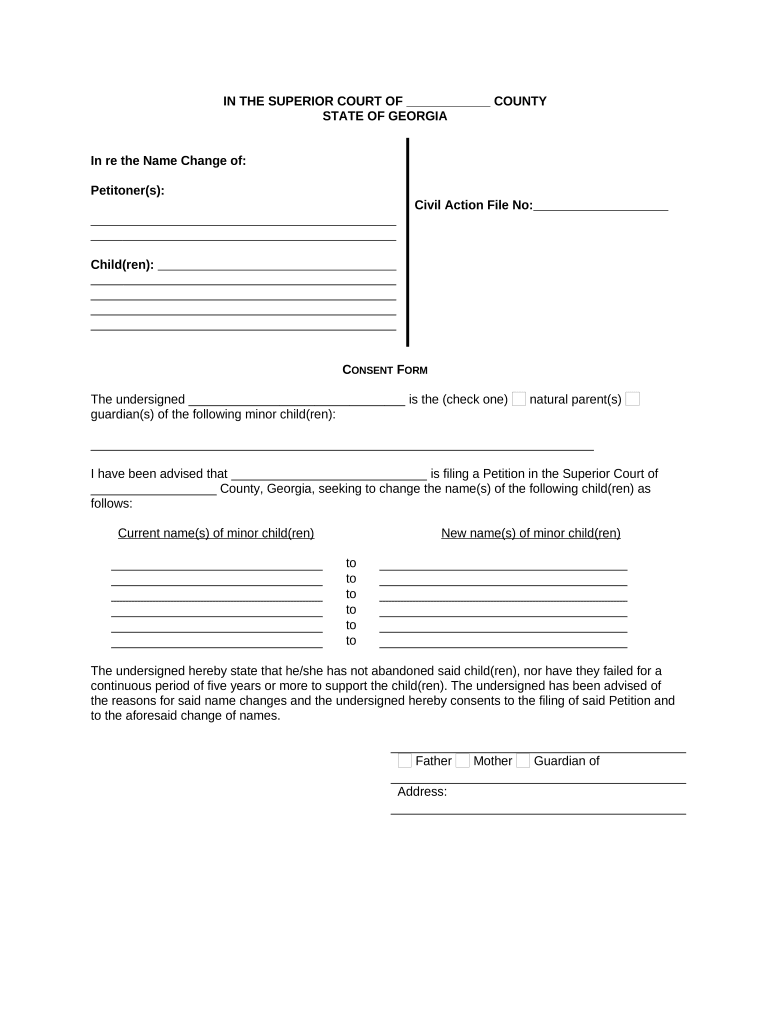
GA Consent Form

This template is fully customizable. Edit the text, fill out the fields, and send it for signature. Give it a try!
GA Consent Form

What the GA Consent Form Is and When It Applies

The GA Consent Form (General Authorization) is a written authorization that permits a covered entity or designated person to use or disclose protected information for defined purposes. In healthcare it commonly authorizes release of medical records, test results, imaging, or billing data to named recipients and defines scope, duration, and revocation procedures. The form documents the signer’s informed consent and establishes the legal basis for disclosure under HIPAA and applicable state law. Accurate completion reduces requests for clarification and supports proper record handling.

Why a Clear GA Consent Form Matters

A well-drafted GA Consent Form documents patient authorization, limits disclosure scope, and helps covered entities satisfy HIPAA (45 CFR §164.508) and ESIGN's consent and retention requirements, reducing disputes and protecting privacy.

Why a Clear GA Consent Form Matters

Who Typically Completes or Receives a GA Consent Form

Healthcare providers, clinics, and hospitals commonly use GA Consent Forms to authorize medical record release for care coordination, third-party requests, or billing.

  • Hospitals and clinics requesting authorizations for inter-provider record transfers electronically
  • Patients signing to allow insurers or attorneys access to medical records
  • Legal and administrative staff handling releases for billing, disability, or benefits

Primary Signer Roles

Patient

A patient is the primary signer when capable, providing explicit authorization for specified records, recipients, and timeframes. The patient must sign and date the form; mismatched names or missing dates can invalidate the release and delay legitimate record requests or processing.

Authorized Representative

An authorized representative signs when legally empowered (power of attorney, guardian, or parent for minors). Providers must verify authority with supporting documentation; failure to verify may expose the provider to liability under HIPAA and applicable state privacy statutes.

Required Information Typically Included on the Form

Full Legal Name: Enter exact name as on government ID
Date of Birth: Use MM/DD/YYYY format for identification
Current Address: Include street, city, state, and ZIP
Recipient Details: Provide full recipient name and contact
Purpose of Disclosure: Specify treatment, payment, or another purpose
Expiration Date: Enter MM/DD/YYYY or event-based expiry

Core Elements of a Professional GA Consent Form

A professional GA Consent Form clearly identifies parties, specifies records and purposes, states an expiration, explains revocation rights, includes HIPAA-required language, and provides space for signature and date.

Identification

List the patient and recipient full legal names, relationship, and contact details. Include identifiers such as medical record number to avoid mismatches during retrieval and ensure staff locate the correct chart.
Scope

Describe the exact records covered (for example, lab results, imaging, entire chart) and applicable date ranges. Narrow, specific scopes reduce privacy risk and make disclosure decisions clearer for custodians.

Purpose

State the specific purpose (treatment, payment, legal, disability, research). Clear purposes inform recipients and help validate whether release is appropriate under HIPAA and state rules.

Expiration

Specify a calendar expiration date or event-based end. Time-limited authorizations avoid open-ended consents and align with good records governance and risk management practices.

Revocation

Describe how to revoke the authorization, acceptable methods (written notice), and the effect on disclosures already made. Include contact details for submitting revocations to the record holder.

Signature

Provide signature, printed name, date, and a block for witness or notary when state law or institutional policy requires additional attestation for evidentiary use.

Step-by-Step: Completing a GA Consent Form

Follow these steps to complete a GA Consent Form accurately and reduce processing delays across providers and payers.

  • 01
    Complete Identification: Enter patient and recipient details
  • 02
    Define Scope: List record types and dates
  • 03
    Sign and Date: Signer must sign and date
  • 04
    Submit Copy: Provide a copy to requester and maintain local record

Configuring an Online GA Consent Workflow

Configure the online GA Consent workflow to capture required fields, signer identity verification, and archival settings consistent with HIPAA and ESIGN.

Data Field and Configuration Name Configuration
Essential Data Fields to Capture Full name, DOB, MRN, recipient contact
Signer Authentication Methods and Options Email, SMS code, KBA, or ID proofing
Notarization and Witness Options per State or Policy Enable RON or local notary fields as required
Storage and Retention Settings for Records Auto-archive to secure encrypted storage per retention rules

Platform Considerations for eSigning GA Consent Forms

Use secure eSignature platforms that meet HIPAA and ESIGN requirements when collecting electronic authorizations to ensure auditability and consent capture.

  • Authentication: Email, SMS, or KBA options
  • Audit Trail: Timestamps, IPs, and version history
  • Encryption: TLS in transit and AES-256 at rest

Where Signed GA Consent Forms Are Filed and Sent

Routing and handling determine where signed GA Consent Forms should be filed, who keeps originals, and how recipients receive protected information.

  • To Provider: Keep original in medical record
  • To Requester: Send redacted copy if required
  • To Billing: Attach for claims and payment processing
  • To Legal: Provide certified copy when litigation pending

Timing Considerations: Effective Dates, Expiration, and Processing

Time-sensitive elements include the effective date, expiration, revocation notice, and reasonable deadlines for processing requests and delivering records.

How to Enter Effective Date:

Enter effective date as MM/DD/YYYY

Setting Expiration or Renewal Terms:

Specify exact date or event; renew in writing

Processing Time Expectations and Limits:

Providers generally respond within 30 days under HIPAA

Revocation Submission and Effective Timing:

Revocation effective on receipt; prior disclosures unaffected

Rules for Delivery and Copy Provision:

Provide signed copy to patient; recipient copies per request

Penalties and Legal Risks of Incorrect or Misused Forms

HIPAA Civil Penalties: Civil fines and corrective actions
State Law Fines: Additional statutory penalties possible
Invalid Release: Request may be refused
Privacy Breach Risk: Unauthorized disclosure liabilities
Criminal Liability: Willful disclosure can trigger prosecution
Insurance Denial: Claims or reimbursements delayed

Common Preparation Mistakes to Avoid

  • Failing to specify an expiration or purpose can create an open-ended authorization that may be rejected by recipients or increase privacy risk.
  • Using generic recipient names like 'any provider' or 'attorney' can create ambiguity and lead to denial of information release requests.
  • Signatures that do not match legal names, missing dates, or unsigned fields commonly invalidate the consent and delay processing.
  • Failing to verify an authorized representative's documentation (POA, guardianship) increases provider liability and may result in record access disputes.

Practical Tips for Accurate and Efficient Completion

Adopting best practices reduces processing time, ensures legal compliance, and improves patient experience when handling GA Consent Forms.

Use clear, specific authorization language
Avoid vague terms. Specify record types, date ranges, and recipient details. Explicit purposes reduce denials and help covered entities apply minimum necessary standards under HIPAA, minimizing legal and operational risk.
Verify signatory identity and authority
Match signature names to government IDs, confirm powers of attorney or guardianship for representatives, and document verification steps. Proper verification prevents wrongful disclosures and protects providers from liability.
Limit scope and duration where possible
Narrow authorizations to only required records and a specific timeframe. Shorter durations lower privacy exposure and simplify revocation administration; include clear expiration to avoid inadvertent perpetual consents.
Retain audit trails and signed copies
Keep electronic audit trails, timestamps, IP addresses, and signed PDFs in encrypted storage. Maintain access logs and retention schedules to demonstrate compliance with ESIGN, UETA, and HIPAA during audits or investigations.

Real-World Examples of GA Consent Form Use

Illustrative scenarios showing how precise authorizations streamline record transfers and legal processes in practice.

Hospital Release

A regional hospital used a GA Consent Form to release imaging results to an outside radiology clinic for consult review.

  • Authorized transfer of specific imaging files only.
  • The form specified patient identifiers, limited scope to imaging dated within six months, and included revocation instructions and electronic signature acceptance, which reduced retrieval time and ensured HIPAA-aligned documentation for audit.

Legal Counsel Request

An attorney requested a certified copy of medical records for litigation and provided a signed GA Consent Form from the client.

  • Consent included notarization for evidentiary use.
  • The authorization named the law firm as recipient, permitted disclosure of the entire chart for specified date ranges, and attached proof of representation, streamlining legal review while preserving chain-of-custody and minimizing disputes over authenticity.

eSignature Pricing and Feature Snapshot for GA Consent Workflows

Price and capability comparison for common eSignature plans suitable for GA Consent Forms, focusing on starting price, trials, bulk send, audit trail, and HIPAA compliance.

signNow DocuSign Adobe Sign PandaDoc HelloSign
Starting Price $8/user/mo $15/user/mo $14/user/mo $19/user/mo $15/user/mo
Free Trial 7-day trial Varies Varies Varies Varies
Bulk Send Yes Yes Yes Yes No
Audit Trail Yes Yes Yes Yes Yes
HIPAA Compliant Yes Yes Yes No No

Key Processing Milestones for a GA Consent Form

Key milestones in the GA Consent Form lifecycle cover signing, verification, disclosure, and archival to satisfy legal and operational requirements.

01

Signing Completed

Signer executes form and dates it

02

Verification Completed

Identity and authority verified; documentation attached

03

Records Released

Authorized records delivered to named recipient

04

Archive and Retention

Store signed copy and audit trail securely

FAQs — Common Questions About GA Consent Forms

Answers to common questions about completing, validating, and revoking GA Consent Forms in U.S. healthcare and administrative contexts.


Need help? Contact support

be ready to get more
Join over 28 million airSlate SignNow users