Establishing secure connection… Loading editor… Preparing document…
Navigation

Fill and Sign the Instructions for Collecting a Judgment and Completing a Writ of Garnishment Colorado Form
Fill and Sign the Instructions for Collecting a Judgment and Completing a Writ of Garnishment Colorado Form

How it works

Open the document and fill out all its fields.
Apply your legally-binding eSignature.
Save and invite other recipients to sign it.

Rate template

4.6
50 votes
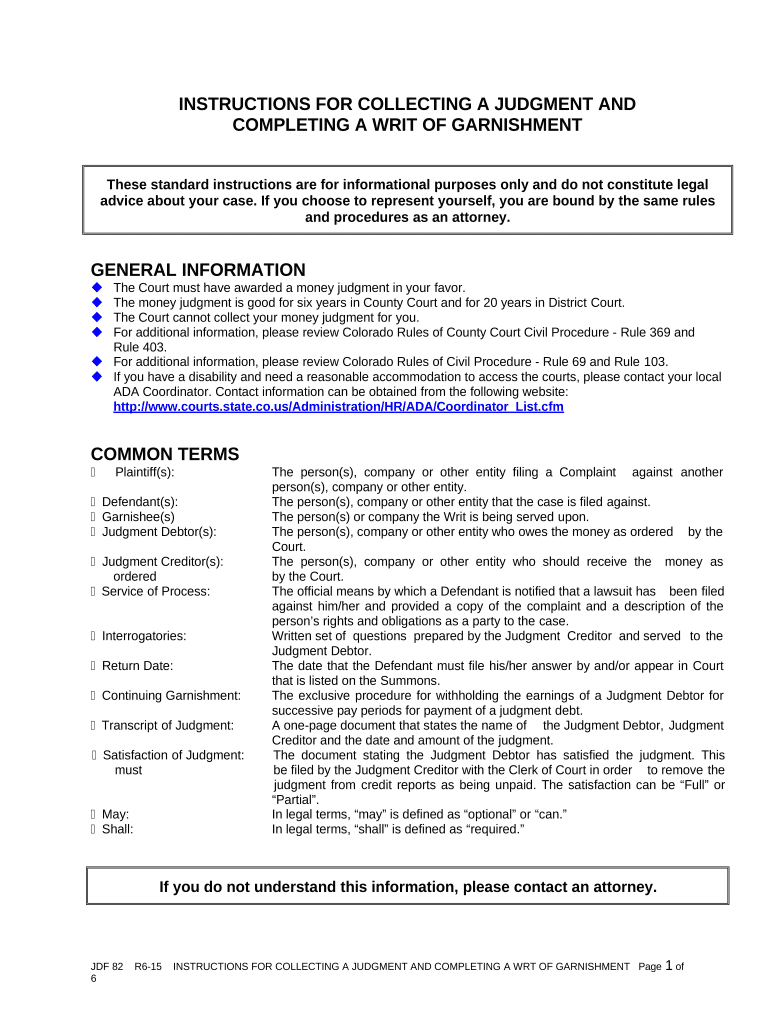
JDF 82 R6-15 INSTRUCTIONS FOR COLLECTING A JUDGMENT AND COMPLETING A WRT OF GARNISHMENT Page 1 of 6 ©2013, 2014, 2015 Colorado Judicial Department for use in the Courts of Colorado INSTRUCTIONS FOR COLLECTING A JUDGMENT AND COMPLETING A WRIT OF GARNISHMENT GENERAL INFORMATION  The Court must have awarded a money judgment in your favor.  The money judgment is good for six years in County Court and for 20 years in District Court.  The Court cannot collect your money judgment for you.  For additional information, please review Colorado Rules of County Court Civil Procedure - Rule 369 and Rule 403.  For additional information, please review Colorado Rules of Civil Procedure - Rule 69 and Rule 103.  If you have a disability and need a reasonable accommodation to access the courts, please contact your local ADA Coordinator. Contact information can be obtained from the following website: http://www.courts.state.co.us/Administration/HR/ADA/Coordinator_List.cfm COMMON TERMS  Plaintiff(s): The person(s), company or other entity filing a Complaint against another person(s), company or other entity.  Defendant(s): The person(s), company or other entity that the case is filed against.  Garnishee(s) The person(s) or company the Writ is being served upon.  Judgment Debtor(s): The person(s), company or other entity who owes the money as ordered by the Court.  Judgment Creditor(s): The person(s), company or other entity who should receive the money as ordered by the Court.  Service of Process: The official means by which a Defendant is notified that a lawsuit has been filed against him/her and provided a copy of the complaint and a description of the person’s rights and obligations as a party to the case.  Interrogatories: Written set of questions prepared by the Judgment Creditor and served to the Judgment Debtor.  Return Date: The date that the Defendant must file his/her answer by and/or appear in Court that is listed on the Summons.  Continuing Garnishment: The exclusive procedure for withholding the earnings of a Judgment Debtor for successive pay periods for payment of a judgment debt.  Transcript of Judgment: A one-page document that states the name of the Judgment Debtor, Judgment Creditor and the date and amount of the judgment.  Satisfaction of Judgment: The document stating the Judgment Debtor has satisfied the judgment. This must be filed by the Judgment Creditor with the Clerk of Court in order to remove the judgment from credit reports as being unpaid. The satisfaction can be “Full” or “Partial”.  May: In legal terms, “may” is defined as “optional” or “can.”  Shall: In legal terms, “shall” is defined as “required.”These standard instructions are for informational purposes only and do not constitute legal advice about your case. If you choose to represent yourself, you are bound by the same rules and procedures as an attorney. If you do not understand this information, please contact an attorney. JDF 82 R6-15 INSTRUCTIONS FOR COLLECTING A JUDGMENT AND COMPLETING A WRT OF GARNISHMENT Page 2 of 6 ©2013, 2014, 2015 Colorado Judicial Department for use in the Courts of ColoradoFEES     s t  t  p rt to t    s m nontr r s  ollows  Copy of Documents $.75 per page  Service Fees Varies (Payable to Process Server)  Issue Writ of Garnishment $45.00  Certification Fee $20.00  Transcript of Judgment $25.00  Execution $45.00  Satisfaction of Judgment $20.00  Hearing for Interrogatories $70.00 FORMS To access a form online go to www.courts.state.co.us and click on the “Self Help/Forms” tab. The packet/forms are available in PDF or WORD by selecting “All Court Forms and Instructions” and then “Garnishments and Judgments”. You may complete a form online or you may print it and type or print legibly in black ink. You may need all or some of these forms. Read these instructions carefully to determine what forms you may need.  JDF 76 General Motion  JDF 77 General Order  JDF 89 Notice to Garnishee, Application of Funds to Judgment and Release of Funds to Judgment Creditor  JDF 105 Pattern Interrogatories Under C.R.C.P. 369(g) - Individual  JDF 108 Pattern Interrogatories Under C.R.C.P. 369(g) - Business  JDF 111 Satisfaction of Judgment  Form 26 Writ of Continuing Garnishment  Form 27 Calculation of the Amount of Exempt Earnings  Form 28 Objection to Calculation of Amount of Exempt Earnings  Form 29 Writ of Garnishment with Notice of Exemption and Pending Levy  Form 30 Claim of Exemption to Writ of Garnishment with Notice  Form 32 Writ of Garnishment - Judgment Debtor other than Natural Person FIRST STEPS TO COLLECTING YOUR JUDGMENT Step 1: First ask the Judgment Debtor to pay, preferably in writing. Step 2: If the Judgment Debtor refuses to pay and you do not know where the Judgment Debtor works, banks or owns property, you will need to have the interrogatories served. The Judgment Debtor is ordered by the Court to answer the questions truthfully. The answers provided in the interrogatories can be helpful in collecting your judgment, such as employer’s name and pay dates, location of bank accounts and/or other assets.  If you received an Order for Entry of Judgment, the Court has already authorized you to serve the Interrogatories and for the Judgment Debtor to answer them. Pursuant to Rule 369(g) of the Colorado Rules of Civil Procedure, the Judgment Creditor can automatically issue the Form Interrogatories (JDF 105 or 108) as part of the judgment order without further order of the Court.  If you want to use any interrogatories other than the Pattern Interrogatories forms mentioned in these instructions, you will need to have them approved by the court before they can be used. Step 3: Serve the Court Order and the interrogatories on the Judgment Debtor.  You can have the Judgment Debtor served by doing one of the following: JDF 82 R6-15 INSTRUCTIONS FOR COLLECTING A JUDGMENT AND COMPLETING A WRT OF GARNISHMENT Page 3 of 6 ©2013, 2014, 2015 Colorado Judicial Department for use in the Courts of Colorado  Select either the Sheriff’s Department, a private process server, or someone you know who is 18 years or older and not a party to the action and who knows the rules of service to serve the Judgment Debtor. The process server must follow the Service of Process requirements stated in Rule 4 or 304. Be sure to direct the sheriff, private process server, or person serving the Interrogatories to return the Affidavit of Service to the Court as soon as possible after service has been completed. OR  Ask the court clerk to mail the interrogatories to the Judgment Debtor. You will be responsible for the cost of mailing. Step 4: Await return of the interrogatories.  The answers must be filed with the Court and a copy mailed to the sender no later than 14 days after the Judgment Debtor received them. Step 5: Upon receipt of the interrogatories, you are ready to file a Writ of Garnishment OR you may request to place a lien against real estate owned by the Judgment Debtor. If the Judgment Debtor does not comply with the order in answering the interrogatories, you will need to file a request for an Order to Issue a Contempt Citation to the Judgment Debtor, with return of service of interrogatories on debtor. STEPS TO FILING A WRIT Step 1: Determine Appropriate Forms to Complete. Determine the appropriate writ of garnishment that you wish the Court to issue based on the types listed below (A – C) and the information you obtained from the interrogatories. Below each type of garnishment is a listing of the forms that you will need: A. Garnishment of an Individual’s Wages  Form 26 - Writ of Continuing Garnishment Required Paperwork - 1 original and 3 copies  Form 27 - Calculation of the Amount of Exempt Earnings Required Paperwork - 1 original and 2 copies  Form 28 - Objection to Calculation of the Amount of Exempt Earnings Required Paperwork - 1 original B. Garnishment of an individual’s bank / savings institution, or assets other than earnings  Form 29 - Writ of Garnishment with Notice of Exemption and Pending Levy Required Paperwork - 1 original and 4 copies (5 if two debtors)  Form 30 - Claim of Exemption to Writ of Garnishment with Notice Required Paperwork - 1 original C. Garnishment of debtor which is a business entity  Form 32 - Writ of Garnishment - Judgment Debtor other than Natural Person Required Paperwork - 1 original and 2 copies. Step 2: Complete Forms .  Line 1. Original Amount of Judgment Entered or the revived amount, if applicable.  Original amount refers to the actual judgment amount entered by the magistrate or judge. If court costs, interest, and/or attorney fees were granted on the judgment date, include them as part of the original judgment.  Revived amount refers to the judgment amount that remains unsatisfied, plus any costs and interest granted. The revived amount will be per the Order for Revival of Judgment – JDF 125.You must complete Lines 1 – 5 on the Writ in the upper portion of the form . JDF 82 R6-15 INSTRUCTIONS FOR COLLECTING A JUDGMENT AND COMPLETING A WRT OF GARNISHMENT Page 4 of 6 ©2013, 2014, 2015 Colorado Judicial Department for use in the Courts of Colorado  Line 2. Plus any Interest Due on Judgment This is the amount of interest accrued from the date of judgment. Unless there was a different interest rate granted on the judgment date, interest is 8% per annum for all cases except child support arrearages, which is 12% per annum.  Line 3. Taxable Costs (including estimated cost of service of this Writ) This refers to post-judgment costs only. Cost of issuance of the Writ, service costs, etc.  Line 4. Less any Amount Paid Enter all amounts you have received as payment on the judgment here.  Line 5. Principal Balance/Total Amount Due and owing  Fill in the name of the employer, bank, etc. on whom the Writ is to be served. You will need to provide the process server with complete address(es) to serve the documents. This can be included on the Return of Service or on separate documentation.  Section “c” requires that you choose how checks are payable. Make Checks Payable to:  If you are pro-se (representing yourself), your checks must be made payable to the Clerk of the Court.  If you are a judgment creditor with an attorney entered on your case or a licensed collection agency, checks may be made payable to either to you or your attorney. Step 3: File Writ and appropriate documents with the Court. The Clerk will issue the Writ upon your payment. $45.00. If you do not have an attorney and are requesting a garnishment of the Judgment Debtor’(s) wages please provide self-addressed stamped envelopes so that the Court can forward money received from the garnishee/employer. Step 4: Serve the Writ and appropriate documents. Select either the Sheriff’s Department, a private process server, or someone you know who is 18 years or older and not a party to the action and who knows the rules of service to serve the Garnishee. There is a service fee that is payable to the Sheriff’s Department or Private Process Server.  You can locate private process servers in the yellow pages under Process Servers.  Make sure you provide the process server with complete address information to serve the Writ.  If you need to have the Writ served to a bank, employer, etc. outside of Colorado, you will need to follow the rules of service in that state.  When service is complete, proof of service (Return of Service) must be filed with the Court.  Make sure you have the appropriate copies and any other forms as described below to provide to the process server. A. Writ of Continuing Garnishment (Wages) Form 26:  Two copies of the Writ are served on the Garnishee together with a blank copy of Form 28. B. Writ of Garnishment with Notice of Exemption and Pending Levy (Bank Account, Tenants, Etc.) Form 29:  A copy of the Writ is served on the Garnishee together with a blank copy of Form 30.  A copy of the Writ is served on the Judgment Debtor.  Provide a self-addressed stamped envelope to receive the completed Writ. C. Writ of Garnishment Judgment Debtor other than Natural person (Judgment Debtor is Business) Form 32:  A copy of the Writ is served on the Garnishee. Step 5: Responsibilities of the Garnishee and Judgment Creditor after Service. Go to Section A, B, C as appropriate. A. Writ of Continuing Garnishment (Wages) Form 26  The Garnishee shall complete the Writ by answering the questions on page 2.Complete the remaining two sections on the bottom portion of the form. JDF 82 R6-15 INSTRUCTIONS FOR COLLECTING A JUDGMENT AND COMPLETING A WRT OF GARNISHMENT Page 5 of 6 ©2013, 2014, 2015 Colorado Judicial Department for use in the Courts of Colorado  The Garnishee shall deliver a copy of the completed Writ, together with the Calculation of the Amount of Exempt Earnings (Form 27) and a blank copy of the Objection to the Calculation of the Amount of Exempt Earnings (Form 28) to the Judgment Debtor at the time the Judgment Debtor receives earnings for the first pay period affected by such writ. For all subsequent pay periods within the effective garnishment period, the Garnishee shall provide a copy of the Calculation of the Amount of Exempt Earning (Form 27) to the Judgment Debtor for that pay period.  The Garnishee shall file the answer to the Writ with the Clerk of Court and send a copy to the Judgment Creditor no less than 7 and no more than 14 days following the time the Judgment Debtor receives earnings for the first pay period affected by the Writ or 42 days following the date such Writ was served upon the Garnishee, whichever is less.  If the Judgment Debtor does not file an objection with the Court within 14 days of receiving a copy of the Writ, the Garnishee shall send the nonexempt earnings to the individual designated on page 2 section “e” of the Writ. If you are pro se (representing yourself), the Court will send you the money in the self-addressed stamped envelope that you provided when you filed the Writ.  If the Judgment Debtor does object, you will receive a copy of the objection and a hearing will be set within 14 days. B. Writ of Garnishment with Notice of Exemption and Pending Levy (Bank Account, Tenants, Etc.) Form 29:  The Garnishee shall complete the Writ by answering the questions on page 2.  The Garnishee shall file a completed copy with the Court and mail a copy to the Judgment Creditor.  If the Garnishee is a Bank and is holding money or if the Garnishee has possession of the identified property, the Judgment Creditor shall serve a copy of the completed Writ along with a blank copy of the Claim of Exemption to Writ of Garnishment with Notice (Form 30) to the Judgment Debtor.  If the Judgment Debtor does not file a written Claim of Exemption with the Court within 14 days of receiving a copy of the Writ, complete the Notice to Garnishee, Application of Funds to Judgment, and Release of Funds to Judgment Creditor (JDF 89). This form must be filed and approved by the Court before the Garnishee who is holding money can release such funds.  If the Garnishee is holding money of the Judgment Debtor, such as a bank, the Garnishee shall pay the amount not to exceed the total amount due and owing on the judgment to the Court.  Once the Court has signed the Notice to Garnishee, Application of Funds to Judgment, and Release of Funds to Judgment Creditor (JDF 89), it is the responsibility of the Judgment Creditor to get the Notice (JDF 89) to the Garnishee who is holding the funds.  If the Judgment Debtor does object, you will receive a copy of the objection and a hearing will be set within 14 days after the filing of such objection. C. Writ of Garnishment Judgment Debtor other than Natural Person (Judgment Debtor is Business) Form 32:  The Garnishee shall complete the Writ by answering the questions on page 2.  The Garnishee shall file a completed copy with the Court and mail a copy to the Judgment Creditor.  If the answers to the writ of garnishment show that the Garnishee has property or holds money owed to the Judgment Debtor, the Court shall enter judgment in favor of the Judgment Debtor and against the Garnishee for the use of the Judgment Creditor.  This order shall direct the Garnishee to deliver personal property to the sheriff or if the Garnishee holds money of the Judgment Debtor bank to pay the amount not to exceed the total amount due and owing on the judgment to the Registry of the Court. A Writ of Continuing Garnishment is good for 182 days for any judgment ordered on or after August 8, 2001 and for 91 days for any judgment ordered prior to August 8, 2001. When the Effective Garnishment Period expires, you will need to complete a new Writ, file it with the Court and Serve the Garnishee. JDF 82 R6-15 INSTRUCTIONS FOR COLLECTING A JUDGMENT AND COMPLETING A WRT OF GARNISHMENT Page 6 of 6 ©2013, 2014, 2015 Colorado Judicial Department for use in the Courts of ColoradoSTEPS TO REQUESTING A LIEN AGAINST REAL ESTATE Step 1: Ask the Court for a Transcript of Judgment. The cost is $25.00. Step 2: Take the Transcript of Judgment to the County Clerk and Recorder where the Judgment Debtor owns the real estate. The lien continues for 6 years if the judgment was awarded in County Court and for 20 years if the judgment was awarded in District Court. Step 3: Advise the Judgment Debtor that he or she will not be able to sell or mortgage the real estate until the Judgment amount has been paid and you release the judgment lien. WHAT TO DO AFTER YOU COLLECT YOUR JUDGMENT Step 1: Complete a Satisfaction of Judgment (JDF 111) and file with the Court. Step 2: Mail a copy of the Satisfaction of Judgment to the Judgment Debtor, and Garnishee if any. Step 3: If you placed a lien on the real estate owned by the Judgment Debtor, notify the Clerk and Recorder to release the lien.

Helpful tips for finishing your ‘Instructions For Collecting A Judgment And Completing A Writ Of Garnishment Colorado’ online

Are you fed up with the inconvenience of handling paperwork? Look no further than airSlate SignNow, the premier electronic signature solution for individuals and businesses. Wave farewell to the tedious routine of printing and scanning documents. With airSlate SignNow, you can effortlessly complete and sign paperwork online. Take advantage of the robust features packed within this user-friendly and affordable platform and transform your document management approach. Whether you need to approve forms or collect signatures, airSlate SignNow manages it all seamlessly, requiring merely a few clicks.

Adhere to this detailed guide:

  1. Sign into your account or initiate a free trial with our service.
  2. Click +Create to upload a file from your device, cloud storage, or our form library.
  3. Access your ‘Instructions For Collecting A Judgment And Completing A Writ Of Garnishment Colorado’ in the editor.
  4. Click Me (Fill Out Now) to finalize the form on your side.
  5. Add and designate fillable fields for others (if necessary).
  6. Proceed with the Send Invite settings to request eSignatures from others.
  7. Download, print your copy, or convert it into a multi-use template.

Don’t stress if you need to collaborate with your colleagues on your Instructions For Collecting A Judgment And Completing A Writ Of Garnishment Colorado or send it for notarization—our solution offers everything you require to accomplish such tasks. Create an account with airSlate SignNow today and elevate your document management experience to new levels!

Here is a list of the most common customer questions. If you can’t find an answer to your question, please don’t hesitate to reach out to us.

Need help? Contact Support

The best way to complete and sign your instructions for collecting a judgment and completing a writ of garnishment colorado form


Save time on document management with airSlate SignNow and get your instructions for collecting a judgment and completing a writ of garnishment colorado form eSigned quickly from anywhere with our fully compliant eSignature tool.

How to Sign a PDF Online How to Sign a PDF Online

How to complete and sign documents online

Previously, dealing with paperwork took pretty much time and effort. But with airSlate SignNow, document management is quick and easy. Our powerful and user-friendly eSignature solution allows you to effortlessly fill out and eSign your instructions for collecting a judgment and completing a writ of garnishment colorado form online from any internet-connected device.

Follow the step-by-step guide to eSign your instructions for collecting a judgment and completing a writ of garnishment colorado form template online:

  • 1.Sign up for a free trial with airSlate SignNow or log in to your account with password credentials or SSO authentication.
  • 2.Click Upload or Create and import a file for eSigning from your device, the cloud, or our form catalogue.
  • 3.Click on the file name to open it in the editor and utilize the left-side toolbar to fill out all the blank areas appropriately.
  • 4.Place the My Signature field where you need to approve your sample. Type your name, draw, or upload a picture of your regular signature.
  • 5.Click Save and Close to finish editing your completed document.

Once your instructions for collecting a judgment and completing a writ of garnishment colorado form template is ready, download it to your device, export it to the cloud, or invite other parties to eSign it. With airSlate SignNow, the eSigning process only takes several clicks. Use our powerful eSignature solution wherever you are to handle your paperwork efficiently!


How to Sign a PDF Using Google Chrome How to Sign a PDF Using Google Chrome

How to complete and sign paperwork in Google Chrome

Completing and signing paperwork is simple with the airSlate SignNow extension for Google Chrome. Adding it to your browser is a quick and productive way to deal with your forms online. Sign your instructions for collecting a judgment and completing a writ of garnishment colorado form template with a legally-binding electronic signature in a couple of clicks without switching between tools and tabs.

Follow the step-by-step guidelines to eSign your instructions for collecting a judgment and completing a writ of garnishment colorado form template in Google Chrome:

  • 1.Navigate to the Chrome Web Store, find the airSlate SignNow extension for Chrome, and install it to your browser.
  • 2.Right-click on the link to a document you need to sign and select Open in airSlate SignNow.
  • 3.Log in to your account with your password or Google/Facebook sign-in buttons. If you don’t have one, you can start a free trial.
  • 4.Use the Edit & Sign menu on the left to complete your sample, then drag and drop the My Signature option.
  • 5.Upload a photo of your handwritten signature, draw it, or simply enter your full name to eSign.
  • 6.Make sure all the details are correct and click Save and Close to finish editing your paperwork.

Now, you can save your instructions for collecting a judgment and completing a writ of garnishment colorado form sample to your device or cloud storage, email the copy to other individuals, or invite them to eSign your form via an email request or a secure Signing Link. The airSlate SignNow extension for Google Chrome enhances your document workflows with minimum time and effort. Start using airSlate SignNow today!


How to Sign a PDF in Gmail How to Sign a PDF in Gmail How to Sign a PDF in Gmail

How to fill out and sign forms in Gmail

Every time you get an email with the instructions for collecting a judgment and completing a writ of garnishment colorado form for approval, there’s no need to print and scan a file or save and re-upload it to another tool. There’s a much better solution if you use Gmail. Try the airSlate SignNow add-on to promptly eSign any documents right from your inbox.

Follow the step-by-step guide to eSign your instructions for collecting a judgment and completing a writ of garnishment colorado form in Gmail:

  • 1.Navigate to the Google Workplace Marketplace and look for a airSlate SignNow add-on for Gmail.
  • 2.Install the program with a corresponding button and grant the tool access to your Google account.
  • 3.Open an email with an attached file that needs signing and utilize the S symbol on the right panel to launch the add-on.
  • 4.Log in to your airSlate SignNow account. Select Send to Sign to forward the file to other parties for approval or click Upload to open it in the editor.
  • 5.Drop the My Signature field where you need to eSign: type, draw, or import your signature.

This eSigning process saves time and only takes a couple of clicks. Use the airSlate SignNow add-on for Gmail to adjust your instructions for collecting a judgment and completing a writ of garnishment colorado form with fillable fields, sign paperwork legally, and invite other people to eSign them al without leaving your inbox. Enhance your signature workflows now!


How to Sign a PDF on a Mobile Device How to Sign a PDF on a Mobile Device How to Sign a PDF on a Mobile Device

How to complete and sign documents in a mobile browser

Need to quickly submit and sign your instructions for collecting a judgment and completing a writ of garnishment colorado form on a smartphone while doing your work on the go? airSlate SignNow can help without the need to set up extra software programs. Open our airSlate SignNow solution from any browser on your mobile device and create legally-binding electronic signatures on the go, 24/7.

Follow the step-by-step guidelines to eSign your instructions for collecting a judgment and completing a writ of garnishment colorado form in a browser:

  • 1.Open any browser on your device and follow the link www.signnow.com
  • 2.Register for an account with a free trial or log in with your password credentials or SSO option.
  • 3.Click Upload or Create and add a file that needs to be completed from a cloud, your device, or our form catalogue with ready-to go templates.
  • 4.Open the form and complete the blank fields with tools from Edit & Sign menu on the left.
  • 5.Add the My Signature field to the form, then type in your name, draw, or add your signature.

In a few easy clicks, your instructions for collecting a judgment and completing a writ of garnishment colorado form is completed from wherever you are. Once you're finished editing, you can save the document on your device, create a reusable template for it, email it to other people, or invite them eSign it. Make your documents on the go fast and efficient with airSlate SignNow!


How to Sign a PDF on iPhone How to Sign a PDF on iPhone

How to fill out and sign forms on iOS

In today’s business world, tasks must be done rapidly even when you’re away from your computer. Using the airSlate SignNow mobile app, you can organize your paperwork and approve your instructions for collecting a judgment and completing a writ of garnishment colorado form with a legally-binding eSignature right on your iPhone or iPad. Install it on your device to conclude agreements and manage documents from just about anywhere 24/7.

Follow the step-by-step guide to eSign your instructions for collecting a judgment and completing a writ of garnishment colorado form on iOS devices:

  • 1.Open the App Store, find the airSlate SignNow app by airSlate, and set it up on your device.
  • 2.Launch the application, tap Create to add a template, and select Myself.
  • 3.Choose Signature at the bottom toolbar and simply draw your signature with a finger or stylus to eSign the form.
  • 4.Tap Done -> Save right after signing the sample.
  • 5.Tap Save or take advantage of the Make Template option to re-use this document in the future.

This method is so straightforward your instructions for collecting a judgment and completing a writ of garnishment colorado form is completed and signed in a couple of taps. The airSlate SignNow app works in the cloud so all the forms on your mobile device remain in your account and are available any time you need them. Use airSlate SignNow for iOS to improve your document management and eSignature workflows!


How to Sign a PDF on Android How to Sign a PDF on Android

How to fill out and sign forms on Android

With airSlate SignNow, it’s easy to sign your instructions for collecting a judgment and completing a writ of garnishment colorado form on the go. Set up its mobile application for Android OS on your device and start boosting eSignature workflows right on your smartphone or tablet.

Follow the step-by-step guide to eSign your instructions for collecting a judgment and completing a writ of garnishment colorado form on Android:

  • 1.Navigate to Google Play, search for the airSlate SignNow application from airSlate, and install it on your device.
  • 2.Sign in to your account or register it with a free trial, then import a file with a ➕ key on the bottom of you screen.
  • 3.Tap on the uploaded document and choose Open in Editor from the dropdown menu.
  • 4.Tap on Tools tab -> Signature, then draw or type your name to eSign the sample. Fill out empty fields with other tools on the bottom if required.
  • 5.Use the ✔ key, then tap on the Save option to finish editing.

With a user-friendly interface and full compliance with major eSignature laws and regulations, the airSlate SignNow app is the best tool for signing your instructions for collecting a judgment and completing a writ of garnishment colorado form. It even operates without internet and updates all document modifications once your internet connection is restored and the tool is synced. Complete and eSign forms, send them for approval, and make multi-usable templates anytime and from anywhere with airSlate SignNow.

Sign up and try Instructions for collecting a judgment and completing a writ of garnishment colorado form
  • Close deals faster
  • Improve productivity
  • Delight customers
  • Increase revenue
  • Save time & money
  • Reduce payment cycles

