Establishing secure connection…Loading editor…Preparing document…

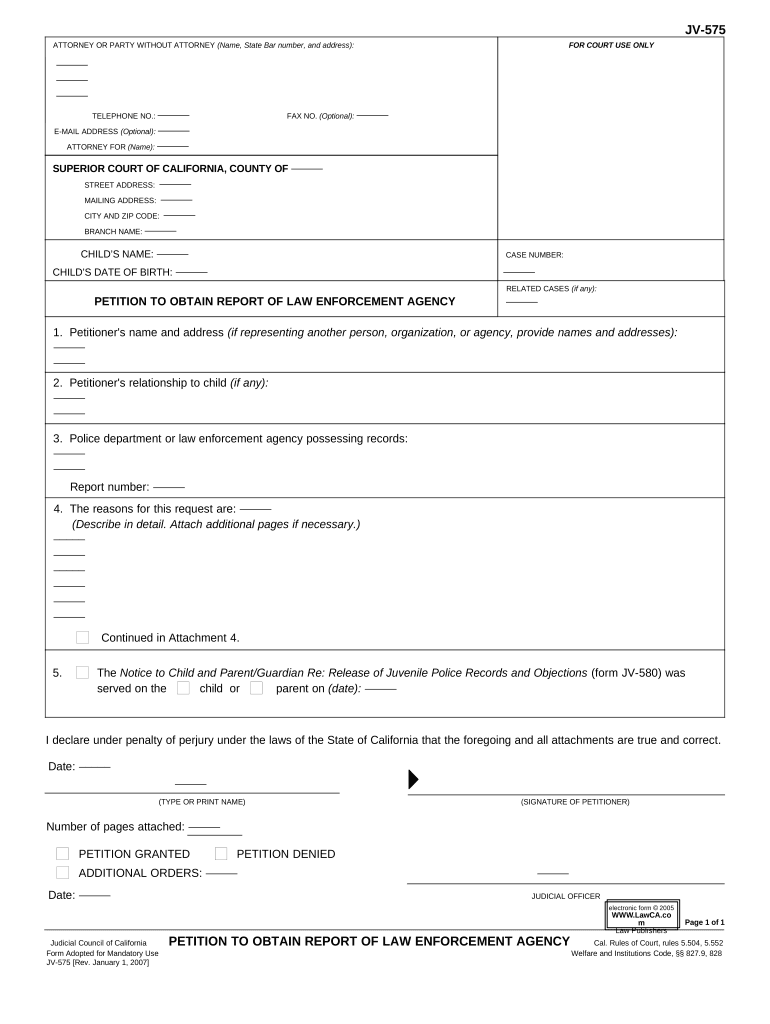
California Petition to Obtain Report of Law Enforcement Agency

This template is fully customizable. Edit the text, fill out the fields, and send it for signature. Give it a try!
California Petition to Obtain Report of Law Enforcement Agency

What the California Petition to Obtain Report of Law Enforcement Agency Is

A California Petition to Obtain Report of Law Enforcement Agency is a formal written request used to secure copies of police incident reports, arrest records, or investigative files held by local, county, or state law enforcement. Petitioners typically identify the specific report sought, provide incident details (names, dates, locations, report number where available), and state the legal basis for access. Agencies process requests under statutory authority or internal policy and may redact exempt material for privacy or investigative reasons; identity verification and copying fees are common prerequisites.

Why this petition matters for evidence and records access

A clear petition creates a documented request that helps agencies locate records, document chain-of-custody, and support legal or administrative uses.

Why this petition matters for evidence and records access

Step-by-step: completing and submitting the petition

Use this sequential checklist to prepare a complete petition and reduce back-and-forth with the agency.

  • 01
    Prepare details: Gather names, date, location, and any report number available.
  • 02
    Complete form: Enter all required fields and sign the petition.
  • 03
    Attach ID: Include a copy of government ID if agency requires verification.
  • 04
    Submit: Deliver per agency instructions: in person, mail, email, or online portal.

Who typically files this petition and why

Individuals and organizations file petitions to request law enforcement reports for legal, insurance, or personal reasons.

  • Victims and witnesses requesting official copies for case records or personal closure.
  • Attorneys and legal representatives seeking evidence for litigation, defense, or discovery.
  • Insurance adjusters and claims specialists obtaining documentation for claims processing or subrogation.

Institutions use formal petitions to create an auditable request trail that supports appeals and court filings.

Primary requester profiles

Victim/Individual

An individual seeking a report for personal, insurance, or legal reasons. May need to prove identity and relationship to the case; agencies often permit limited access for named parties.

Attorney/Representative

A licensed attorney, claims adjuster, or authorized representative acting on behalf of a client. Must typically provide a signed authorization or proof of representation and comply with agency requirements.

Required information elements at a glance

Petitioner Name: Full legal name
Incident Date: MM/DD/YYYY preferred
Agency Name: City/county/state
Report Number: If known, enter exactly
Purpose: Legal or administrative reason
Contact Info: Phone, email, mailing address

Consequences of errors or misuse

False Statement: Possible criminal penalties
Privacy Violation: Civil liability risk
Denial of Access: Request refused or delayed
Fee Forfeiture: Nonrefundable processing charges
Record Misidentification: Wrong file delivered
Unauthorized Use: Legal restrictions apply

Common preparation mistakes to avoid

  • Failing to identify the correct law enforcement agency or jurisdiction leads to rerouting and long delays in obtaining reports.
  • Providing incomplete incident details (no date, misspelled names, or no report number) can lengthen search time and increase costs.
  • Overlooking exemptions: many investigative records are partially redacted under privacy or safety exemptions and may be withheld entirely.
  • Not supplying required identity verification or authorization for third-party requests causes immediate rejection or requests for supplemental documentation.

Key components of a professional petition

A well-structured petition presents clear identifying details, a precise records description, and documentation of legal authority to access the file.

Caption

Header with petitioner name, mailing address, and contact information to ensure the agency can respond and return documents.
Records Requested

A specific description of incident reports, investigative files, or audio/video records by date, location, and report number to narrow the search.

Legal Basis

Citation to the California Public Records Act or other statutory authority and a concise explanation of why disclosure is appropriate.

Identifiers

Names, dates of birth, and report numbers for involved parties to reduce ambiguity and avoid misidentification.

Fees and Payment

Statement of anticipated copying fees, delivery costs, and acceptable payment methods; note whether fee waiver is requested.

Verification

Signature, date, and any required proof of identity or authorization for third-party requests to establish requester standing.

How the petition process typically flows

The workflow below shows common stages from creating the petition through delivery of records.

  • Draft Petition: Prepare forms and attach identity documents.
  • Submit to Agency: Use agency portal, email, mail, or in-person delivery.
  • Agency Review: Staff verify identity, locate records, assess exemptions.
  • Delivery: Agency provides copies, often with redactions and fee invoice.

Configuring an electronic petition workflow

Set up a digital workflow that captures required fields, signer verification, and secure delivery for auditability.

Field Configuration
Signature Enable typed, drawn, or cryptographic signature with timestamp
Authentication Email verification or ID upload for higher assurance
Attachments Allow PDF or image attachments for IDs and authorizations
Delivery Configure email, secure link, or agency portal upload

Technical and platform considerations for e-submission

Use a platform that supports common file formats, audit trails, and secure signer authentication.

  • File formats: PDF, DOCX, or image files
  • Audit trail: Timestamps, IP, and action history
  • Integrations: Link to storage or case management

Ensure the chosen system meets legal requirements for retention, access logs, and any statutory authentication the receiving agency requires.

Typical timelines and statutory response windows

Deadlines depend on the filing authority; California public records procedures include specific short response windows for initial agency action.

Initial Agency Response:

California agencies generally must respond within 10 calendar days (Cal. Gov. Code §6253).

Search and Production:

Time to locate and produce records varies by request scope and backlog.

Fee Payment:

Production may be delayed until copying fees or deposit are paid.

Appeal or Administrative Review:

Agencies typically provide instructions and deadlines for administrative appeals.

Court Petition:

If denied, judicial review timelines depend on the filing court and local rules.

Key milestones from submission to receipt

Track these sequential milestones to monitor progress and know when to follow up with the agency.

01

Submit Petition

Deliver completed petition and identity documents to the correct agency unit.

02

Agency Acknowledgment

Agency confirms receipt and may request additional documentation or fees.

03

Processing & Redaction

Agency locates records and applies redactions for exempt material.

04

Final Delivery

Agency provides copies and invoice, or issues a formal denial with appeal instructions.

Representative eSignature vendor comparison for petition workflows

Platform pricing and capability choices affect cost, authentication options, and compliance support for electronic petitions and records requests.

signNow DocuSign Adobe Sign PandaDoc HelloSign
Starting Price $8/user/mo $15/user/mo $14/user/mo $19/user/mo $15/user/mo
Free Trial 7-day free trial Varies Varies Varies Varies
Bulk Send Yes Yes Yes Yes No
Audit Trail Yes Yes Yes Yes Yes
HIPAA Compliant Yes Yes Yes No No

FAQs and troubleshooting for petitioners

Answers to common questions about preparing, submitting, and following up on petitions to obtain law enforcement reports.


Need help? Contact support

be ready to get more
Join over 28 million airSlate SignNow users