Establishing secure connection…Loading editor…Preparing document…

Letter Refusing Late Return of Merchandise

This template is fully customizable. Edit the text, fill out the fields, and send it for signature. Give it a try!
Letter Refusing Late Return of Merchandise

What the Letter Refusing Late Return of Merchandise Is

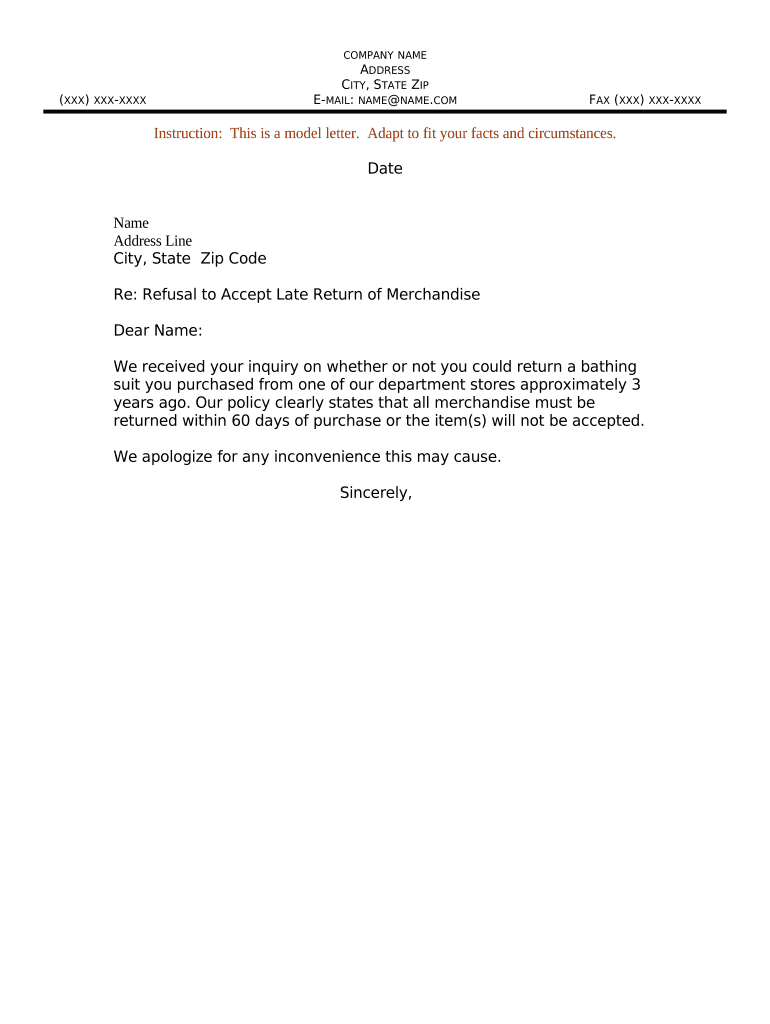
A Letter Refusing Late Return of Merchandise is a formal business communication used to notify a purchaser or borrower that their request to return goods has been denied because it was submitted after the seller’s published return window or contrary to return policy. The letter documents the decision, cites the applicable policy or contract clause, summarizes the facts (order number, item, dates), and records any remedial options available, such as repair, store credit if permitted, or referral to warranty service. Keep a copy for dispute resolution and accounting records.

Why a Clear Denial Letter Matters

A concise refusal letter protects the seller by documenting policy application, reduces dispute escalation, and creates a clear audit trail for accounting and customer-service reviews.

Why a Clear Denial Letter Matters

Who Typically Sends or Receives This Letter

Use clear, consistent language and retain the letter and supporting evidence to defend against disputes or chargebacks.

  • Retail operations and e-commerce merchants handling physical goods and return policies.
  • Property managers or landlords responding to late appliance or fixture returns.
  • Third-party repair centers or warranty administrators denying out-of-window returns.

Step-by-Step: Preparing and Sending the Refusal Letter

Follow a short, consistent process to prepare, approve, and deliver the refusal letter so you maintain evidentiary control and customer-service standards.

  • 01
    Gather Records: Collect order, correspondence, and policy version.
  • 02
    Draft Letter: State denial, cite policy, list facts.
  • 03
    Obtain Approval: Have authorized manager review and sign.
  • 04
    Deliver and Archive: Send via certified mail or eSignature; file copy.

How Delivery and Evidence Capture Typically Works

A reliable delivery and retention flow preserves the record and reduces later disputes; pick one consistent method and document it.

  • Create Template: Use a standard letter template with required fields.
  • Attach Supporting Files: Include invoices, photos, and correspondence.
  • Choose Delivery: Select certified mail or secure eDelivery.
  • Capture Proof: Retain delivery receipts and audit trails.

Recommended Digital Workflow Settings

Map a repeatable workflow before sending letters to ensure consistent authentication, delivery, and retention across cases.

Setting Recommendation
Authentication Email link | SMS code or MFA
Delivery Method Certified mail | Secure eDelivery
Template Storage Centralized library | Versioned templates
Retention Policy 3–7 years | Archive after final resolution

Platform and Format Considerations for eDelivery

Ensure the chosen system captures signer attribution, timestamps, and tamper-evident copies; verify HIPAA or industry compliance when handling protected data.

  • File Formats: PDF, DOCX supported
  • Integrations: CRM and cloud storage
  • Authentication: Email, SMS, or KBA

Essential Elements to Include in a Professional Refusal Letter

A complete refusal letter balances clarity and formality: document the reason, reference policy, offer next steps if any, and preserve evidence.

Header

Company name, address, and contact details placed at the top to clearly identify the sender and provide a route for escalation.
Date and Reference

Letter date plus order or invoice number to tie the communication to a specific transaction and to aid internal searches.

Statement of Denial

A short factual sentence refusing the late return, including the return request date and the policy window referenced.

Policy Citation

Identify the exact clause and effective date of the return policy relied upon to support the denial.

Evidence Summary

List attached or available supporting records such as photos, prior emails, tracking events, or inspection notes.

Next Steps

Explain available alternatives (repair, paid service, manufacturer warranty) or how to escalate to a manager or dispute resolution.

Required Data Fields at a Glance

Full Name: Customer legal name
Order ID: Invoice or sale number
Item Details: SKU/model and quantity
Request Date: MM/DD/YYYY format
Policy Cited: Exact clause/version
Signer Info: Name, title, date

Common Preparation and Delivery Pitfalls

  • Failing to attach the original order or correspondence makes it hard to prove the customer was out of policy and weakens dispute defense.
  • Quoting an outdated policy version can be interpreted as inconsistent enforcement and can trigger consumer complaints or chargebacks.
  • Using vague language or offering conflicting remedies invites follow-up disputes and creates inconsistent precedent for customer service.
  • Sending without a verifiable delivery receipt or audit trail increases exposure to 'I never received it' claims and arbitration risk.

Risks of an Incorrect or Incomplete Denial Letter

Chargeback Exposure: Financial loss risk
Regulatory Complaint: State consumer agency notice
Civil Liability: Breach or misrepresentation claim
Reputational Harm: Negative reviews and loss
Accounting Errors: Inventory and refund discrepancies
Record Gaps: Weakened dispute defense

Timelines to Observe When Issuing the Letter

Adhere to internal response SLAs and evidence-retention windows to preserve rights and support later audits or disputes.

Response SLA:

Issue denial within 7 business days of request.

Delivery Method:

Send by certified mail or secure eDelivery same day as signing where possible.

Customer Follow-up:

Allow 14 days for escalation or customer reply.

Record Retention:

Retain records for minimum three years.

Escalation Window:

Escalate unresolved disputes after 30 days.

Key Milestones and Case Workflow

Track milestones from initial request to final closure so each case has a clear timeline and responsible owner.

01

Request Received

Log date and source of customer return request.

02

Policy Review

Confirm policy version and eligibility criteria for return.

03

Decision Issued

Prepare and sign the refusal letter with evidence attached.

04

Case Closed

Archive files and update inventory/accounting once resolution final.

eSignature Vendor Pricing Comparison for Letter Delivery

Comparison of common eSignature vendors and feature criteria to help evaluate platforms for sending and retaining refusal letters.

signNow DocuSign Adobe Sign PandaDoc HelloSign
Starting Price $8/user/mo $15/user/mo $14/user/mo $19/user/mo $15/user/mo
Free Trial 7-day free trial Varies Varies Varies Varies
Bulk Send Yes Yes Yes Yes No
Audit Trail Yes Yes Yes Yes Yes
Envelope Cap No envelope cap 100 envelopes/user/year Varies Varies Varies

Practical Examples of When to Use the Letter

Two concise scenario examples show typical uses and the documentation to attach when denying a late return.

Retail Return Denial

A customer requests a refund 45 days after delivery, outside the 30-day policy window.

  • The merchant cites the 30-day policy and includes invoice plus delivery tracking.
  • The letter states the denial, lists attachments, offers paid repair option, and documents the mailing and audit trail for chargeback defense.

Warranty Return Refusal

A buyer seeks return beyond the stated warranty period for a used appliance.

  • The service center references warranty dates and inspection notes.
  • The refusal letter summarizes the inspection, attaches inspection photos and prior communications, and explains alternate repair or manufacturer warranty referral.

Frequently Asked Questions About Denial Letters and eDelivery

Answers to common questions about validity, delivery, electronic signing, recordkeeping, and next steps for disputed denials.


Need help? Contact support

be ready to get more
Join over 28 million airSlate SignNow users