Establishing secure connection…Loading editor…Preparing document…

Zero Tolerance Policy

This template is fully customizable. Edit the text, fill out the fields, and send it for signature. Give it a try!
Zero Tolerance Policy

What a Zero Tolerance Policy Is and When It Applies

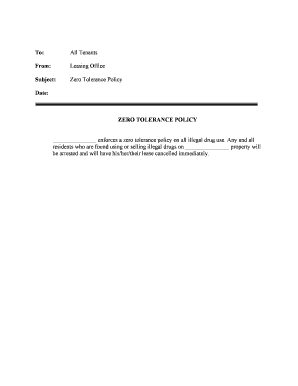
A Zero Tolerance Policy is an organizational rule that defines certain behaviors as unacceptable and subject to fixed disciplinary action. It typically covers harassment, workplace violence, substance abuse, discrimination, retaliation, and serious safety violations. The policy sets reporting channels, investigation procedures, and predefined consequences intended to ensure consistent enforcement across employees, contractors, vendors, and volunteers. Organizations use this document to protect safety, meet legal obligations, and document that complaints were handled according to stated procedures and applicable law.

Why a Clear Zero Tolerance Policy Matters

A precise Zero Tolerance Policy reduces legal risk, supports consistent decision-making, preserves safety, and communicates behavioral expectations to the workforce. Well-drafted policies help evidence compliance in investigations and regulatory reviews.

Why a Clear Zero Tolerance Policy Matters

Who Should Prepare and Acknowledge This Policy

The policy is generally prepared by HR with legal review and acknowledged by affected staff.

  • Human resources teams and compliance officers responsible for drafting, distributing, and tracking acknowledgements.
  • Supervisors and people managers who enforce the rules and document incidents and corrective actions.
  • Legal counsel or outside counsel who review for statutory compliance and appeal procedures.

Maintain a single authoritative version and require completed acknowledgements from all covered parties.

Core Sections to Include in a Professional Zero Tolerance Policy

A complete policy balances clear rules with documented procedures so decisions are defensible and repeatable.

Scope

Identify who is covered (employees, contractors, vendors) and the situations and locations the policy governs, including off-duty or remote conduct when directly affecting the workplace.
Prohibited Conduct

List specific behaviors (e.g., harassment, threats, violence, drug or alcohol use at work) with objective examples so employees understand what triggers enforcement.

Reporting Process

Describe multiple reporting channels (HR, manager, hotline), confidentiality limits, and how reports are submitted, escalated, and recorded.

Investigation Procedure

Explain who conducts investigations, expected timelines, interim measures (e.g., administrative leave), and standards of proof to ensure fairness.

Disciplinary Actions

Define a range of consequences linked to offense severity, up to termination, and explain any progressive-discipline exceptions.

Appeals and Review

Provide a transparent appeal or review process and identify the office or individual responsible for final determinations.

Information Elements to Collect and Protect

Policy Identifier: Policy title and version
Effective Date: MM/DD/YYYY format
Covered Parties: Employees, contractors, vendors
Reporting Contacts: Name, role, contact details
Investigation Log: Incident ID and status
Retention Rule: Retention timeframe and legal basis

Step-by-Step: Creating, Approving, and Distributing the Policy

Follow a consistent workflow from drafting to acknowledgement to preserve evidence of distribution and consent.

  • 01
    Draft: Draft policy language with HR and legal input
  • 02
    Review: Circulate to leadership and counsel for edits
  • 03
    Approve: Obtain signed organizational approval and set an effective date
  • 04
    Distribute: Publish to employees and collect dated acknowledgements

How to Configure an Online Acknowledgement Workflow

Configure a digital workflow that records signers, timestamps, and delivery channels for auditability.

Field Configuration
Notification method Email followed by LMS notice
Approval workflow HR review then legal sign-off
eSignature required Yes — capture signature and date
Authentication level Email link + optional SMS OTP

Where Completed Acknowledgements Should Be Sent and Stored

Define a single authoritative repository for signed acknowledgements to support audits and regulatory inquiries.

  • HR Records: Primary repository for signed forms and investigation files
  • Manager Copies: Read-only copies for supervisors as needed
  • Legal File: Retain complete investigative records and decision documentation
  • External Agencies: Provide redacted records if legally required

Technical Considerations for Electronic Distribution and Signing

Choose a solution that provides secure signing, audit trails, and integration with your HR systems.

  • Document formats: PDF and DOCX supported
  • Integrations: Connects with HRIS and cloud storage
  • Authentication: Email link, SMS OTP, or stronger methods

Verify the vendor meets required compliance frameworks and supports a tamper-evident audit trail for signatures.

Key Deadlines, Review Cycles, and Processing Expectations

Set deadlines and communicate them so staff know when training and acknowledgements are due.

Effective Date:

Policy goes into effect on the stated MM/DD/YYYY

Acknowledgement Deadline:

Employees should sign within 14–30 days

Initial Training:

Complete training within 30 days of effective date

Annual Review:

Review and update policy annually or after significant incidents

Investigation Timeline:

Complete fact-finding within 30–60 days where possible

Common Preparation Errors to Avoid

  • Using vague terms without examples — creates ambiguity and inconsistent enforcement that weakens disciplinary decisions.
  • Failing to name reporting channels or contacts — delays investigations and frustrates complainants seeking help.
  • Not documenting acknowledgements centrally — leaves the organization unable to prove distribution or employee receipt.
  • Skipping legal review for special jurisdictions — state laws (harassment training, whistleblower protections) may impose additional obligations.

Consequences of an Inadequate or Incorrect Policy

Legal Liability: Lawsuits or administrative fines
Regulatory Penalties: OSHA, EEOC, or state agency sanctions
Discrimination Claims: Exposure to retaliatory or discrimination suits
Operational Risk: Loss of employee trust and morale
Contract Risk: Breach of contractual compliance terms
Reputational Harm: Public relations and recruitment impacts

Practical Use Cases for a Zero Tolerance Policy

These concise scenarios show how organizations typically use the policy to manage incidents and evidence compliance.

Mid-size Hospital

A hospital requires signed acknowledgements for clinical staff

  • Training completion is verified via electronic records
  • Investigations capture timestamps and redacted reports to meet HIPAA and accreditation requirements.

Property Management Firm

A management company incorporates a zero tolerance clause into tenant and vendor contracts

  • Incidents reported through centralized portal
  • Signed acknowledgements and incident logs support consistent enforcement and dispute resolution.

eSignature Options for Distributing and Capturing Policy Acknowledgements

Compare common vendor features relevant to high-volume policy distribution and secure audit trails; signNow appears first in the table.

signNow DocuSign Adobe Sign PandaDoc HelloSign
Starting Price $8/user/mo $15/user/mo $14/user/mo $19/user/mo $15/user/mo
Free Trial 7-day free trial Varies by plan Varies by plan Varies by plan Varies by plan
Bulk Send Yes Yes Yes Yes Varies
Audit Trail Yes Yes Yes Yes Yes
HIPAA Compliant Yes Yes Yes No No

Frequently Asked Questions About the Zero Tolerance Policy

Answers to common questions about enforceability, electronic acknowledgements, retention, and noncompliance handling.


Need help? Contact support

be ready to get more
Join over 28 million airSlate SignNow users