Establishing secure connection…Loading editor…Preparing document…

Notice of Limitation of Time for Rejection of Additional Terms

This template is fully customizable. Edit the text, fill out the fields, and send it for signature. Give it a try!
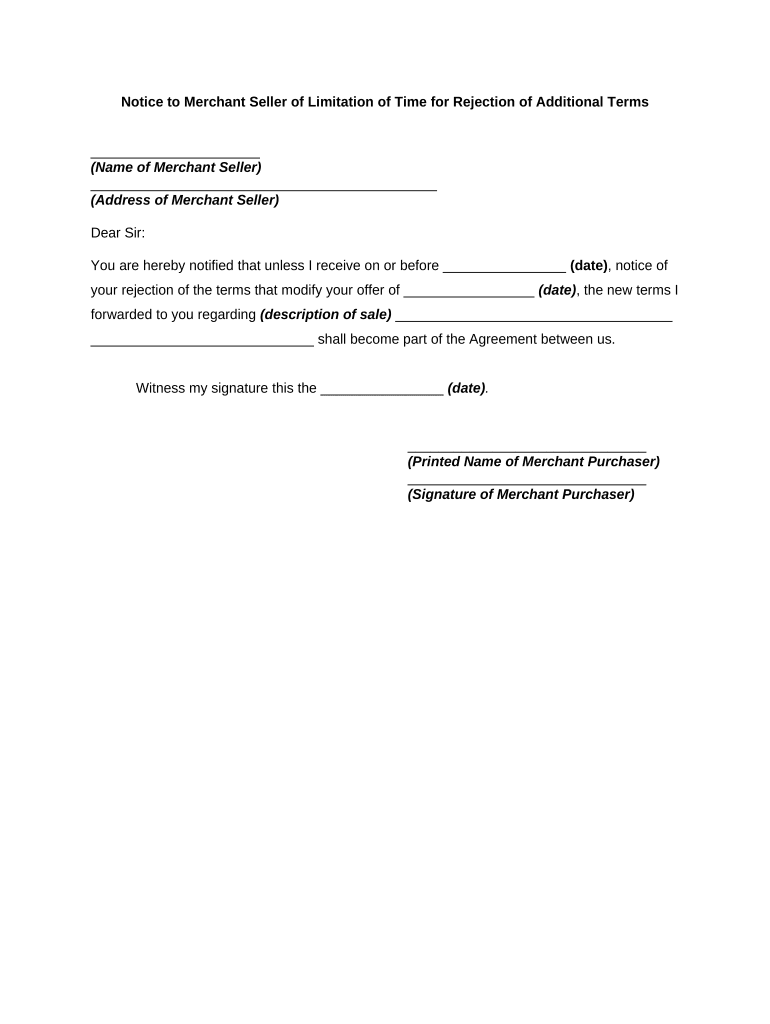
Notice of Limitation of Time for Rejection of Additional Terms

What the Notice of Limitation of Time for Rejection of Additional Terms Is

A Notice of Limitation of Time for Rejection of Additional Terms is a formal written notice that establishes a fixed period during which a recipient may reject proposed additional contractual terms attached to a primary agreement. The notice clarifies that silence or failure to respond within the stated window will be treated as acceptance or waiver of the extra terms, and it typically identifies the documents involved, the duration of the review window, and the method for submitting objections. It functions to reduce ambiguity, set predictable timelines, and preserve the sender's procedural rights under contract law.

Why an Explicit Time-Limited Rejection Notice Matters

Using a clear notice narrows the timeframe for objections, reduces disputes over late rejections, and documents mutual expectations. It supports contract certainty by creating an objective deadline for responding to added terms.

Why an Explicit Time-Limited Rejection Notice Matters

Who Typically Issues or Responds to This Notice

Organizations and individuals who attach supplemental terms to primary agreements use these notices to set a response window and minimize prolonged negotiation.

  • Procurement teams and vendors managing contract amendments and exhibits, where suppliers attach standard terms.
  • Legal departments and outside counsel issuing boilerplate additional terms with a limited acceptance period.
  • Contract counterparties and purchasing agents who must track and respond within the stated window to preserve rejection rights.

The notice is appropriate for repeat suppliers, one-off contractors, and counterparties in regulated industries where timely clarity on contract terms matters.

Essential Elements to Include in a Professional Notice

A concise notice should clearly identify the related agreement, describe the additional terms, state the exact rejection deadline, and explain the method for delivering any rejection. Include contact and signature details for accountability.

Related Agreement

Reference by title, date, and parties to link the notice to the underlying contract.
Description of Terms

Summarize the added clauses or attach them as a labeled exhibit for easy review.

Rejection Deadline

State a clear expiration using MM/DD/YYYY and a specific time zone if needed.

Method of Response

Specify acceptable delivery channels: email address, certified mail, portal link, or electronic form.

Consequences

Explain effect of non-response, such as deemed acceptance or waiver of rejection rights.

Signature Block

Provide sender name, title, and signature line to validate the notice.

Step-by-Step: Issuing and Responding to the Notice

Follow these sequential steps to issue the notice and handle rejections in a defensible way.

  • 01
    Prepare Notice: Draft notice referencing the agreement and attached terms.
  • 02
    Set Deadline: Choose a clear date/time and state the time zone.
  • 03
    Send and Record: Deliver via specified channel and retain delivery evidence.
  • 04
    Log Responses: Register any rejection and preserve the timestamped communication.

How to Route and Process Rejections

Design a simple routing procedure so senders and recipients know where to submit and how the organization processes objections.

  • Incoming Channel: Designated email, contract management portal, or certified mail address.
  • Acknowledgement: Automated receipt confirmation that includes the received timestamp.
  • Review Workflow: Legal or contract team evaluates the rejection within a set timeframe.
  • Final Disposition: Record acceptance, negotiation, or final waiver outcome in the contract file.

Configuring an Online Workflow for Notice Management

Map the online fields and routing rules to ensure consistent capture and evidence of notice delivery.

Field Configuration
Notice Date Field Auto-validate MM/DD/YYYY; required
Deadline Field Calculate expiration and lock after deadline
Delivery Method Select email, portal, or certified mail options
Response Upload Allow attachments; store audit metadata

Digital Signing and Submission Requirements

Use an eSignature-enabled platform that captures signer identity, timestamps, and an audit trail consistent with ESIGN and UETA.

  • Authentication: Email links, SMS codes, or stronger MFA as required
  • Audit Trail: IP, timestamp, and action log retained
  • Document Formats: PDF or DOCX with embedded signed record

Ensure the chosen platform supports secure storage, tamper-evident files, and access controls to preserve the notice as admissible evidence.

Typical Timelines and Critical Deadlines to Set

Choose a response window that balances review time and operational certainty; common windows are 5, 10, or 30 calendar days depending on complexity.

Short Review Window:

5 calendar days for minor, boilerplate additions

Standard Review Window:

10 calendar days for routine contractual changes

Extended Review Window:

30 calendar days for material or negotiated terms

Immediate Objection:

Rejections received before notice date are invalid

Late Rejection Policy:

Specify consequences for post-deadline objections

Key Milestones from Issuance to Final Disposition

Track major events from sending the notice through final recordation to ensure all parties meet procedural requirements.

01

Notice Issued

Sender files and timestamps the notice upon dispatch.

02

Receipt Acknowledged

Recipient receives confirmation and the audit log records timestamp.

03

Rejection Window

Recipient may submit objections during the stated period.

04

Final Outcome

Sender records acceptance, negotiation, or deemed acceptance result.

Common Mistakes to Avoid

  • Using vague deadlines without time zone leading to disputes
  • Failing to specify acceptable delivery methods and address
  • Not preserving delivery evidence such as delivery receipts
  • Neglecting to state the consequence of non-response clearly

Potential Legal and Operational Risks of an Incorrect Notice

Waiver Risk: Unclear notice may unintentionally waive objections
Dispute Exposure: Ambiguity increases litigation or arbitration likelihood
Regulatory Impact: In regulated sectors, improper process may violate rules
Contract Voidance: Defective notice could render supplemental terms unenforceable
Operational Delay: Late or unclear handling slows performance timelines
Record Gaps: Missing audit trail weakens evidentiary position

Representative eSignature Pricing and Feature Snapshot

Comparison of starting price and typical capabilities across common eSignature providers to inform platform choices for notice issuance and retention.

signNow DocuSign Adobe Sign PandaDoc HelloSign
Starting Price $8/user/mo $15/user/mo $14/user/mo $19/user/mo $15/user/mo
Free Trial Yes, 7-day trial No No Yes, limited Yes, limited
Bulk Send Yes Yes Yes Yes No
Audit Trail Yes Yes Yes Yes Yes
Envelope Cap No cap 100 envelopes/user/year Varies by plan Varies by plan Varies by plan

Frequently Asked Questions and Common Troubleshooting

Answers to frequent questions about timing, delivery, evidentiary value, and electronic submission for rejection notices.


Need help? Contact support

be ready to get more
Join over 28 million airSlate SignNow users