Declarant Identity
List the disclaimant’s full legal name, current address, and relationship to the decedent or titled owner; mismatched names can hinder acceptance by courts or land-records offices and complicate tax treatment.
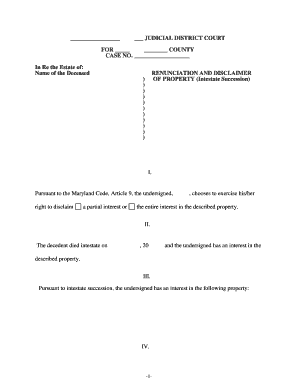
A properly executed disclaimer preserves tax and distribution outcomes, prevents unintended acceptance of property, and simplifies estate administration. It can avoid gift or estate tax consequences and ensure assets flow according to the decedent’s plan or intestacy rules when used correctly.

Several parties encounter renunciations and disclaimers during probate, estate planning, and real property transfers.
Work with counsel or an experienced fiduciary when timing, tax consequences, or recording requirements could affect the outcome.
An estate attorney prepares and reviews disclaimers for legal sufficiency and tax consequences, advises the beneficiary about timing and recording, and files necessary court or land-records documents when required to effect the disclaimant’s intent.
A beneficiary or heir executes the disclaimer to decline property. The individual must understand tax ramifications and confirm that the signing meets statutory timing and form requirements to avoid unintended acceptance.
List the disclaimant’s full legal name, current address, and relationship to the decedent or titled owner; mismatched names can hinder acceptance by courts or land-records offices and complicate tax treatment.
Provide a precise legal description for real property or a clear description of personal property, including account numbers or parcel identifiers to avoid ambiguity about what is being disclaimed and to support recording.
Use unambiguous language stating the intent to refuse, that the disclaimer is irrevocable (if applicable), that no acceptance has occurred, and whether the disclaimer is qualified for federal tax purposes.
Include the execution date and, where relevant for tax qualification, the date of the decedent’s death or event that created the interest, since timing can determine tax consequences and validity.
Have the disclaimant sign in front of a notary and any required witnesses; attach a notary acknowledgment and any witness affidavits required by Maryland or county practice before recording.
State whether the instrument is to be recorded with the county land records, and include instructions or attachments needed by the clerk, such as transfer tax affidavits or cover sheets for indexing.
| Field | Configuration |
|---|---|
| Identity Field | Require government ID upload and typed legal name |
| Conditional Fields | Show recording instructions only for real property disclaimers |
| Signer Authentication | Use SMS or knowledge-based checks as needed |
| Notary Integration | Allow capture of notary name, seal, and A/V record when required |
Ensure the digital process supports identity proofing, secure storage, and the evidence needed for legal and tax purposes.
Choose a platform that preserves an audit trail, supports notarization workflows (including RON if required), and meets ESIGN/UETA record retention standards.
Generally must be within nine months of the decedent’s death to qualify for federal tax purposes (IRC §2518)
Execute disclaimers promptly during probate to prevent distribution of disclaimed property to the disclaimant
Record before relying on land records for title changes; county rules determine acceptable documents
Inform estate and gift tax preparers immediately so returns reflect the disclaimer accurately
Some states impose shorter or different windows; verify Maryland statutes or local practice
Provide a certified, page-numbered PDF/A copy that includes the notarization block and is suitable for county recorder electronic uploads and archival storage in document management systems.
Offer an editable Word DOCX version for attorney review and revision before final execution; after signing, convert to PDF for recording and retention.
Attach a notary acknowledgment or jurat as a separate page when required by county practice so the recorder can index the instrument correctly.
Create a version with county cover sheet and legal description formatted to the recorder’s specifications to minimize rejection or additional fees at submission.
A beneficiary declines a life estate to allow the property to pass to younger heirs
An heir executes a qualified disclaimer to let assets flow to a trust for tax reasons
| signNow | DocuSign | Adobe Sign | PandaDoc | HelloSign | |
|---|---|---|---|---|---|
| Starting Price | $8/user/mo | $15/user/mo | $14/user/mo | $19/user/mo | $15/user/mo |
| Free Trial | 7-day free trial | Verify with vendor | Verify with vendor | Verify with vendor | Verify with vendor |
| Bulk Send | Yes (Premium) | Yes | Yes | Yes | Verify with vendor |
| Audit Trail | Yes | Yes | Yes | Yes | Yes |
| HIPAA Compliant | Yes (BAA) | Yes (BAA) | Yes (BAA) | No | No |
| Envelope Cap | No cap | 100 envelopes/user/year | Varies by plan | Varies by plan | Varies by plan |