Establishing secure connection…Loading editor…Preparing document…

Motion to Vacate Form

This template is fully customizable. Edit the text, fill out the fields, and send it for signature. Give it a try!
Motion to Vacate Form

What a Motion to Vacate Form Is and when it applies

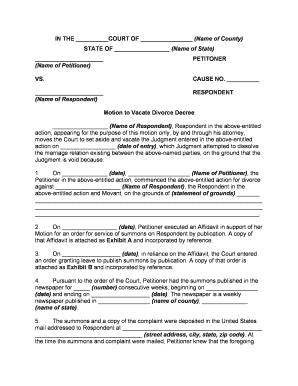
A Motion to Vacate Form is a formal court filing requesting that a judge set aside, annul, or reopen a prior order or judgment. Common uses include vacating default judgments, relief from clerical errors, or correcting judgments entered after defective service. The form identifies the judgment to be vacated, the legal basis for relief, supporting facts and evidence, and the relief requested. Courts require that the motion comply with local rules for captioning, service, and timing; many jurisdictions also require supporting affidavits or declarations under penalty of perjury.

Why the Motion to Vacate Matters

A Motion to Vacate lets parties correct procedural defects, address lack of notice or fraud, and restore access to relief otherwise lost by a default or clerical error. It preserves legal rights and can prevent unjust enforcement of a judgment.

Why the Motion to Vacate Matters

Who typically files a Motion to Vacate

The motion is filed by the party seeking to undo a court order, often following a missed deadline, improper service, or newly discovered evidence.

  • Individuals filing to rescind a default judgment after missed service or notice
  • Businesses or organizations correcting clerical errors or voiding voidable entries
  • Attorneys representing clients seeking relief based on mistake, inadvertence, or excusable neglect

Core components to include in a professional Motion to Vacate Form

A well-prepared motion is concise, fact-supported, and follows local formatting. Include clearly labeled exhibits and a proposed form of order for court use.

Caption

Court name, case number, party names, and title 'Motion to Vacate' placed at the top of the first page to match court docketing rules.
Grounds

A short legal statement of why relief is proper (e.g., lack of service, excusable neglect, fraud, newly discovered evidence, or clerical mistake).

Statement of Facts

A chronological summary of facts supporting the motion; include dates, actions, and how the petitioner discovered the issue.

Legal Argument

Cite controlling statutes and case law briefly to show why the court has authority to vacate under the circumstances.

Supporting Evidence

Attach declarations, affidavits, exhibits, or proof of service that corroborate factual claims and show prejudice or lack thereof.

Proposed Order

A draft order for the judge to sign that clearly states the relief granted and any conditions or deadlines.

Essential information fields to include

Case Number: Exact docket number
Party Names: Full legal names
Judgment Date: MM/DD/YYYY
Grounds Cited: Short legal basis
Relief Requested: Specific remedy
Signature: Signed and dated

Step-by-step: completing and filing a Motion to Vacate

Follow a standard sequence: draft the motion, attach evidence, serve opposing parties, and file with the clerk according to local rules.

  • 01
    Draft Motion: Prepare caption, grounds, facts, legal argument, and proposed order.
  • 02
    Attach Evidence: Include declarations, exhibits, and proof of service records.
  • 03
    Serve Parties: Serve the motion per court rules and record service method.
  • 04
    File with Court: Submit via e-filing or clerk's office; pay filing fees if required.

Configuring an online workflow to complete and submit the form

Set up a digital workflow to collect signatures, attach exhibits, and create a single PDF for filing or e-submission.

Document Upload Combine motion, exhibits, and proposed order into one PDF
Signature Fields Place signature and date fields for movant and attorney
Attachment Labels Label exhibits A, B, C and link to references in the motion
Service Tracking Record email delivery, certified mail, or process server affidavits
Export Package Generate a single PDF with an audit trail for court filing

Where to file and how the submission flows

Filing destinations and acceptance methods vary by court; confirm whether your court allows e-filing, permits email submission, or requires in-person delivery.

  • Electronic Filing: Upload to the court's e-filing portal when available
  • Clerk Submission: Deliver or mail physical copies to the clerk's office
  • Service to Opposing Party: Serve motion per local rules and file proof of service
  • Hearing Scheduling: Court may set a hearing; check local rules for timelines

Digital signing and e-submission considerations

Confirm that your chosen e-sign and filing platform supports PDF exports, an audit trail, and the court's preferred file format.

  • Format Support: PDF/A or PDF preferred
  • Audit Trail: Timestamp, IP, and action log
  • Authentication: Email, SMS, or stronger methods

Common timing rules and filing deadlines to watch

Timing for a Motion to Vacate depends on the legal ground and local rules; some relief must be requested within short statutory windows while others permit motions brought later for fraud or mistake.

Default Judgment Relief:

Often governed by short windows like 30 days for Rule-based relief (varies by jurisdiction)

Excusable Neglect:

Courts analyze facts; file promptly after discovering the issue

Fraud or Misrepresentation:

May allow later motions if fraud is newly discovered

Clerical Error:

Courts often permit immediate corrective motions

Hearing Notice:

Local rules set minimum days for opposing counsel notice

Common mistakes that lead to denial or delay

  • Missing caption or incorrect case number causing clerk rejection and delayed docketing; verify docket details before filing.
  • Failing to attach or properly label supporting declarations and exhibits, which prevents the court from evaluating factual claims.
  • Improper service on opposing parties or failure to file proof of service, often leading to dismissal for lack of notice.
  • Waiting too long to file after discovering the error; courts may deny relief where the movant unreasonably delayed.

Risks and potential consequences of filing incorrectly

Motion Denial: Court may refuse relief
Sanctions: Attorney fees or monetary sanctions
Waiver: Rights may be forfeited by delay
Contempt Risk: If filings misrepresent facts
Enforcement: Original judgment may remain enforceable
Appeal Limits: Review may be limited on post-judgment motions

eSignature options and typical pricing for filing workflows

Select an eSignature provider that meets authentication, audit trail, and document-format requirements for court filing; pricing models vary by user or invite-based plans.

signNow DocuSign Adobe Sign PandaDoc HelloSign
Starting Price $8/user/mo $15/user/mo $14/user/mo $19/user/mo $15/user/mo
Free Trial 7-day trial Varies by vendor Varies by vendor Varies by vendor Varies by vendor
Bulk Send Yes Varies by plan Varies by plan Varies by plan Varies by plan
Audit Trail Yes Yes Yes Yes Yes
HIPAA Compliant Yes Varies by plan Varies by plan No No

Real-world examples of related document workflows

Practical examples show how organizations correct records or obtain relief through properly prepared filings and secure signing workflows.

Optica Ventures

When a default judgment threatened a transaction, counsel prepared a concise Motion to Vacate supported by a sworn declaration.

  • The court held a short hearing.
  • "The interface is simple and easy-to-use for our team; more importantly, it is just as easy for our customers." — Brian Fitzgibbons, COO, Optica Ventures LLC

Martin Properties

A property manager used an electronic workflow to gather signatures and supporting rental records.

  • The motion corrected a clerical entry quickly.
  • "I can process and execute all of these documents online with 100% compliance and built-in security." — Tim Martin, Founder, Martin Properties

Who may sign the motion and attest to facts

Movant — Individual

The individual or authorized representative who seeks vacatur signs and submits declarations attesting to facts under penalty of perjury; accuracy is required to avoid sanctions.

Attorney — Counsel

A licensed attorney may sign and file the motion on behalf of a client and must comply with professional responsibility rules and local filing requirements.

Updating or revising a filed Motion to Vacate

If new facts emerge or an error is discovered, follow local rules to file an amended motion or supplemental declaration promptly.

01

Identify Error:

Document the nature and timing of the mistake
02

Prepare Amendment:

Draft an amended motion or supplemental declaration
03

Attach New Evidence:

Include newly discovered exhibits
04

Serve Opposing Party:

Provide service per local rules
05

File with Court:

File the amendment and updated proof of service
06

Seek Leave if Required:

Request the court's permission where rules require

Frequently asked questions about Motions to Vacate

Answers to common procedural and technical questions when preparing, signing, and filing a Motion to Vacate.


Need help? Contact support

be ready to get more
Join over 28 million airSlate SignNow users