Establishing secure connection… Loading editor… Preparing document…
Navigation

Fill and Sign the Nm Directory of Resources for Individuals Who Are Blind and Visually Form
Fill and Sign the Nm Directory of Resources for Individuals Who Are Blind and Visually Form

How it works

Open the document and fill out all its fields.
Apply your legally-binding eSignature.
Save and invite other recipients to sign it.

Rate template

4.4
39 votes
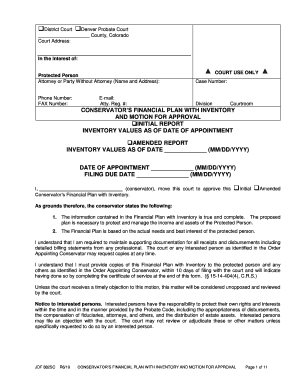
JDF 882 SC R6/19 CONSERVATOR’ S FINANCIAL PLAN WITH INVENTORY AND MOTION FOR APPROVAL Page 1 of 11 ❑ District Court ❑ Denver Probate Court ___________________ County, Colorado Court Address: In the Interest of: Protected Person COURT USE ONLY Attorney or Party W ithout Attorney (Name and Address): Phone Number: E-mail: FAX Number: Atty. Reg. #: Case Number: Division Courtroom CONSERVATOR’S FINANCIAL PLAN WITH INVENTORY AND MOTION FOR APPROVAL ❑ INITIAL REPORT INVENTORY VALUES AS OF DATE OF APPOINTMENT ❑ AMENDED REPORT INVENTORY VALUES AS OF DATE _____________ ( MM/DD/YYYY) DATE OF APPOINTMENT _____________ ( MM/DD/YYYY) FILING DUE DATE ________________ (MM/DD/YYYY) I, (conservator) , move this court to approve this ❑ Initial ❑ Amended Conservator’s Financial Plan with Inventory . As grounds therefore, the conservator states the following: 1. The information contained in the Financial Plan with Inventory is true and complete. The proposed plan is necessary to protect and manage the income and assets of the Protected Person. 2. The Financial Plan is based on the actual needs and best interest of the protected person. I understand that I am re quired to maintain supporting documentation for all receipts and disbursements including detailed billing statements from any professional. The court or any interested person as identified in the Order Appointing Conservator may request copies at any time. I understand that I must pr ovide copies of this Financial Plan with Inventory to the protected person and any others as identified in the Order Appointing Conservator , within 10 days of filing with the court and will indicate having done so by completing the certificate of service a t the end of this form . (§ 15 -14 -404(4), C.R.S.) Unless the court receives a timely objection to this motion, this matter will be considered unopposed and reviewed by the court. Notice to interested persons. Interested persons have the responsibility to protect their own rights and interests within the time and in the manner provided by the Probate Code, including the appropriateness of disbursements, the compensation of fiduciaries, attorneys, and others, and the distribution of estate assets. Interested persons may file an objection with the court. The court may not review or adjudicate these or other matters unless specifically requested to do so by an interested person. JDF 882 SC R6/19 CONSERVATOR’ S FINANCIAL PLAN WITH INVENTORY AND MOTION FOR APPROVAL Page 2 of 11 PART A: CONTACT INFORMATION Prot ected Person’s Information: ❑ Check if updated information from petition Name: ____________________________________________________ Age : ________ (Include Name of Living Center or Nursing Home , if applicable ) Street Address: __________________________________________________________________________ City: State: Zip Code: Mailing Address, if differnty: ________________________________________________________ ___ City: ___________________ State: ______________ Zip Code: _________________ Primary Phone : Alternate Phone: _____________________ Conservator’s Information: ❑ Check if updated information from petition Name: ____________________________________________________ Age: _______________ Have you had any criminal charges filed against you or convictions entered since the last report? ❑Yes ❑ No If Yes, explain: ____________________________________________ _________________________________ Occupation: _____________________ Your Relationship to protected p erson: __________________________ Street Ad dress: ___________________ _________________________________________ City: ___________________ State: ______ Z ip Code: _________ Mailing Address, if different: ___________________________________________________________ City: ________________ State: ___________ Zip Code: _____________ Primary phone ___________________ Alternate Telephone: ______ __________ _ Email a ddress: ___________________ Co -Conservator’s Information: (if applicable) ❑ Check if Updated Information from Petition Name: ____________________________________________________ Age: ____________ Have you had any criminal charges filed against you or convictions entered since the last Petition? ❑Yes ❑ No If Yes, explain: ______________________________________________________________________________ Occupation: _____________________ Your Relationship to Protected Person: ________________________ _ Street Ad dress: ___________________ _________________________________________ City: ___________________ State: ______ Zip Code: _________ Mailing Address, if different: ___________________________________________________________ City: ________________ State: ___________ Zip Code: _____________ Primary phone ___________________ Alternate Telephone: _________________ Email address: ___________________ PART B: CONSERVATORSHIP ISSUES 1. Are the assets in the estate identified to date sufficient to provide for the present and future care of the Protected Person? ❑ Yes ❑ No If No , describe why and what steps should be taken. If you would like the Court to take action, you must file a motion with the Court. JDF 882 SC R6/19 CONSERVATOR’ S FINANCIAL PLAN WITH INVENTORY AND MOTION FOR APPROVAL Page 3 of 11 2. Should there be a change in scope of the Conservatorship? ❑ Yes ❑ No If Yes , describe why and what steps should be taken. If you would like the Court to take action, you must file a motion with the Court. 3. ❑ Bond has been set in the amount of $ ___________________ . Sure ty has been posted. ❑ The setting of bond was deferred pending filing of this Conservator’s Financial Plan with Inventory and Motion for Approval. The Conservator now requests that bond be set in the amount of $_____________. ❑ Bond has been waived by the Court. INSTRUCTIONS ON HOW TO COMPLETE THIS FORM The Financial Plan and Inventory must be filed with the Court pursuant to §§15 -14 -418 and 15 -14 -419 , C.R.S. Step s 1 and 2 are a projection of the Protected Person’s annual income and expenses. Enter both the anticipated monthly and annual amounts in the respective columns. Step 3 is an inventory of the Protected Person’s assets. Provide a detail ed description of the asset as well as the current fair market value. Step 4 summarizes all costs and expenses incurred by the estate related to this proceeding. Step 5 summarizes all debts of the estate. Provide a detail ed description as well as t he remaining amount due. Step 6 and 7 are a summary. Transfer the respective income and expense totals from Steps 1 and 2 as well as the asset and liability totals in steps 3 through 5 to the appropriate lines in Step 7 to calculate the net income and net worth. PART C: FINANCIAL PLAN List all expected sources of receipts/income and disbursements/expenses in the charts below. If a specific category is not applicable, indicate “0” in the projected monthly and annual amounts columns. You will use these amounts when you file the initial Conservator’s Report. Step 1: Projected Receipts/Income Indicate the amount of cash receipts/income received on both a monthly and annual basis. If an income amount (such as wages) is to be received on a monthly basis, multiply the amount by 12 to determine the projected annual amount. If an income amount (suc h as dividends) is to be received on an annual basis, divide the amount by 12 to determine the projected monthly amount. Description of Receipt/Income Category Projected Monthly Amount Projected Annual Amount Asset Not Previously Reported Business Income Court Order Repayment Disability /Unemployment /Worker’s Compensation Distribution – Annuity Distribution – Pension s/Retirement Plan Distribution - Trust JDF 882 SC R6/19 CONSERVATOR’ S FINANCIAL PLAN WITH INVENTORY AND MOTION FOR APPROVAL Page 4 of 11 Farm/Ranch Income Gifts from Others Inheritance Insurance Settlement/Benefit Interest/Dividends Loan Repayment Oil/Gas/Mineral Royalties Other Public Assistance Other Receipts/Income Proceeds from Sale of Assets Rental Income Reverse Mortgage Payment Social Security Tax Refunds VA Benefits Wages Total Receipts/Income Enter the total projected monthly and annual amounts in Step 6. Step 2: Projected Disbursements/Expenses Indicate the cash disbursement/expense amount on both a monthly and annual basis. If an expense (such as utilities) is to be paid on a monthly basis, multiply the amount by 12 to determine the projected annual amount. If an expense (such as property taxe s) is to be paid on an annual basis, divide the amount by 12 to determine the projected monthly amount. Description of Disbursement/Expense Category Projected Monthly Amount Projected Annual Amount Assisted Living/Care Facility Bank/Investment Account Fees Caregiver/In -Home Provider Charitable Contributions Clothing Collectibles Debt Repayment (excluding CC) Debt Repayment (Credit Card) Distributions -Protected Person Education/Tuition/Student Loan JDF 882 SC R6/19 CONSERVATOR’ S FINANCIAL PLAN WITH INVENTORY AND MOTION FOR APPROVAL Page 5 of 11 Entertainment/Movies Equipment Farm/Ranch Expense Fees –Accountant/CPA Fees -Conservator –Non Prof Fees –Conservator –Prof essional Fees –Court Visitor Fees -Guardian –Non Prof Fees -Guardian –Prof essional Fees -Guardian Ad Litem (GAL) Fees -Investment Acct Management Fees -Legal for Conservator Fees -Legal for Guardian Fees –Legal for GAL Fees –Legal for Protected Person Fees –Other Professional Funeral Gifts Groceries/Hygiene/Household Supplies HOA Fees Hobbies Home Furnishings Insurance – Home/Renter Insurance – Life Insurance – Long Term Care Insurance – Other Jewelry Livestock Loan Interest Loans Medical -Doctor/Prof/Hospital Medical - Furnishings/Supplies Medical -Insurance Medical -Medicab/Transportation Medical -Medications Medical -Other Mortgage Motor Vehicle - Insurance Motor Vehicle – Loan Payments JDF 882 SC R6/19 CONSERVATOR’ S FINANCIAL PLAN WITH INVENTORY AND MOTION FOR APPROVAL Page 6 of 11 Motor Vehicle – Registration/Other Motor Vehicle – Repairs/Maint/Fuel Moving Expenses Other Disbursement/Expense Other Transportation Pet Care Property Repairs/Maintenance Rent Restaurants/Dining Out School Supplies Services - Cleaning Services - Personal Care Subscriptions/Dues Taxes – FICA and Medicare Taxes – Income Taxes – Property and Assessments Travel/Vacations Utilities (Including Phone/Cell) Total Disbursements/Expenses Enter the total projected monthly and annual amounts in Step 6. $ $ INVENTORY Step 3: Current Assets Report the fair market value of each category of asset in the chart below as of date of appointment . By indicating “None”, you are stating affirmatively that the Protected Person does not have assets in that category. Note: If additional space is neede d, separate sheets may be used. If additional items are discovered after the initial inventory has been completed, a supplemental inventory listing those additional item(s) must be completed. Cash on Hand, Bank, Checking,Savings , Certificate of Deposits, and Health Accounts (Name of Bank or Financial Institution) ❑ None Payable on Death Type of Account Account # (last 4 - digits only) Balance $ Total $ JDF 882 SC R6/19 CONSERVATOR’ S FINANCIAL PLAN WITH INVENTORY AND MOTION FOR APPROVAL Page 7 of 11 Stocks, Bonds, Mutual Funds, Securities , Annuities and Investment Accounts (Name of Joint Owner or Transfer on Death Beneficiary) ❑ None Number of Shares or Identify Account Number (last 4 -digits only) Current Value $ Total $ Life Insurance (Name of Company/Beneficiary) ❑ None Type of Policy Face Amount of Policy Cash Value $ Total $ Pension, Profit Sharing and Retirement Funds (Name of Beneficiary) ❑ None Type of Plan (401(k), IRA, 457, PERA, Military, etc.) Account # (last 4 -digits only, if applicable) Current Account Value (Note: Distributions should be listed in Step 1 above) $ Total $ Motor Vehicles and Recreation Vehicles (Including Motorcycles, ATV’s, Boats, etc.) (Names of Joint Owners) ❑ None Year Make and Model Estimated Value (Value = what you could sell it for in its current condition) $ Total $ Real Estate (Indicate address) (Name any Joint Owners) ❑ None Type of Property (Home, Rental, Land, etc.) Estimated Value (Value = what you could sell it for in its current condition) $ JDF 882 SC R6/19 CONSERVATOR’ S FINANCIAL PLAN WITH INVENTORY AND MOTION FOR APPROVAL Page 8 of 11 Total $ General Household and Other Personal Property ❑ None Estimated Value (Value = what you could sell it for in its current condition) General Household and Other Personal Property (Total value except for items listed below.) $ Separately list and value items of significant value below, for example: Jewelry, Antiques, Collectibles, Artwork, etc. Total $ Miscellaneous Assets (List each one separately and be specific.) ❑ None Estimated Value (Value = what you could sell it for in its current condition) $ Total $ Total Assets Enter this amount in Step 7. $ Step 4: Accrued Liabilities to Professionals The conservator requests that the accrued expenses of this proceeding as of date of appointment as detailed below be approved by the court as identified in Step 2. Type of Professional and Name of Individual Amount Billed Account Manage ment - Professional $ Accountant/CPA Conservator -Non Professional Conservator -Professional Court Visitor Guardian -Non Professional Guardian - Professional Guardian Ad Litem (GAL) Legal Fees - Conservator Legal Fees - Guardian Legal Fees - GAL Legal Fees - Protecte d Person Other Professional Fees JDF 882 SC R6/19 CONSERVATOR’ S FINANCIAL PLAN WITH INVENTORY AND MOTION FOR APPROVAL Page 9 of 11 Total Accrued Expenses Enter totals below in Step 5 - Inventory of Liabilities/Debts. $ Step 5: Other Current Liabilities /Debts Report the value of each liability /debt in the chart below as of date of appointment as identified in Step 2 . Description of Liability /Debt ❑ None Name of Creditor Account Number (last 4 -digits only) Balance Accrued expenses associated with this proceeding (Total Step 4 above ) $ Mortgage (principal due only) Motor Vehicle Loan 2nd Mortgage /Home Improvement Student Loan /Tuition Credit Card Federal Taxes State / Local Taxes Other Loan/ Liabilit y/Debt (Please list) HELOC Reverse Mortgage Total Liabilities /Debt Enter this amount in Step 7. $ Summary Step 6: Summary of Financial Plan (Receipts/Income Minus Disbursements/Expenses) Summarize the Financial Plan below after comp leting the detailed ac counting information in Step 1 and Step 2. Projected Monthly Projected Annual Amount Amount (A) Receipts/ Income (Total from Step 1 ) $ _____________ $ _____________ (B) Disbursements/ Expense s (Total from Step 2) $ _____________ $ _____________ Net Income: (A) minus (B) $ _____________ $ _____________ Step 7: Summary of Inventory Summarize the Inventory below after completing the detailed accounting information in Step 3 and Step 5. (A) Total Assets (Total from Step 3 ) $ _____________ (B) Total Liabilities/Debt (Total from Step 5) $ _____________ Net Worth : (A) minus (B) $ _____________ JDF 882 SC R6/19 CONSERVATOR’ S FINANCIAL PLAN WITH INVENTORY AND MOTION FOR APPROVAL Page 10 of 11 Bond ❑ Bond has been set in the amount of $ ___________________ . Sure ty has been posted. ❑ The setting of bond was deferred pending filing of this Conservator’s Financial Plan w ith Inventory and Motion for Approval . The Conservator now requests that bond be set in the amount of $___________________. (§15 -14 - 415, C.R.S.) ❑ Bond has been waived by the Court. ❑ By checking this box, I am acknowledging I am filling in the blanks and not changing anything else on the form. ❑ By checking this box, I am acknowledging that I have made a change to the original content of this form. IMPORTANT This document must be signed and dated by all conservators and served on the protected person and all interested parties, as indicated by the attached certificate of service. A conservator is required to file an amended “Financial Plan” whenever there is a change in circumstances that requires a substantial deviation from the existing plan. In addition, if the conservator finds other property not included in the original “Invento ry”, or if the value of the listed property is inaccurate or misleading , the conservator must prepare and file an amended “Inventory” with the court. Copies of these amendments must be provided to all interested parties. § 15 -14 -418(5) C.R.S. § 15 -14 - 419(2 ) C.R.S. THIS SECTION MUST BE COMPLETED CORRECTLY AND SIGNED OR THE DOCUMENT MAY BE REJECTED. Colorado Law REQUIRES that the Conservator’s Financial Plan with Inventory and Motion for Approval be served on the PROTECTED PERSON AND INTERESTED PERSONS pur suant to the Order Appointing Conservator, including minors 12 years of age or older (§ 15 -14 -404(4), C.R.S.). In the space below, list the names, addresses, and method of delivery for each party listed on the Order Appointing Conservator and provide each party with a copy of this document. VERIFICATION I declare under penalty of perjury under the law of Colorado that the foregoing is true and correct. Executed on the ______ day of Executed on the ______ day of (date) (date) _______________________, _________, _______________________, _________, (month) (year) (month) (year) at ______________________________________ at ______________________________________ (city or other location, and state OR country) (city or other location, and state OR country) _______________________________ _______________________________ (printed name) (printed name) _______________________________ _______________________________ (Signature of Conservator/Successor) (Signature of Co -Conservator/Successor, if any) _________________________________________ __________________ Attorney Signature, (if any) Date JDF 882 SC R6/19 CONSERVATOR’ S FINANCIAL PLAN WITH INVENTORY AND MOTION FOR APPROVAL Page 11 of 11 CERTIFICATE OF SERVICE I certify that on ___________________ (date), a copy of this _______________ (name of document) was served as follows on each of the following: Name and Address Relationship to Decedent, Ward, or Protected Person Manner of Service* *Insert one of the following: hand delivery, first -class mail, certified mail, e -service, or fax. _____________________________________________ Signature

Practical advice on finalizing your ‘Nm Directory Of Resources For Individuals Who Are Blind And Visually ’ online

Are you fed up with the burden of handling paperwork? Your solution is here with airSlate SignNow, the premier eSignature solution for individuals and organizations. Bid farewell to the time-consuming task of printing and scanning documents. With airSlate SignNow, you can easily complete and sign documents online. Take advantage of the powerful features incorporated into this user-friendly and affordable platform and transform your method of document management. Whether you require signing forms or gathering signatures, airSlate SignNow simplifies the process with just a few clicks.

Adhere to this detailed guide:

  1. Access your account or sign up for a complimentary trial with our service.
  2. Select +Create to upload a document from your device, cloud storage, or our template library.
  3. Load your ‘Nm Directory Of Resources For Individuals Who Are Blind And Visually ’ in the editor.
  4. Select Me (Fill Out Now) to finalize the document on your side.
  5. Include and allocate fillable fields for others (if needed).
  6. Continue with the Send Invite settings to solicit eSignatures from additional parties.
  7. Save, print your version, or convert it into a reusable template.

No need to worry if you need to work with others on your Nm Directory Of Resources For Individuals Who Are Blind And Visually or send it for notarization—our platform provides everything necessary to accomplish these tasks. Register with airSlate SignNow today and elevate your document management to new levels!

Here is a list of the most common customer questions. If you can’t find an answer to your question, please don’t hesitate to reach out to us.

Need help? Contact Support

The best way to complete and sign your nm directory of resources for individuals who are blind and visually form


Save time on document management with airSlate SignNow and get your nm directory of resources for individuals who are blind and visually form eSigned quickly from anywhere with our fully compliant eSignature tool.

How to Sign a PDF Online How to Sign a PDF Online

How to complete and sign forms online

In the past, coping with paperwork required lots of time and effort. But with airSlate SignNow, document management is quick and easy. Our robust and easy-to-use eSignature solution enables you to easily complete and eSign your nm directory of resources for individuals who are blind and visually form online from any internet-connected device.

Follow the step-by-step guide to eSign your nm directory of resources for individuals who are blind and visually form template online:

  • 1.Sign up for a free trial with airSlate SignNow or log in to your account with password credentials or SSO authorization option.
  • 2.Click Upload or Create and import a form for eSigning from your device, the cloud, or our form collection.
  • 3.Click on the document name to open it in the editor and use the left-side menu to fill out all the empty fields accordingly.
  • 4.Put the My Signature field where you need to eSign your sample. Type your name, draw, or import an image of your handwritten signature.
  • 5.Click Save and Close to accomplish modifying your completed document.

Once your nm directory of resources for individuals who are blind and visually form template is ready, download it to your device, save it to the cloud, or invite other people to eSign it. With airSlate SignNow, the eSigning process only takes a few clicks. Use our robust eSignature solution wherever you are to handle your paperwork productively!


How to Sign a PDF Using Google Chrome How to Sign a PDF Using Google Chrome

How to fill out and sign forms in Google Chrome

Completing and signing documents is simple with the airSlate SignNow extension for Google Chrome. Adding it to your browser is a fast and beneficial way to manage your forms online. Sign your nm directory of resources for individuals who are blind and visually form template with a legally-binding electronic signature in just a few clicks without switching between applications and tabs.

Follow the step-by-step guide to eSign your nm directory of resources for individuals who are blind and visually form template in Google Chrome:

  • 1.Go to the Chrome Web Store, locate the airSlate SignNow extension for Chrome, and add it to your browser.
  • 2.Right-click on the link to a form you need to approve and select Open in airSlate SignNow.
  • 3.Log in to your account using your credentials or Google/Facebook sign-in option. If you don’t have one, you can start a free trial.
  • 4.Use the Edit & Sign toolbar on the left to fill out your sample, then drag and drop the My Signature option.
  • 5.Insert an image of your handwritten signature, draw it, or simply type in your full name to eSign.
  • 6.Make sure all data is correct and click Save and Close to finish editing your form.

Now, you can save your nm directory of resources for individuals who are blind and visually form template to your device or cloud storage, send the copy to other people, or invite them to electronically sign your document with an email request or a protected Signing Link. The airSlate SignNow extension for Google Chrome improves your document workflows with minimum effort and time. Try airSlate SignNow today!


How to Sign a PDF in Gmail How to Sign a PDF in Gmail How to Sign a PDF in Gmail

How to fill out and sign documents in Gmail

When you receive an email with the nm directory of resources for individuals who are blind and visually form for approval, there’s no need to print and scan a document or download and re-upload it to a different tool. There’s a better solution if you use Gmail. Try the airSlate SignNow add-on to promptly eSign any paperwork right from your inbox.

Follow the step-by-step guide to eSign your nm directory of resources for individuals who are blind and visually form in Gmail:

  • 1.Navigate to the Google Workplace Marketplace and look for a airSlate SignNow add-on for Gmail.
  • 2.Set up the program with a related button and grant the tool access to your Google account.
  • 3.Open an email with an attached file that needs approval and use the S symbol on the right sidebar to launch the add-on.
  • 4.Log in to your airSlate SignNow account. Select Send to Sign to forward the document to other parties for approval or click Upload to open it in the editor.
  • 5.Put the My Signature option where you need to eSign: type, draw, or upload your signature.

This eSigning process saves efforts and only requires a couple of clicks. Utilize the airSlate SignNow add-on for Gmail to update your nm directory of resources for individuals who are blind and visually form with fillable fields, sign paperwork legally, and invite other parties to eSign them al without leaving your inbox. Enhance your signature workflows now!


How to Sign a PDF on a Mobile Device How to Sign a PDF on a Mobile Device How to Sign a PDF on a Mobile Device

How to complete and sign documents in a mobile browser

Need to rapidly submit and sign your nm directory of resources for individuals who are blind and visually form on a mobile phone while doing your work on the go? airSlate SignNow can help without the need to install extra software programs. Open our airSlate SignNow solution from any browser on your mobile device and add legally-binding electronic signatures on the go, 24/7.

Follow the step-by-step guide to eSign your nm directory of resources for individuals who are blind and visually form in a browser:

  • 1.Open any browser on your device and go to the www.signnow.com
  • 2.Sign up for an account with a free trial or log in with your password credentials or SSO authentication.
  • 3.Click Upload or Create and import a file that needs to be completed from a cloud, your device, or our form collection with ready-to go templates.
  • 4.Open the form and complete the blank fields with tools from Edit & Sign menu on the left.
  • 5.Place the My Signature field to the sample, then enter your name, draw, or add your signature.

In a few simple clicks, your nm directory of resources for individuals who are blind and visually form is completed from wherever you are. Once you're done with editing, you can save the document on your device, generate a reusable template for it, email it to other individuals, or ask them to eSign it. Make your documents on the go fast and effective with airSlate SignNow!


How to Sign a PDF on iPhone How to Sign a PDF on iPhone

How to complete and sign documents on iOS

In today’s business community, tasks must be completed quickly even when you’re away from your computer. Using the airSlate SignNow mobile app, you can organize your paperwork and sign your nm directory of resources for individuals who are blind and visually form with a legally-binding eSignature right on your iPhone or iPad. Install it on your device to conclude contracts and manage forms from anyplace 24/7.

Follow the step-by-step guidelines to eSign your nm directory of resources for individuals who are blind and visually form on iOS devices:

  • 1.Open the App Store, search for the airSlate SignNow app by airSlate, and install it on your device.
  • 2.Launch the application, tap Create to add a form, and choose Myself.
  • 3.Choose Signature at the bottom toolbar and simply draw your signature with a finger or stylus to eSign the sample.
  • 4.Tap Done -> Save after signing the sample.
  • 5.Tap Save or utilize the Make Template option to re-use this document later on.

This process is so straightforward your nm directory of resources for individuals who are blind and visually form is completed and signed in a few taps. The airSlate SignNow application works in the cloud so all the forms on your mobile device are kept in your account and are available whenever you need them. Use airSlate SignNow for iOS to improve your document management and eSignature workflows!


How to Sign a PDF on Android How to Sign a PDF on Android

How to complete and sign paperwork on Android

With airSlate SignNow, it’s easy to sign your nm directory of resources for individuals who are blind and visually form on the go. Install its mobile application for Android OS on your device and start enhancing eSignature workflows right on your smartphone or tablet.

Follow the step-by-step guide to eSign your nm directory of resources for individuals who are blind and visually form on Android:

  • 1.Navigate to Google Play, search for the airSlate SignNow app from airSlate, and install it on your device.
  • 2.Sign in to your account or create it with a free trial, then add a file with a ➕ key on the bottom of you screen.
  • 3.Tap on the uploaded file and choose Open in Editor from the dropdown menu.
  • 4.Tap on Tools tab -> Signature, then draw or type your name to electronically sign the sample. Fill out empty fields with other tools on the bottom if required.
  • 5.Utilize the ✔ key, then tap on the Save option to end up with editing.

With an intuitive interface and full compliance with major eSignature laws and regulations, the airSlate SignNow application is the perfect tool for signing your nm directory of resources for individuals who are blind and visually form. It even works offline and updates all document modifications once your internet connection is restored and the tool is synced. Complete and eSign documents, send them for eSigning, and generate re-usable templates whenever you need and from anywhere with airSlate SignNow.

Sign up and try Nm directory of resources for individuals who are blind and visually form
  • Close deals faster
  • Improve productivity
  • Delight customers
  • Increase revenue
  • Save time & money
  • Reduce payment cycles

