Establishing secure connection…Loading editor…Preparing document…

Notice to Creditors

This template is fully customizable. Edit the text, fill out the fields, and send it for signature. Give it a try!
Notice to Creditors

What a Notice to Creditors Is and when it’s used

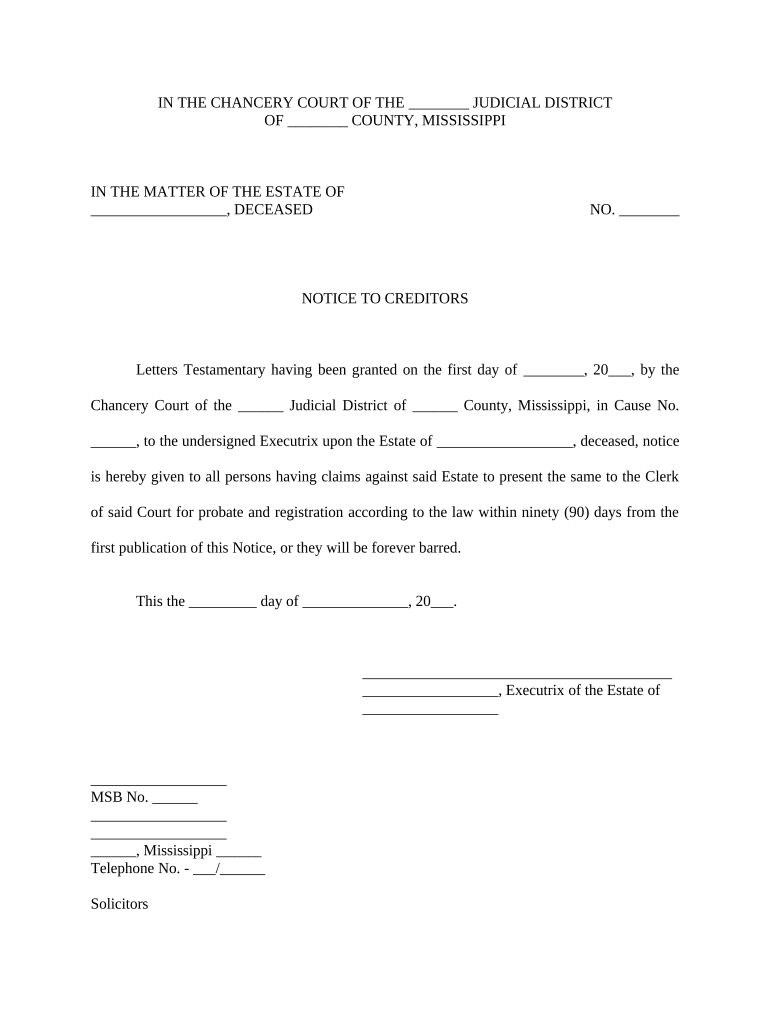
A Notice to Creditors is a formal public notice published or served during probate to alert potential creditors of a decedent that the estate is open and that claims must be submitted by a specified deadline. Courts commonly require publication in a local newspaper and direct personal service to known creditors; the notice establishes a statutory claims period and helps limit personal liability for the estate representative. Procedures, deadlines, and required wording vary by state and local probate rules, so follow the local court order governing publication and service.

Why issuing a correct Notice to Creditors matters

A properly prepared notice preserves the estate representative’s right to limit creditor claims, provides statutory protection against late claims, and documents compliance with probate procedures.

Why issuing a correct Notice to Creditors matters

Who typically prepares and responds to a Notice to Creditors

The Notice to Creditors is used by estate administrators and attorneys to start the creditor-claims period and by creditors to assert claims.

  • Estate administrators and personal representatives who handle probate and need to limit claims against estate assets.
  • Probate attorneys who draft the notice, obtain court orders, and coordinate publication or service requirements.
  • Businesses and individual creditors who receive notice and must file timely claims to preserve recovery rights.

Parties should confirm local court rules before publishing or serving the notice to ensure statutory deadlines and required wording are met.

Core elements to include in a professional Notice to Creditors

A Notice to Creditors should contain precise estate identifiers, case references, claim deadlines, and clear instructions about where and how to submit claims. Include the items below to meet typical probate requirements.

Court Caption

Include the probate court name, case number, and decedent full legal name exactly as shown on the probate petition to ensure court and public record linkage.
Personal Representative

Name and mailing address of the estate’s personal representative or administrator, plus contact instructions for submitting claims or supporting documentation.

Claim Deadline

State the deadline for filing claims clearly (dates or time period) and indicate whether the period starts from first publication or receipt of notice.

Submission Instructions

Explain required claim form content, acceptable delivery methods (mail, in-person, electronic if allowed), and where to deliver proofs of claim.

Publication Statement

Include a sentence that the notice will be published in a named newspaper per the court order and note the first publication date when available.

Legal Consequences

Explain that late claims may be barred by statute and reference that compliance is governed by state probate law and the court’s order.

Security and compliance items to consider

Encryption: TLS 1.2/1.3 in transit
Data at Rest: AES-256 encrypted storage
Certifications: SOC 2 Type II; ISO 27001
Healthcare: HIPAA available (BAA required)
eSign Law: ESIGN and UETA compliant
Audit Trail: Timestamped signer events

Step-by-step: prepare and issue a Notice to Creditors

Follow this sequence to prepare, publish, serve, and record a Notice to Creditors in a way that aligns with typical probate procedures.

  • 01
    Draft the notice: Assemble case caption, representative info, and proposed claim deadline.
  • 02
    Obtain court order: Request court approval for publication wording and schedule per local rules.
  • 03
    Publish notice: Place notice in court-approved newspaper and record dates of publication.
  • 04
    Serve known creditors: Mail or personally serve known creditors and retain proof of service.

Where to file, publish, and send the notice

Notices commonly move through the court clerk, a newspaper for publication, and direct service to known creditors; use the following routing steps.

  • Probate Court Clerk: File the petition and obtain order to publish.
  • Newspaper Publication: Publish notice per court order and retain affidavit.
  • Mail to Creditors: Send via certified mail to known creditors.
  • Record Proof: File affidavit of publication and service with the court.

How to configure an online Notice to Creditors workflow

If using an electronic workflow, configure fields, authentication, and storage before sending to ensure legal compliance and easy recordkeeping.

Document Template Use a version-controlled template for consistent notices.
Signature Type Set to electronic signature with audit trail.
Authentication Choose email link, SMS code, or stronger KBA if required.
Reminders Enable scheduled reminders for signers and proof-of-service
Storage Location Save signed copies to secure case folder or court portal

Digital delivery and eSignature considerations

Digital workflows can handle drafting, signing, authentication, and archival but must align with court and state rules.

  • Integrations: Salesforce, NetSuite, or cloud storage sync
  • File formats: PDF and DOCX supported
  • Authentication: Email, SMS, or advanced KBA

Typical timing and deadlines to track

Deadlines for publication and creditor claims vary by state. Track dates closely and enter deadlines into the estate calendar immediately after court order or first publication.

Order to Publish:

Obtain from court before placing notice.

First Publication:

Date that starts many statutory claim periods.

Claim Filing Period:

Commonly four months from first publication in many jurisdictions.

Personal Service:

May trigger a different deadline for individually served creditors.

Affidavit Filing:

File proof of publication promptly with the court.

Key milestones for a Notice to Creditors lifecycle

Sequence the major stages below to track progress from petition to estate closing.

01

File Probate Petition

Clerk opens case and assigns a case number.

02

Request Publication Order

Judge or clerk authorizes notice wording and schedule.

03

Publish and Serve

Complete newspaper runs and mailings to known creditors.

04

Wait Claim Period

Monitor for timely filed claims before closing estate.

Common pitfalls when preparing a Notice to Creditors

  • Using incorrect case caption or representative name, which can invalidate service or cause court rejection of proof of publication.
  • Missing the court-ordered wording or schedule for publication, resulting in noncompliance and potential need to republish.
  • Failing to document or retain affidavits of publication and proof of service, which undermines the estate representative’s defenses against late claims.
  • Assuming electronic publication or email service is acceptable without confirming local court rules or statutory requirements for notice.

Consequences of errors or missed deadlines

Claims Barred: Late claims may be barred
Personal Liability: Representative may face creditor suits
Court Delays: Probate closing can be postponed
Additional Costs: Republishing raises estate expenses
Loss of Defenses: Failure to publish forfeits statutory protections
Clerical Rejection: Improper proof may be rejected

eSignature vendor comparison for Notice to Creditors workflows

Compare typical starting prices and key capabilities relevant to notices, bulk publishing, HIPAA, and envelope limits. signNow is listed first per vendor table conventions.

signNow DocuSign Adobe Sign PandaDoc HelloSign
Starting Price $8/user/mo $15/user/mo $14/user/mo $19/user/mo $15/user/mo
Free Trial 7-day free trial Varies Varies Varies Varies
Bulk Send Yes (Premium) Yes Yes Yes No
Audit Trail Yes Yes Yes Yes Yes
HIPAA Compliant Yes Yes Yes No No
Envelope Cap No cap 100 envelopes/user/year Varied Varied Varied

Practical examples of notice workflows

These short scenarios show common approaches to publishing and documenting a Notice to Creditors in routine estate administrations.

Small Estate Publication

Executor orders a two-week newspaper run after court approval to start the claims period

  • Publication begins on a specified date to trigger statutory timelines
  • The executor files the affidavit of publication with the court and keeps certified copies to document compliance and defense against late claims.

Known Creditor Service

Personal representative compiles a creditor list from estate records and mailings

  • Notices are sent by certified mail with return receipt requested
  • Proofs of mailing are retained and filed with the probate court to limit the potential for delayed claims and litigation.

Frequently asked questions about Notices to Creditors

Answers to common implementation and legal questions about preparing, publishing, and proving a Notice to Creditors in probate.


Need help? Contact support

be ready to get more
Join over 28 million airSlate SignNow users