Establishing secure connection…Loading editor…Preparing document…

Consent to Change of Name

This template is fully customizable. Edit the text, fill out the fields, and send it for signature. Give it a try!
Consent to Change of Name

What the Consent to Change of Name Is and When It’s Used

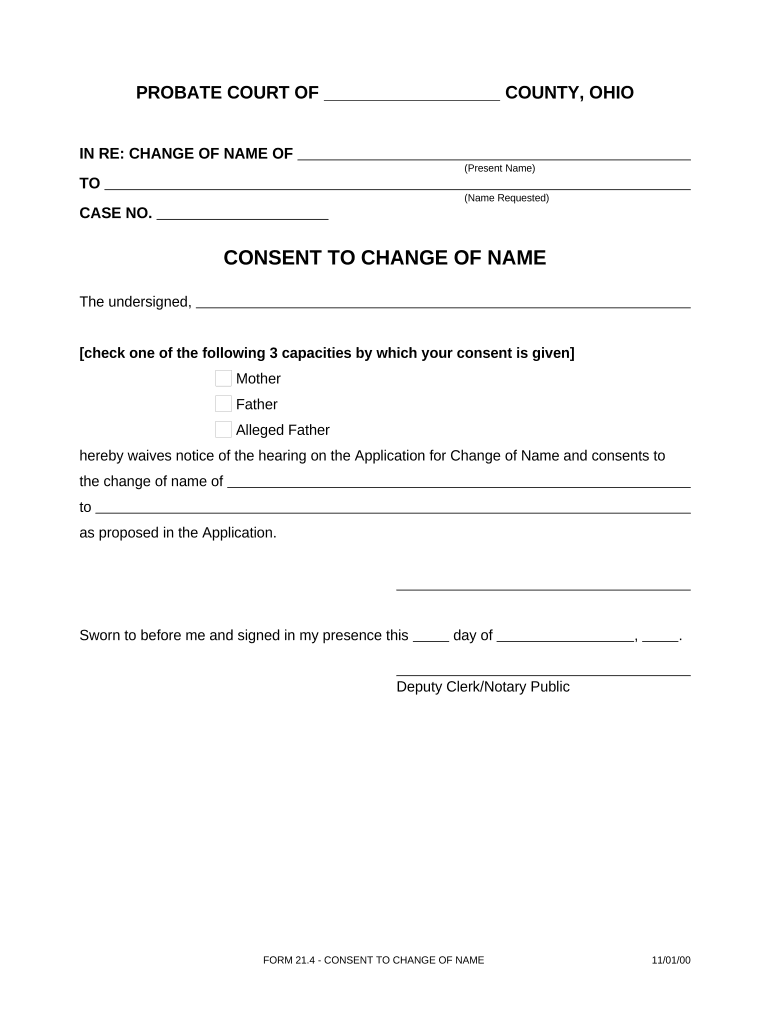
A Consent to Change of Name is a signed statement by an individual or legal guardian authorizing a court or administrative body to change a person’s legal name. The document commonly appears in family law, adoption, guardianship, and minor name-change proceedings and may be required by a court, clerk, or agency to establish that any necessary parties agree to the requested change. The form captures identity details, relationship to the person whose name will change, the proposed new name, and any notarized affirmation or witness statements required by local rules.

Why a Clear, Compliant Consent Matters

A properly executed consent reduces processing delays, lowers the risk of a court rejecting the petition, and documents legal authority for the change. Clear consents also protect against later disputes about identity, parental rights, or fraud by creating a dated, attributable record of agreement.

Why a Clear, Compliant Consent Matters

Who Typically Prepares or Signs This Consent

Parties who commonly complete this consent include the petitioner, parents or legal guardians for minors, custodial adults, and authorized agents acting under a durable power of attorney.

  • Parent or legal guardian of a minor: signs to permit a child’s name change in family or adoption cases.
  • Petitioner requesting their own name change: signs to affirm identity and intent to change name.
  • Authorized agent or attorney-in-fact: signs only when a valid power of attorney specifically authorizes that act.

Confirm who must sign under local court rules before filing; some jurisdictions require notarized signatures or additional witness statements for consents affecting minors or guardianship matters.

Typical Signers and Their Roles

Petitioner

The person whose name is being changed. They must sign to show intent and may need to attest to residency and absence of fraud; courts require identification and sometimes an accompanying petition.

Parent or Guardian

A parent or legal guardian must sign for minor name changes; signatures often must be notarized and may require both parents' consent unless a court order or custody arrangement limits one parent’s authority.

Essential Data Elements to Include

Full Legal Name: Exact current name
Date of Birth: MM/DD/YYYY
Current Name: Name on legal ID
Proposed Name: Exact new name
Relationship: Parent, guardian, petitioner
Consent Statement: Signed, dated, notarized

Step-by-Step: Completing and Submitting a Consent to Change of Name

Follow a consistent sequence to prepare, sign, and file the consent to minimize delays and meet court requirements.

  • 01
    Prepare Documents: Gather ID, birth certificate, and any custody or guardianship orders.
  • 02
    Complete Consent: Fill fields exactly; use MM/DD/YYYY for dates.
  • 03
    Notarize: Sign before a notary or RON session if allowed.
  • 04
    File with Court: Attach consent to the name-change petition and file per local procedures.

How to Customize and Automate the Consent Online

Configure an electronic workflow to collect signatures, notarization, and supporting attachments consistently.

Field | Setting Action | Recommendation
Required Fields Make identity and consent fields mandatory
Conditional Logic Show guardian fields only for minors
Attachment Rules Require ID and court orders when applicable
Signer Order Enforce petitioner then guardian then notary

Technical Requirements for eCompletion and eNotarization

Choose a platform that supports e-signatures, conditional fields, attachments, and RON where permitted.

  • File Formats: PDF and DOCX supported
  • Authentication: Email plus SMS or KBA
  • Integrations: Works with case management systems

Ensure the selected provider supports required security and compliance standards for your jurisdiction and the type of consent being collected.

Where to File and How the Consent Travels

Typical routing: prepare the consent, collect signatures and notarization, attach to the name-change petition, and submit to the court clerk or agency that handles vital records.

  • Prepare: Complete consent and gather attachments
  • Sign: Collect signatures and notarization
  • Attach: Combine consent with the petition
  • File: Submit to county court clerk or agency

Timing: Typical Processing and Filing Expectations

There is no single federal deadline for name-change consents; timing is set by local courts and agencies. Plan to allow extra time for notarization, background checks, and required publications.

Court Filing Window:

File with the petition based on local court calendar

Processing Time:

Processing often ranges from 2 to 12 weeks, depending on county caseload

Publication Period:

Some jurisdictions require public notice for several weeks

Notarization Scheduling:

Allow time for in-person or RON appointments

Record Update:

Vital records and IDs may take additional weeks after court order

Key Sections a Professional Consent Should Contain

A complete consent form groups identity, authority, explicit consent language, notarization, attachments, and signature attribution for clarity and enforceability.

Identity

Full legal name, DOB, and identifying details linking the consent to the subject
Authority

Statement of legal relationship or power that authorizes the signer to consent

Consent Wording

Clear, unambiguous language granting permission for the name change

Notary Block

Space for notarization or RON details, plus seal and date

Attachments

List and attach supporting documents such as birth certificate or custody orders

Signature Details

Signer name printed, signature, date, and contact information

Real-World Examples of Consent Use

Two anonymized customer examples show how consents fit into broader case workflows and digital processes.

Martin Properties

A property manager used an online consent to update tenant records following a legal name change

  • The consent was notarized remotely
  • The manager attached the court order and updated lease records within a week, avoiding lease re-execution and minimizing administrative delay.

Fertility Center

A clinic collected signed consents to change patient records after a legal name change

  • Consent included HIPAA authorization language
  • The signed and dated consent plus court order enabled the clinic to update billing and medical records consistently across systems.

Practical Tips for Accurate and Efficient Completion

Follow these practical checks to reduce reject rates and speed court acceptance.

Match IDs Exactly
Confirm names and dates match government IDs and birth certificates; discrepancies are the most common cause of rejection and delay.
Use Clear Consent Language
Avoid vague phrases; state the proposed name and the specific permission being granted to ensure enforceability.
Notarize Properly
Sign in front of the notary or complete a compliant RON session where allowed; missing seals or incorrect acknowledgements invalidate the consent.
Keep Copies
Retain certified copies and the court order for downstream updates to IDs, titles, and educational or medical records.

Consequences of an Incorrect or Fraudulent Consent

Invalid Consent: Court may deny petition
Filing Delay: Additional fees and repeat filings
Rejection: Clerk returns incomplete submissions
Identity Risk: Potential for identity disputes
Perjury Liability: False statements may trigger legal sanctions
Civil Exposure: Possible civil claims by affected parties

Common Pitfalls to Avoid When Preparing a Consent

  • Leaving name formats inconsistent between the consent and supporting IDs, causing clerks to request amended paperwork or supplemental verification.
  • Signing before notarization or using initials where full signature is required, which often leads to rejection by the court clerk.
  • Failing to attach required custody or guardianship orders when the signer’s authority depends on those documents, prompting delays.
  • Assuming remote notarization is permitted in your county without confirming RON rules, which can invalidate an otherwise complete consent.

Comparison: eSignature Vendor Pricing and Capabilities

Overview of common vendor pricing and capability differences relevant when collecting consents and notarizations; signNow is listed first per comparison format.

signNow DocuSign Adobe Sign PandaDoc HelloSign
Starting Price $8/user/mo $15/user/mo $14/user/mo $19/user/mo $15/user/mo
Free Trial 7-day free trial, no credit card required Varies Varies Varies Varies
Bulk Send Yes Yes Yes Yes No
Audit Trail Yes Yes Yes Yes Yes
Envelope Cap No envelope cap 100 envelopes/user/year Varies Varies Varies

Frequently Asked Questions About Consent to Change of Name

Answers to common questions about validity, e-signing, notarization, and filing to address typical problems users encounter.


Need help? Contact support

be ready to get more
Join over 28 million airSlate SignNow users