Establishing secure connection…Loading editor…Preparing document…

Texas Right-of-Way Easement

This template is fully customizable. Edit the text, fill out the fields, and send it for signature. Give it a try!
Texas Right-of-Way Easement

What the Texas Right-of-Way Easement Is and How it Functions

A Texas Right-of-Way Easement is a written grant that gives an entity the legal right to use a defined portion of real property for access, utilities, transportation, or infrastructure while the underlying fee ownership remains with the landowner. The instrument describes the easement area, permitted uses, duration (temporary, perpetual, or term-limited), and any conditions for maintenance or restoration. In Texas, easements affecting real property are typically executed, acknowledged before a notary, and recorded in the county clerk’s office to provide constructive notice and protect title interests.

Why a Formal Right-of-Way Easement Matters

A clear written easement establishes legal access and operational rights, limits disputes over use and maintenance responsibility, and creates recordable evidence for title and lenders.

Why a Formal Right-of-Way Easement Matters

Who Typically Prepares or Signs This Easement

Each signer’s role and authority should be documented; corporate or trustee signers must follow entity signature rules and show authorization.

  • Landowners granting access to a road, pipeline, or utility who need to limit future liability and preserve fee ownership.
  • Utility companies, municipalities, and developers who require legal assurance of uninterrupted access for construction or maintenance.
  • Title companies and lenders who verify recorded easements as part of closing and lien priority determination.

Stepwise Process to Prepare, Sign, and Record the Easement

Follow this sequence to complete the easement correctly and establish public notice.

  • 01
    Negotiate Terms: Agree on location, scope, compensation, and maintenance responsibilities.
  • 02
    Draft Instrument: Prepare a precise legal description and exhibit map tied to the property.
  • 03
    Execute with Authority: Have authorized signers sign in the presence of a notary, if required.
  • 04
    Record Document: Submit to the county clerk for recording to secure constructive notice.

Digital Workflow Settings for Completing the Easement Online

Configure a straightforward eSignature workflow that captures signer identity, notarization, and recording metadata.

Field Configuration
Signature Field Assign to grantee and grantor; require date stamps.
Notary Block Add notary signature, seal image, and acknowledgement text.
Exhibit Attachment Attach survey/map PDF; link to legal description.
Authentication Require email + SMS code or stronger ID verification for remote signers.

Typical Online Signing and Recording Flow

This sequence explains how an electronic easement can move from draft to recorded instrument.

  • Upload Document: Sender uploads PDF with exhibits and places fields.
  • Add Signers: Enter signer names and preferred authentication methods.
  • Signer Authentication: Signers verify identity via email link and SMS code.
  • Download & Record: Execute, download signed PDF, and submit to county clerk.

Essential Clauses and Elements to Include in the Easement

A professional Texas Right-of-Way Easement contains several standard provisions that define scope, duties, and remedies.

Grant Clause

Defines the grantor’s conveyance of a specific interest, identifies benefited party, and states whether the easement is exclusive or non-exclusive with clear limits.
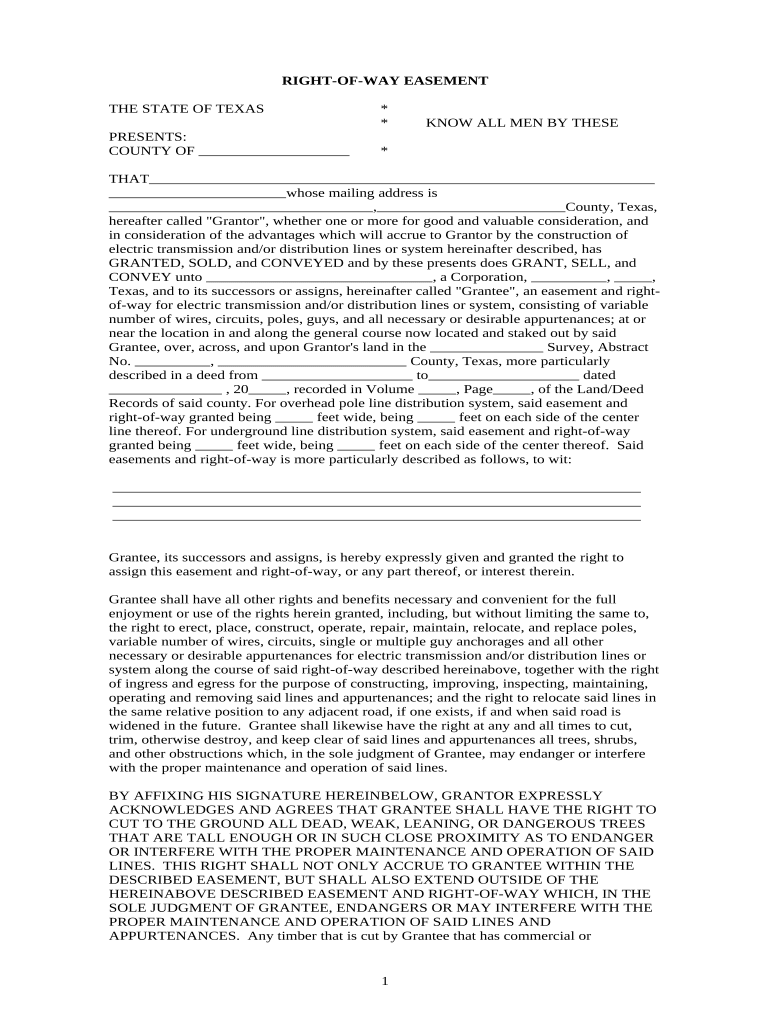
Legal Description

Incorporates a precise legal description or survey exhibit that ties the easement area to the recorded parcel and supports accurate county indexing.

Purpose Statement

Specifies permitted uses such as utilities, ingress/egress, or maintenance access and explicitly prohibits unrelated activities to limit future disputes.

Term & Termination

Lists start and end dates or indicates perpetual duration, and details termination conditions, reversion rights, or abandonment procedures.

Maintenance & Repair

Allocates responsibility for maintenance, restoration after construction, and cost sharing to reduce operational conflicts between parties.

Indemnity & Insurance

Requires insurance coverages and indemnification language to protect the landowner and grantee from third-party claims arising from easement activities.

Supporting Documents Often Attached to Easements

Several attachments strengthen the easement’s clarity and facilitate recording and future enforcement.

Survey Exhibit

A certified survey or plat showing the easement geometry, bearings, distances, and map legend that attaches to the easement as an exhibit.

Title Commitment

A current title commitment or abstract excerpt discloses existing encumbrances and confirms the grantor’s ability to convey the easement interest.

Maintenance Agreement

A separate maintenance or cost-sharing agreement can detail seasonal responsibilities, vegetation control, and repair timelines for the easement area.

Access Plan

Construction or access plans showing where temporary construction zones will be located and how traffic or equipment will use the easement.

Key Data and Compliance Items to Capture

Grantor Name: Full legal name
Grantee Name: Full legal name
Legal Description: Survey or plat reference
Notary Acknowledgement: Notary name and seal
Execution Date: MM/DD/YYYY
Recording County: County clerk name

Consequences of Incomplete or Incorrect Easements

Unrecorded Interest: Loss of constructive notice
Ambiguous Boundary: Increased litigation risk
Missing Notary: Recording rejection
Unauthorized Signer: Transaction may be void
Improper Consideration: Tax or contract disputes
Failure to Maintain: Damage claims or injunctions

Common Preparation Pitfalls to Avoid

  • Using a vague legal description instead of a recorded survey, which leads to boundary disputes and possible reformation actions by courts.
  • Failing to record the easement promptly, allowing subsequent purchasers to claim lack of notice and complicating title insurance coverage.
  • Omitting explicit maintenance or restoration obligations for construction, which creates recurring disputes over repair costs and access timing.
  • Accepting verbal or unsigned agreements; without a written, executed, and recorded instrument the easement may be unenforceable against third parties.

Timing Considerations and Typical Deadlines

Plan for prompt execution and recording to protect priority and ensure compliance with contractual or permitting schedules.

Effective Date:

Enter MM/DD/YYYY; determines when rights commence.

Recording Timing:

Record as soon as feasible after execution to preserve priority.

Permit Deadlines:

Coordinate easement execution with municipal or TXDOT permit windows.

Construction Windows:

Align term dates with planned construction start and end.

Insurance Effective Date:

Match insurer coverage start to easement effective date.

Key Milestones from Negotiation to Recordation

A typical milestone timeline helps teams track legal, permitting, and recording tasks in order.

01

Negotiation Complete

Parties finish terms and approve the legal description.

02

Draft Approval

Legal counsel reviews and the draft is finalized.

03

Execution & Notarization

Authorized signers sign before a notary public.

04

County Recordation

Submit the acknowledged document to county clerk for recording.

Real-World Examples of Online Easement Execution

These brief case notes show how organizations used online signatures and digital attachments to complete property access agreements.

Optica Ventures LLC

The interface is simple and easy-to-use for our team; more importantly, it is just as easy for our customers.

  • Rapid signature routing reduced time to record by days.
  • The digital exhibits and audit trail enabled clean title review and faster closings for multiple lot transactions.

Martin Properties

I can process and execute all of these documents online with 100% compliance and built-in security.

  • Mobile signing allowed field teams to sign on site during inspections.
  • Resulting recorded easements proved enforceable; title insurers accepted the recorded digital PDF and acknowledgements without dispute.

Typical Signers and Their Authority

Grantor

A landowner, trustee, or corporate property holder who must confirm authority to convey an easement and sign in accordance with entity authorization documents or recorded trust instruments.

Grantee Representative

An authorized officer or agent of the utility, municipality, or developer who signs for the entity receiving rights and who must provide proof of corporate or agency authority.

Technical Considerations for eSigning and eRecording

Confirm platform security certifications, retention controls, and audit trails to meet lender, title, and county recording expectations.

  • File Formats: PDF and PDF/A compatible
  • Integrations: Works with title, CRM, and cloud storage
  • Authentication: Supports email, SMS, and stronger ID checks

Comparing signNow and Common eSignature Vendors for Easement Workflows

The table summarizes core pricing and policy dimensions relevant to high-volume easement executions and notarization-driven workflows.

signNow DocuSign Adobe Sign PandaDoc HelloSign
Starting Price $8/user/mo $15/user/mo $14/user/mo $19/user/mo $15/user/mo
Free Trial 7-day free trial Varies by plan Varies by plan Varies by plan Varies by plan
Bulk Send Yes (available on premium tiers) Varies by plan Varies by plan Varies by plan Varies by plan
Audit Trail Yes Yes Yes Yes Yes
HIPAA Compliant Yes (BAA available) Varies by plan Varies by plan Varies by plan Varies by plan
Envelope Cap No cap 100 envelopes/user/year Varies by plan Varies by plan Varies by plan

Frequently Asked Questions About Texas Right-of-Way Easements

Answers to common execution, recording, and enforceability questions for Texas easements.


Need help? Contact support

be ready to get more
Join over 28 million airSlate SignNow users