Establishing secure connection…Loading editor…Preparing document…

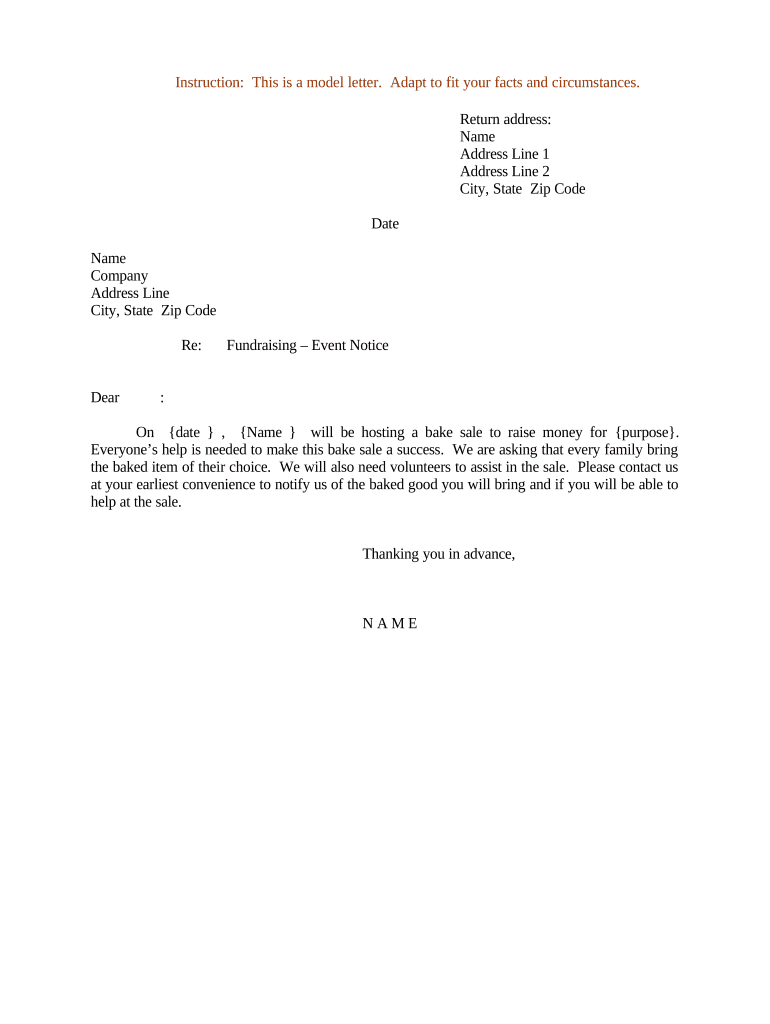
Event Notice for Fundraising Bake Sale

This template is fully customizable. Edit the text, fill out the fields, and send it for signature. Give it a try!
Event Notice for Fundraising Bake Sale

What this Event Notice is and when to use it

An Event Notice for Fundraising Bake Sale is a written announcement that communicates the key details and official permissions required to run a community bake sale for fundraising purposes. It typically lists the date, time, location, organizer contact information, food safety or health permit status, whether vendors are selling prepared foods, insurance or waiver requirements, and any applicable local regulations. The notice serves both to inform the public and to document that the organizer sought or obtained required approvals from a venue owner, health authority, or permitting office before the event occurs.

Why a clear event notice matters

A clear event notice reduces confusion, demonstrates compliance with local health and permitting rules, and documents permissions needed by hosting venues or authorities. It protects organizers and helps volunteers, vendors, and donors understand expectations and liability boundaries.

Why a clear event notice matters

Who typically prepares and receives this notice

Make distribution part of your planning checklist to ensure all stakeholders receive the same information in a timely manner.

  • Venue owner or manager receives a copy to confirm site access and any insurance requirements.
  • Local health department or food safety inspector receives details when required by local ordinance.
  • Volunteer leads and vendor participants receive operational details, setup times, and safety instructions.

Step-by-step: preparing and issuing the notice

Follow this sequence to prepare, review, and distribute the event notice efficiently.

  • 01
    Draft the Notice: Collect event facts and draft the notice text.
  • 02
    Confirm Permits: Check local food/temporary event permit requirements.
  • 03
    Obtain Approvals: Get written permission from venue owner or manager.
  • 04
    Distribute Copies: Share final notice with stakeholders and retain a signed copy.

Typical routing and recipient workflow

A standard routing sequence ensures the notice reaches all required reviewers and is retained for records.

  • Organizer: Prepares and signs the notice.
  • Venue: Reviews and returns venue permission.
  • Local Authority: Receives permit application or notice when required.
  • Volunteers/Vendors: Receive a copy for operational use.

Digital workflow setup for e-submission

Configure a simple e-submission workflow to collect signatures and evidence of approvals.

Field Configuration
Organizer Signature Required electronic signature field with date.
Venue Approval Checkbox + signature field for venue manager.
Permit Attachment Upload field for permit PDF or proof of application.
Distribution List Email addresses for venue, health authority, volunteers.

Technical considerations for eSubmission and signing

Verify the chosen platform's security and retention features meet any local or organizational recordkeeping requirements before relying solely on electronic copies.

  • Document Formats: Accept PDF and DOCX for compatibility with municipal systems.
  • Authentication: Email link or SMS code meets typical organizer needs.
  • Audit Trail: Capture timestamp, signer email, and IP address.

Essential elements to include for a professional notice

Including these six elements makes the notice complete and useful for reviewers and participants.

Clear Identification

Event name, organizer, and concise purpose statement so recipients can quickly understand why the event is being held and who is responsible.
Precise Timing

Start and end times with setup and teardown windows to coordinate venue access, vendor arrival, and compliance with local time-limited permits.

Exact Location

Full street address and specific site details such as building, room, lot, or booth numbers to prevent confusion during setup and emergency response.

Food Handling Status

Temporary food permit status, food handler certification details, and whether prepackaged or on-site-prepared foods will be offered, which affects inspections.

Liability and Insurance

State whether general liability insurance is in place, limits, and any indemnity clauses required by the venue to reduce exposure.

Contact and Signoff

Authorized organizer contact details plus a dated signature and printed name to verify responsibility and authority for the event.

Data and privacy items to protect

Donor Information: Collect only necessary donor data.
Volunteer Records: Securely store contact and emergency details.
Medical Alerts: Limit collection of health data unless required.
Document Access: Restrict editing to authorized organizers.
Retention Policy: Define how long notices are kept.
Encryption: Use encrypted storage for sensitive files.

Consequences of incomplete or incorrect notices

Permit Denial: Event may be canceled.
Fines: Local fines or administrative penalties.
Health Inspection: Mandatory corrective actions or closure.
Liability Claims: Increased exposure to civil claims.
Insurance Denial: Coverage may be denied for incidents.
Reputational Harm: Loss of donor trust or venue relationships.

Common mistakes to avoid when preparing the notice

  • Failing to verify whether a temporary food permit is required before printing and distributing the notice can lead to last-minute cancellations.
  • Using ambiguous location details or failing to list setup and teardown times causes vendor and volunteer confusion and missed inspections.
  • Not securing written venue permission or insurance information can result in denial of access or refused coverage after incidents.
  • Collecting more personal data than needed without proper safeguards risks privacy breaches and possible regulatory scrutiny.

Common eSignature vendor pricing and basic feature comparison

Compare starting prices and basic capabilities for selecting an eSignature platform to manage notices and approvals; signNow is listed first for clarity.

signNow DocuSign Adobe Sign PandaDoc HelloSign
Starting Price $8/user/mo $15/user/mo $14/user/mo $19/user/mo $15/user/mo
Free Trial Yes, 7-day No No No No
Bulk Send Yes Yes Yes Yes No
Audit Trail Yes Yes Yes Yes Yes
HIPAA Compliant Yes Yes Yes No No

Frequently asked questions about event notices

Answers to common operational, legal, and technical questions when preparing or submitting an Event Notice for a fundraising bake sale.


Need help? Contact support

be ready to get more
Join over 28 million airSlate SignNow users