Establishing secure connection… Loading editor… Preparing document…
Navigation

Fill and Sign the Sec Info Renaissance Cosmetics Incde 10 K405 for 3 Form
Fill and Sign the Sec Info Renaissance Cosmetics Incde 10 K405 for 3 Form

How it works

Open the document and fill out all its fields.
Apply your legally-binding eSignature.
Save and invite other recipients to sign it.

Rate template

4.6
53 votes
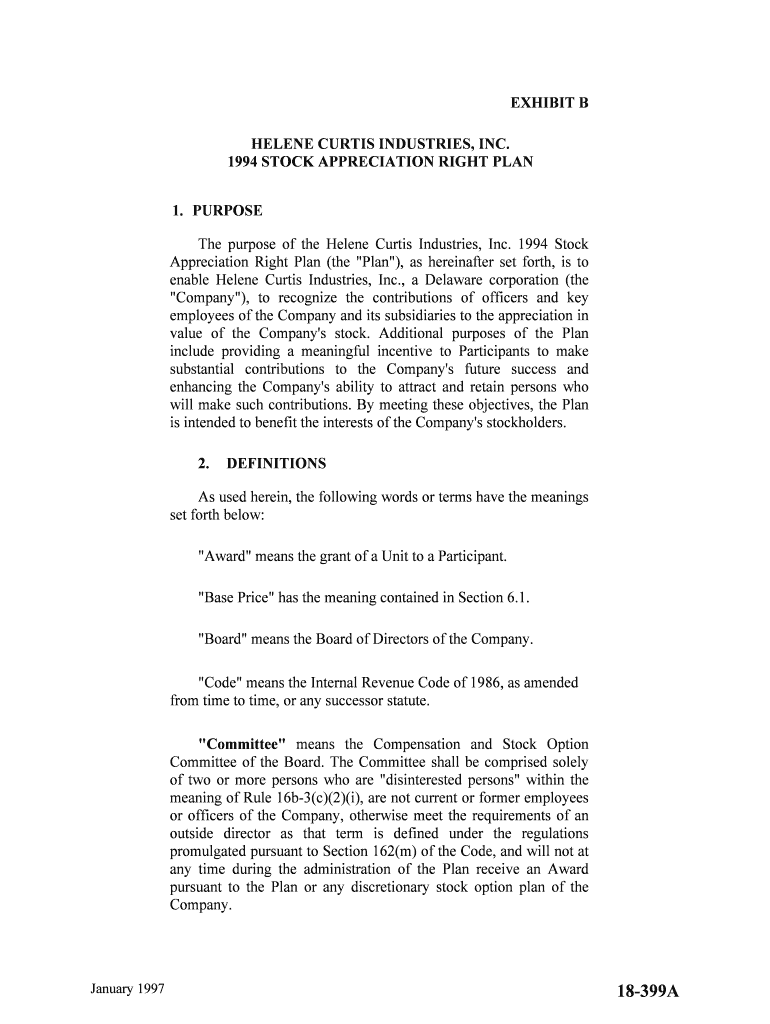
January 1997 18-399A EXHIBIT B HELENE CURTIS INDUSTRIES, INC. 1994 STOCK APPRECIATION RIGHT PLAN 1. PURPOSE The purpose of the Helene Curtis Industries, Inc. 1994 Stock Appreciation Right Plan (the "Plan"), as hereinafter set forth, is to enable Helene Curtis Industries, Inc., a Delaware corporation (the "Company"), to recognize the contributions of officers and key employees of the Company and its subsidiaries to the appreciation in value of the Company's stock. Additional purposes of the Plan include providing a meaningful incentive to Participants to make substantial contributions to the Company's future success and enhancing the Company's ability to attract and retain persons who will make such contributions. By meeting these objectives, the Plan is intended to benefit the interests of the Company's stockholders. 2. DEFINITIONS As used herein, the following words or terms have the meanings set forth below: "Award" means the grant of a Unit to a Participant. "Base Price" has the meaning contained in Section 6.1. "Board" means the Board of Directors of the Company. "Code" means the Internal Revenue Code of 1986, as amended from time to time, or any successor statute. "Committee" means the Compensation and Stock Option Committee of the Board. The Committee shall be comprised solely of two or more persons who are "disinterested persons" within the meaning of Rule 16b-3(c)(2)(i), are not current or former employees or officers of the Company, otherwise meet the requirements of an outside director as that term is defined under the regulations promulgated pursuant to Section 162(m) of the Code, and will not at any time during the administration of the Plan receive an Award pursuant to the Plan or any discretionary stock option plan of the Company. © 1997 Jefren Publishing Company, Inc. 18-399B "Common Stock" or "Stock" means the Common Stock of the Company. "Company" means Helene Curtis Industries, Inc., a corporation established under the laws of Delaware. "Designated Beneficiary" means the beneficiary designated by a Participant, in a manner determined by the Committee, to receive amounts due or exercise rights of the Participant in the event of the Participant's death. In the absence of an effective designation, Designated Beneficiary shall mean the Participant's estate. "Disability" means a physical or mental disability of such a nature that it would qualify a Participant for benefits under the long term disability insurance plan of Helene Curtis, Inc. or any successor plan. "Fair Market Value," as used to refer to the price of a share of Common Stock on a particular day, means the closing price for the Common Stock for that day as reported in The Wall Street Journal, or if no prices are quoted for that day, the last preceding day on which such prices of Common Stock are so quoted. "Participant" means an individual selected by the Committee to receive an Award under the Plan. "Retirement" means the termination of employment by a Participant after attaining age 62 under circumstances which the Committee, in its sole discretion, deems equivalent to retirement. "Unit" means a right granted pursuant to this Plan to a Participant which entitles the Participant to receive at the time of exercise an amount, payable solely in cash, equal to the difference between the Fair Market Value of a single share of Common Stock and the Base Price of a single share of Common Stock. "Unit Agreement" means an agreement executed by the Company and a Participant containing the terms and conditions for an Award of Units. "Substantial Cause" means (a) the commission of a criminal act against, or in derogation of the interests of the Company or its subsidiaries; (b) knowingly divulging confidential information about the Company or its subsidiaries to a competitor or to the public; (c) interference with the relationship between the Company or its subsidiaries and any major supplier or customer; or (d) the performance of any similar action that the Committee, in its sole discretion, may deem to be sufficiently injurious to the interest of the January 1997 18-399C Company or its subsidiaries to constitute substantial cause for termination. 3. ADMINISTRATIONThe Plan shall be administered by the Committee in accordance with Rule 16b-3(c)(2)(i). Subject to the express provisions of the Plan, the Committee shall have full authority to determine the number and type of Awards granted to each Participant and shall interpret the Plan, prescribe, amend and rescind rules and regulations relating to it, determine the terms and provisions of the respective Participants' agreements (which need not be identical) and make such other determinations as it deems necessary or advisable for the administration of the Plan. The decisions of the Committee on matters within its jurisdiction under the Plan shall be conclusive and binding. No member of the Board or the Committee shall be liable for any action taken or determination made in good faith. 4. UNITS AVAILABLE The maximum number of Units that will be available for issuance under the Plan is 2,000,000 Units, which shall be subject to adjustment in accordance with the provisions of Section 7 hereof. No Participant may be granted an Award in excess of 100,000 Units in any 12-month period. In the event that any Unit granted under the Plan expires unexercised or is terminated or ceases to be exercisable for any other reason without having been fully exercised prior to the end of the period during which Units may be granted under the Plan, such unexercised Units shall again become available for new Awards to be granted under the Plan to any eligible employee (including the holder of such former Units). 5. AWARDS Awards may be made under the Plan to any of the officers or employees of the Company or its subsidiaries who, in the opinion of the Committee, are in a position to make a significant contribution to the Company's future success. The Committee shall determine, within the limits of the express provisions of the Plan, those key managerial employees to whom, and the time or times at which, Units are to be granted. The Committee shall also determine the number of Units, the duration of each Unit, the Base Price under each Unit, the time or times within which (during the term of the Unit) all or portions of each Unit may be exercised. In making such determinations; the Committee may take into account the nature of the services rendered by the employee, his or her present and potential contributions to the Company's success and such other © 1997 Jefren Publishing Company, Inc. 18-399D factors as the Committee in its discretion shall deem relevant. 6. REQUIRED TERMS AND CONDITIONS OF UNITSThe Units granted under the Plan shall be in such form and upon such terms and conditions as the Committee shall from time to time determine, subject to the provisions of the Plan, including the following: 6.1 Base Price. The Base Price of each Unit shall be established by the Committee and may not be a price less than the Fair Market Value of Common Stock on the date an Award is made. 6.2 Maximum Term of Unit. A Unit shall be exercisable during such period of time as the Committee may specify, provided that no Unit shall be exercisable after the expiration of five years from the date it is granted. 6.3 Installment Exercise Limitations. Each Award shall generally become exercisable in such number of cumulative annual installments as the January 1997 18-399E Committee shall establish, if any, with an equal number becoming exercisable at the end of each year after the date such Award is made, except to the extent that other terms of exercise are specifically provided by other provisions of the Plan. 6.4 Termination of Employment (a)Death. If a Participant dies during employment with the Company (or within three months after cessation of such employment, unless cessation occurs due to Substantial Cause) and at a time when the Participant is entitled to exercise a Unit, all Units which were exercisable at the time of the Participant's death may be exercised at any time within three years after the Participant's death. Units not exercisable at the time of death will terminate. Units exercisable after death may be exercised by the Designated Beneficiary and shall be subject to all provisions of the Plan, and must be exercised by the end of the post-death exercise period specified in this paragraph. Unless exercised within the applicable period, each Unit shall expire at the end of such period. In no event, however, may any Unit granted under the Plan be exercised after the expiration of the term set forth in the Unit at the time of grant. (b) Retirement. In the event a Participant ceases employment due to Retirement at a time when the Participant is entitled to exercise a Unit granted under the Plan (unless, as determined by the Committee, such Participant becomes employed by a competitor of the Company) all Units which were exercisable at the time of the Participant's Retirement may be exercised at any time within three years after the Participant terminates employment due to Retirement; provided, however, that if the Participant shall die during the extended period for exercise provided by this section, the Units exercisable at the time of Retirement may be exercised to the same extent as if the deceased Participant had survived during a period equal to the greater of one year from the date of death or the remainder of the extended period. Units not exercisable at the time of Retirement will terminate. Unless exercised within the applicable period, each Unit shall expire at the end of such period. In no event, however, may any Unit granted under the Plan be © 1997 Jefren Publishing Company, Inc. 18-399F exercised after the expiration of the term set forth in the Unit at the time of grant. (c) Disability. In the event that the Participant's employment ceases due to Disability at a time when the Participant is entitled to exercise a Unit, all Units which were exercisable at the time of the Participant's Disability may be exercised at any time within three years after the Participant ceases employment due to Disability; provided, however, that if Participant shall die during the extended period for exercise provided by this section, the Units exercisable at the time employment ceased due to Disability may be exercised by the Designated Beneficiary to the same extent as if the deceased Participant had survived during a period equal to the greater of one year from the date of death or the remainder of the extended period. Units not exercisable at the time of Disability will terminate. Unless exercised within the applicable period, each Unit shall expire at the end of such period. In no event shall any Unit be exercised after the expiration of the term set forth in the Unit at the time of grant. (d) Other termination. In the event that Participant shall cease to be employed by the Company and/or its subsidiaries for any reason other than death, Disability or Retirement as set forth above unless, as determined by the Committee, the Participant becomes employed by a competitor of the Company, the Participant shall have the right, subject to the provisions of Sections 6.2 and 7, to exercise his or her Unit(s) at any time within three months after such cessation of employment (not in excess of the stated term of the Unit) but only to the extent each Unit was exercisable at the date of such cessation of employment. Notwithstanding the provisions of the preceding sentence, if employment is terminated at the request of the Company for Substantial Cause, the Participant's right to exercise any Units shall terminate at the time notice of termination of employment is given by the Company to such Participant. (e) Acceleration of Vesting. Notwithstanding any provision to the contrary in the foregoing Section 6, the Committee shall have the discretion at the time Units are granted under the Plan, to provide in the Unit Agreement for the exercise of all or a portion of Units, January 1997 18-399G which would otherwise not be exercisable, at the time of death, Disability or Retirement of the Participant. 6.5 Notice of Exercise. Units may be exercised by giving written notice to the Secretary of the Company, stating the number of Units which are being exercised. Upon exercise, such holder of the Units will be paid the difference between the Base Price of the Units and the Fair Market Value of the Common Stock on the exercise date. The payment will be made in the form of a check payable to the holder of the Units within 30 days of the exercise date. 7. ADJUSTMENTS 7.1 The aggregate number of Units and the number of Units per Participant that may be granted hereunder and the Base Price per share for each Unit, may all be appropriately adjusted, as the Committee may in its sole discretion determine, for any increase or decrease in the number of shares of issued Common Stock of the Company resulting from a subdivision or consolidation of shares whether through reorganization, payment of a share dividend or other increase or decrease in the number of such shares outstanding effected without receipt of consideration by the Company; provided, however, that no adjustment in the number of Units which may be granted under the Plan or in the number of outstanding Units shall be made in the event of a contribution, directly or indirectly of Common Stock by the Company to any Company employee benefit plan. 7.2 Subject to any required action by the stockholders, if the Company shall be a party to a transaction involving a sale of substantially all its assets, a merger or a consolidation, any Unit granted hereunder may be canceled by the Company as of the effective date of any such transaction, by giving 30 days' prior written notice to the holders thereof of its intention to do so during which time he or she shall have the right to exercise all Units whether or not by its terms such Unit is then exercisable and without regard to any installment exercise provisions therein or in this Plan. 7.3 In the case of dissolution of the Company, every Unit outstanding hereunder shall terminate; provided, however, that each Unit holder shall have 30 days' prior written notice of such event, during which time he or she shall have a right to exercise all Units whether or not, by its terms, such Unit is then exercisable and without regard to any installment exercise provisions therein or in this Plan. © 1997 Jefren Publishing Company, Inc. 18-399H 7.4 On the basis of information known to the Company, the Board or the Committee shall make all determinations under this Section 7, including whether a transaction involves a sale of substantially all the Company's assets, and all such determinations shall be conclusive and binding. 7.5 The termination of the Plan and any exercise of a Unit the exercisability of which is accelerated by the operation of Section 7.2 above shall be subject to and conditioned upon the consummation of the transaction, to which such acceleration relates and if, for any reason, such transaction is abandoned, the exercise of such Unit shall be void and such Unit shall thereafter be exercisable only as permitted by the Plan, which shall remain in full force and effect. 8. UNIT AGREEMENTS Each Participant shall agree to such terms and conditions in connection with the exercise of a Unit and execute a Unit Agreement containing such terms and conditions, as the Committee may deem appropriate. Unit Agreements need not be identical. 9. NON-TRANSFERABILITY During the lifetime of a Participant, any Unit granted to a Participant shall be exercisable only by such Participant, the Participant's payee pursuant to a qualified domestic relations order or in the case of a Disability, legal guardian or representative. No Unit shall be assignable or transferable, except by will or by the laws of descent and distribution or, pursuant to a domestic relations order entered by a court of competent jurisdiction. The granting of a Unit shall impose no obligation upon the employee to exercise such Unit. The foregoing notwithstanding, nothing January 1997 18-399I shall prevent the Participant (or any other person who acquires any of the Participant's Units in the manner stated above) from transferring any of the Units to a trust with the prior consent of the Committee. 10. NO CONTRACT OF EMPLOYMENTNeither the adoption of this Plan nor the grant of any Unit shall be deemed to obligate the Company or any subsidiary of the Company to continue the employment of any Participant for any particular period, nor shall the granting of a Unit constitute a request or consent to postpone the Retirement date of any Participant. 11. INDEMNIFICATION OF COMMITTEE In addition to such other rights of indemnification as they may have as directors or as members of the Committee, the members of the Committee shall be indemnified by the Company against the reasonable expenses, including attorneys' fees actually and necessarily incurred in connection with the defense of any action, suit or proceeding, (or in connection with any appeal therein), to which they or any of them may be a party by reason of any action taken or failure to act under or in connection with the Plan or any Award granted hereunder, and against all amounts paid by them in settlement thereof (provided such settlement is approved by independent legal counsel selected by the Company) or paid by them in satisfaction of a judgment in any such action, suit or proceeding, except in relation to matters as to which it shall be adjudged in such action, suit or proceedings that such Committee member is liable for gross negligence or misconduct in the performance of his duties, provided that within 60 days after institution of any such action, suit or proceeding a Committee member shall in writing offer the Company the opportunity, at its own expense, to handle and defend the same. 12. TERMINATION AND AMENDMENT OF PLAN The Board, acting by a majority of its members, exclusive of Board Members who are eligible to receive Units, may from time to time alter, amend or suspend the Plan or any Unit granted hereunder or may at any time terminate the Plan, provided, however, that the Board may not (i) (except as provided in Section 7 hereof) change the total number of Units available under the Plan, (ii) increase the maximum term of Units or maximum number of units that may be granted to an individual in any 12-month period, (iii) decrease the minimum Unit price or otherwise materially increase the benefits accruing to participants under the Plan or (iv) materially modify the © 1997 Jefren Publishing Company, Inc. 18-399J eligibility requirements of the Plan, and provided further that no such action shall materially and adversely affect any outstanding Units without the consent of the respective Unit holders. 13. TAX WITHHOLDINGThe Company shall have the power to either require the recipient to remit to the Company an amount sufficient to satisfy Federal, state and local withholding tax requirements, or to deduct from a payment pursuant to the Plan an amount sufficient to satisfy any withholding tax requirements. January 1997 18-399K 14. GOVERNING LAWThe provisions of the Plan shall be governed by and interpreted in accordance with the laws of Delaware. 15. EFFECTIVE DATE AND TERMINATION DATE OF PLAN The effective date of the Plan shall be March 1, 1994, and the Plan shall end on March 1, 2004. Helene Curtis Industries, Inc 5/25/94 [THE NEXT PAGE IS 18-400A]

Valuable instructions on completing your ‘Sec Info Renaissance Cosmetics Incde 10 K405 For 3 ’ online

Are you fed up with the inconvenience of handling paperwork? Look no further than airSlate SignNow, the top eSignature platform for individuals and businesses. Bid farewell to the lengthy process of printing and scanning documents. With airSlate SignNow, you can effortlessly complete and sign documents online. Utilize the powerful tools included in this user-friendly and cost-effective platform and transform your method of document management. Whether you need to approve documents or collect signatures, airSlate SignNow manages everything with ease, needing just a few clicks.

Follow this comprehensive guide:

  1. Access your account or initiate a free trial with our service.
  2. Press +Create to upload a document from your device, cloud storage, or our template collection.
  3. Open your ‘Sec Info Renaissance Cosmetics Incde 10 K405 For 3 ’ in the editor.
  4. Click Me (Fill Out Now) to prepare the form on your end.
  5. Add and designate fillable fields for others (if needed).
  6. Proceed with the Send Invite settings to request eSignatures from others.
  7. Store, print your copy, or transform it into a reusable template.

No need to worry if you want to collaborate with your colleagues on your Sec Info Renaissance Cosmetics Incde 10 K405 For 3 or send it for notarization—our platform provides everything you need to achieve such tasks. Create an account with airSlate SignNow today and elevate your document management to new levels!

Here is a list of the most common customer questions. If you can’t find an answer to your question, please don’t hesitate to reach out to us.

Need help? Contact Support

The best way to complete and sign your sec info renaissance cosmetics incde 10 k405 for 3 form

Save time on document management with airSlate SignNow and get your sec info renaissance cosmetics incde 10 k405 for 3 form eSigned quickly from anywhere with our fully compliant eSignature tool.

How to Sign a PDF Online How to Sign a PDF Online

How to fill out and sign documents online

Previously, dealing with paperwork took lots of time and effort. But with airSlate SignNow, document management is fast and easy. Our robust and user-friendly eSignature solution allows you to easily fill out and eSign your sec info renaissance cosmetics incde 10 k405 for 3 form online from any internet-connected device.

Follow the step-by-step guide to eSign your sec info renaissance cosmetics incde 10 k405 for 3 form template online:

  • 1.Sign up for a free trial with airSlate SignNow or log in to your account with password credentials or SSO authentication.
  • 2.Click Upload or Create and add a file for eSigning from your device, the cloud, or our form collection.
  • 3.Click on the document name to open it in the editor and utilize the left-side toolbar to fill out all the blank fields appropriately.
  • 4.Put the My Signature field where you need to approve your form. Type your name, draw, or import an image of your handwritten signature.
  • 5.Click Save and Close to finish modifying your completed form.

Once your sec info renaissance cosmetics incde 10 k405 for 3 form template is ready, download it to your device, export it to the cloud, or invite other individuals to electronically sign it. With airSlate SignNow, the eSigning process only requires several clicks. Use our robust eSignature tool wherever you are to deal with your paperwork effectively!


How to Sign a PDF Using Google Chrome How to Sign a PDF Using Google Chrome

How to fill out and sign documents in Google Chrome

Completing and signing paperwork is easy with the airSlate SignNow extension for Google Chrome. Adding it to your browser is a fast and effective way to manage your paperwork online. Sign your sec info renaissance cosmetics incde 10 k405 for 3 form template with a legally-binding electronic signature in just a couple of clicks without switching between tools and tabs.

Follow the step-by-step guidelines to eSign your sec info renaissance cosmetics incde 10 k405 for 3 form template in Google Chrome:

  • 1.Go to the Chrome Web Store, find the airSlate SignNow extension for Chrome, and add it to your browser.
  • 2.Right-click on the link to a document you need to eSign and select Open in airSlate SignNow.
  • 3.Log in to your account with your password or Google/Facebook sign-in buttons. If you don’t have one, sign up for a free trial.
  • 4.Use the Edit & Sign toolbar on the left to fill out your template, then drag and drop the My Signature option.
  • 5.Add a picture of your handwritten signature, draw it, or simply enter your full name to eSign.
  • 6.Make sure all information is correct and click Save and Close to finish editing your paperwork.

Now, you can save your sec info renaissance cosmetics incde 10 k405 for 3 form sample to your device or cloud storage, send the copy to other individuals, or invite them to electronically sign your form via an email request or a protected Signing Link. The airSlate SignNow extension for Google Chrome enhances your document workflows with minimum time and effort. Try airSlate SignNow today!


How to Sign a PDF in Gmail How to Sign a PDF in Gmail How to Sign a PDF in Gmail

How to fill out and sign paperwork in Gmail

When you receive an email containing the sec info renaissance cosmetics incde 10 k405 for 3 form for approval, there’s no need to print and scan a document or download and re-upload it to another tool. There’s a better solution if you use Gmail. Try the airSlate SignNow add-on to quickly eSign any paperwork right from your inbox.

Follow the step-by-step guidelines to eSign your sec info renaissance cosmetics incde 10 k405 for 3 form in Gmail:

  • 1.Go to the Google Workplace Marketplace and look for a airSlate SignNow add-on for Gmail.
  • 2.Install the program with a related button and grant the tool access to your Google account.
  • 3.Open an email with an attached file that needs approval and utilize the S sign on the right panel to launch the add-on.
  • 4.Log in to your airSlate SignNow account. Choose Send to Sign to forward the document to other people for approval or click Upload to open it in the editor.
  • 5.Place the My Signature field where you need to eSign: type, draw, or import your signature.

This eSigning process saves efforts and only requires a few clicks. Use the airSlate SignNow add-on for Gmail to update your sec info renaissance cosmetics incde 10 k405 for 3 form with fillable fields, sign forms legally, and invite other individuals to eSign them al without leaving your mailbox. Enhance your signature workflows now!


How to Sign a PDF on a Mobile Device How to Sign a PDF on a Mobile Device How to Sign a PDF on a Mobile Device

How to fill out and sign documents in a mobile browser

Need to rapidly complete and sign your sec info renaissance cosmetics incde 10 k405 for 3 form on a mobile phone while doing your work on the go? airSlate SignNow can help without needing to set up additional software applications. Open our airSlate SignNow tool from any browser on your mobile device and add legally-binding eSignatures on the go, 24/7.

Follow the step-by-step guide to eSign your sec info renaissance cosmetics incde 10 k405 for 3 form in a browser:

  • 1.Open any browser on your device and follow the link www.signnow.com
  • 2.Create an account with a free trial or log in with your password credentials or SSO authentication.
  • 3.Click Upload or Create and import a file that needs to be completed from a cloud, your device, or our form catalogue with ready-to go templates.
  • 4.Open the form and fill out the blank fields with tools from Edit & Sign menu on the left.
  • 5.Place the My Signature area to the form, then type in your name, draw, or upload your signature.

In a few simple clicks, your sec info renaissance cosmetics incde 10 k405 for 3 form is completed from wherever you are. Once you're finished editing, you can save the file on your device, build a reusable template for it, email it to other individuals, or invite them eSign it. Make your paperwork on the go fast and efficient with airSlate SignNow!


How to Sign a PDF on iPhone How to Sign a PDF on iPhone

How to fill out and sign paperwork on iOS

In today’s corporate environment, tasks must be completed rapidly even when you’re away from your computer. Using the airSlate SignNow application, you can organize your paperwork and sign your sec info renaissance cosmetics incde 10 k405 for 3 form with a legally-binding eSignature right on your iPhone or iPad. Set it up on your device to close deals and manage documents from just about anywhere 24/7.

Follow the step-by-step guide to eSign your sec info renaissance cosmetics incde 10 k405 for 3 form on iOS devices:

  • 1.Open the App Store, search for the airSlate SignNow app by airSlate, and install it on your device.
  • 2.Open the application, tap Create to upload a form, and choose Myself.
  • 3.Opt for Signature at the bottom toolbar and simply draw your autograph with a finger or stylus to eSign the form.
  • 4.Tap Done -> Save after signing the sample.
  • 5.Tap Save or utilize the Make Template option to re-use this paperwork in the future.

This process is so straightforward your sec info renaissance cosmetics incde 10 k405 for 3 form is completed and signed in just a couple of taps. The airSlate SignNow application works in the cloud so all the forms on your mobile device remain in your account and are available whenever you need them. Use airSlate SignNow for iOS to boost your document management and eSignature workflows!


How to Sign a PDF on Android How to Sign a PDF on Android

How to fill out and sign forms on Android

With airSlate SignNow, it’s easy to sign your sec info renaissance cosmetics incde 10 k405 for 3 form on the go. Set up its mobile app for Android OS on your device and start enhancing eSignature workflows right on your smartphone or tablet.

Follow the step-by-step guide to eSign your sec info renaissance cosmetics incde 10 k405 for 3 form on Android:

  • 1.Go to Google Play, find the airSlate SignNow app from airSlate, and install it on your device.
  • 2.Sign in to your account or register it with a free trial, then import a file with a ➕ option on the bottom of you screen.
  • 3.Tap on the uploaded document and choose Open in Editor from the dropdown menu.
  • 4.Tap on Tools tab -> Signature, then draw or type your name to electronically sign the form. Fill out blank fields with other tools on the bottom if required.
  • 5.Use the ✔ key, then tap on the Save option to finish editing.

With an easy-to-use interface and total compliance with primary eSignature laws and regulations, the airSlate SignNow app is the best tool for signing your sec info renaissance cosmetics incde 10 k405 for 3 form. It even operates offline and updates all record modifications when your internet connection is restored and the tool is synced. Fill out and eSign forms, send them for approval, and create multi-usable templates whenever you need and from anyplace with airSlate SignNow.

Sign up and try Sec info renaissance cosmetics incde 10 k405 for 3 form
  • Close deals faster
  • Improve productivity
  • Delight customers
  • Increase revenue
  • Save time & money
  • Reduce payment cycles

