Establishing secure connection… Loading editor… Preparing document…
Navigation

Fill and Sign the Short Form Agreement Template
Fill and Sign the Short Form Agreement Template

How it works

Open the document and fill out all its fields.
Apply your legally-binding eSignature.
Save and invite other recipients to sign it.

Rate template

4.6
61 votes
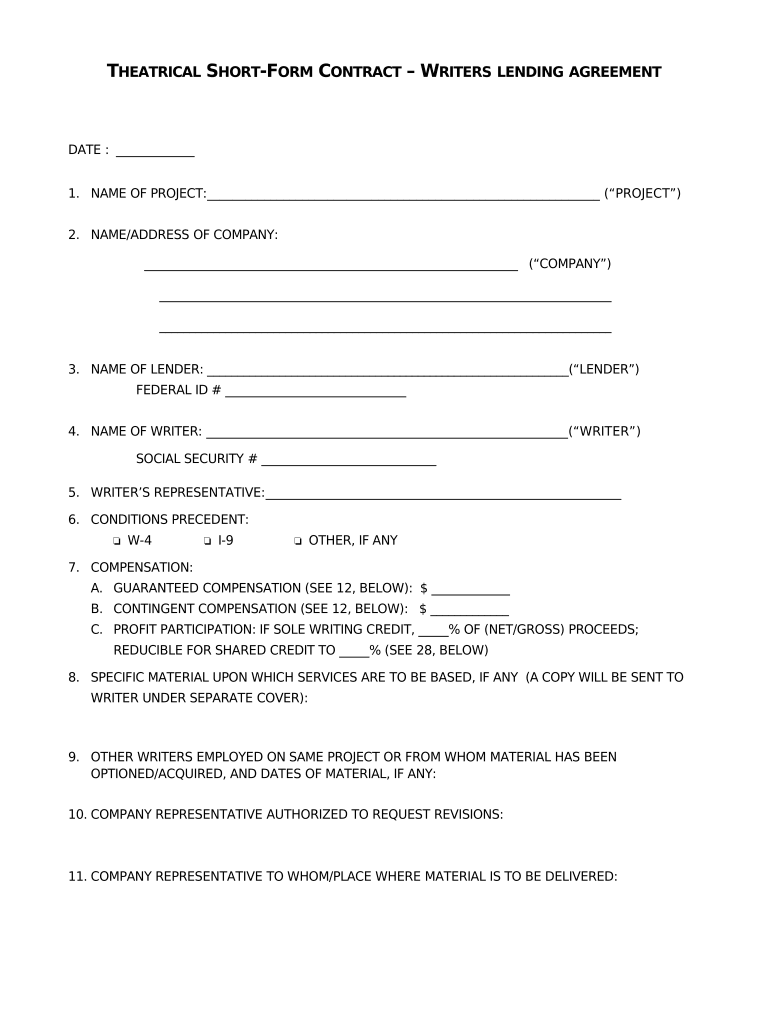
T HEATRICAL S HORT -F ORM C ONTRACT – W RITERS LENDING AGREEMENT DATE : _____________ 1. NAME OF PROJECT: ______________________________________________________________ (“PROJECT”) 2. NAME/ADDRESS OF COMPANY: ______________________________________________________________ (“COMPANY”) ___________________________________________________________________________ ___________________________________________________________________________ 3. NAME OF LENDER: ____________________________________________________________(“LENDER”) FEDERAL ID # ______________________________ 4. NAME OF WRITER: ____________________________________________________________ (“WRITER” ) SOCIAL SECURITY # _____________________________ 5. WRITER’S REPRESENTATIVE: ___________________________________________________________ 6. CONDITIONS PRECEDENT:  W-4  I-9  OTHER, IF ANY 7. COMPENSATION: A. GUARANTEED COMPENSATION (SEE 12, BELOW): $ _____________ B. CONTINGENT COMPENSATION (SEE 12, BELOW): $ _____________ C. PROFIT PARTICIPATION: IF SOLE WRITING CREDIT, _____% OF (NET/GROSS) PROCEEDS; REDUCIBLE FOR SHARED CREDIT TO _____% (SEE 28, BELOW) 8. SPECIFIC MATERIAL UPON WHICH SERVICES ARE TO BE BASED, IF ANY (A COPY WILL BE SENT TO WRITER UNDER SEPARATE COVER): 9. OTHER WRITERS EMPLOYED ON SAME PROJECT OR FROM WHOM MATERIAL HAS BEEN OPTIONED/ACQUIRED, AND DATES OF MATERIAL, IF ANY: 10. COMPANY REPRESENTATIVE AUTHORIZED TO REQUEST REVISIONS: 11. COMPANY REPRESENTATIVE TO WHOM/PLACE WHERE MATERIAL IS TO BE DELIVERED: 12. SERVICES TO BE PERFORMED, INCLUDING NUMBER OF STEPS (e.g., story and frst draft, two rewrites and a polish) : A. FOR STEP 1:  GUARANTEED  OPTIONAL WRITING PERIOD: _______ WEEKS READING PERIOD: _______ WEEKS PAYMENT DUE: $_______________ (50% DUE ON COMMENCEMENT, 50% ON DELIVERY) B. FOR STEP 2 (IF APPLICABLE):  GUARANTEED  OPTIONAL WRITING PERIOD: _______ WEEKS READING PERIOD: _______ WEEKS PAYMENT DUE: $_______________ (50% DUE ON COMMENCEMENT, 50% ON DELIVERY) C. FOR STEP 3 (IF APPLICABLE):  GUARANTEED  OPTIONAL WRITING PERIOD: _______ WEEKS READING PERIOD: _______ WEEKS PAYMENT DUE: $_______________ (50% DUE ON COMMENCEMENT, 50% ON DELIVERY) D. FOR STEP 4 (IF APPLICABLE):  GUARANTEED  OPTIONAL WRITING PERIOD: _______ WEEKS READING PERIOD: _______ WEEKS PAYMENT DUE: $_______________ (50% DUE ON COMMENCEMENT, 50% ON DELIVERY) E. FOR STEP 5 (IF APPLICABLE):  GUARANTEED  OPTIONAL WRITING PERIOD: _______ WEEKS READING PERIOD: _______ WEEKS PAYMENT DUE: $_______________ (50% DUE ON COMMENCEMENT, 50% ON DELIVERY) F. ADDITIONAL STEPS (IF APPLICABLE): _______________________________________________________________ _______________________________________________________________ 2 13. COMPANY SHALL PAY THE ABOVE GUARANTEED AMOUNTS DUE IF READING PERIODS PASS AND COMPANY DOES NOT REQUEST SERVICES; HOWEVER, IF THERE HAS BEEN NO INTERVENING WRITER(S), SERVICES SHALL BE DUE, SUBJECT TO WRITER'S PROFESSIONAL AVAILABILITY, FOR A PERIOD NOT TO EXCEED ______ MONTHS. 14. BONUS: A. For sole writing credit: $_____________ B. For shared writing credit: $___________ Shared credit bonus will be paid on commencement of principal photography if no other writer has been engaged; balance to be paid on determination of writing credit. C. For “green light” or engagement of an “element”: $___________ If Writer is writer of record or is most recent writer on the Project at the time the Project is given a “green light” by a studio or an element is attached on a pay-or-play basis, Writer shall be given a bonus of __________________________________ Dollars ($________ ) which may  may not  be applied against the bonus in A. or B., above. 15. CREDITS AND SEPARATED RIGHTS: P er WGA MBA. 16. EXISTING CREDIT OBLIGATIONS REGARDING ASSIGNED MATERIAL, IF ANY (SUBJECT TO WGA MBA): 17. VIEWING CUT: Per WGA MBA: Writer shall be invited to view a cut of the flm in time sufcient such that any editing suggestions, if accepted, could be reasonably and efectively implemented. Writer shall also be invited to [ _____ ] other screenings. 18. PREMIERES: If writer receives writing credit, Company shall  shall not  provide Writer and one (1) guest with an invitation to the initial celebrity premiere, if held, with travel and accommodations at a level not less than the director or producer of the project. 19. VIDEOCASSETTE: Per WGA MBA. 20. TRANSPORTATION AND EXPENSES: If Company requires Lender to cause Writer to perform services hereunder at a location more than ____ miles from Writer's principal place of residence, which is _____________________, Writer shall be given frst class (if available) transportation to and from such location and a weekly sum of $________ ($______ per week in a high cost urban area). 21. SEQUELS/REMAKES: If separated rights, • Theatrical sequels = 50% initial compensation and bonus; remakes = 33%. • Series Payments: $ ______ per 1/2 hour episode; $ ____ per 1 hour episode; $ _____ per MOW (in network primetime or on pay television, otherwise $ _____ per MOW); $ ______ per sequel produced directly for the videocassette/videodisc market; $ ______ per product produced for the interactive market based on the Project; _________________________ [other, e.g., theme park attractions based on the Project]. • Spin-ofs: Generic – 1/2 of above payments Planted – 1/4 of above payments 3 • If Writer is accorded sole “Written by” or “Screenplay by” credit, Writer shall have the right of frst negotiation on all audio-visual exploitation, including, but not limited to remakes and sequels and MOWs, mini-series and TV pilots (or frst episode if no pilot) for a period of seven (7) years following release. 22. NOTICES: All notices shall be sent as follows: TO LENDER AND/OR WRITER: TO COMPANY: 23. MINIMUM BASIC AGREEMENT: The parties acknowledge that this contract is subject to all of the terms and provisions of the Basic Agreement and to the extent that the terms and provisions of said Basic Agreement are more advantageous to Writer than the terms hereof, the terms of said Basic Agreement shall supersede and replace the less advantageous terms of this agreement. Writer is an employee as defned by said Basic Agreement and Company has the right to control and direct the services to be performed. 24. GUILD MEMBERSHIP: To the extent that it may be lawful for the Company to require the Lender to do so, Lender agrees Writer will become and/or remain a member of Writers Guild of America in good standing as required by the provisions of said Basic Agreement. If Writer fails or refuses to become or remain a member of said Guild in good standing, as required in the preceding sentence, the Company shall have the right at any time thereafter to terminate this agreement with the Lender. 25. RESULTS AND PROCEEDS: Work-Made-For-Hire: Lender acknowledges that all results, product and proceeds of Writer's services (including all original ideas in connection therewith) are being specially ordered by Producer for use as part of a Motion Picture and shall be considered a “work made for hire” for Producer as specially commissioned for use as a part of a motion picture in accordance with Sections 101 and 201 of Title 17 of the U.S. Copyright Act. Therefore, Producer shall be the author and copyright owner thereof for all purposes throughout the universe without limitation of any kind or nature. In consideration of the monies paid to Lender hereunder, Producer shall solely and exclusively own throughout the universe in perpetuity all rights of every kind and nature whether now or hereafter known or created in and in connection with such results, product and proceeds, in whatever stage of completion as may exist from time to time, including: (i) the copyright and all rights of copyright; (ii) all neighboring rights, trademarks and any and all other ownership and exploitation rights now or hereafter recognized in any Territory, including all rental, lending, fxation, reproduction, broadcasting (including satellite transmission), distribution and all other rights of communication by any and all means, media, devices, processes and technology; (iii) the rights to adapt, rearrange, and make changes in, deletions from and additions to such results, product and proceeds, and to use all or any part thereof in new versions, adaptations, and other Motion Pictures including Remakes and Sequels; (iv) the right to use the title of the Work in connection therewith or otherwise and to change such title; and (v) all rights generally known as the “moral rights of authors.” 4 26. WARRANTY AND INDEMNIFICATION: A. Subject to Article 28 of the WGA Basic Agreement, Lender hereby represents and warrants as follows: 1. Lender is free to enter into this Agreement and no rights of any third parties are or will be violated by Lender entering into or performing this Agreement. Lender and Writer are not subject to any conficting obligation or any disability, and Lender nor Writer have not made and shall not hereafter make any agreement with any third party, which could interfere with the rights granted to Company hereunder or the full performance of Lender’s or Writer's obligation and services hereunder. 2. All of the Work (and the Property, if any) shall be wholly original with Writer and none of the same has been or shall be copied from or based upon any other work unless assigned in this contract. The reproduction, exhibition, or any use thereof or any of the rights herein granted shall not defame any person or entity nor violate any copyright or right of privacy or publicity, or any other right of any person or entity. The warranty in this subparagraph shall not apply to any material as furnished to Writer by Company (unless such furnished material was written or created by Writer or originally furnished to Company by Writer) or material inserted in the Work by Company, but shall apply to all material which Writer may add thereto. 3. Lender and/or Writer are sole owner of the Property together with the title thereof and all rights granted (or purported to be granted) to Company hereunder, and no rights in the Property have been granted to others or impaired by Lender and/or Writer, except as specifed, if at all, in this Agreement. No part of the property has been registered for copyright, published, or otherwise exploited or agreed to be published or otherwise exploited with the knowledge or consent of Lender and/or Writer, or is in the public domain. Lender and/or Writer do not know of any pending or threatened claim or litigation in connection with the Property or the rights herein granted. 4. Lender shall indemnify and hold harmless Company (and its afliated companies, successors, assigns, and the directors, ofcers, employees, agents, and representatives of the foregoing) from any damage, loss, liability, cost, penalty, guild fee or award, or expense of any kind (including attorney's fees (hereinafter “Liability”) arising out of, resulting from, based upon or incurred because of a breach by Lender and/or Writer of any agreement, representation, or warranty made by Lender and/or Writer hereunder. The party receiving notice of such claim, demand or action shall promptly notify the other party thereof. The pendency of such claim, demand, or action shall not release Company of its obligation to pay Lender sums due hereunder. B. Company agrees to indemnify Lender and Writer and hold Lender and Writer harmless from and against any and all damages and expenses (other than with respect to any settlement entered into without Company's written consent) arising out of any third party claim against Writer resulting from Company's development, production, distribution and/or exploitation of the Project. 27. NO INJUNCTIVE RELIEF: The sole right of Lender and Writer as to any breach or alleged breach hereunder by Company shall be the recovery of money damages, if any, and the rights herein granted by Lender and Writer shall not terminate by reason of such breach. In no event may Lender or Writer terminate this 5 Agreement or obtain injunctive relief or other equitable relief with respect to any breach of Company's obligations hereunder. 28. PROFIT PARTICIPATION: Terms to be negotiated in good faith. If the parties fail to reach agreement within [ ] months after execution hereof, either party, upon 30 days notice to the other, may submit the matter to what is known as a “baseball arbitration,” in which each party presents one proft proposal and the arbitrator is required to adopt one of the two proposals. The arbitrator shall be selected and the arbitration conducted pursuant to the Voluntary Labor Arbitration Rules of the AAA. 29. AGREEMENT OF THE PARTIES: This document [including Attachment 1, if any] shall constitute the agreement between the parties until modifed or amended by a subsequent writing. __________________________________(“LENDER”) _________________________________(“COMPANY”) BY: _________________________________________ BY: _________________________________________ TITLE: TITLE: CC: WGA CONTRACTS DEPARTMENT 6 ATTACHMENT 1 ADDITIONAL PROVISIONS, IF ANY: _________________________________________________________________________________________________________ _________________________________________________________________________________________________________ _________________________________________________________________________________________________________ _________________________________________________________________________________________________________ _________________________________________________________________________________________________________ ___________________________________________________________________________ 7 By signing below, Writer acknowledges that Writer has read this agreement and confrms all grants, representations, warranties and agreements made by Lender and agrees to perform the services provided for therein in accordance with the terms and conditions thereof and, if Writer fails to do so, Writer acknowledges that Company shall have the same rights against Writer as Company has against Lender. Writer shall look solely to Lender for any and all compensation hereunder and, if Writer’s employment agreement with Lender becomes inefective or if Lender ceases to exist, then Writer, at the election of Producer, shall be deemed substituted as a direct party hereto in the place and stead of Lender. _______________________________________ (“Writer”) 8

Useful suggestions for preparing your ‘Short Form Agreement Template’ online

Are you fed up with the inconvenience of managing paperwork? Look no further than airSlate SignNow, the leading eSignature platform for individuals and small to medium-sized businesses. Bid farewell to the tedious process of printing and scanning documents. With airSlate SignNow, you can effortlessly complete and authorize paperwork online. Utilize the extensive features included in this intuitive and cost-effective platform and transform your document management approach. Whether you need to sign forms or gather eSignatures, airSlate SignNow manages everything seamlessly, with just a few clicks.

Adhere to this comprehensive guide:

  1. Access your account or register for a complimentary trial with our service.
  2. Click +Create to upload a document from your device, cloud storage, or our form repository.
  3. Open your ‘Short Form Agreement Template’ in the editor.
  4. Click Me (Fill Out Now) to set up the document on your end.
  5. Add and designate fillable fields for others (if needed).
  6. Continue with the Send Invite settings to request eSignatures from others.
  7. Save, print your copy, or convert it into a reusable template.

Don’t worry if you need to collaborate with your colleagues on your Short Form Agreement Template or send it for notarization—our platform provides you with everything necessary to achieve such tasks. Create an account with airSlate SignNow today and enhance your document management to new levels!

Here is a list of the most common customer questions. If you can’t find an answer to your question, please don’t hesitate to reach out to us.

Need help? Contact Support

The best way to complete and sign your short form agreement template

Save time on document management with airSlate SignNow and get your short form agreement template eSigned quickly from anywhere with our fully compliant eSignature tool.

How to Sign a PDF Online How to Sign a PDF Online

How to fill out and sign forms online

In the past, working with paperwork took pretty much time and effort. But with airSlate SignNow, document management is fast and easy. Our robust and easy-to-use eSignature solution lets you easily complete and eSign your short form agreement template online from any internet-connected device.

Follow the step-by-step guidelines to eSign your short form agreement template online:

  • 1.Sign up for a free trial with airSlate SignNow or log in to your account with password credentials or SSO authentication.
  • 2.Click Upload or Create and import a form for eSigning from your device, the cloud, or our form collection.
  • 3.Click on the file name to open it in the editor and use the left-side toolbar to complete all the blank fields appropriately.
  • 4.Place the My Signature field where you need to eSign your sample. Provide your name, draw, or import an image of your regular signature.
  • 5.Click Save and Close to accomplish editing your completed form.

Once your short form agreement template is ready, download it to your device, export it to the cloud, or invite other people to eSign it. With airSlate SignNow, the eSigning process only takes a couple of clicks. Use our robust eSignature tool wherever you are to deal with your paperwork successfully!


How to Sign a PDF Using Google Chrome How to Sign a PDF Using Google Chrome

How to complete and sign documents in Google Chrome

Completing and signing documents is simple with the airSlate SignNow extension for Google Chrome. Adding it to your browser is a fast and productive way to deal with your paperwork online. Sign your short form agreement template sample with a legally-binding electronic signature in a couple of clicks without switching between tools and tabs.

Follow the step-by-step guidelines to eSign your short form agreement template form in Google Chrome:

  • 1.Go to the Chrome Web Store, search for the airSlate SignNow extension for Chrome, and add it to your browser.
  • 2.Right-click on the link to a form you need to sign and select Open in airSlate SignNow.
  • 3.Log in to your account using your credentials or Google/Facebook sign-in option. If you don’t have one, you can start a free trial.
  • 4.Utilize the Edit & Sign menu on the left to complete your sample, then drag and drop the My Signature option.
  • 5.Upload a photo of your handwritten signature, draw it, or simply enter your full name to eSign.
  • 6.Verify all the details are correct and click Save and Close to finish editing your paperwork.

Now, you can save your short form agreement template sample to your device or cloud storage, send the copy to other individuals, or invite them to electronically sign your document via an email request or a secure Signing Link. The airSlate SignNow extension for Google Chrome enhances your document workflows with minimum time and effort. Start using airSlate SignNow today!


How to Sign a PDF in Gmail How to Sign a PDF in Gmail How to Sign a PDF in Gmail

How to fill out and sign forms in Gmail

When you get an email containing the short form agreement template for signing, there’s no need to print and scan a document or download and re-upload it to a different program. There’s a better solution if you use Gmail. Try the airSlate SignNow add-on to promptly eSign any paperwork right from your inbox.

Follow the step-by-step guidelines to eSign your short form agreement template in Gmail:

  • 1.Navigate to the Google Workplace Marketplace and find a airSlate SignNow add-on for Gmail.
  • 2.Set up the tool with a corresponding button and grant the tool access to your Google account.
  • 3.Open an email with an attached file that needs approval and utilize the S symbol on the right panel to launch the add-on.
  • 4.Log in to your airSlate SignNow account. Opt for Send to Sign to forward the file to other parties for approval or click Upload to open it in the editor.
  • 5.Drop the My Signature option where you need to eSign: type, draw, or import your signature.

This eSigning process saves efforts and only takes a few clicks. Use the airSlate SignNow add-on for Gmail to adjust your short form agreement template with fillable fields, sign paperwork legally, and invite other people to eSign them al without leaving your mailbox. Improve your signature workflows now!


How to Sign a PDF on a Mobile Device How to Sign a PDF on a Mobile Device How to Sign a PDF on a Mobile Device

How to fill out and sign documents in a mobile browser

Need to rapidly complete and sign your short form agreement template on a mobile phone while doing your work on the go? airSlate SignNow can help without the need to install additional software programs. Open our airSlate SignNow solution from any browser on your mobile device and add legally-binding eSignatures on the go, 24/7.

Follow the step-by-step guidelines to eSign your short form agreement template in a browser:

  • 1.Open any browser on your device and follow the link www.signnow.com
  • 2.Create an account with a free trial or log in with your password credentials or SSO authentication.
  • 3.Click Upload or Create and import a file that needs to be completed from a cloud, your device, or our form collection with ready-to go templates.
  • 4.Open the form and fill out the blank fields with tools from Edit & Sign menu on the left.
  • 5.Add the My Signature field to the form, then type in your name, draw, or upload your signature.

In a few easy clicks, your short form agreement template is completed from wherever you are. Once you're done with editing, you can save the file on your device, create a reusable template for it, email it to other individuals, or ask them to electronically sign it. Make your paperwork on the go fast and productive with airSlate SignNow!


How to Sign a PDF on iPhone How to Sign a PDF on iPhone

How to complete and sign documents on iOS

In today’s corporate environment, tasks must be completed quickly even when you’re away from your computer. With the airSlate SignNow mobile app, you can organize your paperwork and sign your short form agreement template with a legally-binding eSignature right on your iPhone or iPad. Set it up on your device to conclude agreements and manage forms from anywhere 24/7.

Follow the step-by-step guidelines to eSign your short form agreement template on iOS devices:

  • 1.Open the App Store, find the airSlate SignNow app by airSlate, and set it up on your device.
  • 2.Launch the application, tap Create to import a form, and select Myself.
  • 3.Opt for Signature at the bottom toolbar and simply draw your autograph with a finger or stylus to eSign the sample.
  • 4.Tap Done -> Save after signing the sample.
  • 5.Tap Save or utilize the Make Template option to re-use this paperwork later on.

This method is so simple your short form agreement template is completed and signed within a few taps. The airSlate SignNow app works in the cloud so all the forms on your mobile device remain in your account and are available whenever you need them. Use airSlate SignNow for iOS to boost your document management and eSignature workflows!


How to Sign a PDF on Android How to Sign a PDF on Android

How to fill out and sign forms on Android

With airSlate SignNow, it’s simple to sign your short form agreement template on the go. Install its mobile app for Android OS on your device and start enhancing eSignature workflows right on your smartphone or tablet.

Follow the step-by-step guidelines to eSign your short form agreement template on Android:

  • 1.Go to Google Play, search for the airSlate SignNow application from airSlate, and install it on your device.
  • 2.Log in to your account or create it with a free trial, then upload a file with a ➕ key on the bottom of you screen.
  • 3.Tap on the uploaded document and select Open in Editor from the dropdown menu.
  • 4.Tap on Tools tab -> Signature, then draw or type your name to eSign the sample. Complete empty fields with other tools on the bottom if needed.
  • 5.Use the ✔ key, then tap on the Save option to finish editing.

With an easy-to-use interface and full compliance with major eSignature laws and regulations, the airSlate SignNow application is the perfect tool for signing your short form agreement template. It even works without internet and updates all form modifications once your internet connection is restored and the tool is synced. Fill out and eSign documents, send them for eSigning, and generate re-usable templates whenever you need and from anyplace with airSlate SignNow.

Sign up and try Short form agreement template
  • Close deals faster
  • Improve productivity
  • Delight customers
  • Increase revenue
  • Save time & money
  • Reduce payment cycles

