Establishing secure connection… Loading editor… Preparing document…
Navigation

Fill and Sign the Superior Court of Washington County of Courtswagov Form
Fill and Sign the Superior Court of Washington County of Courtswagov Form

How it works

Open the document and fill out all its fields.
Apply your legally-binding eSignature.
Save and invite other recipients to sign it.

Rate template

4.6
36 votes
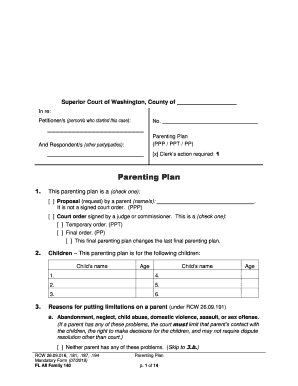
RCW 26.09.016, .181, .187, .194 Ma ndatory Form (07/201 9) FL All Family 140 Parenting Plan p. 1 of 14 Superior Court of Washington, County of In re: Petitioner/s (person/s who started this case) : And Respondent/s (other party/parties) : No. Parenting Plan (PPP / PPT / PP) [x] Clerk’s action required: 1 Parenting Plan 1. This parenting plan is a (check one): [ ] Proposal (request) by a parent (name/s): . It is not a signed court order. (PPP) [ ] Court order signed by a judge or commissioner. This is a (check one) : [ ] Temporary order. (PPT) [ ] Final order. (PP) [ ] This final parent ing plan changes the last final parenting plan. 2. Children – This parenting plan is for the following children: Child’s name Age Child’s name Age 1. 4. 2. 5. 3. 6. 3. Reasons for putting limitations on a parent (under RCW 26.09 .191) a. Abandonment, neglect, child abuse, domestic violence, assault, or sex offense. (If a parent has any of these problems, the court must limit that parent’s contact with the children, the right to make decisions for the children, and may not require dispute resolution other than court.) [ ] Neither parent has any of these problems. ( Skip to 3.b. ) RCW 26.09.016, .181, .187, .194 Ma ndatory Form (07/201 9) FL All Family 140 Parenting Plan p. 2 of 14 [ ] A parent has one or more of t hese problems as follows (check all that apply ): [ ] Abandonment – (Parent’s name): intentionally abandoned a chi ld listed in 2 for an extended time. [ ] Neglect – (Parent’s name): substantially refused to perform his/her parenting duties for a child listed in 2. [ ] Child Abuse – (Parent’s name): (or someone living in that parent’s home) abused or threatened to abuse a child. The abuse was (check all that apply): [ ] physical [ ] sexual [ ] repeated emotional abuse. [ ] Domestic Violence – (Parent’s name): (or someone living in that parent’s home) has a history of domestic violence as defined in RCW 26.50.010. [ ] Assault – (Parent’s name): (or someone living in that parent’s home) has assaulted or sexually assaulted someone causing grievous physical harm, causing fear of such harm , or resulting in a pregnancy. [ ] Sex Offense – [ ] (Par ent’s name): has been convicted of a sex offense as an adult. [ ] Someone living in (parent’s name): ’s home has been convicted as an adult or adjudicated as a juvenile of a sex offense. b. Other problems that may harm the children’s best interests. (If a parent has any of these problems, the court may limit that parent’s contact with the children and right to make decisions for the children.) [ ] Neither parent has any of these problems. ( Skip to 4. ) [ ] A parent has one or more of t hese proble ms as follows (check all that apply ): [ ] Neglect – (Parent’s name): neglected his/her parental duties towards a child listed in 2. [ ] Emotional or physical problem – (Parent’s name): has a long -term emotional or physical problem that gets in the way of his/her ability to parent. [ ] Substance Abuse – (Parent’s name): has a long -term problem with drugs, alcohol, or other substances that gets in the way of his/her ability to parent. [ ] Lack of emotional ties – (Parent’s name): has few or no emotional ties with a child listed in 2. [ ] Abusive use of conflict – (Parent’s name): uses conflict in a way that endangers or damages the psychological development of a child listed in 2. [ ] Withholding the child – (Parent’s name): has kept the o ther parent away from a child listed in 2 for a long time, without a good reason. [ ] Other (specify): RCW 26.09.016, .181, .187, .194 Ma ndatory Form (07/201 9) FL All Family 140 Parenting Plan p. 3 of 14 4. Limitations on a parent [ ] Does not apply. There are no reasons for limitations checked in 3. a. or 3. b. above. (Skip to 5.) [ ] No limitat ions despite reasons (explain why there are no limitations on a parent even though there are reasons for limitations checked in 3a. or 3. b. above) : [ ] The following limits or conditions apply to (parent’s name): (check all that apply): [ ] No con tact with the children. [ ] Limited contact as shown in the Parenting Time Schedule (sections 8 – 11 ) below. [ ] Limited contact a s follows (specify schedule, list all contact here instead of in a Parenting Time Schedule, skip sections 8 – 11 ): [ ] Supervised contact. All parenting time shall be supervised. Any costs of supervision must be paid by (name) : The supervisor shall be: [ ] a professional supervisor (name) : [ ] a non -professional supervisor (name) : The dates and times of sup ervised contact will be: [ ] as shown in the Parenting Time Schedule (sections 8 – 11 ) below. [ ] as follows (specify) : (Specific rules for supervision, if any): [ ] Other limitations or conditions during parenting time (specify) : [ ] Evaluation or treatment required. (Name): must: [ ] be evaluated for: . [ ] start (or continue) and comply with treatment: [ ] as recommended by the evaluation. [ ] as follows (specify kind of treatment and any other details): [ ] provide a copy of the evaluation and compliance reports (specify details): RCW 26.09.016, .181, .187, .194 Ma ndatory Form (07/201 9) FL All Family 140 Parenting Plan p. 4 of 14 If this parent does not follow the evaluation or treatment requirements above, then (what happens): 5. Decision -making When the children are with you, you are responsible for the m. You can make day -to-day decisions for the children when they are with you, including decisions about safety and emergency health care. Major decisions must be made as follows a. Who can make major decisions about the children? Type of Major Decisio n Joint (parents make these decisions together) Limited (only the parent named below has authority to make these decisions) School / Educational [ ] [ ] (Name): Health care (not emergency) [ ] [ ] (Name): Other: [ ] [ ] (Name): Other: [ ] [ ] (Name): Other: [ ] [ ] (Name): b. Reasons for limits on major decision -making, if any: [ ] There are no reasons to limit major decision -making. [ ] Major decision -making must be limited because one of the parents has problems as described in 3. a. above. [ ] Major decision -making should be limited because (check all that apply) : [ ] Both parents are against shared decision -making. [ ] One of the parents does not want to share decision -making and this is reasonable because of: [ ] problems as described in 3. b. above. [ ] the history of each parent’s participation in decision -making. [ ] the parents’ ability and desire to cooperate with each other in decision -making. [ ] the distance between the parents’ homes makes it hard to make timely decisions together. 6. Dispute Resolution – If you and the other parent disagree: From time to time, the parents may have disagreements about shared decisions or about what parts of this parenting plan mean. To solve disagreements about this pare nting plan, the parents will go to a dispute resolution provider or court. The court may only require a dispute resolution provider if there are no limitations in 3a . a. The parents will go to (check one): [ ] The dispute resolution provider below (befo re they may go to court): [ ] Mediation (mediator or agency name): RCW 26.09.016, .181, .187, .194 Ma ndatory Form (07/201 9) FL All Family 140 Parenting Plan p. 5 of 14 If there are domestic violence issues, you may only use mediation if the victim asks for mediation, mediation is a good fit for the situation, and the victim can bring a support person t o mediation. [ ] Arbitration (arbitrator or agency name): [ ] Counseling (counselor or agency name): If a dispute resolution provider is not named above, or if the named provider is no longer available, the parents may agree on a provider or ask the court to name one. Important! Unless there is an emergency, the parents must participate in the dispute resolution process listed above in good faith, before going to court. This section does not apply to disagreements about money or support. [ ] Co urt (without having to go to mediation, arbitration, or counseling) . (If you check this box, skip to section 7 below, do not fill out 6.b.) b. If mediation, arbitration, or counseling is required, one parent must notify the other parent by (check one): [ ] certified mail [ ] other (specify): The parents will pay for the mediation, arbitration, or counseling services as follows (check one): [ ] (Name): will pay %, (Name): will pay %. [ ] based on each parents’ Proportional Share of Income (percentage) from line 6 of the Child Support Worksheet . [ ] as decided through the dispute resolution process. What to expect in the dispute resolution process:  Preference shall be given to carrying out the parenting plan.  If you reach an agreement, it must be put into writing, signed, and both parents must get a copy.  If the court finds that you have used or frustrated the dispute resolution process without a good reason, the court can order you to pay financial sanctions (penalties) including the other parent’s legal fees.  You may go back to court if the dispute resolution process doesn’t solve the disagreement or if you disagree with the arbitrator’s decision. 7. Custodian The custodian is (name): solely for the purpose of all state and fede ral statutes which require a designation or determination of custody. Even though one parent is called the custodian, this does not change the parenting rights and responsibilities described in this plan. (Washington law generally refers to parenting time and decision -making, rather than custody. However, some state and federal laws require that one person be named the custodian. The custodian is the person with whom the children are scheduled to reside a majority of their time.) RCW 26.09.016, .181, .187, .194 Ma ndatory Form (07/201 9) FL All Family 140 Parenting Plan p. 6 of 14  Parenting Time Schedu le (Residential Provisions) Check one: [ ] Skip the parenting time schedule in sections 8 - 11 if one parent has no contact with the children other than what is described in section 4 – Limitations. The children live with (name): except as described i n section 4. [ ] Complete the parenting time schedule in sections 8 - 11 . 8. School Schedule a. Children under School -Age [ ] Does not apply. All children are school -age. [ ] The schedule for children under school -age is the same as for school -age children. [ ] Children under school -age are scheduled to live with (name): , except when they are scheduled to live with (name): on (check all that apply): [ ] WEEKENDS: [ ] every week [ ] every other week [ ] other (specify) : from (day) at : .m. to (day) at : .m. from (day) at : .m. to (day) at : .m. [ ] WEEKDAYS: [ ] every week [ ] every other week [ ] other (specify) : from (day) at : .m. to (day) at : .m. from (day) at : .m. to (day) at : .m. [ ] OTHER (specify) : [ ] Other (specify) : b. School -Age Children This schedule will apply (check one): [ ] immediately . [ ] when the youngest child enters (check one): [ ] Kindergarten [ ] 1st grade [ ] when the oldest child enters (check one): [ ] Kindergarten [ ] 1st grade [ ] Other: The children are scheduled to live with (name): , except when they are scheduled to live with (name): on (check all that apply): [ ] WEEKENDS: [ ] every week [ ] every other week [ ] other (specify) : from (day) at : .m. to (day) at : .m. RCW 26.09.016, .181, .187, .194 Ma ndatory Form (07/201 9) FL All Family 140 Parenting Plan p. 7 of 14 from (day) at : .m. to (day) at : .m. [ ] WEEKDAYS: [ ] every week [ ] every other week [ ] other (specify) : from (day) at : .m. to (day) at : .m. from (day ) at : .m. to (day) at : .m. [ ] OTHER (specify) : [ ] Other (specify) : 9. Summer Schedule Summer begins and ends [ ] according to the school calendar. [ ] as follows: . [ ] The Summer Schedule is the same as the School Schedu le. (Skip to 10 .) [ ] The Summer Schedule is the same as the School Schedule except that each parent shall spend weeks of uninterrupted vacation time with the children each summer. The parents shall confirm their vacation schedules in writing by the e nd of (date) each year. (Skip to 10 .) [ ] The Summer Schedule is different than the School Schedule. The Summer Schedule will begin the summer before: (check one) : [ ] the youngest child [ ] the oldest child [ ] each child begins (check one ): [ ] Kindergarten [ ] 1st grade [ ] Other: During the summer the children are scheduled to live with (name): , except when they are scheduled to live with (name): on (check all that apply): [ ] WEEKENDS: [ ] every week [ ] every othe r week [ ] other (specify) : from (day) at : .m. to (day) at : .m. from (day) at : .m. to (day) at : .m. [ ] WEEKDAYS: [ ] every week [ ] every other week [ ] other (specify) : from (day) at : .m. to (day) at : .m. from (day) at : .m. to (day) at : .m. [ ] OTHER (specify) : RCW 26.09.016, .181, .187, .194 Ma ndatory Form (07/201 9) FL All Family 140 Parenting Plan p. 8 of 14 10. Holiday Schedule (includes school breaks) [ ] The Holiday Schedule is the same as the School and Summer Schedules above for all holidays and school breaks. (Skip to 11 .) [ ] This is the Holiday Schedule for [ ] all children [ ] school -age children only : (Put one parent’s name in each column and fill out when the children will be with that parent for holidays and school breaks.) Holiday Children with (name) : Children with (name): Martin Luther King Jr. Day [ ] Odd Years [ ] Even Years [ ] Every Yr. [ ] Odd Years [ ] Even Years [ ] Every Yr. Begin day/time: Begin day/time: End day/time: End day/time: [ ] With the parent who has the childr en for the attached weekend [ ] Other plan: Presidents’ Day [ ] Odd Years [ ] Even Years [ ] Every Yr. [ ] Odd Years [ ] Even Years [ ] Every Yr. Begin day/time: Begin day/time: End day/time: End day/time: [ ] With the parent who has the children for the attached weekend [ ] Other plan: Mid -winter Break [ ] Odd Years [ ] Even Years [ ] Every Yr. [ ] Odd Years [ ] Even Years [ ] Every Yr. Begin day/time: Begin day/time: End day/time: End day/time: [ ] Each parent has the children for the half of break attached to his/her weekend. The children must be exchanged on Wednesday at (time): . [ ] Other plan: Spring Break [ ] Odd Years [ ] Even Years [ ] Every Yr. [ ] Odd Years [ ] Even Years [ ] Ever y Yr. Begin day/time: Begin day/time: End day/time: End day/time: [ ] Each parent has the children for the half of break attached to his/her weekend. The children must be exchanged on Wednesday at (time): . [ ] Other plan: Mother’s Day [ ] Odd Years [ ] Even Years [ ] Every Yr. [ ] Odd Years [ ] Even Years [ ] Every Yr. Begin day/time: Begin day/time: End day/time: End day/time: [ ] Other plan: RCW 26.09.016, .181, .187, .194 Ma ndatory Form (07/201 9) FL All Family 140 Parenting Plan p. 9 of 14 Holiday Children with (name) : Children with (name): Memorial Day [ ] Odd Years [ ] Even Years [ ] Every Yr. [ ] Odd Years [ ] Even Years [ ] Every Yr. Begin day/time: Begin day/time: End day/time: End day/time: [ ] With the parent who has the children for the attached weekend [ ] Other plan: Father’s Day [ ] Odd Years [ ] Even Years [ ] Every Y r. [ ] Odd Years [ ] Even Years [ ] Every Yr. Begin day/time: Begin day/time: End day/time: End day/time: [ ] Other plan: Fourth of July [ ] Odd Years [ ] Even Years [ ] Every Yr. [ ] Odd Years [ ] Even Years [ ] Every Yr. Begin day/time: Begin day/time: End day/time: End day/time: [ ] Follow the Summer Schedule in section 9. [ ] Other plan: Labor Day [ ] Odd Years [ ] Even Years [ ] Every Yr. [ ] Odd Years [ ] Even Years [ ] Every Yr. Begin day/ti me: Begin day/time: End day/time: End day/time: [ ] With the parent who has the children for the attached weekend [ ] Other plan: Thanksgiving Day / Break [ ] Odd Years [ ] Even Years [ ] Every Yr. [ ] Odd Years [ ] Even Years [ ] Every Yr. Begin day/time: Begin day/time: End day/time: End day/time: [ ] Other plan: Winter Break [ ] Odd Years [ ] Even Years [ ] Every Yr. [ ] Odd Years [ ] Even Years [ ] Every Yr. Begin day/time: Begin day/time: End d ay/time: End day/time: [ ] Other plan: RCW 26.09.016, .181, .187, .194 Ma ndatory Form (07/201 9) FL All Family 140 Parenting Plan p. 10 of 14 Holiday Children with (name) : Children with (name): Christmas Eve [ ] Odd Years [ ] Even Years [ ] Every Yr. [ ] Odd Years [ ] Even Years [ ] Every Yr. Begin day/time: Begin day/time: End day/time: End day/time: [ ] Follow the Winter Br eak schedule above. [ ] Other plan: Christmas Day [ ] Odd Years [ ] Even Years [ ] Every Yr. [ ] Odd Years [ ] Even Years [ ] Every Yr. Begin day/time: Begin day/time: End day/time: End day/time: [ ] Follow the Winter Break schedu le above. [ ] Other plan: New Year’s Eve / New Year’s Day (odd/even is based on New Year’s Eve ) [ ] Odd Years [ ] Even Years [ ] Every Yr. [ ] Odd Years [ ] Even Years [ ] Every Yr. Begin day/time: Begin day/time: End day/time: End da y/time: [ ] Follow the Winter Break schedule above. [ ] Other plan: Children’s Birthdays [ ] Odd Years [ ] Even Years [ ] Every Yr. [ ] Odd Years [ ] Even Years [ ] Every Yr. Begin day/time: Begin day/time: End day/time: End day/ time: [ ] Other plan: All three -day weekends not listed elsewhere (Federal holidays, school in -service days, etc.) [ ] The children shall spend any unspecified holiday or non -school day with the parent who has them for the attached weekend. [ ] Other plan: Other occasion important to the family: _________ [ ] Odd Years [ ] Even Years [ ] Every Yr. [ ] Odd Years [ ] Even Years [ ] Every Yr. Begin day/time: Begin day/time: End day/time: End day/time: [ ] Other plan: Ot her occasion important to the family: _________ [ ] Odd Years [ ] Even Years [ ] Every Yr. [ ] Odd Years [ ] Even Years [ ] Every Yr. Begin day/time: Begin day/time: End day/time: End day/time: [ ] Other plan: RCW 26.09.016, .181, .187, .194 Ma ndatory Form (07/201 9) FL All Family 140 Parenting Plan p. 11 of 14 11. Conflicts in Sc heduling The Holiday Schedule must be observed over all other schedules. If there are conflicts within the Holiday Schedule (check all that apply): [ ] Named holidays shall be followed before school breaks. [ ] Children’s birthdays shall be followed b efore named holidays and school breaks. [ ] Other (specify): 12. Transportation Arrangements The children will be exchanged for parenting time (picked up and dropped off) at: [ ] each parent’s home [ ] school or daycare when in session [ ] oth er location (specify) : Who is responsible for arranging transportation? [ ] The picking up parent – The parent who is about to start parenting time with the children must arrange to have the children picked up. [ ] The dropping off parent – The p arent whose parenting time is ending must arrange to have the children dropped off. Other details (if any): 13. Moving with the Children (Relocation) Anyone with majority or substantially equal residential time (at least 45 percent) who wants to move with the children must notify every other person who has court -ordered time with the children . Move to a different school district If the move is to a different school district, the relocating person must complete the form Notice of Intent to Move with Children (FL Relocate 701) and deliver it at least 60 days before the intended move. Exceptions:  If the relocating person could not reasonably have known enough information to complete the form in time to give 60 days’ notice, s/he must give notice withi n 5 days after learning the information.  If the relocating person is relocating to a domestic violence shelter or moving to avoid a clear, immediate and unreasonable risk to health or safety, notice may be delayed 21 days .  If information is protected unde r a court order or the address confidentiality program, it may be withheld from the notice.  A relocating person who believes that giving notice would put her/himself or a child at unreasonable risk of harm, may ask the court for permission to leave things out of RCW 26.09.016, .181, .187, .194 Ma ndatory Form (07/201 9) FL All Family 140 Parenting Plan p. 12 of 14 the notice or to be allowed to move without giving notice. Use form Motion to Limit Notice of Intent to Move with Children (Ex Parte) (FL Relocate 702). The Notice of Intent to Move with Children can be delivered by having someone personally serve the other party or by any form of mail that requires a return receipt. If the relocating person wants to change the Parenting Plan because of the move, s/he must deliver a proposed Parenting Plan together with the Notice . Move within the same school di strict If the move is within the same school district, the relocating person still has to let the other parent know. However, the notice does not have to be served personally or by mail with a return receipt. Notice to the other party can be made in any reasonable way. No specific form is required. Warning! If you do not notify… A relocating person who does not give the required notice may be found in contempt of court. If that happens the court can impose sanctions. Sanctions can include requiring the relocating person to bring the children back if the move has already happened, and ordering the relocating person to pay the other side’s costs and lawyer’s fees. Right to object A person who has court -ordered time with the children can object to a mov e to a different school district and/or to the relocating person’s proposed Parenting Plan . If the move is within the same school district, t he other party doesn’t have the right to object to the move, but s/he may ask to change the Parenting Plan if ther e are adequate reasons under the modification law (RCW 26.09.260). An objection is made by filing the Objection about Moving with Children and Petition about Changing a Parenting/Custody Order (Relocation) (form FL Relocate 721). File your Objection with the court and serve a copy on the relocating person and anyone else who has court -ordered time with the children. Service of the Objection must be by personal service or by mailing a copy to each person by any form of mail that requires a return receipt. The Objection must be filed and served no later than 30 days after the Notice of Intent to Move with Children was received. Right to move During the 30 days after the Notice was served, the relocating person may not move to a different school district w ith the children unless s/he has a court order allowing the move. After the 30 days, if no Objection is filed, the relocating person may move with the children without getting a court order allowing the move. After the 30 days, if an Objection has been f iled , the relocating person may move with the children pending the final hearing on the Objection unless :  The other party gets a court order saying the children cannot move, or  The other party has scheduled a hearing to take place no more than 15 days a fter the date the Objection was served on the relocating person. (However, the relocating person may ask the court for an order allowing the move even though a hearing is pending if the relocating person believes that s/he or a child is at unreasonable ri sk of harm.) The court may make a different decision about the move at a final hearing on the Objection . RCW 26.09.016, .181, .187, .194 Ma ndatory Form (07/201 9) FL All Family 140 Parenting Plan p. 13 of 14 Parenting Plan after move If the relocating person served a proposed Parenting Plan with the Notice , and if no Objection is filed within 30 days after the Notice was served (or if the parties agree):  Both parties may follow that proposed plan without being held in contempt of the Parenting Plan that was in place before the move. However, the proposed plan cannot be enforced by contempt unless it has be en approved by a court.  Either party may ask the court to approve the proposed plan. Use form Ex Parte Motion for Final Order Changing Parenting Plan – No Objection to Moving with Children (FL Relocate 706). Forms You can find forms about moving with chi ldren at:  The Washington State Courts’ website: www.courts.wa.gov/forms ,  The Administrative Office of the Courts – call: (360) 705 -5328,  Washington LawHelp: www.washingtonlawhelp.org , or  The Superior Court Clerk’s office or county law library (for a fee). (This is a summary of the law. The complete law is in RCW 26.09.430 through 26.09.480.) 14. Other 15. Proposal [ ] Does not apply. This is a court order. [ ] This is a proposed (requested) parenting plan. ( The parent/s requesting this plan must read and sign below.) I declare under penalty of perjury under the laws of the state of Washington that this plan was proposed in good faith and that the information in section 3 above is true. Parent requesting plan signs here Signed at (cit y and state) Other parent requesting plan (if agreed) signs here Signed at (city and state) 16. Court Order [ ] Does not apply. This is a proposal. [ ] This is a court order (if signed by a judge or commissioner below). Findings of Fact – Based on the pleadings and any other evidence considered: The Court adopts the statements in section 3 (Reasons for putting limitations on a parent) as its findings. [ ] The Court makes additional findings which are: [ ] contained in an order or finding s of fact entered at the same time as this Parenting Plan . RCW 26.09.016, .181, .187, .194 Ma ndatory Form (07/201 9) FL All Family 140 Parenting Plan p. 14 of 14 [ ] attached as Exhibit A as part of this Parenting Plan . [ ] other: Conclusions of Law – This Parenting Plan is in the best interest of the children. [ ] Other: Order – The parties mu st follow this Parenting Plan . Date Judge or Commissioner signs here Warning! If you don’t follow this Parenting Plan , the court may find you in contempt (RCW 26.09.160). You still have to follow this Parenting Plan even if the other parent doesn ’t. Violation of residential provisions of this order with actual knowledge of its terms is punishable by contempt of court and may be a criminal offense under RCW 9A.40.060(2) or 9A.40.070(2). Violation of this order may subject a violator to arrest. If this is a court order, the parties and/or their lawyers (and any GAL) sign below. This order (check any that apply): This order (check any that apply): [ ] is an agreement of the parties. [ ] is an agreement of the parties. [ ] is presented by me. [ ] is presented by me. [ ] may be signed by the court without notice to me. [ ] may be signed by the court without notice to me. Petitioner signs here or lawyer signs here + WSBA # Respondent signs here or lawyer signs here + WSBA # Print Nam e Date Print Name Date This order (check any that apply): This order (check any that apply): [ ] is an agreement of the parties. [ ] is an agreement of the parties. [ ] is presented by me. [ ] is presented by me. [ ] may be signed by the court without notice to me. [ ] may be signed by the court without notice to me. Other party signs here or lawyer signs here + WSBA # Other party or Guardian ad Litem signs here Print Name Date Print Name Date

Helpful advice on preparing your ‘Superior Court Of Washington County Of Courtswagov’ online

Are you fed up with the inconvenience of handling paperwork? Look no further than airSlate SignNow, the leading electronic signature solution for individuals and small to medium-sized businesses. Bid farewell to the tedious process of printing and scanning documents. With airSlate SignNow, you can effortlessly complete and sign documents online. Leverage the powerful features embedded in this user-friendly and cost-effective platform and transform your method of document management. Whether you need to authorize forms or gather electronic signatures, airSlate SignNow manages everything seamlessly, requiring only a few clicks.

Follow this comprehensive guide:

  1. Access your account or sign up for a complimentary trial of our service.
  2. Select +Create to upload a document from your device, cloud, or our template library.
  3. Open your ‘Superior Court Of Washington County Of Courtswagov’ in the editor.
  4. Click Me (Fill Out Now) to set up the document on your end.
  5. Insert and designate fillable fields for others (if needed).
  6. Proceed with the Send Invite options to solicit eSignatures from additional parties.
  7. Save, print your version, or convert it into a reusable template.

Don’t fret if you need to collaborate with your colleagues on your Superior Court Of Washington County Of Courtswagov or send it for notarization—our platform equips you with all the tools necessary to complete such tasks. Create an account with airSlate SignNow today and uplift your document management to new levels!

Here is a list of the most common customer questions. If you can’t find an answer to your question, please don’t hesitate to reach out to us.

Need help? Contact Support

The best way to complete and sign your superior court of washington county of courtswagov form

Save time on document management with airSlate SignNow and get your superior court of washington county of courtswagov form eSigned quickly from anywhere with our fully compliant eSignature tool.

How to Sign a PDF Online How to Sign a PDF Online

How to complete and sign forms online

Previously, coping with paperwork required pretty much time and effort. But with airSlate SignNow, document management is quick and simple. Our robust and user-friendly eSignature solution allows you to easily fill out and eSign your superior court of washington county of courtswagov form online from any internet-connected device.

Follow the step-by-step guidelines to eSign your superior court of washington county of courtswagov form template online:

  • 1.Sign up for a free trial with airSlate SignNow or log in to your account with password credentials or SSO authentication.
  • 2.Click Upload or Create and add a file for eSigning from your device, the cloud, or our form collection.
  • 3.Click on the document name to open it in the editor and utilize the left-side menu to complete all the blank areas appropriately.
  • 4.Put the My Signature field where you need to eSign your sample. Provide your name, draw, or import a photo of your regular signature.
  • 5.Click Save and Close to accomplish modifying your completed document.

After your superior court of washington county of courtswagov form template is ready, download it to your device, save it to the cloud, or invite other people to eSign it. With airSlate SignNow, the eSigning process only takes a couple of clicks. Use our powerful eSignature solution wherever you are to handle your paperwork successfully!


How to Sign a PDF Using Google Chrome How to Sign a PDF Using Google Chrome

How to complete and sign paperwork in Google Chrome

Completing and signing paperwork is easy with the airSlate SignNow extension for Google Chrome. Installing it to your browser is a fast and efficient way to deal with your paperwork online. Sign your superior court of washington county of courtswagov form template with a legally-binding eSignature in just a few clicks without switching between applications and tabs.

Follow the step-by-step guide to eSign your superior court of washington county of courtswagov form in Google Chrome:

  • 1.Navigate to the Chrome Web Store, find the airSlate SignNow extension for Chrome, and install it to your browser.
  • 2.Right-click on the link to a form you need to approve and choose Open in airSlate SignNow.
  • 3.Log in to your account with your password or Google/Facebook sign-in buttons. If you don’t have one, you can start a free trial.
  • 4.Use the Edit & Sign menu on the left to fill out your template, then drag and drop the My Signature option.
  • 5.Upload a photo of your handwritten signature, draw it, or simply type in your full name to eSign.
  • 6.Verify all data is correct and click Save and Close to finish editing your paperwork.

Now, you can save your superior court of washington county of courtswagov form sample to your device or cloud storage, send the copy to other people, or invite them to electronically sign your document via an email request or a protected Signing Link. The airSlate SignNow extension for Google Chrome improves your document workflows with minimum time and effort. Try airSlate SignNow today!


How to Sign a PDF in Gmail How to Sign a PDF in Gmail How to Sign a PDF in Gmail

How to fill out and sign forms in Gmail

Every time you get an email with the superior court of washington county of courtswagov form for approval, there’s no need to print and scan a document or download and re-upload it to a different tool. There’s a better solution if you use Gmail. Try the airSlate SignNow add-on to rapidly eSign any documents right from your inbox.

Follow the step-by-step guidelines to eSign your superior court of washington county of courtswagov form in Gmail:

  • 1.Navigate to the Google Workplace Marketplace and look for a airSlate SignNow add-on for Gmail.
  • 2.Set up the tool with a related button and grant the tool access to your Google account.
  • 3.Open an email with an attachment that needs approval and utilize the S sign on the right panel to launch the add-on.
  • 4.Log in to your airSlate SignNow account. Select Send to Sign to forward the document to other people for approval or click Upload to open it in the editor.
  • 5.Drop the My Signature field where you need to eSign: type, draw, or upload your signature.

This eSigning process saves efforts and only requires a few clicks. Use the airSlate SignNow add-on for Gmail to update your superior court of washington county of courtswagov form with fillable fields, sign paperwork legally, and invite other individuals to eSign them al without leaving your inbox. Enhance your signature workflows now!


How to Sign a PDF on a Mobile Device How to Sign a PDF on a Mobile Device How to Sign a PDF on a Mobile Device

How to complete and sign forms in a mobile browser

Need to rapidly complete and sign your superior court of washington county of courtswagov form on a smartphone while working on the go? airSlate SignNow can help without needing to set up extra software applications. Open our airSlate SignNow solution from any browser on your mobile device and create legally-binding electronic signatures on the go, 24/7.

Follow the step-by-step guidelines to eSign your superior court of washington county of courtswagov form in a browser:

  • 1.Open any browser on your device and go to the www.signnow.com
  • 2.Sign up for an account with a free trial or log in with your password credentials or SSO option.
  • 3.Click Upload or Create and import a file that needs to be completed from a cloud, your device, or our form library with ready-made templates.
  • 4.Open the form and complete the blank fields with tools from Edit & Sign menu on the left.
  • 5.Put the My Signature field to the sample, then enter your name, draw, or add your signature.

In a few simple clicks, your superior court of washington county of courtswagov form is completed from wherever you are. As soon as you're finished editing, you can save the file on your device, build a reusable template for it, email it to other people, or invite them eSign it. Make your documents on the go prompt and effective with airSlate SignNow!


How to Sign a PDF on iPhone How to Sign a PDF on iPhone

How to complete and sign forms on iOS

In today’s corporate environment, tasks must be done rapidly even when you’re away from your computer. With the airSlate SignNow mobile app, you can organize your paperwork and sign your superior court of washington county of courtswagov form with a legally-binding eSignature right on your iPhone or iPad. Set it up on your device to conclude contracts and manage documents from anyplace 24/7.

Follow the step-by-step guidelines to eSign your superior court of washington county of courtswagov form on iOS devices:

  • 1.Go to the App Store, search for the airSlate SignNow app by airSlate, and set it up on your device.
  • 2.Open the application, tap Create to add a form, and choose Myself.
  • 3.Opt for Signature at the bottom toolbar and simply draw your signature with a finger or stylus to eSign the sample.
  • 4.Tap Done -> Save right after signing the sample.
  • 5.Tap Save or use the Make Template option to re-use this document in the future.

This method is so simple your superior court of washington county of courtswagov form is completed and signed in a couple of taps. The airSlate SignNow app works in the cloud so all the forms on your mobile device are kept in your account and are available any time you need them. Use airSlate SignNow for iOS to improve your document management and eSignature workflows!


How to Sign a PDF on Android How to Sign a PDF on Android

How to fill out and sign documents on Android

With airSlate SignNow, it’s easy to sign your superior court of washington county of courtswagov form on the go. Install its mobile app for Android OS on your device and start improving eSignature workflows right on your smartphone or tablet.

Follow the step-by-step guide to eSign your superior court of washington county of courtswagov form on Android:

  • 1.Open Google Play, search for the airSlate SignNow application from airSlate, and install it on your device.
  • 2.Log in to your account or create it with a free trial, then add a file with a ➕ option on the bottom of you screen.
  • 3.Tap on the uploaded file and choose Open in Editor from the dropdown menu.
  • 4.Tap on Tools tab -> Signature, then draw or type your name to eSign the form. Complete blank fields with other tools on the bottom if needed.
  • 5.Utilize the ✔ key, then tap on the Save option to end up with editing.

With an intuitive interface and full compliance with primary eSignature requirements, the airSlate SignNow app is the perfect tool for signing your superior court of washington county of courtswagov form. It even operates without internet and updates all document adjustments once your internet connection is restored and the tool is synced. Fill out and eSign forms, send them for eSigning, and make re-usable templates whenever you need and from anywhere with airSlate SignNow.

Sign up and try Superior court of washington county of courtswagov form
  • Close deals faster
  • Improve productivity
  • Delight customers
  • Increase revenue
  • Save time & money
  • Reduce payment cycles

