Establishing secure connection…Loading editor…Preparing document…

Tenancy in Common Agreement

This template is fully customizable. Edit the text, fill out the fields, and send it for signature. Give it a try!
Tenancy in Common Agreement

What a Tenancy in Common Agreement Is and When It Applies

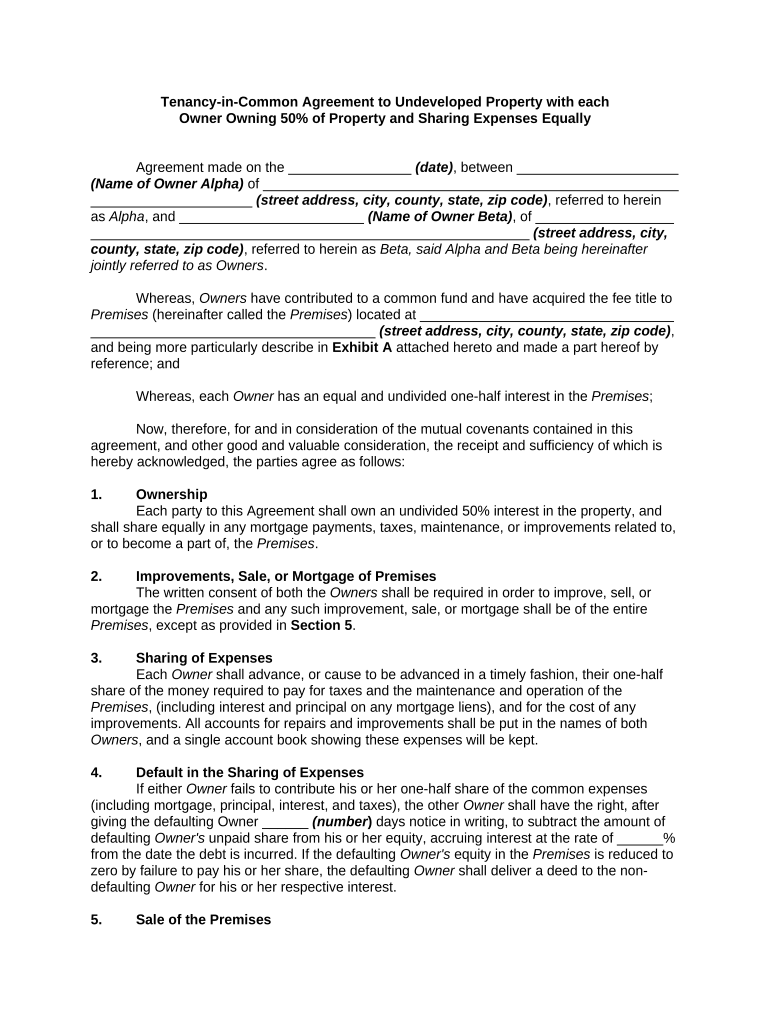
A Tenancy in Common Agreement documents shared ownership of real property where each co-owner holds an identifiable share that can be unequal and freely transferred. The agreement describes each party's ownership percentage, contribution, rights to use the property, cost and revenue allocations, and procedures for sale, partition, or buyouts. Unlike joint tenancy, tenancy in common does not create a right of survivorship; each interest passes according to the owner's will or state intestacy rules. A clear written agreement reduces disputes, clarifies tax and mortgage responsibilities, and facilitates property transfer or refinancing.

Why a Written Tenancy in Common Agreement Matters (Legal and Practical)

A written Tenancy in Common Agreement clarifies ownership percentages, expense allocation, and transfer rights while reducing litigation risk. Electronic execution is generally enforceable under the ESIGN Act (15 U.S.C. ch. 96, 2000) and the Uniform Electronic Transactions Act (UETA, 1999) where adopted; verify any state-specific exceptions such as wills or certain court filings.

Why a Written Tenancy in Common Agreement Matters (Legal and Practical)

Typical Parties and Professionals Involved

Involve counsel or title professionals when drafting complex provisions, allocating tax items, or preparing for recording and financing.

  • Individual co-owners sharing title and expenses, often family members or private investors.
  • Real estate investors and syndicates allocating unequal ownership percentages and rental revenue.
  • Attorneys, title companies, and lenders who review, record, or rely on the ownership terms.

Core Sections to Include in a Professional Agreement

A complete Tenancy in Common Agreement covers ownership details, financial responsibilities, use and occupancy rules, transfer mechanics, dispute resolution, and administrative procedures.

Parties and Interests

Identify each owner by full legal name and set the exact ownership percentage or fractional interest for the record and tax reporting purposes.
Property Description

Provide the full legal property description, address, and parcel ID to avoid ambiguity when recording the deed or handling title issues.

Contributions & Expenses

Specify initial capital contributions, ongoing expense allocation (taxes, insurance, maintenance), and the method for reimbursing advances or capital calls.

Use and Occupancy

Define permitted uses, occupancy rules, short-term rental policies if any, and procedures for resolving conflicting uses or scheduling.

Transfers and Buyouts

Describe rights to sell, right of first refusal or consent thresholds, valuation method for buyouts, and transfer notice requirements.

Dispute Resolution

Include mediation and arbitration clauses, partition waiver or consent terms, and the governing law to limit costly litigation.

Essential Information Required in the Agreement

Owner Name: Full legal name
Ownership Share: Exact percentage
Property ID: Legal description
Effective Date: MM/DD/YYYY
Consideration: Cash or noncash value
Signatures: Signed and dated

Step-by-Step: Completing the Agreement

Follow these steps to prepare, execute, and record a Tenancy in Common Agreement.

  • 01
    Gather Records: Collect deed and title information
  • 02
    Draft Terms: Specify shares, expenses, and transfer rules
  • 03
    Review with Counsel: Confirm tax and recording effects
  • 04
    Sign and Record: Execute, notarize if required, and record

How to Configure an Electronic Signing Workflow

Set up a repeatable eSigning workflow for consistent execution and record retention.

Field Configuration
Signer Order Simultaneous or sequential signing
Authentication Email + SMS or stronger as needed
Template Settings Pre-fill owner fields and required checks
Audit Trail Enable timestamps and IP logging

Where to Send and How to File the Final Agreement

After execution, follow these routing steps to ensure the agreement is effective and discoverable.

  • Deliver Copies: Provide each owner an executed copy
  • Record Deed: Record deed and any amendment as required
  • Notify Lenders: Inform mortgage holders if relevant
  • Store Records: Keep executed PDF and audit trail

Digital Signing Considerations and Platform Needs

Ensure the platform complies with ESIGN and UETA and supports secure storage and export of the signed record and audit trail.

  • File Formats: PDF and DOCX support
  • Integrations: CRM and cloud storage connectivity
  • Authentication: Email, SMS, or KBA options

Timing and Recording Expectations

Record and communicate key actions promptly to protect ownership rights and preserve priority with respect to third parties.

Recording Window:

Record deed within days to weeks

Mortgage Notification:

Notify lender immediately if required

Tax Reporting:

Update for property tax and reporting

Title Insurance:

Order endorsement or update promptly

Amendments:

Execute and record amendments quickly

Common Errors to Avoid When Preparing the Agreement

  • Failing to state exact ownership percentages, creating ambiguity and tax disputes later.
  • Using informal property descriptions rather than the recorded legal description for recording.
  • Omitting transfer mechanics or buyout formulas, which often leads to litigation or partition actions.
  • Neglecting to update mortgage lenders and title insurance, risking lien priority problems.

Potential Legal and Financial Risks

Unclear Shares: Title disputes
Failure to Record: Priority risk
Tax Misreporting: Backup withholding
Partition Action: Forced sale
Invalid Signatures: Unenforceable agreement
Mortgage Defaults: Acceleration risk

Real-world Examples of Electronic Execution and Recordkeeping

These brief examples show how organizations completed property transactions and managed execution at scale.

Martin Properties

Small property manager executed tenancy documents online to close co-ownership faster.

  • Used mobile and offline signing options for field agents.
  • Resulted in complete, auditable records accessible to owners and counsel for title and refinance processes.

Optica Ventures LLC

Investment group standardized a tenancy template for multiple co-owned assets.

  • Templates reduced drafting time between partners.
  • Standardization improved consistency across deals and simplified title company review when recording deeds.

How Tenancy in Common Compares with Other Co-Ownership Forms

Compare tenancy in common to common alternatives to select the right ownership structure for tax, transferability, and survivorship goals.

Criteria Tenancy in Common Joint Tenancy Tenancy by Entirety
Right of Survivorship yes (married only)
Transferability freely transferable severance may break jt generally restricted
Use for Investors less common
Estate Passing by will/intestacy passes to surviving joint tenants passes to spouse

eSignature Vendor Comparison for Executing Tenancy in Common Agreements

Compare common vendor price points and core capabilities when selecting an eSignature provider for real property agreements; signNow is listed first per vendor order rules.

signNow DocuSign Adobe Sign PandaDoc HelloSign
Starting Price $8/user/mo $15/user/mo $14/user/mo $19/user/mo $15/user/mo
Free Trial 7-day free trial Varies by plan Varies by plan Varies by plan Varies by plan
Bulk Send Yes Yes Yes Yes No
Audit Trail Yes Yes Yes Yes Yes
HIPAA Compliant Yes Yes Yes No No

Frequently Asked Questions About Tenancy in Common Agreements

Answers to common execution, recording, and dispute questions for Tenancy in Common Agreements.


Need help? Contact support

be ready to get more
Join over 28 million airSlate SignNow users