Establishing secure connection…Loading editor…Preparing document…

Vermont Emancipation Form

This template is fully customizable. Edit the text, fill out the fields, and send it for signature. Give it a try!
Vermont Emancipation Form

What the Vermont Emancipation Form Is and when it’s used

The Vermont Emancipation Form is a court petition used to request that a family or probate court recognize a minor as legally independent from parental control. The form typically asks for the minor's identifying information, factual grounds for emancipation, evidence of financial self-sufficiency or safe living arrangements, and a proposed order. Filing triggers court review and may require notice to parents or guardians, a hearing, and entry of a written order. Electronic signatures and submissions are generally accepted when they meet federal and state eSignature rules such as the ESIGN Act and applicable UETA provisions.

Why this form matters for minors, families, and service providers

A properly completed Vermont Emancipation Form documents a minor's request for legal independence, clarifies responsibilities for support and decisionmaking, and creates a formal court record that third parties can rely on.

Why this form matters for minors, families, and service providers

Who commonly prepares or files an emancipation petition

Access to accurate forms and clear instructions reduces filing errors and supports timely review by the presiding judge.

  • Minor petitioners pursuing a declaration of independence from parents or guardians.
  • Parents, guardians, or attorneys preparing supporting affidavits and notices.
  • Social workers, school officials, or legal aid staff assisting documentation and evidence gathering.

Typical signers and their roles

Minor Petitioner

A person under 18 who files the petition. The narrative should describe maturity, living arrangements, income source, and reasons for emancipation in detail to assist judicial evaluation and to establish intent and capacity.

Respondent Guardian

A parent or guardian named on the petition who receives notice and may respond. Their participation and any consent or objection are material to the court’s assessment of the minor’s best interests and parental responsibilities.

Primary parts of a professional Vermont Emancipation Form

A complete petition organizes identification, factual grounds, supporting evidence, notice details, proposed orders, and signature blocks so the court can evaluate the case efficiently.

Caption

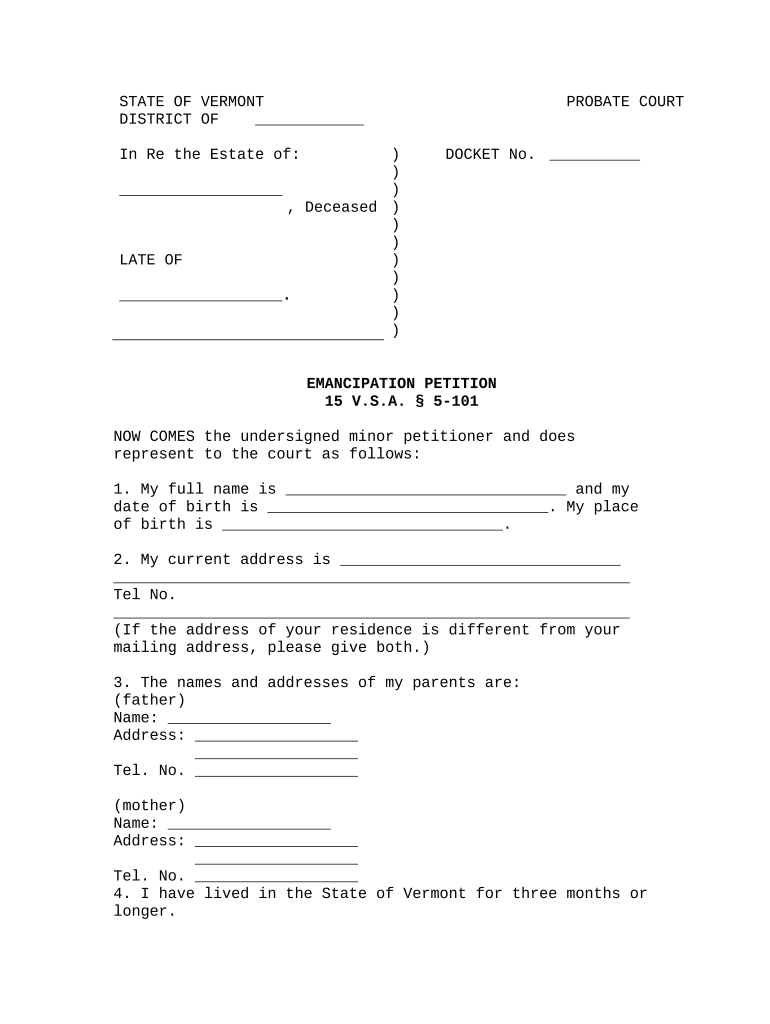
Court name and case caption listing petitioner, respondents, and docket area; ensures correct jurisdiction and that the clerk assigns a case number for tracking and service.
Petitioner Details

Minor's full legal name, date of birth, current address, contact information, and any prior case numbers or guardianship records that clarify identity and prior court interactions.

Grounds Stated

A clear, factual statement of reasons for emancipation such as living independently, financial self-sufficiency, or marriage/military service when applicable under state practice.

Supporting Evidence

Affidavits, pay stubs, lease agreements, school records, or social services reports attached to substantiate claims of independence and stable living arrangements.

Notice & Service

Declaration of how and when parents or guardians were served, plus any required consent forms or proof of attempted notice when actual service is not possible.

Relief Requested

Specific orders sought such as termination of parental control, authority to contract, or entitlement to public benefits; proposed effective date for the emancipation.

Required data fields typically found on the form

Petitioner Name: Full legal name
Date of Birth: MM/DD/YYYY format
Current Address: Street, city, state, ZIP
Parental Contacts: Names and addresses
Grounds Summary: Concise factual statement
Signature Block: Signature and date required

Step-by-step: completing the Vermont Emancipation Form

Follow these sequential steps to prepare a complete petition and supporting packet suitable for court filing and judicial review.

  • 01
    Collect IDs: Gather government ID and birth certificate
  • 02
    Write Grounds: Draft a clear factual statement of independence
  • 03
    Attach Proof: Include pay stubs, lease, or affidavits
  • 04
    File & Serve: Submit to court and serve respondents

Typical electronic workflow settings for the petition

Configure the online packet to mirror court filing and service requirements for reliable eSubmission and tracking.

Field Configuration
Routing Order Petitioner → Attorney → Court clerk
Authentication Method Email link or SMS code
Attachments PDF exhibits, labelled
Notifications Automatic signer and clerk alerts

Where to file and how submissions are routed

Emancipation petitions are typically filed with the county family or probate court; follow local clerk procedures for filing, service, and hearing scheduling.

  • Prepare Packet: Assemble petition, exhibits, and proposed order
  • File With Clerk: Submit at clerk's office or electronic filing portal
  • Serve Parties: Provide notice to parents or guardians per court rules
  • Attend Hearing: Appear or submit evidence as directed

Sharing, signing, and eSubmission options

Use secure transfer and keep a copy of the certificate of completion and any notarization records for the court file.

  • Document Formats: PDF and DOCX supported
  • Signing Modes: Email link, in-person, or RON
  • Integrations: Works with common cloud storage

Principal risks and legal consequences of errors

Dismissal Risk: Incomplete petitions may be dismissed
Delay in Relief: Missing documents prolong hearings
Perjury Exposure: False statements can carry penalties
Benefit Disruption: Improper orders can affect entitlements
Service Failures: Incorrect service may void proceedings
Privacy Breach: Improper disclosure of sensitive data

Common mistakes when preparing an emancipation petition

  • Failing to provide proof of independent income or a stable residence, which leaves the petition unsupported and vulnerable to denial.
  • Not correctly serving parents or guardians according to court rules, resulting in continuances or dismissal for improper notice.
  • Submitting unsigned or improperly dated affidavits, which can render key evidence inadmissible at a hearing.
  • Relying solely on conclusory statements rather than documentary exhibits such as leases, pay stubs, or school records.

Typical timing and scheduling expectations

Timing varies with local court caseload, service requirements, and whether contested matters require additional hearings.

Filing Acceptance:

Clerk reviews and accepts or returns within days

Service Window:

Respondents typically must be served before hearing

Hearing Schedule:

Courts commonly set hearings 30–90 days after filing

Evidence Deadline:

Exhibits often due several days before hearing

Order Entry:

Judge issues written order after decision

Practical tips for accurate, efficient completion

Follow these recommendations to reduce friction and improve the chance of acceptance at initial filing.

Use a clear facts-first narrative
Draft a chronology showing living arrangements, income, and maturity. Present facts chronologically with exhibits tied to specific statements so judges can evaluate self-sufficiency without ambiguity.
Label & paginate exhibits
Attach exhibits with clear labels and page numbers and reference them in the petition. Judges and clerks rely on exhibit labels to match evidence to assertions during review and hearing.
Confirm service rules
Verify local court rules for how service must be effected and proof of service format. An incorrect proof of service is a common procedural reason for case delay or dismissal.
Keep signed originals
Retain signed originals and secure copies of electronic certificates of completion and any notarial records for the court file and future verification.

Comparing eSignature vendors for completing and submitting the form

Overview of typical plan features and pricing to help choose an eSignature provider for form completion and secure submission.

signNow DocuSign Adobe Sign PandaDoc HelloSign
Starting Price $8/user/mo $15/user/mo $14/user/mo $19/user/mo $15/user/mo
Free Trial 7-day free trial Varies by plan Varies by plan Varies by plan Varies by plan
Bulk Send Yes (Premium) Yes (certain plans) Yes (enterprise) Yes (enterprise) Varies
Audit Trail Yes Yes Yes Yes Yes
HIPAA Compliant Yes (BAA available) Varies by plan Varies by plan Varies by plan Varies by plan
Envelope Cap No cap 100 envelopes/user/year Varies by plan Varies by plan Varies by plan

Frequently asked questions about completing the Vermont Emancipation Form

Answers to common procedural, evidentiary, and technical questions encountered when preparing or eSigning emancipation petitions.


Need help? Contact support

be ready to get more
Join over 28 million airSlate SignNow users