Establishing secure connection… Loading editor… Preparing document…
Navigation

Fill and Sign the Worksheet Form Ud 83
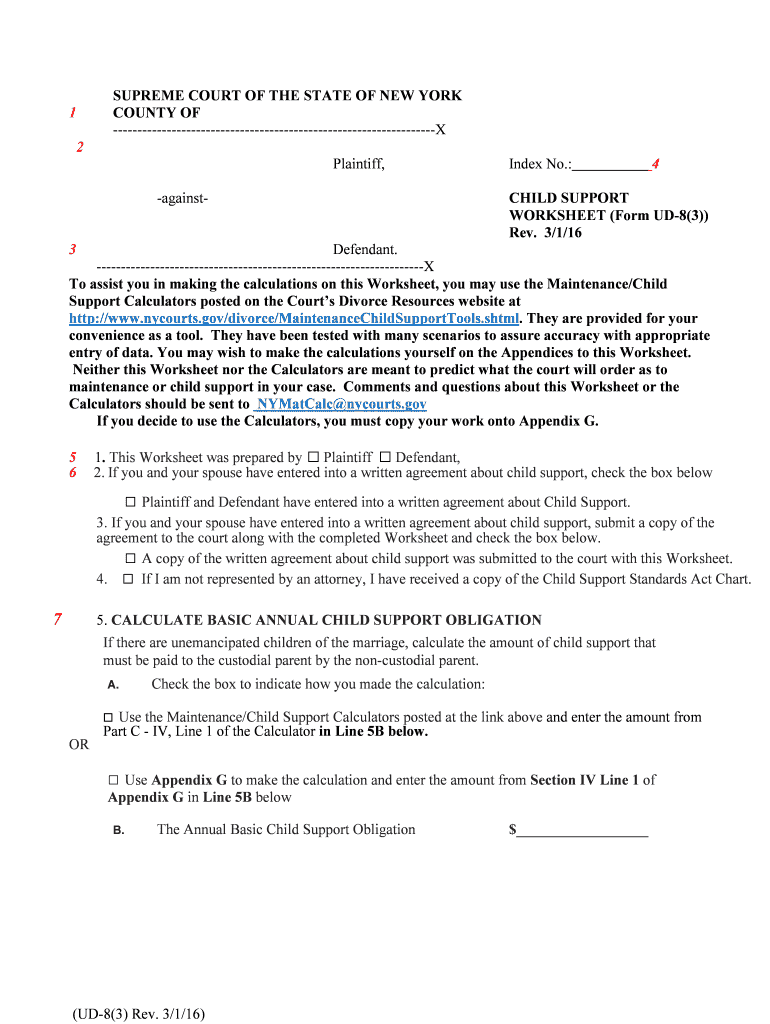
Fill and Sign the Worksheet Form Ud 83

How it works

Open the document and fill out all its fields.
Apply your legally-binding eSignature.
Save and invite other recipients to sign it.

Rate template

4.8
56 votes
(UD-8(3) Rev. 3/1/16) SUPREME COURT OF THE STATE OF NEW YORK 1 COUNTY OF ------------------------------------------------------------------X 2 Plaintiff, Index No.: 4 -against- CHILD SUPPORT WORKSHEET (Form UD-8(3)) Rev. 3/1/16 3 Defendant. -------------------------------------------------------------------X To assist you in making the calculations on this Worksheet, you may use the Maintenance/Child Support Calculators posted on the Court’s Divorce Resources website at http://www.nycourts.gov/divorce/MaintenanceChildSupportTools.shtml. They are provided for your convenience as a tool. They have been tested with many scenarios to assure accuracy with appropriate entry of data. You may wish to make the calculations yourself on the Appendices to this Worksheet. Neither this Worksheet nor the Calculators are meant to predict what the court will order as to maintenance or child support in your case. Comments and questions about this Worksheet or the Calculators should be sent to NYMatCalc@nycourts.gov If you decide to use the Calculators, you must copy your work onto Appendix G. 5 1. This Worksheet was prepared by ☐ Plaintiff ☐ Defendant, 6 2. If you and your spouse have entered into a written agreement about child support, check the box below ☐ Plaintiff and Defendant have entered into a written agreement about Child Support. 3. If you and your spouse have entered into a written agreement about child support, submit a copy of the agreement to the court along with the completed Worksheet and check the box below. ☐ A copy of the written agreement about child support was submitted to the court with this Worksheet. 4. ☐ If I am not represented by an attorney, I have received a copy of the Child Support Standards Act Chart. 7 5. CALCULATE BASIC ANNUAL CHILD SUPPORT OBLIGATION If there are unemancipated children of the marriage, calculate the amount of child support that must be paid to the custodial parent by the non-custodial parent. A. Check the box to indicate how you made the calculation: ☐ Use the Maintenance/Child Support Calculators posted at the link above and enter the amount from Part C - IV, Line 1 of the Calculator in Line 5B below. OR □ Use Appendix G to make the calculation and enter the amount from Section IV Line 1 of Appendix G in Line 5B below B. The Annual Basic Child Support Obligation $__________________ (UD-8(3) Rev. 3/1/16) 8 6. If you believe the Annual Basic Child Support Obligation is unjust and should be changed,1 list the factors you would like the Court to consider in its decision, after reviewing the 10 child support adjustment factors in Appendix F. _________________________________________________________________________________________________________________________________________________________________________________________________________________________________________________________________________________________________________________________________________________________________________________________________________________________ __________________________________________________________________________________ Attach an additional page if needed and check the box below: Additional Page Attached □ 9 7. If you would like the Court to award child support on Combined Parental Income in excess of $143,000, please list the factors you would like the Court to consider in its decision, after reviewing the 10 child support adjustment factors in Appendix F. 2 _________________________________________________________________________________________________________________________________________________________________________________________________________________________________________________________________________________________________________________________________________________________________________________________________________________________ Attach an additional page if needed and check the box below: Additional Page Attached □ 10 8. I have carefully read this statement and attest that it is true and accurate to the best of my knowledge. ___________________________________ Signature ☐Plaintiff ☐Defendant _______________________________________ Subscribed and Sworn to print or type name before me on Notary Public 1 If a party believes that NCP’s Annual Child Support Obligation is unjust or inappropriate, the party can ask the Court to order the NCP to pay an adjusted amount after considering the 10 child support adjustment factors. The 10 child support adjustment factors pursuant to DRL §240(1 -b) (f) are listed on Appendix F. . 2 If the Combined Parental Income exceeds $143,000, the Court may award an additional amount of child support. In making such decision, the Court will consider the 10 child support adjustment factors and/or the child support percentages as shown for information only on Appendix G Section I lines 9- 9c and on Part C- I line 8 of the Calculators. (UD-8(3) Rev. 3/1/16) SEE APPENDICES F AND G ATTACHED APPENDIX F. 10 Child Support Adjustment Factors Where Income Exceeds $143,000 or When Considering Adjustment of Award (see DRL 240(1-b)(f)) APPENDIX G. Calculation of Annual Basic Child Support Obligation A P P E N D I X F Ch. 567 of the laws of 1989 APPENDIX F 10 CHILD SUPPORT ADJUSTMENT FACTORS PURSUANT TO DRL §240(B-1)(F) FOR ADJUSTMENT OF AWARD OR WHERE COMBINED PARENTAL INCOME EXCEEDS $143,000 1. The financial resources of the custodial and non-custodial parent, and those of the child; 2. The physical and emotional health of the child and his/her special needs and aptitudes; 3. The standard of living the child would have enjoyed had the marriage or household not been dissolved; 4. The tax consequences to the parties; 5. The non-monetary contributions that the parents will make toward the care and well-being of the child; 6. The educational needs of either parent; 7. A determination that the gross income of one parent is substantially less than the other parent's gross income; 8. The needs of the children of the non-custodial parent for whom the non-custodial parent is providing support who are not subject to the instant action and whose support has not been deducted from income pursuant to subclause (D) of clause (vii) of subparagraph five of paragraph (b) of this subdivision, and the financial resources of any person obligated to support such children, provided, however, that this factor may apply only if the resources available to support such Children are less than the resources available to support the children who are subject to the instant action; 9. Provided that the child is not on public assistance (i) extraordinary expenses incurred by the non- custodial parent in exercising visitation, or (ii) expenses incurred by the non-custodial parent in extended visitation provided that the custodial parent's expenses are substantially reduced as a result thereof; and 10. Any other factors the court determines are relevant in each case, the court shall order the non- custodial parent to pay his or her pro rata share of the basic child support obligation, and may order the non-custodial parent to pay an amount pursuant to paragraph (e) of this subdivision. A P P E N D I X G 1 of 5 EFF.RRev. 3/1/16 (CH. 269, and CH. 387, L. 2015) APPENDIX G CALCULATION OF ANNUAL BASIC CHILD SUPPORT OBLIGATION I. ADJUST FOR MAINTENANCE AND COMPUTE BASIC CHILD SUPPORT BEFORE LOW INCOME ADJUSTMENT OR ADD-ONS 1. Enter the amount of the guideline award of maintenance on Income of Maintenance Payor up to $178,000 from Line 3B of Maintenance Guidelines Worksheet Form UD-8(2); OR, if you have a written agreement a s t o m a i n t e n a n c e w i t h y o u r s p o u s e , e n t e r t h e a g r e e d a m o u n t i n s t e a d ( a n d p r o v i d e t h e a g re e m e n t t o t h e c o u r t t o p r o v e t h e c o r r e c t a m o u n t ) . N o t e : i f n e i t h e r p a r t y s e e k s m a i n t e n a n c e , e n t e r z e r o i n s t e a d … … … … … … … $ 2. Net Annual Income of Party with lower income, adjusted for Maintenance (Line 1 above plus Line 1A or 1B of Annual Income Worksheet Form UD-8(1), whichever is lower)……………………………………………………………. $ 3. Net Annual Income of Party with higher income adjusted for Maintenance (Line 1A or 1B of Annual Income Worksheet Form UD-8(1), whichever is higher, m i n u s l i n e 1 a b o v e ). . . . … … … … … … … … … … … … … … … … … … . .$ 4.Combined Parental Income adjusted for Maintenance (Total 2 plus 3) . . … … … … … … … … … … … … … … … … … $ 5.Determine whether the Non-Custodial parent (NCP) is the party with the higher or lower income and enter the Income of the NCP from Line 2 or 3, whichever applies . . . . . . . . . . . . . . . . . . . . . . . . . . . . . $ . . . . . . . . . ALSO ENTER THIS AMOUNT IN Section II, Line 1 5a. Enter the NCP’s Percentage Share of Combined Parental Income . . . . . . % Note: Divide Line 5 by Line 4 Note: The percentage share is sometimes referred to as the “pro rata share.” You will use this same percentage for the NCP’s share of Mandatory Add-on Expenses in Section III below. 5b. Enter the CP’s Percentage Share of Combined Parental Income. . . . . . . . _............. % Note: Divide Custodial Parent (“CP”)’s Income (from Line 2 or Line 3, whichever applies), by Line 4 Note: The percentage share is sometimes referred to as the “pro rata share.” You will use this same percentage for the CP’s share of Mandatory Health insurance Expenses in Section III below 6. Enter the percentage that applies based on the number of children . . . . . . % % 1 child =17%; 2 children =25%; 3 children =29%; 4 children =31%; 5 children= 35% (minimum) 7. Multiply the percentage in Line 6 by Combined Parental Income from Line 4, but only up to $143,000 of Combined Parental Income . . . . . . . . $ This is the Combined Child Support on Combined Income up to $143,000 Example: If Combined Parental Income in Line 4 is $150,000, and if there are 2 children, multiply $143,000 by 25%. A P P E N D I X G 2 of 5 EFF.RRev. 3/1/16 (CH. 269, and CH. 387, L. 2015) 8. Multiply amount in Line 7 by percentage in Line 5a . . . . . . . . . . . . . . . $ This is the NCP’s Annual Percentage Share of Child Support on Combined Parental Income up to and including $143,000. ALSO ENTER THIS AMOUNT IN SECTION II, Line 2 NCP’S ANNUAL BASIC PAYMENT will be the total of Line 8 plus any possible increase at the court’s discretion after consideration of the 10 child support adjustment factors and /or the child support percentage for child support on combined parental income in excess of $143,000, if any. This is the amount the NCP must pay to the CP for all of the children’s costs and expenses, before possible low income adjustment (See Section II), Add On Ex- penses (see Section III), and possible adjustment at the Court’s discretion if the Court finds such amount to be unjust and inappropriate based on consideration of the 10 child support adjustment factors (See Appendix F). Lines 9-9c below are for information only and are not to be included in the totals in this worksheet. 9. Compute Child Support on Combined Parental Income Above $143,000, if any. If there is none, skip to Section II below. 9a. If there is Combined Parental Income above $143,000, enter the amount of such Income you asking the Court to use for child support. . . . . . . . . . . . . . . $ 9b. Multiply amount in Line 9a by percentage in Line 6 This is Combined Child Support on Income above $143,000 you are asking the court to consider for Child Support . . . . . . . . . . . . . . . . . . . . . . . . $ 9c. Multiply Line 9b by the percentage in Line 5a This is the NCP’s Annual Percentage Share of Income Above $143,000 that you are asking the court to consider for Child Support . . . . . . . . . . . . . . $ A P P E N D I X G 3 of 5 EFF.RRev. 3/1/16 (CH. 269, and CH. 387, L. 2015) II. DETERMINE WHETHER LOW INCOME EXEMPTION APPLIES 1. NCP’s Annual Income (Line 5 of Section I) . . . . . . . . . . . . . . . . . . . . . $ 2. Basic Child Support Obligation (Line 8 of Section I) . . . . . . . . . . . . . . . $ 3. Subtract Line 2 from Line 1 . . . . . . . . . . . . . . . . . . . . . . . . . . . . . . . $ This is the NCP’s Annual Income after the Basic Child Support Obligation . . . . . . . . . . . . . . . . . . . . . . . . . . . . . . . . . . . . . . . . . . $ If Line 3 is less than the Self-Support Reserve (SSR) of $16,038, there will be a low income adjustment. If Line 3 is less than the SSR of $16,038 but greater than $11,880 (poverty level), child support shall be the greater of $600 or the difference between NCP Income and the SSR of $16,038. Proceed to Line 4a to compute the difference. Enter the greater of $600 or the difference in Line 4b. (Note: Add-on expenses may apply in the Court's discretion). If Line 3 is equal to or greater than the Self-Support Reserve (SSR) of $16,038, there will be no low income adjustment. Skip the rest of this section and proceed to Section III below. If Line 3 is less than $11,880 (the poverty level), the Basic Child Support shall be $300 1; Enter $300 in Line 4b below. Add on Expenses will not apply. 4a. NCP Income minus SSR: Subtract $16,038 from amount in Line 1. . . . . $ 4b. Enter the Basic Child Support Obligation with Low Income Exemption if applicable . . . . . . . . . . . . . . . . . . . . . . . . . . . . . . . . . . $ In Line 4b, enter $300 if Line 3 is less than $11,880. ALSO ENTER THIS AMOUNT ON LINE 5B at page 2 of the Worksheet. Skip Section III. OR In Line 4b, enter the greater of $600 and Line 4a, if Line 3 is greater than $11,880 but less than $16,038. Then proceed to Section III. OR In Line 4b, enter amount from Line 2 if Line 3 is equal to or greater than $16,038. Then Proceed to Section III. 1 However, if the Court finds such amount to be unjust and inappropriate, based on the factors in DRL§ 240 (1-b)(f), the Court can order the NCP to pay less than $300 per year. A P P E N D I X G 4 of 5 EFF.RRev. 3/1/16 (CH. 269, and CH. 387, L. 2015) III. ADD-ON EXPENSES (SKIP THIS SECTION IF THE BASIC CHILD SUPPORT OBLIGATION WITH LOW INCOME EXEMPTION IS $300) IF LINE 3 of SECTION II IS LESS THAN THE SSR BUT GREATER THAN THE POVERTY LEVEL, THE COURT HAS DISCRETION WHETHER OR NOT TO AWARD THE MANDATORY ADD ON EXPENSES (see DRL 240(1-b)(d)). A. Mandatory Child Care Expenses 1. Enter annual cost of child care (child care costs from custodial parent's working, or receiving elementary, secondary or higher education or vocational training leading to employment. ) . . . . . . . . . . . . . . . . . . . . . . . . . . . . . . . . . . . . . . $ 2. NCP’s Percentage Share of Child Care Expenses (from Line 5a of Section I) % 3. NCP’s Dollar Share of Child Care Expenses (multiply Line 1 x line 2) . . . . $ B. Mandatory Health Expenses (health insurance premiums and future unreimbursed health-related expenses) 4a. NCP's % share of health insurance premiums and future unreimbursed health-related expense . . . . . . . . . . . . . . . . . . . . . . . . . . . . . . . . . . . % 4b. CP's % share of health insurance premiums and future unreimbursed health-related expense . . . . . . . . . . . . . . . . . . . . . . . . . . . . . . . . . . % 5. Annual cost of health insurance for the children . . . . . . . . . . . . . . . . . . $ 6. Does the NCP provide the Health Insurance? . . . . . . . . . . . . . . . . YES NO 6a. If No, NCP’s dollar share of Health Insurance (added to the Basic Child Support Obligation) (multiply Line 4a x line 5) . . $ 6b. If yes, CP’s dollar Share of Health Insurance (deducted from Basic Child Support Obligation)(multiply Line 4b x line 5). . $ 7. Health Care Adjustment (Add amount from Line 6a or subtract amount from Line 6b, whichever applies) . . . . . . . . . . . . . . . . . . . . . . . . . . . . . $ 8. Total Mandatory Add-On Expenses (Total Lines 3 and 7) . . . . . . . . . . . $ 9. For Information Only, (not to add to the totals in this Worksheet), enter the total Discretionary Expenses for Child Care and Education if you are asking the Court to consider awarding .t h e m* * . . . . . ..$___________ ** Note: In addition to Mandatory Add-On Expenses in A and B above, the Court may determine and apportion additional Discretionary Expenses for child care expenses, and additional Discretionary Expenses for education. A P P E N D I X G 5 of 5 EFF.RRev. 3/1/16 (CH. 269, and CH. 387, L. 2015) IV. BASIC ANNUAL CHILD SUPPORT OBLIGATION* Add Line 4b of Section II and Line 8 of Section III, BUT IF LINE 3 of SECTION II IS LESS THAN THE SSR BUT GREATER THAN THE POVERTY LEVEL (the “SSR Adjustment”) KEEP IN MIND THAT THE TOTAL MAY BE LOWER AFTER THE COURT DECIDES WHETHER TO AWARD THE ADD-ON EXPENSES. NCP’s Basic Child Support Obligation Adjusted for low income from Line 4b of Section II $_________________ NCP’s Total Share of Mandatory Child Care Expenses from Line 3 of Section III $____________________ NOTE: Leave this blank for the Court to fill in if there is an SSR Adjustment NCP’s Total Share of Mandatory Health Insurance Premiums for the Children from Line 7 of Section III $_________________ NOTE: Leave this blank for the Court to fill in if there is an SSR Adjustment Total Line 1 Section IV ……………………………… $____________________ This is the NCP’s Annual Basic Payment Adjusted for Low Income If any, Including Add On Expenses and Health Insurance Adjustment, if applicable ENTER THIS AMOUNT ON LINE 5B of the Worksheet * Note: The Basic Annual Child Support Obligation will also include whatever the Court may order the NCP to pay in child support on combined parental income above $143,000, if any, after considering the 10 child support adjustment factors and/or the child support percentage. .

Helpful advice on finalizing your ‘Worksheet Form Ud 83’ online

Are you fed up with the inconvenience of handling paperwork? Look no further than airSlate SignNow, the premier electronic signature solution for individuals and small to medium-sized businesses. Bid farewell to the laborious tasks of printing and scanning documents. With airSlate SignNow, you can easily complete and sign documents online. Take advantage of the powerful functionalities included in this user-friendly and affordable platform and transform your document administration. Whether you need to authorize forms or gather electronic signatures, airSlate SignNow manages everything seamlessly with just a few clicks.

Adhere to this detailed guide:

  1. Access your account or initiate a free trial with our service.
  2. Click +Create to upload a file from your device, cloud storage, or our templates.
  3. Open your ‘Worksheet Form Ud 83’ in the editor.
  4. Click Me (Fill Out Now) to fill out the form on your end.
  5. Add and assign fillable fields for additional participants (if needed).
  6. Proceed with the Send Invite options to solicit eSignatures from others.
  7. Download, print your copy, or transform it into a reusable template.

No need to fret if you wish to collaborate with your colleagues on your Worksheet Form Ud 83 or send it for notarization—our platform provides everything you need to complete such tasks. Sign up with airSlate SignNow today and take your document management to the next level!

Here is a list of the most common customer questions. If you can’t find an answer to your question, please don’t hesitate to reach out to us.

Need help? Contact Support
Worksheet form ud 83 template
Worksheet form ud 83 pdf
Worksheet form ud 83 ny court
Worksheet form ud 83 online
Child support Worksheet B
Maintenance Guidelines Worksheet
ud-8(2)
UD 8 1
FORM UD-8(2)
Form UD-8(1)
NYS child support modification Form PDF
Temporary Spousal Maintenance Guidelines Calculator

The best way to complete and sign your worksheet form ud 83

Save time on document management with airSlate SignNow and get your worksheet form ud 83 eSigned quickly from anywhere with our fully compliant eSignature tool.

How to Sign a PDF Online How to Sign a PDF Online

How to complete and sign documents online

In the past, dealing with paperwork took pretty much time and effort. But with airSlate SignNow, document management is quick and easy. Our robust and user-friendly eSignature solution enables you to effortlessly complete and eSign your worksheet form ud 83 online from any internet-connected device.

Follow the step-by-step guide to eSign your worksheet form ud 83 template online:

  • 1.Sign up for a free trial with airSlate SignNow or log in to your account with password credentials or SSO authentication.
  • 2.Click Upload or Create and import a file for eSigning from your device, the cloud, or our form library.
  • 3.Click on the document name to open it in the editor and utilize the left-side menu to complete all the empty fields properly.
  • 4.Put the My Signature field where you need to approve your form. Provide your name, draw, or import a picture of your handwritten signature.
  • 5.Click Save and Close to finish modifying your completed form.

Once your worksheet form ud 83 template is ready, download it to your device, export it to the cloud, or invite other people to electronically sign it. With airSlate SignNow, the eSigning process only takes a few clicks. Use our powerful eSignature solution wherever you are to handle your paperwork productively!


How to Sign a PDF Using Google Chrome How to Sign a PDF Using Google Chrome

How to complete and sign documents in Google Chrome

Completing and signing documents is easy with the airSlate SignNow extension for Google Chrome. Adding it to your browser is a fast and effective way to deal with your forms online. Sign your worksheet form ud 83 template with a legally-binding electronic signature in just a couple of clicks without switching between tools and tabs.

Follow the step-by-step guide to eSign your worksheet form ud 83 form in Google Chrome:

  • 1.Navigate to the Chrome Web Store, find the airSlate SignNow extension for Chrome, and add it to your browser.
  • 2.Right-click on the link to a document you need to eSign and select Open in airSlate SignNow.
  • 3.Log in to your account with your password or Google/Facebook sign-in option. If you don’t have one, sign up for a free trial.
  • 4.Use the Edit & Sign toolbar on the left to complete your template, then drag and drop the My Signature option.
  • 5.Insert an image of your handwritten signature, draw it, or simply type in your full name to eSign.
  • 6.Make sure all the details are correct and click Save and Close to finish modifying your form.

Now, you can save your worksheet form ud 83 template to your device or cloud storage, send the copy to other people, or invite them to electronically sign your document via an email request or a protected Signing Link. The airSlate SignNow extension for Google Chrome enhances your document workflows with minimum time and effort. Start using airSlate SignNow today!


How to Sign a PDF in Gmail How to Sign a PDF in Gmail How to Sign a PDF in Gmail

How to complete and sign documents in Gmail

When you receive an email containing the worksheet form ud 83 for signing, there’s no need to print and scan a file or save and re-upload it to another program. There’s a much better solution if you use Gmail. Try the airSlate SignNow add-on to quickly eSign any paperwork right from your inbox.

Follow the step-by-step guidelines to eSign your worksheet form ud 83 in Gmail:

  • 1.Navigate to the Google Workplace Marketplace and locate a airSlate SignNow add-on for Gmail.
  • 2.Install the tool with a corresponding button and grant the tool access to your Google account.
  • 3.Open an email with an attached file that needs signing and utilize the S key on the right panel to launch the add-on.
  • 4.Log in to your airSlate SignNow account. Choose Send to Sign to forward the file to other people for approval or click Upload to open it in the editor.
  • 5.Drop the My Signature field where you need to eSign: type, draw, or import your signature.

This eSigning process saves time and only requires a couple of clicks. Utilize the airSlate SignNow add-on for Gmail to update your worksheet form ud 83 with fillable fields, sign paperwork legally, and invite other parties to eSign them al without leaving your inbox. Improve your signature workflows now!


How to Sign a PDF on a Mobile Device How to Sign a PDF on a Mobile Device How to Sign a PDF on a Mobile Device

How to fill out and sign paperwork in a mobile browser

Need to rapidly fill out and sign your worksheet form ud 83 on a mobile phone while doing your work on the go? airSlate SignNow can help without the need to set up additional software programs. Open our airSlate SignNow solution from any browser on your mobile device and add legally-binding eSignatures on the go, 24/7.

Follow the step-by-step guide to eSign your worksheet form ud 83 in a browser:

  • 1.Open any browser on your device and go to the www.signnow.com
  • 2.Register for an account with a free trial or log in with your password credentials or SSO option.
  • 3.Click Upload or Create and add a file that needs to be completed from a cloud, your device, or our form catalogue with ready-made templates.
  • 4.Open the form and complete the empty fields with tools from Edit & Sign menu on the left.
  • 5.Place the My Signature field to the sample, then enter your name, draw, or add your signature.

In a few easy clicks, your worksheet form ud 83 is completed from wherever you are. When you're done with editing, you can save the document on your device, create a reusable template for it, email it to other people, or invite them electronically sign it. Make your paperwork on the go quick and efficient with airSlate SignNow!


How to Sign a PDF on iPhone How to Sign a PDF on iPhone

How to fill out and sign forms on iOS

In today’s business world, tasks must be completed rapidly even when you’re away from your computer. With the airSlate SignNow application, you can organize your paperwork and approve your worksheet form ud 83 with a legally-binding eSignature right on your iPhone or iPad. Set it up on your device to close deals and manage forms from just about anywhere 24/7.

Follow the step-by-step guide to eSign your worksheet form ud 83 on iOS devices:

  • 1.Open the App Store, find the airSlate SignNow app by airSlate, and set it up on your device.
  • 2.Open the application, tap Create to add a form, and choose Myself.
  • 3.Choose Signature at the bottom toolbar and simply draw your signature with a finger or stylus to eSign the form.
  • 4.Tap Done -> Save after signing the sample.
  • 5.Tap Save or utilize the Make Template option to re-use this document in the future.

This method is so easy your worksheet form ud 83 is completed and signed within a few taps. The airSlate SignNow app works in the cloud so all the forms on your mobile device are kept in your account and are available any time you need them. Use airSlate SignNow for iOS to enhance your document management and eSignature workflows!


How to Sign a PDF on Android How to Sign a PDF on Android

How to complete and sign documents on Android

With airSlate SignNow, it’s easy to sign your worksheet form ud 83 on the go. Install its mobile app for Android OS on your device and start improving eSignature workflows right on your smartphone or tablet.

Follow the step-by-step guidelines to eSign your worksheet form ud 83 on Android:

  • 1.Open Google Play, search for the airSlate SignNow app from airSlate, and install it on your device.
  • 2.Sign in to your account or register it with a free trial, then import a file with a ➕ key on the bottom of you screen.
  • 3.Tap on the imported file and choose Open in Editor from the dropdown menu.
  • 4.Tap on Tools tab -> Signature, then draw or type your name to electronically sign the sample. Complete blank fields with other tools on the bottom if required.
  • 5.Use the ✔ key, then tap on the Save option to finish editing.

With an easy-to-use interface and total compliance with main eSignature standards, the airSlate SignNow application is the best tool for signing your worksheet form ud 83. It even works without internet and updates all form changes when your internet connection is restored and the tool is synced. Fill out and eSign documents, send them for eSigning, and make re-usable templates anytime and from anyplace with airSlate SignNow.

Sign up and try Worksheet form ud 83
  • Close deals faster
  • Improve productivity
  • Delight customers
  • Increase revenue
  • Save time & money
  • Reduce payment cycles


