What is a signature style? Types of signatures and what they say about you

A signature style is the distinctive way you sign your name. You can write, draw, or type it. It covers letter shapes, size, slant, legibility, and decorative strokes. Your style travels with you from paper forms to digital documents. This article explains the main types of signatures and what research says about them. It also shows how to develop a personal style and save it in SignNow.
Key takeaways
- A signature style combines letter shapes, size, slant, legibility, spacing, and flourishes.
- Common styles include cursive, printed, initials, illegible scrawl, ornate, minimalist, and typed font signatures.
- Studies link larger signatures to social dominance and status, but the effects are modest.
- Handwriting analysis (graphology) shows low predictive validity in peer-reviewed research.
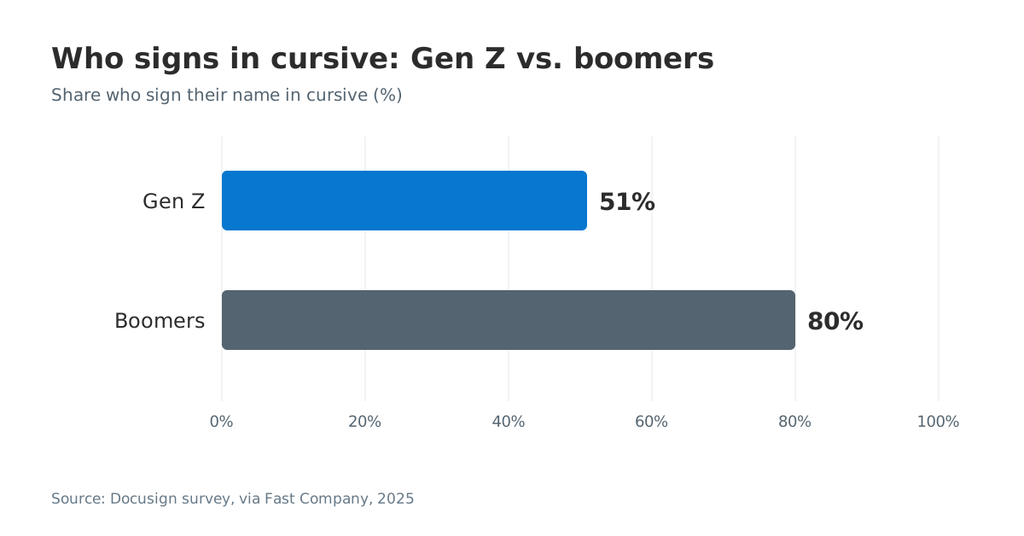
- A Docusign survey found 51% of Gen Z sign in cursive, versus 80% of boomers.
- Style does not decide legal validity; intent to sign and good records matter more.
- In SignNow, you can type, draw, or upload a signature. Then you save it as your default.
What is a signature style?
A signature style is the visual pattern you repeat every time you sign your name. Think of it as your personal handwriting logo. It helps people recognize your mark at a glance.
Several elements shape every signature style:
- Letter shapes: rounded cursive loops, sharp angles, or plain block letters.
- Size: how much space the signature takes relative to the signature line.
- Slant: a lean to the right, a lean to the left, or an upright stance.
- Legibility: how easily a reader can figure out your name.
- Name order and length: full name, first initial with surname, or initials only.
- Flourishes: underlines, tails, loops, and dots placed with intent.
- Spacing and rhythm: gaps between letters and the speed of the stroke.
A signature style is not only a paper habit. Most people now sign leases, offer letters, and invoices on a computer or phone. The US ESIGN Act defines an electronic signature by intent. It can be a sound, symbol, or process adopted with intent to sign. That definition says nothing about looks. Your style serves identity and recognition, while intent carries the legal weight.
Need a digital version right away? Our guide to creating an electronic signature online covers the basic methods. This article focuses on choosing and refining the style itself.
Why your signature style matters
Your signature style matters because people use it to recognize you and verify your documents. A consistent mark makes your sign-off easy to compare across contracts, checks, and forms.
Why it matters: an inconsistent signature can slow down reviews and raise questions about authenticity.
Three practical reasons stand out:
- Recognition. Banks, notaries, and clients compare new signatures with earlier ones. Consistency speeds up that check.
- First impressions. A signature sits at the end of an offer, proposal, or letter. Its quality and neatness quietly convey care.
- Identity across channels. Many professionals now sign on paper, in an app, and on a website. One recognizable style keeps your identity steady.
Signing habits are also changing fast. A Docusign survey found that only 51% of Gen Z sign in cursive. The same survey put boomers at 80%. Fast Company reports that Docusign also released six new signature styles in 2025.
Older polling shows the same drift. A OnePoll survey of 1,000 US adults found that nearly half sign in a hurry. Some 30% of respondents aged 18 to 34 described their signature as “flexible.”
Types of signature styles
Most signatures fall into seven broad styles. Each style suits different tastes and settings. Many people blend two styles, such as a cursive first initial with a printed surname.
Classic cursive signature
A classic cursive signature joins letters in one flowing line. Readers can usually make out the full name.
- What people read into it: tradition, warmth, and a sense of care.
- Best fit: formal letters, legal paperwork, and personal use.
- Watch out for: long names can make cursive slow to write at small sizes.
Printed signature
A printed signature uses separate block letters, much like handwriting on a form. Some people print because they never learned cursive in school.
- What people read into it: clarity, directness, and a practical mindset.
- Best fit: forms where legibility matters, like medical intake or school documents.
- Watch out for: plain print is easier to imitate, so add a personal detail.
Initials or monogram signature
An initials signature reduces your name to two or three letters. A monogram combines those letters into one connected figure.
- What people read into it: efficiency and a preference for privacy.
- Best fit: high-volume approvals, page initials, and quick sign-offs.
- Watch out for: some institutions ask for a full signature on key documents.
Illegible scrawl signature
An illegible scrawl reduces a name to fast, abstract strokes. Many busy professionals sign this way.
- What people read into it: speed, independence, or a busy schedule.
- Best fit: people who sign dozens of documents a day.
- Watch out for: a scrawl that changes each time makes verification harder.
Ornate signature with flourishes
An ornate signature adds loops, long tails, or a bold underline. It treats the name almost like artwork.
- What people read into it: confidence, creativity, and a flair for display.
- Best fit: autographs, creative work, and personal branding.
- Watch out for: heavy decoration can crowd a small signature field.
Minimalist signature
A minimalist signature uses a few clean strokes and very little decoration. Simplicity is the whole point.
- What people read into it: focus, modern taste, and calm confidence.
- Best fit: professionals who want a quick, versatile mark.
- Watch out for: a too-simple line, like a single stroke, offers little individuality.
Typed font signature
A typed font signature turns your typed name into a script-style font. Most eSignature apps offer several fonts to choose from.
- What people read into it: convenience and comfort with digital tools.
- Best fit: routine approvals, online forms, and remote business documents.
- Watch out for: it may not match your paper signature. Pick a font close to it.
The table below compares the different styles at a glance.
| Signature style | Popular interpretation | Legibility | Best for |
| Classic cursive | Tradition, warmth | Medium to high | Formal letters, contracts |
| Printed | Clarity, directness | High | Forms, school and medical documents |
| Initials or monogram | Efficiency, privacy | Low to medium | Page initials, quick approvals |
| Illegible scrawl | Speed, independence | Low | High-volume signing |
| Ornate with flourishes | Confidence, creativity | Medium | Autographs, personal brand |
| Minimalist | Focus, simplicity | Medium | Versatile everyday use |
| Typed font | Convenience | High | Online forms, remote signing |
The interpretations in this table reflect popular belief, not proven personality science. The next section explains why.
How to choose a signature style for your goals
The right signature style depends on where you sign most often. Match the style to your documents and your audience.
For personal use
Personal documents give you the most room to play. Think of birthday cards, journals, letters, and personal artwork. Here, a signature can express your mood and creativity freely. Some people treat it like a favorite piece of jewelry. One small detail makes it theirs. A personal signature can also evolve along your creative journey.
For business documents
Business signatures need clarity and consistency above all. Clients, banks, and partners may compare your signature across many documents. A clean cursive or minimalist style usually works best here. Keep the length short enough to fit standard signature fields. Do you sign mostly online? Use SignNow electronic signatures with a font close to your paper mark.
For creative work and personal brands
Artists, designers, and creators often sign finished work. A signature on a painting, print, or project becomes part of the brand. Here, a bold or ornate style helps the work stand out from the crowd. Some creators keep a simple palette of two versions. One is expressive for artwork. The other is plain for contracts and invoices.
Signature style examples by context
| Context | Suggested style | Why it fits |
| Contracts and legal forms | Classic cursive or minimalist | Recognizable and consistent |
| Daily approvals | Initials or typed font | Fast for high volume |
| Artwork and creative projects | Ornate or bold | Adds individuality and display value |
| Online forms on a website or app | Typed font or drawn signature | Works on any computer or phone |
| Client-facing marketing documents | Minimalist | Clean look that matches a brand aesthetic |
Whatever you decide, keep one version for official use. Changing styles too often makes your signature harder to verify.
What your signature says about you: research vs. popular belief
Research links signature size to a few personality traits. Most other trait readings lack evidence. Treat style meanings as inspiration, not as a diagnosis.
What studies link to signature size
Size is the signature feature with the most research support. Several teams measured signatures and compared them with personality or behavior data.
- Social dominance. A study by Alvaro Mailhos and colleagues tested 340 Uruguayan psychology students. Larger signatures correlated with social dominance in men and women. The BPS Research Digest summary notes a link with narcissism among women only. Signature size showed no link with self-esteem. The authors called the correlations modest.
- Status. Psychologist Richie Zweigenhaft began measuring signatures at Wesleyan University in 1967. In his 1970 paper, eight of nine faculty members used more space than matched students. He later tied signature size to self-esteem and “status awareness.”
- Executive behavior. Charles (Chad) Ham, Nicholas Seybert, and Sean Wang studied about 600 CEO signatures. Larger CEO signatures went with overinvestment and weaker firm performance. A related study of CFO signatures covered more than 500 companies.
Chad Ham of Washington University in St. Louis stressed the limits of this work. “It’s an ‘on-average’ effect,” he said. He added that any signature-size reading needs a large sample.
In other words, a big signature does not prove a big ego. It only shifts the odds slightly across large groups.
What slant, pressure, and loops supposedly mean
Most “what your signature says” articles draw on graphology traditions. These readings are popular, but researchers have not confirmed them. Here is how they usually go.
| Signature feature | Popular reading | Evidence level |
| Large size | Confidence, need for attention | Modest research support |
| Small size | Modesty, focus, reserve | Indirect (inverse of size findings) |
| Right slant | Sociable, outgoing | Not supported |
| Left slant | Reserved, introspective | Not supported |
| Heavy pen pressure | Determination, intensity | Not supported |
| Underline or flourish | Self-assurance | Not supported |
| Illegible letters | Busy, private, quick thinker | Not supported |
Use this table to explore ideas for your own mark. Don’t use it to judge a job candidate or a client.
How reliable is handwriting analysis?
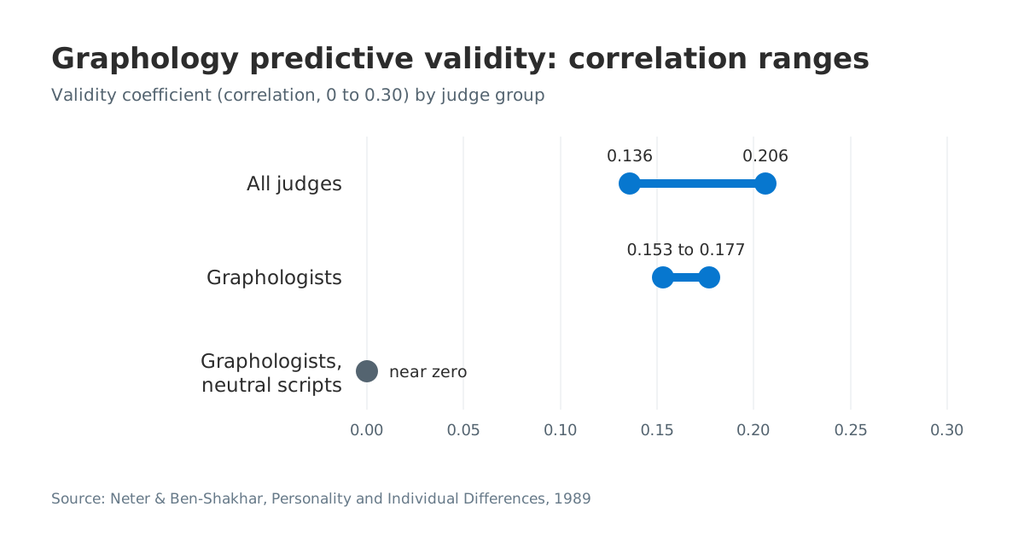
Handwriting analysis has low predictive validity in controlled studies. A 1989 meta-analysis by Neter and Ben-Shakhar reviewed 17 studies and 1,223 handwriting samples. On content-rich scripts, graphologists’ validity ranged from 0.153 to 0.177. With neutral scripts, their validity fell to near zero. Psychologists with no graphology training outperformed graphologists on all dimensions.
The British Psychological Society ranks graphology alongside astrology. Both get a validity rating of zero, as the Wikipedia overview of graphology notes. That verdict makes graphology a poor basis for hiring decisions. Your signature can still express mood, taste, and personality. It just can’t reliably reveal hidden traits.
How to develop your own signature style
You can develop a signature style in a few practice sessions. Focus on consistency first and decoration second.
- Decide on legibility. Choose whether readers should see your full name or a stylized mark. A legible signature works well for clients and official forms.
- Pick the letters to emphasize. Most people stress the first letter of each name. A bold capital gives the signature a clear anchor.
- Choose a comfortable size. Aim for a signature that fits a standard signature line. Oversized marks crowd forms and look awkward in small fields.
- Settle on a slant. Experiment with a right lean, a left lean, and an upright stance. Keep the one that feels natural at speed.
- Add one personal detail. A tail, loop, or underline adds individuality. One detail is usually enough to make you stand out.
- Practice for consistency. Write your signature 20 to 30 times on one page. Compare the shapes and keep the version you can repeat.
- Test it on screen. Draw it with a mouse, trackpad, or finger. Check how it looks at small sizes in a PDF.
Developing a style takes some effort, but not much. If you are interested in a fresh look, try a combination of two styles. Signatures you produce on other websites or generators may look slightly different. Adapt the final version so it matches your pen signature. You don’t absolutely need cursive to have a strong signature.
Keep a matching set of initials, too. Many documents ask for initials on every page, so the two should share an aesthetic.
Want a quick starting point? The SignNow signature generator lets you preview typed and drawn options. Our tips on a handwritten-looking digital signature help with a natural look.
Common signature style mistakes to avoid
A few simple mistakes can weaken an otherwise good signature. Most of them come down to consistency and fit.
- Changing the design often. Frequent changes make your signature hard to verify. Pick one style and keep it for official documents.
- Overloading it with decoration. Fancy loops look striking on a blank page. On a crowded form, they collide with printed text.
- Making it too long. A full name with middle names may not fit small fields. Shorten it to a first initial and surname if needed.
- Copying a famous signature. Inspiration from other signatures is fine. A near copy loses your personal identity and authenticity.
- Ignoring the digital version. A paper signature can look shaky when drawn with a mouse. Upload a clean scan or use a wet ink signature online instead. We have a detailed comparison of wet and electronic signatures in our dedicated blog, please see.
- Skipping the signature field. Always sign inside the signature block on a form. Signatures outside the field can confuse reviewers.
How to create and save your signature style in SignNow
SignNow lets you save a typed, drawn, or uploaded signature as your default. You manage it from the User Profile page. The app then applies it when you sign.
- Log in to SignNow in your browser. You can also start from the SignNow mobile apps on iOS or Android.
- On the dashboard, open My Account near your profile picture.
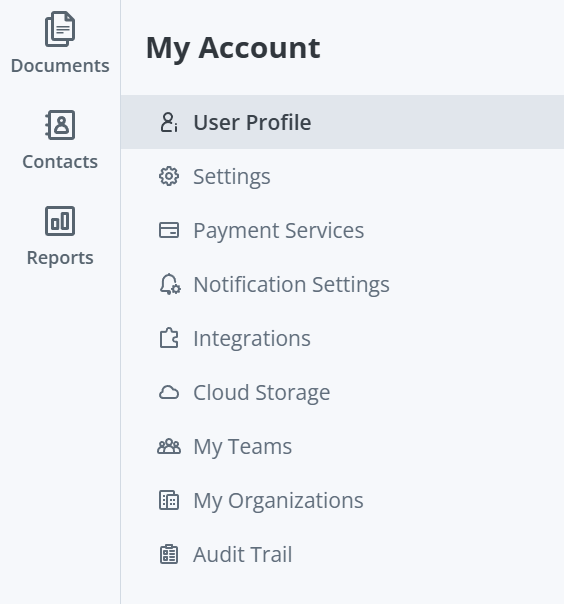
- In the My Account sidebar menu, select User Profile.
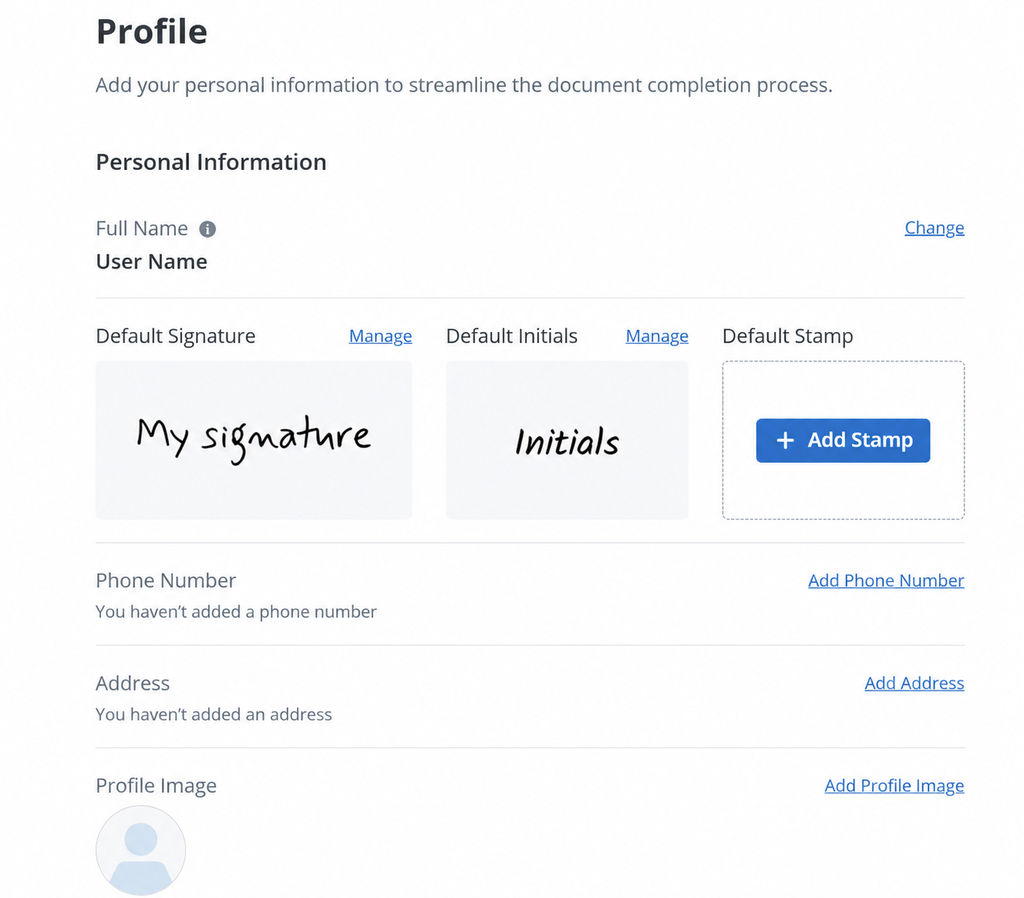
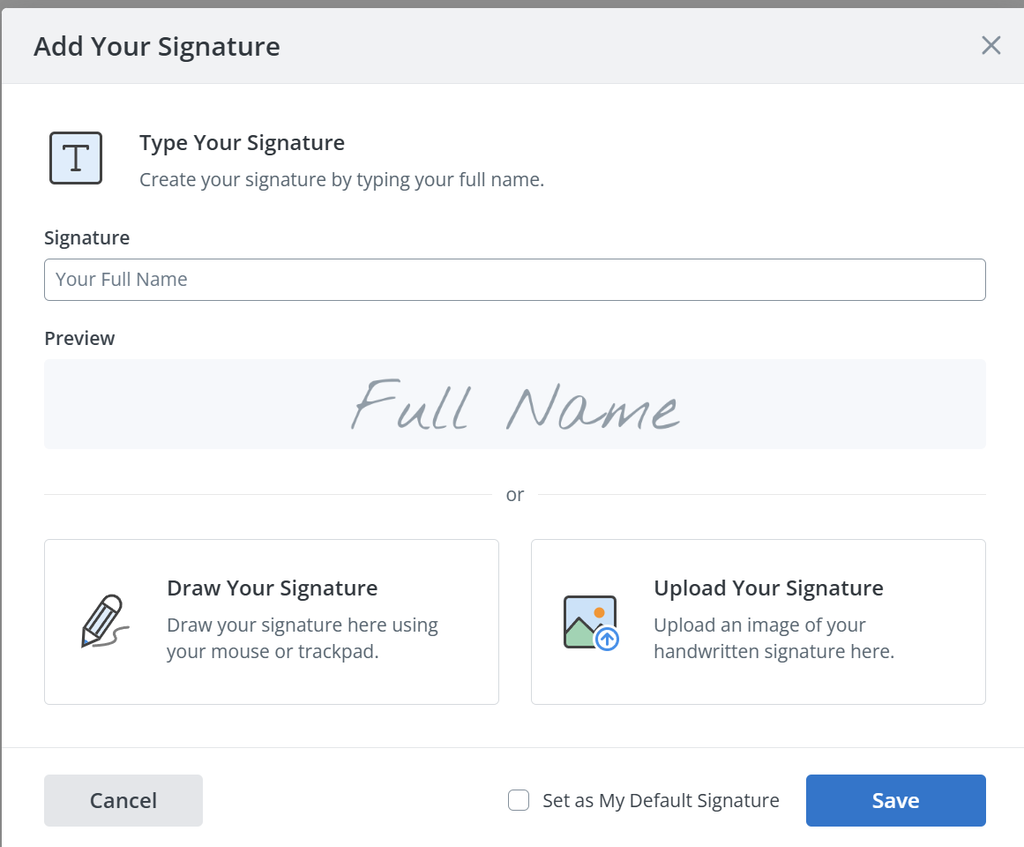
- Click Manage next to Default Signature. Choose how you want to create your signature style:
- Type your full name and preview it.
- Draw your signature with a mouse or trackpad.
- Upload an image of your handwritten signature.
- If you type your name, pick a font style that matches your personal style.
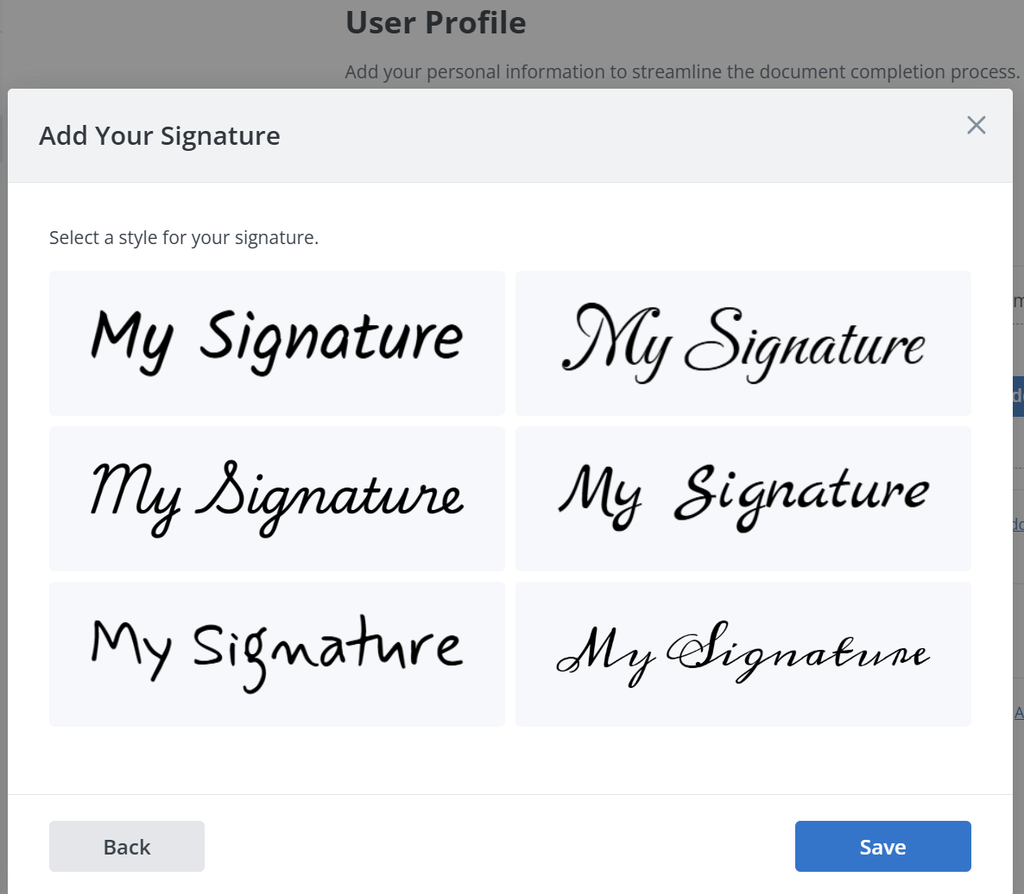
- Click Save to keep your signature. SignNow will use it as your default when you sign documents.
You can change your signature style at any time. Repeat the same steps and save a new version. Default initials work the same way, so your initials can match your signature.
Many users also keep signed files in cloud services. SignNow can export completed documents to Google Drive, Box, Dropbox, OneDrive, and Egnyte. That keeps signing processes tidy for teams on site and remote.
Using your signature style across business documents
A consistent signature style helps clients and partners trust your documents. It matters most when several people sign the same file.
Here are practical ways to keep your style consistent at work:
- Reuse one default. Save one signature and one set of initials in your profile. Use them on every contract, form, and approval.
- Add a stamp where relevant. A company stamp next to your signature suits some regions and industries. SignNow supports stamp fields on documents.
- Keep branding separate. Your signature expresses you, while company branding expresses the business. SignNow lets teams add a custom logo and customize email branding for invites.
- Standardize templates. Place signature fields in the same layout across reusable templates. Signers then know where to sign every time.
- Protect your mark. Turn on two-factor authentication for signers. Every signing action also appears in the audit trail.
Consider a real estate agent who signs on a tablet at showings. Back at the office, she signs on a laptop. With one saved default signature, every lease and disclosure carries the same mark. The signature from a mobile device matches the one from the desktop.
The same principle applies in other industries:
- HR. An HR manager signs dozens of offer letters each month. A saved default signature keeps every letter consistent. Candidates see the same mark on the offer and the onboarding forms.
- Healthcare. A clinic administrator signs intake and consent documents on a tablet. A legible cursive or typed style helps staff confirm who approved each form.
- Finance. A loan officer initials every page of a long agreement. Matching initials and signature styles make the file easier to review later.
Teams can also set a signing order when multiple signers review one file. Each person signs in their own style, and the record shows who signed when.
Mobile signing keeps that routine simple. As one SignNow user put it: “SignNow has made life easier for me. It has been huge to have the ability to sign contracts on-the-go!”
The Business plan starts at $8 per user per month, billed annually. Check current SignNow pricing plans before you decide. For country-specific rules, see the eSignature legality overview.
Final thoughts
A signature style is a small piece of personal identity that you repeat for years. Choose a style that feels natural and fits the documents you sign most. Research ties signature size to modest personality signals, but most trait readings remain popular belief. Treat them as creative inspiration rather than proof.
Try SignNow, choose your signature style, save it as your default, and reuse when needed. Then the same mark follows you across paper, desktop, and mobile signing.
Glossary
- Digital signature: A cryptographic method that verifies a signer’s identity and detects data changes. Definition source: NIST.
- Electronic signature: Electronic data a person attaches to a record with intent to sign. The EU eSignature FAQ uses a similar definition.
- Graphology: The practice of inferring personality from handwriting. Controlled studies show low predictive validity.
- Initials: A short form of a signature, often required on each page of a contract.
- Monogram: Two or more initials combined into one connected design.
- Signature style: The repeatable visual pattern of your signature. It includes letter shapes, size, slant, and flourishes.
FAQ
What is a signature style?
A signature style is the distinctive way you sign your name. It includes letter shapes, size, slant, legibility, and decorative strokes. Your style stays recognizable across paper and digital documents.
What are the main types of signature styles?
There are seven main types. They are classic cursive, printed, initials or monogram, illegible scrawl, ornate, minimalist, and typed font. Many people combine two styles. For example, they write a cursive first initial and a printed surname.
What does your signature say about your personality?
Research links larger signatures to social dominance and status, though the effects are modest. Other popular readings, like slant or pen pressure, lack scientific support. Treat those meanings as inspiration, not as a personality test.
Is it OK to have an illegible signature?
Yes, an illegible signature can be valid if you sign with intent and sign consistently. A scrawl that changes every time can make verification harder. Keep the main shapes stable so banks and clients can compare signatures.
Can I change my signature style?
Yes, you can change your signature style whenever you want. Update it with your bank and key institutions if you sign paper documents with them. In SignNow, open User Profile and click Manage next to Default Signature. Then save a new version.
Is a typed signature legally binding?
In the US, the ESIGN Act recognizes electronic signatures, including typed ones. The signer must intend to sign. Legal validity depends on intent, consent, and proper records, not on the font. For specific situations, consult a qualified attorney.
Sources
- Gen Z killed cursive, so Docusign gave us a new way to sign our names, Fast Company, 2025
- Bigger signature correlates with social bravado and narcissism, BPS Research Digest, 2016
- Size matters: CEO signatures and narcissism, UMD Robert H. Smith School of Business, 2017
- Signed, sealed … delivered?, Washington University Source, 2018
- The predictive validity of graphological inferences: a meta-analytic approach, Neter & Ben-Shakhar, 1989
- A psychologist spent 50 years studying egos, PsyPost
- Americans are losing the art of signing their names, Hyperallergic, 2015
- Electronic signature, Cornell Law School Legal Information Institute
- eSignature FAQ, European Commission
- Digital signature, NIST Computer Security Resource Center
- Key takeaways
- What is a signature style?
- Why your signature style matters
- Types of signature styles
- How to choose a signature style for your goals
- What your signature says about you: research vs. popular belief
- How to develop your own signature style
- Common signature style mistakes to avoid
- How to create and save your signature style in SignNow
- Using your signature style across business documents
- Final thoughts
- Glossary
- FAQ
- Sources
