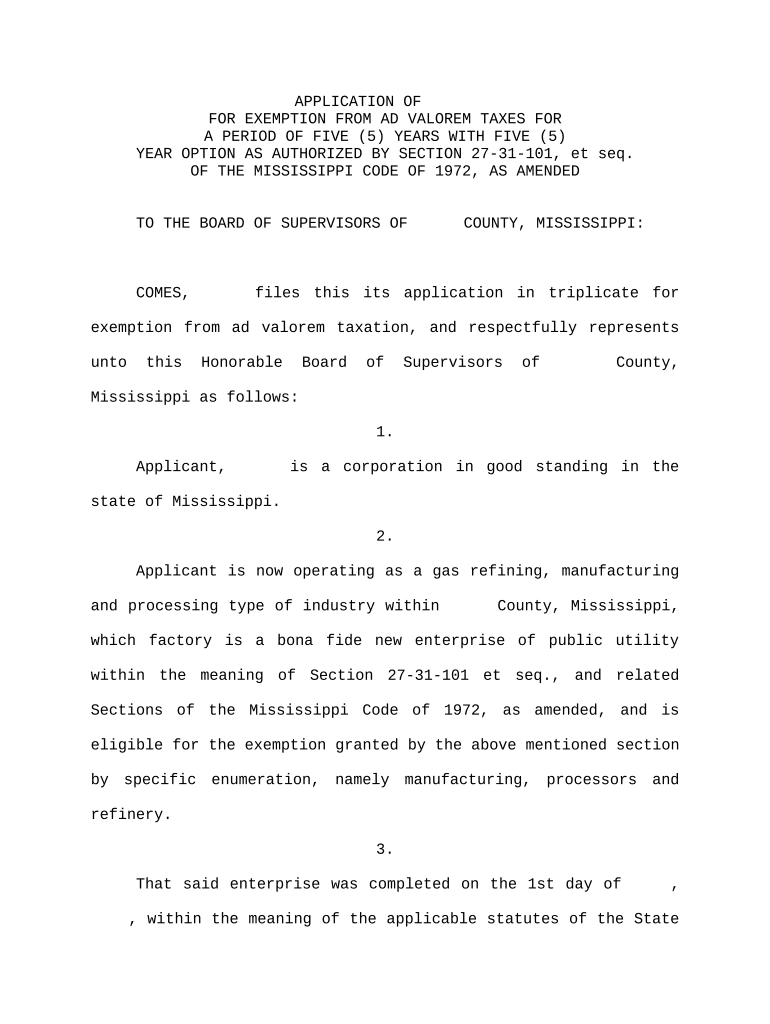
Mississippi Application for Ad Valorem Tax Exemption
What the Mississippi Application for Ad Valorem Tax Exemption Is
Why Completing This Application Matters
A properly prepared application can reduce taxable value, lower annual property taxes, and correct assessor records. Filing timely and accurately protects exemption eligibility and minimizes the risk of late penalties or denial.
Who Typically Prepares and Files This Application
The application is completed by property owners, tax agents, or authorized representatives to claim homestead, disability, veteran, agricultural, or other ad valorem exemptions.
- Individual owners and homeowners filing homestead and owner-occupancy exemptions
- Business owners and property managers claiming commercial or agricultural exemptions
- Authorized representatives such as attorneys, accountants, or tax consultants
Submission rules vary by county; authorized representative filings often require a power of attorney or written authorization on file with the assessor.
Step-by-step: Completing the application
-
01Gather documents: Deed, title, ID, supporting certificates
-
02Complete fields: Enter ownership and parcel details accurately
-
03Attach proof: Include veteran letters, disability paperwork, or agricultural affidavits
-
04Submit to assessor: File with county assessor by the applicable deadline
How to prepare the application digitally
| Field | Configuration |
|---|---|
| Owner Name | Text field, required, auto-validate against uploaded ID |
| Parcel Number | Text field, required, exact-match validation |
| Proof Upload | PDF/JPEG upload, required for selected exemption type |
| Signature | Signer email or eSignature field, date required |
Where to file and how the submission flows
-
Local filing: Submit to county tax assessor's office
-
Clerk review: Clerk verifies documents and completeness
-
Assessor decision: Assessor approves, denies, or requests more info
-
Record update: Approved exemptions are recorded on the tax roll
Key deadlines and timing to watch
Homestead application deadline:
Varies by county; commonly before the tax year begins
Veteran or disability proofs:
Submit with application or by assessor-requested deadline
Appeal window:
State typically allows limited days after assessment notice
Renewal or recertification:
Annual or multi-year recertification may be required
Late filing consequences:
Late filing may delay exemption to next tax year
Processing milestones from application to exemption
Application Received
County clerk logs submission and issues receipt
Initial Completeness Check
Clerk confirms required fields and attachments
Substantive Review
Assessor verifies eligibility and supporting evidence
Final Entry
Exemption recorded and tax bill updated
Common mistakes to avoid when preparing the application
- Submitting incomplete documentation — missing deeds, IDs, or certification letters delays approval or causes denial.
- Entering inconsistent owner names or parcel numbers that do not match county records leads to processing errors.
- Using a P.O. box instead of the physical property address can prevent the assessor from matching the parcel.
- Failing to attach required veteran or disability verification results in automatic disqualification until corrected.
Penalties and risks of incorrect or late filings
Digital submission and platform requirements
Electronic filing acceptance varies; verify the county assessor's allowed formats and authentication requirements before e-submitting.
- File formats: PDF, DOCX accepted
- Authentication: Email or MFA signer verification
- Integrations: Connectors for cloud storage
Comparing eSignature vendors for filing and recordkeeping
| signNow | DocuSign | Adobe Sign | PandaDoc | HelloSign | |
|---|---|---|---|---|---|
| Starting Price | $8/user/mo | $15/user/mo | $14/user/mo | $19/user/mo | $15/user/mo |
| Free Trial | 7-day free trial | Yes (trial) | Yes (trial) | Yes (trial) | Yes (trial) |
| Bulk Send | Yes | Yes | Yes | Yes | No |
| Audit Trail | Yes | Yes | Yes | Yes | Yes |
| HIPAA Compliant | Yes | Yes | Yes | No | No |
Frequently asked questions about the application and e-submission
-
What if my parcel number is wrong?
If the parcel number does not match county records, the assessor will likely return the application for correction. Confirm the APN on the county tax assessor website or your deed before resubmitting to avoid processing delays.
-
Can a representative sign on my behalf?
Yes, with proper authorization. A signed power of attorney or written authorization must accompany the application and may require notarization under county rules. Verify what the local assessor accepts as proof of agency.
-
Are digital signatures accepted?
Many assessors accept electronic signatures under ESIGN and UETA, but county rules differ. Confirm whether the assessor requires an original wet signature, notarization, or accepts e-signed PDFs with an audit trail.
-
What supporting documents are required?
Required documents depend on exemption type: deed or title for ownership, military discharge for veteran exemptions, medical certification for disability exemptions, and affidavits for agricultural status. Check county instructions for exact lists.
-
How do I correct a denied application?
If denied, the assessor will describe deficiencies and the appeal or correction process. Submit corrected documentation promptly and calendar appeal deadlines to preserve rights to challenge decisions.
-
How long until an exemption appears on my bill?
After approval, the assessor records the exemption and the tax roll is updated; timing depends on county processing cycles and billing schedules. If approval is late, the exemption may apply prospectively rather than retroactively.