Establishing secure connection…Loading editor…Preparing document…

Affidavit Statement Form

This template is fully customizable. Edit the text, fill out the fields, and send it for signature. Give it a try!
Affidavit Statement Form

What an Affidavit Statement Form Is and When it Applies

An Affidavit Statement Form is a written, sworn declaration of facts that an individual signs under oath before a notary or other authorized official. Affidavits serve as evidence in administrative, court, and transactional settings where a sworn factual record is required. Electronic execution of affidavits is generally enforceable under the federal ESIGN Act (15 U.S.C. ch. 96) and state UETA laws (1999) where applicable, although certain narrow exceptions (for example, wills and some court filings) may still require traditional procedures.

Why a Proper Affidavit Statement Form Matters

A correctly completed affidavit creates a clear, sworn record that can reduce litigation friction, support administrative claims, and document factual events. Accurate form completion preserves evidentiary weight and can shorten dispute resolution timelines.

Why a Proper Affidavit Statement Form Matters

Who Normally Prepares and Signs an Affidavit

Affidavits are prepared by people with direct knowledge of the facts and submitted by parties to courts, agencies, or counterparties.

  • Attorneys and paralegals preparing sworn statements for litigation or filings.
  • Private individuals (affiants) providing factual testimony or declarations.
  • Business and compliance officers creating sworn certifications for transactions.

Representative Signers and Their Roles

Estate Attorney

An attorney drafts affidavits to support probate or estate matters, ensuring language meets evidentiary standards and that jurats, exhibits, and acknowledgment sections are present for admissibility.

Individual Affiant

A private person signs to attest to facts (identity, residency, event details). The affiant must provide government-issued ID for notarization and ensure the statement is truthful to avoid perjury exposure.

Essential Elements of a Professional Affidavit Statement Form

A complete affidavit follows a standard structure so courts and agencies can rely on its contents without additional clarification.

Caption

Case or matter caption identifies the court, docket, or transaction and provides context for which matter the affidavit pertains, preventing misfiling or misapplication.
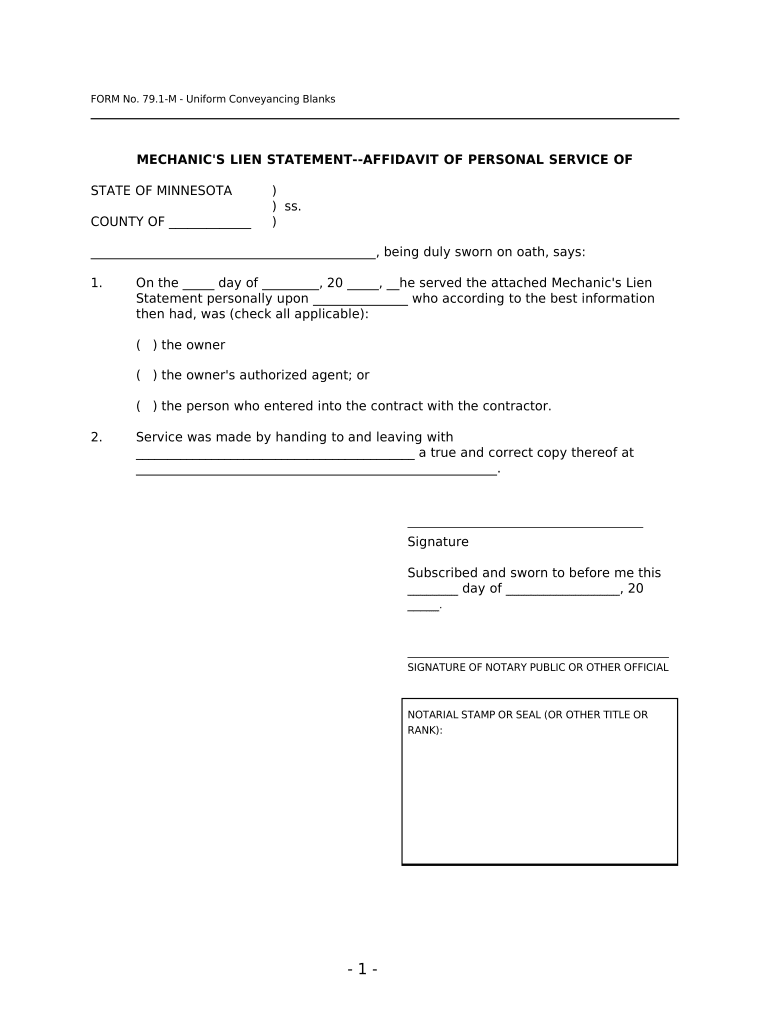
Introductory Clause

The opening identifies the affiant, residence or business address, and a brief statement of the affiant’s capacity and relationship to the facts described.

Statement of Facts

Numbered, chronological factual paragraphs that plainly state events, observations, or documents relied upon; avoid hearsay language when possible.

Exhibits

Referenced supporting documents should be attached and labeled (Exhibit A, B). Each exhibit reference should include a short description and exhibit page range.

Jurat / Oath

A jurat or sworn statement block records the affiant’s oath or affirmation and includes date and venue for the oath.

Notary Block

Notary acknowledgement or jurat must show notary signature, seal, commission expiration, and, for RON, evidence of identity-proofing and A/V session retention.

Required Information and Fields at a Glance

Affiant Name: Full legal name
Affiant Address: Street, city, state, ZIP
Statement Body: Clear numbered facts
Execution Date: MM/DD/YYYY date
Signature Block: Affiant signature and printed name
Notary Details: Jurat/acknowledgment fields

Step-by-Step: Completing an Affidavit Statement Form

Follow these four sequential steps to prepare, execute, and submit an affidavit with minimal friction.

  • 01
    Gather Evidence: Collect IDs, documents, and exhibit copies.
  • 02
    Draft Facts: Write numbered, first-hand factual statements.
  • 03
    Execute Sworn Oath: Sign before a notary or via approved RON.
  • 04
    Submit: File or deliver to the court or agency.

Configuring an Electronic Workflow for Affidavits

When moving an affidavit online, set authentication, attachments, and retention to meet legal and organizational standards.

Field Configuration
Authentication Email + SMS code or KBA for higher assurance
Notary Workflow Enable RON session support if allowed
Attach Exhibits Require mandatory file uploads before signing
Retention Settings Set audit trail retention and export formats

Typical Submission Flow for an Affidavit

Affidavits follow a simple sender-to-signer-to-notary sequence when executed electronically.

  • Prepare Document: Upload affidavit and label exhibits.
  • Assign Signers: Add affiant and notary contact details.
  • Authenticate Signers: Use chosen verification method.
  • Finalize and Archive: Capture signed PDF and audit trail.

Platform and Format Considerations

Choose a platform that supports notarization workflows, secure storage, and audit trails to maintain evidentiary quality.

  • Browser Support: Modern Chrome, Edge, Safari
  • File Formats: PDF and DOCX accepted
  • Integrations: Connect to Salesforce, NetSuite, Box

Timing, Filing Deadlines, and Evidence Considerations

Affidavit timing depends on the proceeding or administrative requirement; missing timing rules can affect admissibility or statutory rights.

Court Filing Windows:

Follow the court’s procedural schedule and local rules

Agency Deadlines:

Adhere to agency-specific filing dates

Notary Session Retention:

RON A/V recordings retained 5–10 years typically

Service Timing:

Serve other parties within procedural timeframes

Effect on Statute:

Execution date can trigger filing and limitation periods

Key Milestones from Draft to Retention

Track milestone stages from drafting through long-term storage to maintain chain-of-custody and evidentiary integrity.

01

Drafting Complete

Affiant reviews and confirms factual accuracy

02

Notary Execution

Oath administered and jurat completed

03

Filing or Delivery

Document submitted to court or agency

04

Secure Retention

Signed file and audit trail archived

Common Mistakes to Avoid When Preparing an Affidavit

  • Omitting the jurat or notary block, which can render the affidavit unsigned under oath.
  • Using inconsistent names or addresses between the ID and the signature block.
  • Attaching exhibits without labeling or referencing them in the body of the affidavit.
  • Failing to authenticate the signer when using electronic methods for higher-assurance filings.

Principal Risks and Legal Consequences

Perjury Risk: False statements may incur criminal perjury charges
Admissibility: Improper execution can lead to court exclusion
Regulatory Exposure: Noncompliance may trigger agency sanctions
Contract Impact: Faulty affidavits can undermine contractual rights
Data Privacy: Sensitive health data requires HIPAA safeguards
Retention Gaps: Premature deletion risks evidentiary loss

Real-World Examples of Electronic Affidavit Adoption

These brief examples show how organizations improved execution and return rates for sworn documents using electronic processes.

Optica Ventures LLC

Optica Ventures integrated e-signing to reduce in-person paperwork and streamline sworn statements.

  • The interface is simple and easy-to-use for our team;
  • Their team noted faster customer completion and reduced manual follow-up while preserving a clear audit trail for legal review.

Martin Properties

A real estate operator moved affidavit workflows online to support remote closings and tenant attestations.

  • I can process and execute all of these documents online
  • The shift allowed mobile signing, consistent compliance checks, and faster turnaround for filings with local agencies and title companies.

eSignature Pricing and Feature Comparison Relevant to Affidavit Workflows

Comparison of starting prices and core features that affect affidavit execution: signing limits, bulk send, audit trail, and HIPAA handling are material considerations.

signNow DocuSign Adobe Sign PandaDoc HelloSign
Starting Price $8/user/mo $15/user/mo $14/user/mo $19/user/mo $15/user/mo
Free Trial 7-day free trial Varied Varied Varied Varied
Bulk Send Yes Yes Yes Yes No
Audit Trail Yes Yes Yes Yes Yes
HIPAA Compliant Yes Yes Yes No No

Frequently Asked Questions About Affidavit Statement Forms

Answers to common practical and legal questions about preparing, executing, and storing affidavits in the United States.


Need help? Contact support

be ready to get more
Join over 28 million airSlate SignNow users