Establishing secure connection…Loading editor…Preparing document…

Judgment to Confirm Title and Remove Clouds

This template is fully customizable. Edit the text, fill out the fields, and send it for signature. Give it a try!
Judgment to Confirm Title and Remove Clouds

What a Judgment to Confirm Title and Remove Clouds Is

A Judgment to Confirm Title and Remove Clouds is a court order resolving competing claims to real property and declaring clear legal title in favor of the prevailing party. Frequently used in quiet title actions, the judgment eliminates defects, adverse claims, or clouds on the chain of title and directs record correction or issuance of replacement instruments. Once entered it becomes a binding judgment against named parties and their successors, can be recorded with the county recorder, and is used to obtain title insurance or complete a sale. State procedural rules govern how and where it is filed.

Why a Judicial Confirmation Matters for Clear Title

A Judgment to Confirm Title and Remove Clouds provides a clear, court-recognized chain of title and facilitates transfers and title insurance. Electronic execution and records are generally enforceable under the ESIGN Act (15 U.S.C. ch. 96) and UETA when applicable.

Why a Judicial Confirmation Matters for Clear Title

Who Uses This Judgment and When It’s Needed

Typical users include legal counsel, property owners, title companies, and lenders engaged in resolving adverse claims.

  • Property owners seeking to remove adverse claims or correct recorded defects in title.
  • Title companies and escrow agents needing a court order to underwrite or clear exceptions.
  • Lenders and purchasers requiring judicial confirmation to close, finance, or insure transactions.

Common Parties and Their Typical Needs

Title Company

When a chain of title contains ambiguous conveyances, title examiners rely on a judgment to confirm title to clear exceptions, satisfy underwriters, and proceed with issuing commitments. The judgment reduces insurer exposure by resolving competing claims before closing.

Property Owner

Owners bring or defend quiet title actions to remove clouds such as disputed conveyances, liens, or adverse possessory claims; a recorded judgment provides marketable title, simplifies future sales, and protects against recurring title disputes.

Key Parts of a Professional Judgment to Confirm Title and Remove Clouds

Essential parts of the judgment document, drafting standards, and supporting exhibits that courts and recorders expect to see are listed below.

Caption

The court caption identifies the jurisdiction, case number, and parties. Accurate party names and venue information are critical for enforceability and for the county recorder to accept the judgment for filing.
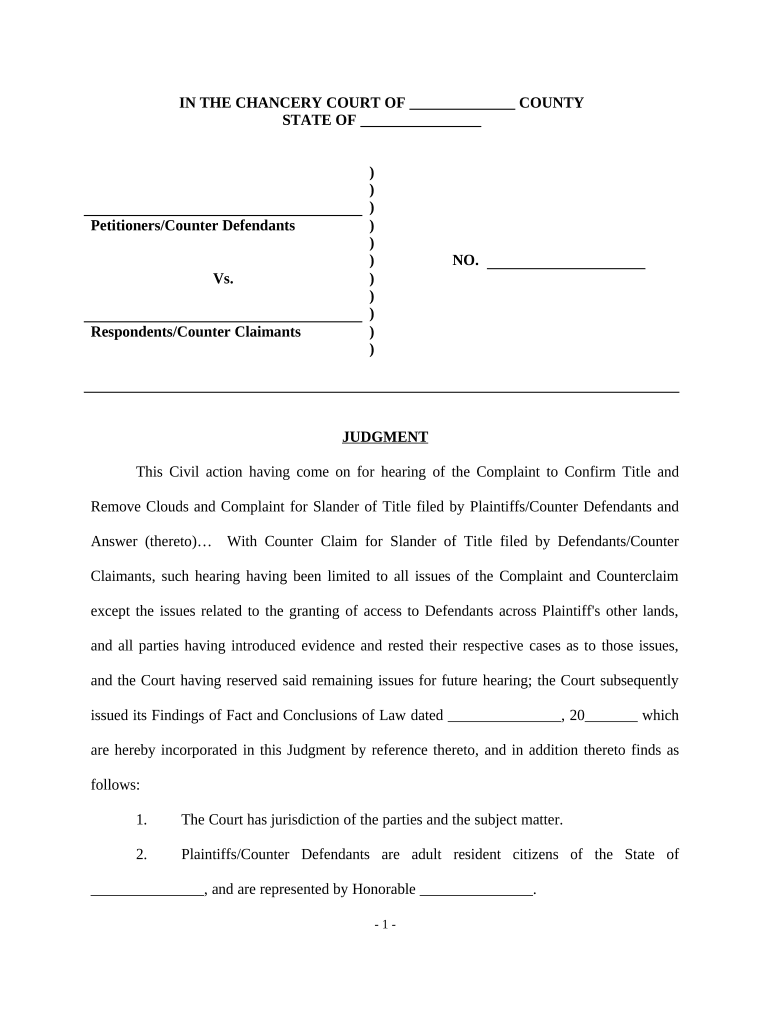
Findings

Judicial findings of fact and conclusions of law establish why title vests in the prevailing party. Clear findings tie the relief granted to the record chain and reduce grounds for appeal or collateral attack.

Order

The operative order states the judgment that title is confirmed and clouds removed; it may direct record correction, instrument reformation, lien discharge, or declaratory relief as necessary to clear the title.

Legal Description

A precise legal description of the property (metes and bounds or recorded plat reference) is required for recording; vague descriptions can delay acceptance by the recorder’s office.

Parties

Full legal names of all parties, their capacities, and counsel appearances; mistranscribed names can impair record notice and may require corrective orders or affidavits.

Exhibits

Supporting exhibits such as deeds, mortgages, chain-of-title abstracts, and notices of lis pendens must be attached or referenced to document the claims and support the court’s findings.

Required Case and Recording Data to Include

Case Number: Court docket identifier number
Court Name: State or county court name
Property Description: Full legal property description
Party Names: Full legal names and capacities
Relief Granted: Specific judgment relief language
Recording Data: Recorder book, page, or instrument

Step-by-Step: Prepare, Obtain, and Record the Judgment

Follow these steps to prepare, file, and record a Judgment to Confirm Title and Remove Clouds.

  • 01
    Prepare complaint: Draft complaint or petition alleging adverse claims and legal basis.
  • 02
    Serve defendants: Effectuate service per state rules; obtain proofs of service.
  • 03
    Present evidence: Submit deeds, chain of title, and supporting affidavits at hearing.
  • 04
    Enter judgment: Obtain signed order from the judge, then record with county recorder.

Where to File, Record, and Share the Final Judgment

Where to file and how to serve or record the final judgment depends on jurisdiction and local recorder requirements.

  • Trial Court: File original judgment with the clerk of court where case was adjudicated.
  • Recordation: Submit the judgment to the county recorder where the property is located.
  • Title Companies: Provide the recorded judgment to underwriters to clear title exceptions.
  • Lien Creditors: Notify or mail recorded judgment copies to known lienholders and secured parties.

Digital Signing and eSubmission Considerations

Electronic signatures and certified electronic records can be used where state law permits and ESIGN/UETA requirements are met.

  • Supported Formats: PDF or certified electronic record
  • Authentication: Signer's intent, audit trail, and ID
  • Integrations: Document management and court e-file systems

Typical Timelines and Processing Expectations

Typical timing and deadlines for judgment preparation, hearing, entry, and recording vary by court and county recorder workloads.

Pleadings served:

Service timelines follow state civil procedure rules.

Hearing schedule:

Courts may set hearings 30–120 days after filing.

Entry of judgment:

Clerk issues signed judgment after hearing or default.

Recording timeframe:

County recorders may record within days to several weeks.

Appeal window:

Typical appeal period is 30 days from entry of judgment.

Common Mistakes That Delay Title Clearance

  • Using imprecise legal descriptions or parcel identifiers can cause recorders to reject the judgment for recording, delaying title clearance and closing.
  • Failing to join necessary parties, such as successors, mortgagees, or unknown claimants, exposes the judgment to collateral attack and may leave clouds unresolved.
  • Relying on an unsigned or incorrectly formatted order risks rejection by the clerk or recorder and can require costly reissuance or supplemental orders.
  • Assuming electronic signatures are accepted without confirming local rules can result in non-acceptance; verify ESIGN/UETA applicability and court e-filing standards beforehand.

Penalties and Risks of an Incorrect or Incomplete Judgment

Recording Delay: Delayed closings and escrow fallout
Clouds Persist: Title insurance denial risk
Appeal Exposure: Judgment vulnerable to appeal
Monetary Costs: Attorney and court fees
Enforceability Issues: Improper service or signatures
Tax/Lien Problems: Unreleased liens remain on title

Practical Examples: How Judgments Cleared Title and Enabled Transactions

These examples show how clearing title with a judgment facilitates closings and supports title underwriting when clouded interests exist.

Martin Properties

Martin Properties encountered conflicting historical conveyances that stalled a pending sale and pursued a quiet title action culminating in a judgment to confirm title.

  • Judgment recorded; sale proceeded successfully.
  • Tim Martin of Martin Properties noted that processing documents online with compliant e-sign workflows made post-judgment execution and closing more efficient; recorded judgment allowed title insurer acceptance and completed the transaction without additional title exceptions.

Optica Ventures

Optica Ventures addressed an unclear lien notation discovered during due diligence and sought judicial relief to remove the cloud prior to refinance or sale.

  • Court reformed records and cleared title.
  • Brian Fitzgibbons of Optica Ventures said simple, easy-to-use document management allowed timely submission of court filings and supporting exhibits; the recorded judgment enabled underwriting and removed barriers to financing and property transfer.

Frequently Asked Questions About Filing and Recording Judgments

Answers to frequent questions about filing, recording, e-signature acceptance, and post-judgment recording are below.


Need help? Contact support

Selected eSignature Vendor Pricing and Feature Snapshot

Pricing and core capabilities vary by plan; the table shows starting price and selected features for commonly used eSignature vendors with signNow listed first.

signNow DocuSign Adobe Sign PandaDoc HelloSign
Starting Price $8/user/mo $15/user/mo $14/user/mo $19/user/mo $15/user/mo
Free Trial Yes, 7-day free trial, no credit card Varies by vendor Varies by vendor Varies by vendor Varies by vendor
Bulk Send Yes Yes Yes Yes No
Audit Trail Yes Yes Yes Yes Yes
HIPAA Compliant Yes Yes Yes No No
Envelope Cap No cap 100 envelopes/user/year Varies by plan Varies by plan Varies by plan
be ready to get more
Join over 28 million airSlate SignNow users