Establishing secure connection… Loading editor… Preparing document…
Navigation

Fill and Sign the Chapter 203 Mn Laws Form
Fill and Sign the Chapter 203 Mn Laws Form

How it works

Open the document and fill out all its fields.
Apply your legally-binding eSignature.
Save and invite other recipients to sign it.

Rate template

4.7
34 votes
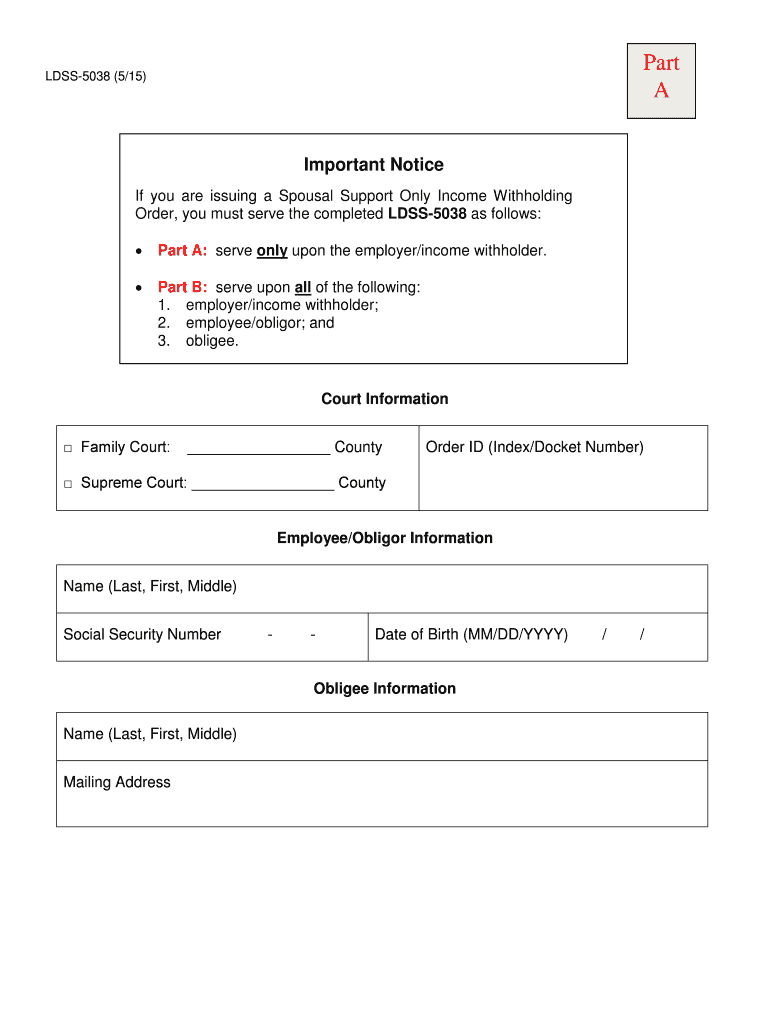
LDSS -5038 (5/15) INCOME WITHHOLDING ORDER Court Information □ Family Court: _________________ County □ Supreme Court: _________________ County Order ID (Index/Docket Number) Employee/Obligor Information Name ( Last , First , Middle) Social Security Number - - Date of Birth (MM/DD/YYYY) / / Obligee Information Name ( Last , First , Middle) Mailing Address Part A Important N otice If you are issuing a Spousal Support Only Income Withholding Order, yo u must serve the completed LDSS -5038 as follows:  Part A: serve only upon the employer/income withholder.  Part B: serve upon all of the following: 1. employer/income withholder; 2. employee/obligor; and 3. obligee. Page intentionally left blank. Document Tracking I D_______________________ ___ _ OMB 0970 -0154 1 LDSS -5038 (5/15) INCOME WITHHOLDING FOR SUPPORT  ORIGINAL INCOME WITHHOLDING ORDER/NOTICE FOR SUPPORT (IWO)  AMENDED IWO  ONE -TIME ORDER/NOTICE FOR LUMP SUM PAYMENT  TERMINATION OF IWO Date: _____________________  Child Support Enforcement (CSE) Agency  Court  Attorney  Private Individual/Entity (Check One) NOTE: This IWO must be regular on its face. Under certain circumstances you must reject this IWO and return it to the sender (see IWO instructions www.acf.hhs.gov/programs/css/resource/income -withholding -for -support -instruction s). If you receive this docu ment from someone other than a state or tribal CSE agency or a c ourt, a copy of the underlying order must be attached. State/Tribe/Territory _______________________ Remittance ID (include w/payment) _________________________ City/County/Dis t./Tribe _______________________ Order ID ________________________________ _______________ Private Individual/En tity ______________________ New York Case ID ________________________________ _______ ________________________________ _____________ RE: ________________________________ _____________ Employer/Income Withholder’s Name Employee/Obligor’s Name (Last, First, Middle) ________________________________ _____________ ________________________________ _____________ Employer/Income Withholder’s Address Employee/Obligor’s Social Security Number ________________________________ _____________ ________________________________ _____________ Custodial Party/ Obligee’s Name (Last, First, Middle) ________________________________ _____________ Employer/Income Withholder’s FEIN _______________ Child(ren)’s Name(s) (Last, First, Middle) Child(ren)’s Birth Date(s) ______________________________ ___________________ ______________________________ ___________________ ______________________________ ___________________ ______________________________ ___________________ ______________________________ ___________________ ______________________________ ___________________ ORDER INFORMATION : This document is based on the support or withholding order from New Yo rk State . You are required by law to deduct these amounts from the employee/obligor’s income until further notice. $ ____________ Per ______________ current child support $ ____________ Per _____________ past -due c hild support - Arrears greater than 12 weeks?  Yes No $ ____________ Per ______________ current cash medical support $ ____________ Per ______________ past -due cash medical support $ ____________ Per ______________ current spousal support $ ____________ Per ______________ past -due spousal support $ ____________ Per ______________ other ( must specify) ________________________________ _______________ for a Total Amount to Withhold of $ ____________ per __________________ . AMOUNTS TO WITHHOLD: You do not have to vary your pay cycle to be in compliance with the Order Information . If your pay cycle does not match the ordered payment cycle, withhold one of the following amounts: $ _________ per weekly pay period $ __________ per semimonthly pay period (twice a month) $ _________ per biweekly pay period (every two weeks) $ __________ per monthly pay period $ _________ Lump Sum Payment: Do not stop any existing IWO unless you receive a termination order. NOTE - Grayed out areas of this form are NOT applicable to spousal support only cases Part B Employer’s Name: __________________________ Employer FEIN: ________________________ Employee/Obligor’s Name: ______________ ___________ ____ SSN: ________________________ New York Case Identifier : ____________________ Order I dentifier : ________________________ OMB Expiration Date – 07/31/2017. The OMB Expiration Date has no bearing on the termination date of the IWO; it identifies the version of the form currently in use. 2 REMITTANCE INFORMATION : If the employee/obligor’s principal place of employment is New York State, you must begin withholding no later than the first pay period that occurs 14 days afte r the date of service of this notice. Send payment within 7 working days of the pay date. If you cannot withhold the full amount of support for any or all orders for this employee/obligor, see Withholding Limits on page 3 . If the obligor is a non -employ ee, obtain withholding limits from Supplemental Information on page 3. If the employee/obligor’s principal place of employment is not New York State, obtain withholding limitations, time requirements, and any allowable employer fees at www.acf.hhs.gov/programs/css/resource/state -income -withholding -contacts -and -program -information for the employee/obligor’s principal place of employment. Include the Remittance ID , pay date and employee/obligor’s name on the payment.  Make payments payable in the name of the obligee identified on PART A .  Remit payment to obligee’s address identified on PART A . Payment must be directed to an SDU in accordance with 42 USC §666(b)(5) and (b)(6) or Tribal Payee (see Payments to SDU below). If payment is not directed to an SDU/Tribal Payee or this IWO is not regular on its face, you must check this box and return th e IWO to the sender. Signature of Judge/Is suing Official (if required by State or Tribal Law): ________________________________ _________ Print Name of Judge/Issuing Official: ________________________________ ________________________________ ____ Title of Judge/Issuing Official: ________________________________ ________________________________ _________ Date of Signature: ________________________________ ________________________________ __________________ If t he employee/obligor works in a state or for a t ribe that is different from the state or t ribe that issued this order, a copy of this IWO must be provided to the employee/obligor.  If checked, the employer/income withholder must provide a copy of this form to the employee/obligor. ADDITIONAL INFORMATION FOR EMPLOYERS/INCOME WITHHOLDERS State -specific contact and withholding information can be found on the Federal Employer Services website located at: www.acf.hhs.gov/programs/css/resource/state -income -withholding -contacts -and -program -information . Priority: W ithholding for support has priority over any other legal process under State law against the same income (42 USC §666(b)( 7)). If a f ederal tax levy is in effect, please notify the sender. Combining Payments: When remitting payments to an SDU or tribal CSE agency, you may combine withheld amounts from more than one employee/obligor’s income in a single payment. You must, however, separately identify each employee/obligor’s portion of the payment. Payments To SDU: You must send child support payments payable by income withholding to the appropriate SDU or to a t ribal CSE agency. If this IWO instructs you to send a payment to an entity other than an SDU ( e.g., payable to the custodial party, court, or attorney), you must check the box above and return this notice to the sender. Exception: If this IWO was sent by a court, attorney, or private individual/ entity and the initial order was entered before January 1, 199 4 or the order was issued by a t rib al CSE agency, you must follow the “Remit payment to” instructions on this form. Reporting the Pay Date: You must report the pay date when sending the payment. The pay date is the date on which the amount was withheld from the employee/obligor’s wages. You m ust comply with the law of the s tate ( or t ribal law if applicable) of the employee/obligor’s principal place of employment regarding time periods within which you must implement the withholding and forward the support payments. Multiple IWOs: If t here is more than one IWO against this employee/obligor and you are unable to fully honor all IWOs due to federal, state, or t ribal withholding limits, you must honor all IWOs to the greatest extent possible, giving priority to current support before payme nt of any past -due support. Follow the s tate or t ribal law/procedure of the employee/obligor’s principal place of employment to determine the appropriate allocation method. Employer’s Name: __________________________ Employer FEIN: ________________________ Employee/Obligor’s Name: ______________ ___________ ____ SSN: ________________________ New York Case Identifier : ____________________ Order I dentifier : ________________________ IMPORTANT: The person completing this form is advised that the information may be shared with the employee/obligor. 3 Lump Sum Payments: You may be required to notify a state or tribal CSE agency of upcoming lump sum payments to this employee/obligor such as bonuses, commissions, or severance pay. Contact the sender to determine if you are required to report and/or withhold lump sum payments. Liability: If you have any doubts about the validity of this IWO, contact the sender. If you fail to withhold income from the employee/obligor’s income as the IWO directs, you are liable for both the accumulated amount you should have withheld and any penalties set by state or t ribal law/procedure , together with interest and reasonable attorney’s fees. If you comply with this IWO you will not be subject to civil liability to any individual or agency for conduct in compliance with this IWO. In New York State, pursuant to Civil Practice Law and Rule s (CPLR) §5241, upon a finding by the Family Court that you failed to withhold or remit withholdings as directed in this IWO, the Court shall issue an order directing your compliance and may direct the payment of a civil penalty not to exceed $500 for the first instance and $1,000 per instance for the second and subsequent instances of noncompliance. Anti -discrimination: You are subject to a fine determined under state or tribal law for discharging an employee/obligor from employment, refusing to employ, or taking disciplinary action against an employee/obligor because of this IWO. In New York State, pursuant to CPLR §5252, the court may direct a civil penalty not to exceed $500 for the first instance and $1,000 per instance for the second and subsequent instances of such discrimination. Withholding Limits: You may not withhold more than the lesser of: 1) the amounts allowed by the Federal Consumer Credit Protection Act (CCPA) (15 US C §1673(b) ); or 2) the amounts allowed by the state of the employee/obligor’s principal place of employment or tribal law if a tribal order (see Remittance Information ). Disposable income is the net income after mandatory deductions such as: state, federal, local taxes; Social Security taxes; statutory pension contribut ions; and Medicare taxes. The f ederal limit is 50% of the disposable income if the obligor is supporting another family and 60% of the disposable income if the obligor is not supporting another family. However, those limits increase 5% - - to 55% and 65% - - if the arrears are greater than 12 weeks. If permitted by the state or t ribe, you may deduct a fee for administrative costs. The combined support amount and fee may not exceed the limit indicated in this section. For t ribal orders, you may not withhold more than the amounts allowe d under the law of the issuing tribe. For t ribal employers/in come withholders who receive a s tate IWO, you may not withhold more than the limit set by tribal law . Depending upon applicable state or t ribal law, y ou may need to consider amounts paid for health care premiums in determining disposable income and applying appropriate withholding limits. Arrears greater than 12 weeks? If the Order Information does not indicate that the arrears are greater than 12 we eks, then the employer should calculate the CCPA limit using the lower percentage. Supplemental Information: (1) PART A of this form contains sensitive information and must be served only upon the employer/income withholder for purposes of processing the income withholding; PART B , which consists of 4 pages , must be served upon the employer/income withholder , employee/obligor, and obligee. (2) Priority of wit hholding pursuant to CPLR §5241 (h) is current support, followed by health insurance premiums, and then arrears payments. (3) If there are multiple IWOs against this employee/obligor, withhold the maximum amount permitted under the CCPA (see Withholding Limits, above ) and pay to each creditor the proportion thereof which such creditor’s claim bears to the combined total. (4) Where the income is compensation that is not paid or payable to the obligor for personal services, there is no limit to the amount you must withhold . (5) If the employee/obligor is reinstated or reem ployed within 90 days after termination, this IWO is still in effect. Employer’s Name: __________________________ Employer FEIN: ________________________ Employee/Obligor’s Name: ______________ ___________ ____ SSN: ________________________ New York Case Identifier : ____________________ Order Identifier: ________________________ 4 NOTIFICATION OF EMPLOYMENT TERMINATION OR INCOME STATUS: If this employee/obligor never worked for you or you are no longer withholding income for this employee/obligor, you must promptly notify the CSE agency and/or the sender by returning this form t o the address listed in the Contact Information below :      This person has never worked for this employer nor received periodic income.   This person no longer works for this employer nor receives periodic income. Please provide the following information for the employee/obligor: Termination date: ________________________________ _____ Last known phone number: _____________________ Last known address: ________________________________ ________________________________ ________________ ________________________________ ________________________________ ________________________________ _ Final payment date to Obligee / tribal payee :_________________ Final payment amount: _________________________ New employer’s name: ________________________________ ________________________________ _______________ New employer’s address: ________________________________ ________________________________ _____________ ________________________________ ________________________________ ________________________________ _ CONTACT INFORMATION: To Employer/Income Withholder: If you have questions, contac t __________ _____________________ (issuer name) by phone: _______________, by fax: ________________, by e -mail or website: ____ ____________________________. Send terminat ion/income status notice and other correspondence to :__________________________________________ ______________________________________________________ _____________________________ (i ssuer address). To Employee/Obligor: If the employee/obligor has questions, contac t ___________________________ (issuer name) by phone: _______________, by f ax: ________________, by e -mail or website:____ ____________________________. The Paperwork Reduction Act of 1995 This information collection and associated responses are conducted in accordance with 45 CFR 303.100 of th e Child Support Enforcement Program. This form is designed to provide uniformity and standardization. Public reporting burden for this collection of information is estimated to average 5 minute s per response for Non -IV-D CPs; 2 minutes per response for employers; 3 seconds for e -IWO employers, including the time for reviewing instructions, gathering and maintaining the data needed, and reviewing the collection of information. An agency may not conduct or sponsor, and a person is not required to respond to, a collection of information unless it displays a currently valid OMB control number.

Useful tips for preparing your ‘Chapter 203 Mn Laws’ online

Are you fed up with the inconvenience of managing paperwork? Look no further than airSlate SignNow, the premier electronic signature solution for individuals and small to medium-sized businesses. Wave goodbye to the monotonous task of printing and scanning documents. With airSlate SignNow, you can effortlessly finalize and sign paperwork online. Take advantage of the extensive features embedded in this user-friendly and cost-effective platform and transform your method of document management. Whether you need to authorize forms or collect signatures, airSlate SignNow simplifies it all with just a few clicks.

Adhere to this comprehensive guide:

  1. Access your account or initiate a free trial with our service.
  2. Click +Create to upload a document from your device, cloud storage, or our template collection.
  3. Edit your ‘Chapter 203 Mn Laws’ in the editor.
  4. Select Me (Fill Out Now) to prepare the form on your end.
  5. Add and designate fillable fields for others (if required).
  6. Continue with the Send Invite settings to solicit eSignatures from others.
  7. Save, print your version, or convert it into a reusable template.

Don’t fret if you need to collaborate with your colleagues on your Chapter 203 Mn Laws or send it for notarization—our platform offers all the tools you need to accomplish such tasks. Sign up with airSlate SignNow today and enhance your document management to a new level!

Here is a list of the most common customer questions. If you can’t find an answer to your question, please don’t hesitate to reach out to us.

Need help? Contact Support
Minn stat 200
Mn election statutes
Mn statute 204B 09
Minn stat 203b
Minn stat 204B
Minn stat 204c
Minn stat 200
Mn statute 204
Mn statute voting
Minn stat 209
Minn stat 204d
Minn stat 204b

The best way to complete and sign your chapter 203 mn laws form

Save time on document management with airSlate SignNow and get your chapter 203 mn laws form eSigned quickly from anywhere with our fully compliant eSignature tool.

How to Sign a PDF Online How to Sign a PDF Online

How to fill out and sign paperwork online

In the past, working with paperwork required lots of time and effort. But with airSlate SignNow, document management is fast and easy. Our powerful and user-friendly eSignature solution allows you to easily complete and eSign your chapter 203 mn laws form online from any internet-connected device.

Follow the step-by-step guide to eSign your chapter 203 mn laws form template online:

  • 1.Sign up for a free trial with airSlate SignNow or log in to your account with password credentials or SSO authorization option.
  • 2.Click Upload or Create and import a form for eSigning from your device, the cloud, or our form catalogue.
  • 3.Click on the document name to open it in the editor and use the left-side toolbar to fill out all the blank areas appropriately.
  • 4.Drop the My Signature field where you need to approve your sample. Type your name, draw, or upload an image of your handwritten signature.
  • 5.Click Save and Close to accomplish editing your completed form.

Once your chapter 203 mn laws form template is ready, download it to your device, export it to the cloud, or invite other people to electronically sign it. With airSlate SignNow, the eSigning process only requires a couple of clicks. Use our powerful eSignature solution wherever you are to deal with your paperwork efficiently!

How to Sign a PDF Using Google Chrome How to Sign a PDF Using Google Chrome

How to fill out and sign paperwork in Google Chrome

Completing and signing paperwork is easy with the airSlate SignNow extension for Google Chrome. Installing it to your browser is a quick and efficient way to deal with your forms online. Sign your chapter 203 mn laws form template with a legally-binding electronic signature in a couple of clicks without switching between programs and tabs.

Follow the step-by-step guidelines to eSign your chapter 203 mn laws form in Google Chrome:

  • 1.Go to the Chrome Web Store, find the airSlate SignNow extension for Chrome, and install it to your browser.
  • 2.Right-click on the link to a document you need to approve and select Open in airSlate SignNow.
  • 3.Log in to your account with your password or Google/Facebook sign-in option. If you don’t have one, you can start a free trial.
  • 4.Use the Edit & Sign menu on the left to complete your sample, then drag and drop the My Signature option.
  • 5.Add an image of your handwritten signature, draw it, or simply enter your full name to eSign.
  • 6.Make sure all the details are correct and click Save and Close to finish editing your form.

Now, you can save your chapter 203 mn laws form sample to your device or cloud storage, email the copy to other individuals, or invite them to electronically sign your form with an email request or a secure Signing Link. The airSlate SignNow extension for Google Chrome improves your document processes with minimum time and effort. Start using airSlate SignNow today!

How to Sign a PDF in Gmail How to Sign a PDF in Gmail How to Sign a PDF in Gmail

How to fill out and sign forms in Gmail

When you receive an email with the chapter 203 mn laws form for approval, there’s no need to print and scan a document or download and re-upload it to another tool. There’s a much better solution if you use Gmail. Try the airSlate SignNow add-on to promptly eSign any documents right from your inbox.

Follow the step-by-step guidelines to eSign your chapter 203 mn laws form in Gmail:

  • 1.Visit the Google Workplace Marketplace and find a airSlate SignNow add-on for Gmail.
  • 2.Install the tool with a related button and grant the tool access to your Google account.
  • 3.Open an email with an attached file that needs signing and utilize the S sign on the right panel to launch the add-on.
  • 4.Log in to your airSlate SignNow account. Opt for Send to Sign to forward the document to other people for approval or click Upload to open it in the editor.
  • 5.Put the My Signature field where you need to eSign: type, draw, or upload your signature.

This eSigning process saves time and only requires a few clicks. Utilize the airSlate SignNow add-on for Gmail to update your chapter 203 mn laws form with fillable fields, sign forms legally, and invite other parties to eSign them al without leaving your inbox. Enhance your signature workflows now!

How to Sign a PDF on a Mobile Device How to Sign a PDF on a Mobile Device How to Sign a PDF on a Mobile Device

How to complete and sign forms in a mobile browser

Need to rapidly fill out and sign your chapter 203 mn laws form on a smartphone while doing your work on the go? airSlate SignNow can help without needing to set up additional software programs. Open our airSlate SignNow tool from any browser on your mobile device and create legally-binding electronic signatures on the go, 24/7.

Follow the step-by-step guidelines to eSign your chapter 203 mn laws form in a browser:

  • 1.Open any browser on your device and go to the www.signnow.com
  • 2.Sign up for an account with a free trial or log in with your password credentials or SSO authentication.
  • 3.Click Upload or Create and import a file that needs to be completed from a cloud, your device, or our form catalogue with ready-made templates.
  • 4.Open the form and complete the empty fields with tools from Edit & Sign menu on the left.
  • 5.Add the My Signature area to the sample, then type in your name, draw, or add your signature.

In a few easy clicks, your chapter 203 mn laws form is completed from wherever you are. As soon as you're finished editing, you can save the document on your device, create a reusable template for it, email it to other individuals, or ask them to electronically sign it. Make your paperwork on the go quick and productive with airSlate SignNow!


How to Sign a PDF on iPhone How to Sign a PDF on iPhone

How to fill out and sign forms on iOS

In today’s corporate environment, tasks must be accomplished quickly even when you’re away from your computer. Using the airSlate SignNow mobile app, you can organize your paperwork and sign your chapter 203 mn laws form with a legally-binding eSignature right on your iPhone or iPad. Install it on your device to conclude contracts and manage forms from anyplace 24/7.

Follow the step-by-step guidelines to eSign your chapter 203 mn laws form on iOS devices:

  • 1.Go to the App Store, search for the airSlate SignNow app by airSlate, and install it on your device.
  • 2.Launch the application, tap Create to add a template, and choose Myself.
  • 3.Opt for Signature at the bottom toolbar and simply draw your signature with a finger or stylus to eSign the sample.
  • 4.Tap Done -> Save right after signing the sample.
  • 5.Tap Save or utilize the Make Template option to re-use this paperwork later on.

This process is so easy your chapter 203 mn laws form is completed and signed in just a couple of taps. The airSlate SignNow application works in the cloud so all the forms on your mobile device are kept in your account and are available whenever you need them. Use airSlate SignNow for iOS to boost your document management and eSignature workflows!


How to Sign a PDF on Android How to Sign a PDF on Android

How to fill out and sign forms on Android

With airSlate SignNow, it’s easy to sign your chapter 203 mn laws form on the go. Install its mobile application for Android OS on your device and start boosting eSignature workflows right on your smartphone or tablet.

Follow the step-by-step guidelines to eSign your chapter 203 mn laws form on Android:

  • 1.Open Google Play, search for the airSlate SignNow app from airSlate, and install it on your device.
  • 2.Sign in to your account or create it with a free trial, then import a file with a ➕ key on the bottom of you screen.
  • 3.Tap on the uploaded file and select Open in Editor from the dropdown menu.
  • 4.Tap on Tools tab -> Signature, then draw or type your name to electronically sign the template. Fill out blank fields with other tools on the bottom if necessary.
  • 5.Use the ✔ key, then tap on the Save option to finish editing.

With a user-friendly interface and full compliance with primary eSignature requirements, the airSlate SignNow app is the perfect tool for signing your chapter 203 mn laws form. It even works offline and updates all record adjustments once your internet connection is restored and the tool is synced. Complete and eSign documents, send them for approval, and generate re-usable templates anytime and from anyplace with airSlate SignNow.

Sign up and try Chapter 203 mn laws form
  • Close deals faster
  • Improve productivity
  • Delight customers
  • Increase revenue
  • Save time & money
  • Reduce payment cycles







