Establishing secure connection… Loading editor… Preparing document…
Navigation

Fill and Sign the Declaration Restrictions Form
Fill and Sign the Declaration Restrictions Form

How it works

Open the document and fill out all its fields.
Apply your legally-binding eSignature.
Save and invite other recipients to sign it.

Rate template

4.7
65 votes
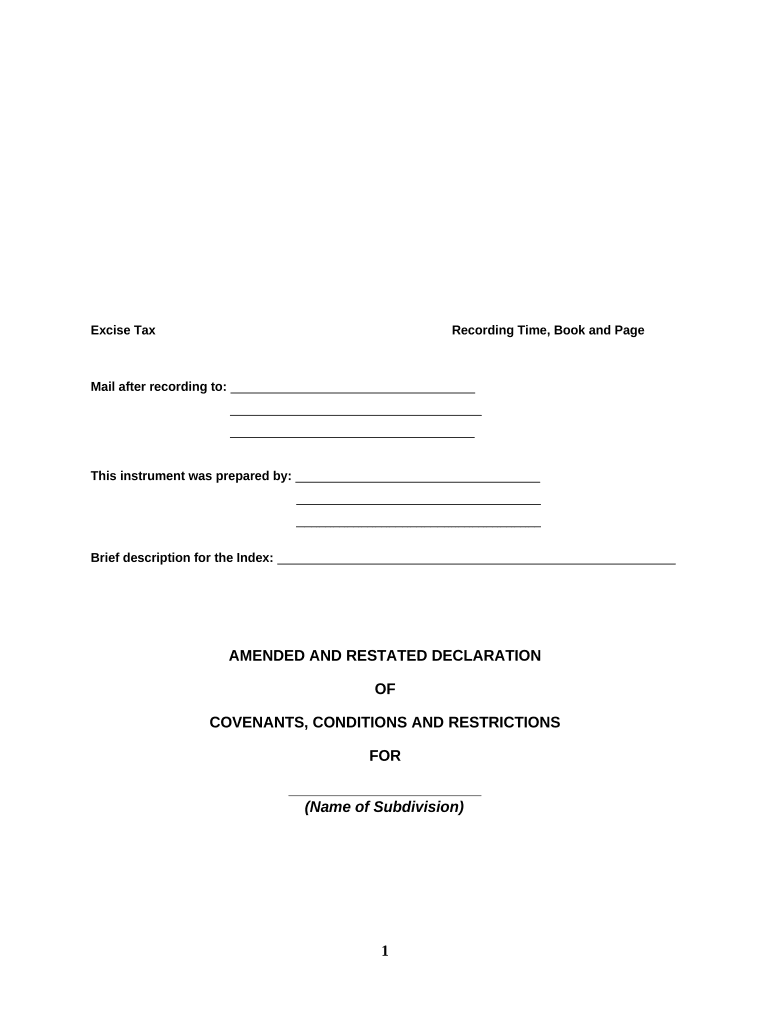
Excise Tax Recording Time, Book and Page Mail after recording to: ___________________________________ ____________________________________ ___________________________________ This instrument was prepared by: ___________________________________ ___________________________________ ___________________________________ Brief description for the Index: _________________________________________________________ AMENDED AND RESTATED DECLARATION OF COVENANTS, CONDITIONS AND RESTRICTIONS FOR _______________________ (Name of Subdivision) 1 TABLE OF CONTENTS ARTICLE I DEFINITIONS ............................................................................................ Section 1. Additional Property ............................................................................. Section 2. Appropriate Local Governmental Authority ........................................ Section 3. Declarant ............................................................................................ Section 4. Declarant’s Development Period ....................................................... Section 5. Lot or Lots .......................................................................................... Section 6. Master Plan ........................................................................................ Section 7. Owner ................................................................................................. Section 8. Period of Declarant Control ................................................................ Section 9. Property .............................................................................................. ARTICLE II ARCHITECTURAL CONTROL ................................................................... Section 1. IMPROVEMENTS ................................................................................ ARTICLE III RESTRICTIONS ........................................................................................ Section 1. LAND USE AND BUILDING TYPE ........................................................ Section 2. DWELLING SPECIFICATIONS ............................................................. Section 3. BUILDING SETBACK .......................................................................... Section 4. GARAGES AND DRIVEWAYS ............................................................. Section 5. NUISANCE .......................................................................................... Section 6. TEMPORARY STRUCTURES ............................................................... Section 7. OUTSIDE ANTENNAS ......................................................................... Section 8. MOTOR VEHICLES .............................................................................. Section 9. MOBILE HOMES, MANUFACTURED HOMES, Etc ............................... Section 10. DETACHED OR OUT BUILDINGS OR STRUCTURES .......................... Section 11. ANIMALS ............................................................................................ Section 12. SOLAR PANELS ................................................................................. Section 13. SWIMMING POOL ............................................................................... Section 14. GARBAGE RECEPTACLES ................................................................. Section 15. SUBDIVISION OF LOTS ...................................................................... Section 16. WAIVER OF UNINTENTIONAL VIOLATION ……………… ARTICLE IV EASEMENTS ............................................................................................ Section 1. UTILITIES ............................................................................................ 2 Section 2. EASEMENT RESERVED BY DECLARANT ........................................... Section 3. ENCROACHMENTS ............................................................................. ARTICLE V GENERAL PROVISIONS ........................................................................... Section 1. ENFORCEMENT .................................................................................. Section 2. SEVERABILITY ................................................................................... Section 3. AMENDMENT ...................................................................................... AMENDED AND RESTATED DECLARATION OF COVENANTS, CONDITIONS AND RESTRICTIONS FOR ______________________ (NAME OF SUBDIVISION) THIS AMENDED AND RESTATED DECLARATION is made on the date hereinafter set forth by __________________ (Name of Declarant) and wife, __________________ (Name of Declarant) , of _______________ (City) , _____________ County, _________________ (State) , hereinafter jointly referred to as Declarant . WHEREAS, Declarant is the sole owner of certain Property (the Property ) in the County of _______________, State of _______________, which is more particularly described as follows: ALL of the land shown on the Plat entitled ___________________ (Name of Subdivision) recorded in Plat Book ______, Page _____, in the Office of the Register of Deeds of ______________ County, ________________ (State) , BEING ALL of Lots ______________ and ______ of _______________ (Name of Subdivision) as shown on plat thereof recorded in Plat Book _____, Page ____, in the Office of the Register of Deeds of __________ County, ___________________ (State) ; and WHEREAS, it is the intent of the Declarant hereby to cause the above-described Property to be subjected to this Amended and Restated Declaration of Covenants, Conditions and Restrictions; NOW, THEREFORE , Declarant hereby declares that all of the Property described above shall be held, sold and conveyed subject to the following easements, restrictions, covenants and conditions, which are for the purpose of protecting the value and desirability of, and which shall run with, such real Property and be binding on all parties having any right, title or interest in the described Property or any part thereof, Declarant’s heirs, successors and assigns, and shall inure to the benefit of each owner thereof. 3 ARTICLE I. DEFINITIONS Section 1. Additional Property. Additional Property shall mean and refer to the property located adjacent to the Property. For the purpose of determining whether property is adjacent to the Property, the rights of way of public roads and utilities, as well as rivers and streams, shall be deemed not to separate otherwise adjacent property. Section 2. Appropriate Local Governmental Authority. Appropriate Local Governmental Authority shall mean and refer to the County of _________ or other appropriate local governmental authority having jurisdiction over the Property. Section 3. Declarant. Declarant shall mean and refer to __________________ (Name of Declarant) and wife, _________________ (Name of Declarant) , as well as their successors and assigns, pursuant to an express assignment or conveyance of any special Declarant rights hereunder to such successor or assign, all of which rights, including Declarant’s voting, architectural review, easement and development rights, shall be assignable and may be apportioned on a lot - by - lot basis. Section 4. Declarant’s Development Period. Declarant’s Development Period shall mean and refer to the period of time commencing on the date this Declaration is recorded in the Office of the Register of Deeds, _____________ County, _______________ (State) , and continuing for so long as Declarant or any affiliate of Declarant shall own any portion of the Property . Section 5. Lot or Lots. Lot shall mean and refer to any separately numbered plot of land shown upon any now or subsequently recorded subdivision plat of the Property intended for single family residential purposes and shall include any improvements constructed thereon and Lots shall refer to all such lots collectively. Declarant hereby reserves the right to reconfigure, from time to time and without the consent of the Owners or the Members of the Association, the boundaries of any Lot or Lots owned by Declarant and to thereby create additional Lots, eliminate existing Lots or create additional Common Elements; provided, however, in no event shall the Property contain a greater number of Lots than the number from time to time permitted by the Appropriate Local Governmental Authority, nor shall any Lot within the Property contain fewer square feet than the minimum number of square feet from time to time required by the Appropriate Local Governmental Authority. If Declarant elects to exercise its right to revise the boundaries of one or more Lots owned by Declarant, Declarant shall record a revised plat of the affected Lot or Lots. Upon the recording by Declarant of such a revised plat, each lot shown on the previously recorded plat or plats, the boundaries of which are revised by the revised plat, shall cease to be a Lot as defined in this Declaration and each newly configured lot shown on the revised plat shall be a Lot as defined in this Declaration. Section 6. Master Plan. Master Plan shall mean and refer to the plan(s) for the Property and the Additional Property now or hereafter approved by the Appropriate Local Governmental Authority, as such plan(s) may be from time to time amended and approved. Section 7. Owner. Owner shall mean and refer to the record Owner, whether one or more persons or entities, of a fee simple title to any Lot which is a part of the Property , as hereinafter defined, including 4 contract sellers, but excluding those having such interest merely as security for the performance of an obligation. Section 8. Period of Declarant Control. Period of Declarant Control shall mean and refer to the period of time commencing on the date this Declaration is recorded in the Office of the Register of Deeds, _____________ County, _________________ (State) , and continuing for so long as Declarant or any affiliate of Declarant shall own any portion of the Property . In the event that Declarant ceases to own any of the Property but thereafter annexes Additional Property to this Declaration, the Period of Declarant Control shall be reinstated until Declarant shall again cease to own any of the Property . Section 9. Property . Property shall mean and refer to all of the Property hereby or hereafter made subject to the terms, covenants and conditions of this Declaration, as amended from time to time. ARTICLE II ARCHITECTURAL CONTROL Section 1. Improvements. No construction, including clearing, grading, street driveway connection, temporary power service, can be commenced on any lot without the written pre-approval of the Declarant. A copy of all plans, drawings, exterior materials to be used including colors, must be furnished to the Declarant for Declarant’s approval and keeping for future reference. Declarant shall not be responsible or liable in any way for any defects in any plans or specification approved by Declarant, nor for any structural defects in any work done according to such plans and specifications. Further, Declarant shall not be liable in damages to anyone by reason of mistake in judgment, negligence, misfeasance, malfeasance or nonfeasance arising out of or in connection with the approval or disapproval or failure to approve or disapprove any such plans or specification or the exercise of any other power or right provided for in this Declaration nor for any approvals or permits required from any governmental or other entity. Every person who submits plans or specifications for approval agrees, by submission of such plans and specifications, and every owner of any Lot agrees, that he or she will not bring any action or suit against Declarant to recover any such damage. ARTICLE III RESTRICTIONS Section 1 Land Use and Building Type No lot shall be used except for single-family residential purposes; provided, however, Declarant, or any affiliated entity may use any Lot owned or leased by Declarant or any affiliated entity as a temporary sales office and/or model for the purposes of carrying on business related to the development, improvement and sale of the Property. Section 2. Dwelling Specifications No dwelling shall be erected or allowed to remain on any lot if the heated area of the main structure, exclusive of basements, cellars, attic dormer spaces, open porches, decks and garages, shall be less than two thousand two hundred (2200) square feet in the case of a one story dwelling, or less than two thousand eight hundred (2800) square feet in the case of a two story dwelling. All dwellings must have an attached garage of a minimum two car capacity. 5 Section 3. Building Setback No building shall be located on any lot nearer to the front or rear lot line, or to any side street or lot line, than shall be permitted under applicable local ordinances in effect at the time such building is to be constructed or as permitted by the _______________ County Board of Adjustment or other appropriate governmental authority pursuant to a variance of such ordinances. Deviations from building line restrictions not in excess of ten percent (10.0%) shall not be construed as a violation of these covenants. Section 4. Garages and Driveways. No garage shall be commenced, erected or maintained upon any lot, nor shall any exterior addition to or change or alteration therein be made until the plans and specifications showing the nature, kind, shape, height, materials and location of the same shall have been submitted to and approved in writing by Declarant as to harmony of external design and location in relation to surrounding structures and topography. All driveways servicing the dwelling shall be asphalt, concrete or pavers of manufactured or natural stone. Driveways must be paved from the street to the garage doors or to the rear wall line of the dwelling. All driveways must begin at the street in front of the house and have ascending or descending grades in conformity with current regulations of the _________________ (State) Department of Transportation governing driveway connections with public roads. Section 5. Nuisance No noxious or offensive activity shall be conducted upon any Lot or the Common Elements nor shall anything be done thereon which may be or may become an annoyance or nuisance to the neighborhood. In the event that any Lot Owner or any other person conducts obnoxious or offensive activity upon any Lot or does anything thereon which may be or may become an annoyance or nuisance to the neighborhood, a written complaint can be filed by a Lot Owner with the Association. No Lot or other area within Property shall be used as a dumping ground for rubbish or as a site for the accumulation of unsightly materials of any kind, including, without limitation, broken or rusty equipment and discarded appliances and furniture. No outdoor clotheslines shall be permitted. Section 6. Temporary Structures. No structure of a temporary character, trailer, tent, shack, garage, barn or other out building shall be permitted at any time or used on any lot at any time as a residence either temporarily or permanently. An exception to this provision shall be a child’s play house if it is of a temporary nature and is located behind the residence. Section 7. Outside Antennas. Except for “dish” antennas designed to receive direct broadcast satellite service, including direct-to-home satellite service, one meter (39”) or less in diameter, antennas designed to receive video programming services via MMDS (wireless cable) and antennas designed to receive television broadcast signals, no outside antennas or satellite dishes and no free standing transmission or receiving towers shall be erected on any Lot within the Property without the prior written permission of the Declarant. Except as otherwise reasonably required in order to receive the intended signal, any antenna or satellite dish erected on any Lot within the Property shall be affixed to the dwelling, shall be a color which blends with its surrounds, shall have a mast only as high as reasonably necessary to receive the intended signal and shall not be visible from any street. Only one (1) dish antenna shall be allowed per Lot. 6 Section 8. Motor Vehicles. No inoperative motor vehicle may be parked or stored on any Lot or any public or private street or other area within the Property for a period in excess of 48 hours. Vehicle or equipment repair or restoration taking longer than 48 hours will not be permitted outside the residence or on any driveway or lot unless such repair or restoration is concealed behind the dwelling and cannot be visible from the street. Section 9. Mobile Homes, Manufactured Homes, Etc. No mobile home, manufactured home, modular home, trailer, or other like structure shall be located or installed on any Lot. As used in this Section, mobile home, manufactured home or modular home shall mean a structure, assembled in whole or in part in a location other than on the Lot itself, transportable in one or more sections, any section of which, during transport, is four (4) feet or more in width and ten (10) feet or more in length, which may or may not be built on a permanent chassis and which is designed to be used as a dwelling with or without a permanent foundation when connected to the required utilities. Notwithstanding the foregoing, Declarant, builders or contractors may maintain temporary improvements (such as a sales office and/or construction trailer) on any Lot during the construction and development period. Section 10. Detached or Out Buildings or Structures Any detached structure, whether built on or off site and for whatever purpose, must conform to the general architectural style and coloration of the residence and be pre approved by Declarant. Section 11. Animals. No animals, livestock or poultry of any kind shall be kept or maintained on the Common Elements or on any Lot or in any dwelling except that dogs, cats or other household pets may be kept or maintained provided that they are not kept or maintained for commercial purposes and further provided that they are kept and maintained in compliance with all laws and ordinances of the State of ________________ and the County of _______________ relating thereto; and Section 12. Solar Panels. Solar panels must either be located on the back side of the dwelling or lot, or be placed in a location that is unobtrusive to adjacent Owners. Section 13. Swimming Pools. No swimming pools shall be placed or built on any lot without the prior written approval of the Declarant. All plans and designs for swimming pools shall be submitted to the Declarant for written approval prior to construction. Section 14. Garbage Receptacles. No Property within this subdivision shall be used or maintained as a dumping ground for rubbish, trash, or other waste. All waste shall be kept in sanitary containers, and all incinerators or other equipment for the storage or disposal of such waste material shall be kept in a clean sanitary condition. The Declarant or its agent shall have the right to enter upon any lot area deemed by public authority or the Declarant or its agent, to be unsightly. If the Declarant performs the work to comply with this restriction, then the cost shall be borne by the Owner and the cost shall be a lien upon the lot until paid as hereinafter set forth. Section 15. Subdivisions of Lots. No Lot shall be subdivided into a lot smaller than or different from the Lot shown on the 7 recorded plat and no street shall be laid out across or through any Lot, except with the written consent of Declarant. Section 16. Waiver of Unintentional Violation. Declarant may waive any unintentional or minor violation of these restrictive covenants by an appropriate instrument in writing provided that if the unintentional or minor violation occurs on any lot which is adjacent to a lot or lots which have been conveyed to a fee simple owner or owners, the consent of such owner or owners shall be obtained to such waiver. ARTICLE IV EASEMENTS Section 1 . UTILITIES. Easements for installation and maintenance of utilities (including cable television service) and drainage facilities are reserved as indicated on recorded plats. In addition, Declarant reserves the right to place additional easements and rights-of-way for the installation and maintenance of utilities (including cable television service) and drainage facilities over the rear TEN (10) feet of all Lots and over each side FIVE (5) feet of all Lots. Within these easements no structures, planting or other material shall be placed or permitted to remain which may interfere with the installation and maintenance of utilities, or which may change the direction of flow of drainage channels in the drainage easements, or which may obstruct or retard the flow of water through drainage channels in the easements. An easement is hereby established for the benefit of the appropriate governmental entity (and any other person or firm providing services to the Property under agreement with or at the direction of the Declarant) over all Common Elements as may be reasonably necessary for the setting, removal and reading of water meters, and the maintenance and replacement of water, sewer and drainage facilities and for the fighting of fires and collection of garbage. Section 2. Easement Reserved by Declarant Declarant hereby reserves such easements on, across and over the Common Elements as shall be reasonably necessary for (i) the exercise by Declarant or any affiliated entity of any right herein reserved, including, without limitation, Declarant’s right, should Declarant elect, to annex the Additional Property, as hereinafter defined and (ii) the development by Declarant or any affiliate, their respective successors and assigns, of the Additional Property, should Declarant elect not to annex the Additional Property, including without limitation easements for ingress, egress and regress over private roads and streets now or hereafter erected on the Property and easements for the use of all utility lines, fixtures and/or their connections located within the Common Elements for the purpose of providing water, light, power, telephone, sewage and sanitary service to the Additional Property. Section 3. Encroachments. In the event that any improvements on a Lot shall encroach upon any Common Elements or upon any other Lot as a result of the initial improvements constructed by Declarant or for any reason not caused by the purposeful or negligent act of the Owner or agents of such Owner, then an easement appurtenant to such Lot shall exist for the continuance of such encroachment upon the Common Elements or other Lot for so long as such encroachment shall naturally exist; and, in the event that any portion of the Common Elements shall encroach upon any Lot, then an easement shall exist for the continuance of such encroachment of the Common Elements into any such Lot for so long as such encroachment shall naturally exist. Section 4. Additional Drainage Easements. In order to implement effective and adequate erosion control, the Declarant shall have the right 8 to enter upon any portion of the Property before and after improvements have been constructed thereon for the purpose of performing any grading or constructing and maintaining erosion prevention devices; provided, however, no such activities shall interfere with any permanent improvements constructed on the Property . ARTICLE V GENERAL PROVISIONS SECTION 1. Enforcement. The failure of Declarant to enforce any right, privilege, covenant or condition which may be granted to it by this Declaration or other above mentioned document shall not constitute a waiver of the right of Declarant to thereafter enforce such right, provision, covenant or condition in the future. Section 2. Severability. Invalidation of any one of the covenants or restrictions by judgment or court order shall in no wise affect any other provision which shall remain in full force and effect. Section 3 Amendment. The covenants and restrictions of this Declaration shall run and bind the land for a term of thirty (30) years from the date this Declaration is recorded, after which time they shall be automatically extended for successive periods of ten (10) years unless terminated as hereinafter provided. No amendment purporting to revoke or curtail any right herein conferred to Declarant shall be effective unless executed by Declarant; and no amendment relating to the maintenance or ownership of any permanent detention or retention pond shall be effective unless reviewed and approved by the governmental office having jurisdiction for watershed protection. IN WITNESS WHEREOF, the undersigned, being the Declarant herein, has caused this instrument to be executed in its name as of the _____ day of _____________, 20_____. ___________________________ _______________________ NAME OF DECLARANT NAME OF DECLARANT (Seal) (Seal) ____________ County, _______________ (State) I certify that the following person personally appeared before me this day, acknowledging to me that he signed the foregoing document: ____________________ (NAME OF DECLARANT) Today's Date: ______________, 20_____ ____________________________________ [Notary's signature as name appears on seal] _______________________________________ [Notary's printed name as name appears on seal] 9 My commission expires: ______________, 20_____. [Affix Notary Seal in Space Above] ___________ County, _______________ (State) I certify that the following person personally appeared before me this day, acknowledging to me that he signed the foregoing document: ___________________ (NAME OF DECLARANT) Today's Date: _________________, 20_____ ____________________________________ [Notary's signature as name appears on seal] _______________________________________ [Notary's printed name as name appears on seal] My commission expires: ______________, 20_____. [Affix Notary Seal in Space Above] SCHEDULE A 10

Useful Suggestions for Finalizing Your ‘Declaration Restrictions’ Online

Are you fed up with the burden of handling documents? Look no further than airSlate SignNow, the premier digital signature platform for individuals and businesses. Wave farewell to the monotonous routine of printing and scanning documents. With airSlate SignNow, you can effortlessly finalize and sign documents online. Make use of the powerful tools offered by this user-friendly and cost-effective platform and transform your method of document management. Whether you need to approve documents or gather signatures, airSlate SignNow manages everything seamlessly, with just a few clicks.

Follow this detailed guide:

  1. Access your account or initiate a free trial with our service.
  2. Click +Create to upload a document from your device, cloud storage, or our template library.
  3. Open your ‘Declaration Restrictions’ in the editor.
  4. Click Me (Fill Out Now) to complete the document on your end.
  5. Add and assign fillable fields for others (if needed).
  6. Proceed with the Send Invite settings to request eSignatures from others.
  7. Download, print your version, or convert it into a reusable template.

No need to worry if you require to work with your teammates on your Declaration Restrictions or send it for notarization—our platform equips you with everything necessary to achieve such tasks. Create an account with airSlate SignNow today and elevate your document management to new levels!

Here is a list of the most common customer questions. If you can’t find an answer to your question, please don’t hesitate to reach out to us.

Need help? Contact Support
Declaration restrictions vs deed restrictions
HOA Declaration vs bylaws
Declaration of Covenants, Conditions and restrictions
Declaration amendment
How do I find CC&Rs for my property
Sample amendment to CC&Rs
Sue HOA for not enforcing rules
HOA amendment example
Declaration restrictions vs deed restrictions
Unlike deed restrictions, declaration restrictions
CC&R rules and regulations
How do I find CC&Rs for my property

The best way to complete and sign your declaration restrictions form

Save time on document management with airSlate SignNow and get your declaration restrictions form eSigned quickly from anywhere with our fully compliant eSignature tool.

How to Sign a PDF Online How to Sign a PDF Online

How to fill out and sign forms online

In the past, dealing with paperwork required lots of time and effort. But with airSlate SignNow, document management is easy and fast. Our powerful and easy-to-use eSignature solution enables you to easily complete and electronically sign your declaration restrictions form online from any internet-connected device.

Follow the step-by-step guidelines to eSign your declaration restrictions form template online:

  • 1.Sign up for a free trial with airSlate SignNow or log in to your account with password credentials or SSO authentication.
  • 2.Click Upload or Create and import a file for eSigning from your device, the cloud, or our form catalogue.
  • 3.Click on the file name to open it in the editor and use the left-side toolbar to fill out all the empty areas appropriately.
  • 4.Put the My Signature field where you need to eSign your sample. Type your name, draw, or upload a picture of your handwritten signature.
  • 5.Click Save and Close to finish modifying your completed form.

Once your declaration restrictions form template is ready, download it to your device, export it to the cloud, or invite other parties to electronically sign it. With airSlate SignNow, the eSigning process only requires a few clicks. Use our robust eSignature solution wherever you are to manage your paperwork productively!


How to Sign a PDF Using Google Chrome How to Sign a PDF Using Google Chrome

How to complete and sign forms in Google Chrome

Completing and signing paperwork is easy with the airSlate SignNow extension for Google Chrome. Installing it to your browser is a fast and productive way to deal with your paperwork online. Sign your declaration restrictions form sample with a legally-binding eSignature in just a couple of clicks without switching between applications and tabs.

Follow the step-by-step guidelines to eSign your declaration restrictions form template in Google Chrome:

  • 1.Navigate to the Chrome Web Store, search for the airSlate SignNow extension for Chrome, and add it to your browser.
  • 2.Right-click on the link to a document you need to eSign and select Open in airSlate SignNow.
  • 3.Log in to your account using your credentials or Google/Facebook sign-in option. If you don’t have one, you can start a free trial.
  • 4.Use the Edit & Sign toolbar on the left to fill out your sample, then drag and drop the My Signature field.
  • 5.Insert a picture of your handwritten signature, draw it, or simply enter your full name to eSign.
  • 6.Make sure all data is correct and click Save and Close to finish editing your paperwork.

Now, you can save your declaration restrictions form sample to your device or cloud storage, send the copy to other individuals, or invite them to electronically sign your document via an email request or a secure Signing Link. The airSlate SignNow extension for Google Chrome enhances your document workflows with minimum time and effort. Try airSlate SignNow today!


How to Sign a PDF in Gmail How to Sign a PDF in Gmail How to Sign a PDF in Gmail

How to complete and sign forms in Gmail

When you receive an email containing the declaration restrictions form for approval, there’s no need to print and scan a file or download and re-upload it to another tool. There’s a better solution if you use Gmail. Try the airSlate SignNow add-on to rapidly eSign any documents right from your inbox.

Follow the step-by-step guidelines to eSign your declaration restrictions form in Gmail:

  • 1.Go to the Google Workplace Marketplace and find a airSlate SignNow add-on for Gmail.
  • 2.Set up the program with a corresponding button and grant the tool access to your Google account.
  • 3.Open an email containing an attachment that needs approval and utilize the S key on the right sidebar to launch the add-on.
  • 4.Log in to your airSlate SignNow account. Choose Send to Sign to forward the document to other parties for approval or click Upload to open it in the editor.
  • 5.Place the My Signature option where you need to eSign: type, draw, or import your signature.

This eSigning process saves efforts and only requires a few clicks. Use the airSlate SignNow add-on for Gmail to adjust your declaration restrictions form with fillable fields, sign forms legally, and invite other people to eSign them al without leaving your mailbox. Improve your signature workflows now!


How to Sign a PDF on a Mobile Device How to Sign a PDF on a Mobile Device How to Sign a PDF on a Mobile Device

How to complete and sign forms in a mobile browser

Need to quickly fill out and sign your declaration restrictions form on a smartphone while working on the go? airSlate SignNow can help without the need to install extra software programs. Open our airSlate SignNow solution from any browser on your mobile device and create legally-binding eSignatures on the go, 24/7.

Follow the step-by-step guide to eSign your declaration restrictions form in a browser:

  • 1.Open any browser on your device and follow the link www.signnow.com
  • 2.Register for an account with a free trial or log in with your password credentials or SSO authentication.
  • 3.Click Upload or Create and import a file that needs to be completed from a cloud, your device, or our form collection with ready-to go templates.
  • 4.Open the form and complete the empty fields with tools from Edit & Sign menu on the left.
  • 5.Place the My Signature area to the form, then enter your name, draw, or add your signature.

In a few simple clicks, your declaration restrictions form is completed from wherever you are. When you're done with editing, you can save the file on your device, create a reusable template for it, email it to other people, or ask them to eSign it. Make your documents on the go fast and efficient with airSlate SignNow!


How to Sign a PDF on iPhone How to Sign a PDF on iPhone

How to complete and sign forms on iOS

In today’s business world, tasks must be done quickly even when you’re away from your computer. Using the airSlate SignNow mobile app, you can organize your paperwork and sign your declaration restrictions form with a legally-binding eSignature right on your iPhone or iPad. Install it on your device to conclude agreements and manage forms from just about anywhere 24/7.

Follow the step-by-step guide to eSign your declaration restrictions form on iOS devices:

  • 1.Open the App Store, find the airSlate SignNow app by airSlate, and install it on your device.
  • 2.Open the application, tap Create to import a template, and choose Myself.
  • 3.Select Signature at the bottom toolbar and simply draw your autograph with a finger or stylus to eSign the sample.
  • 4.Tap Done -> Save after signing the sample.
  • 5.Tap Save or utilize the Make Template option to re-use this paperwork in the future.

This process is so straightforward your declaration restrictions form is completed and signed within a couple of taps. The airSlate SignNow app works in the cloud so all the forms on your mobile device remain in your account and are available whenever you need them. Use airSlate SignNow for iOS to boost your document management and eSignature workflows!


How to Sign a PDF on Android How to Sign a PDF on Android

How to complete and sign documents on Android

With airSlate SignNow, it’s easy to sign your declaration restrictions form on the go. Set up its mobile application for Android OS on your device and start improving eSignature workflows right on your smartphone or tablet.

Follow the step-by-step guidelines to eSign your declaration restrictions form on Android:

  • 1.Open Google Play, find the airSlate SignNow app from airSlate, and install it on your device.
  • 2.Log in to your account or register it with a free trial, then add a file with a ➕ key on the bottom of you screen.
  • 3.Tap on the imported document and choose Open in Editor from the dropdown menu.
  • 4.Tap on Tools tab -> Signature, then draw or type your name to electronically sign the form. Fill out empty fields with other tools on the bottom if needed.
  • 5.Use the ✔ key, then tap on the Save option to finish editing.

With an intuitive interface and total compliance with main eSignature standards, the airSlate SignNow app is the best tool for signing your declaration restrictions form. It even operates offline and updates all form changes once your internet connection is restored and the tool is synced. Fill out and eSign forms, send them for approval, and make multi-usable templates anytime and from anywhere with airSlate SignNow.

Sign up and try Declaration restrictions form
  • Close deals faster
  • Improve productivity
  • Delight customers
  • Increase revenue
  • Save time & money
  • Reduce payment cycles

