Establishing secure connection… Loading editor… Preparing document…
Navigation

Fill and Sign the Drywall Nails Form
Fill and Sign the Drywall Nails Form

How it works

Open the document and fill out all its fields.
Apply your legally-binding eSignature.
Save and invite other recipients to sign it.

Rate template

4.5
41 votes
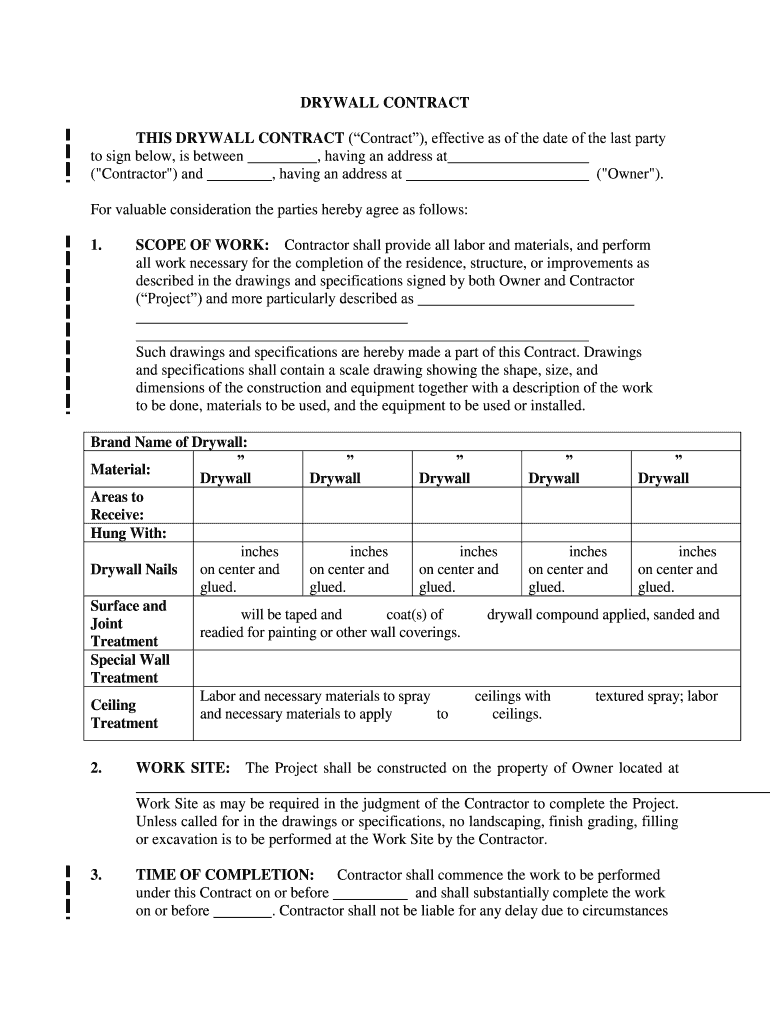
DRYWALL CONTRACT THIS DRYWALL CONTRACT (“Contract”), effective as of the date of the last party to sign below, is between , having an address at ("Contractor") and , having an address at ("Owner"). For valuable consideration the parties hereby agree as follows: 1. SCOPE OF WORK: Contractor shall provide all labor and materials, and perform all work necessary for the completion of the residence, structure, or improvements as described in the drawing s and specifications signed by both Owner and Contractor (“Project”) and more particularly described as Such drawings and specifications are hereby made a part of this Contract. Drawings and specifications shall contain a scale drawing showing the shape, size, and dimensions of the construction and equipment together with a description of the work to be done, materials to be used, and the equipment to be used or installed. Brand Name of Drywall: Material: ” Drywall ” Drywall ” Drywall ” Drywall ” Drywall Areas to Receive: Hung With: Drywall Nails inches on center and glued. inches on center and glued. inches on center and glued. inches on center and glued. inches on center and glued. Surface and Joint Treatment will be taped and coat(s) of drywall compound applied, sanded and readied for painting or other wall coverings. Special Wall Treatment Ceiling Treatment Labor and necessary materials to spray ceilings with textured spray; labor and necessary materials to apply to ceilings. 2. WORK SITE: The Project shall be constructed on the property of Owner located at and more particularly described as (hereafter "the Work Site"). Owner hereby authorizes Contractor to commence and complete the usual and customary excavation and grad ing on the Work Site as may be required in the judgment of the Contractor to complete the Project. Unless called for in the drawings or specifications, no landscaping, finish grading, filling or excavation is to be performed at the Work Site by the Contra ctor. 3. TIME OF COMPLETION: Contractor shall commence the work to be performed under this Contract on or before and shall substantially complete the work on or before . Contractor shall not be liable for any delay due to circumstances beyo nd its control including strikes, casualty, acts of God, illness, injury, or general unavailability of materials. 4. PERMITS: Contractor shall apply for and obtain such permits and regulatory approvals as may be required by the local municipal/county government, the cost thereof shall be included as part of the Project price. 5. INSURANCE: Contractor shall maintain general li ability, workers compensation and builder's risk insurance. 6. SURVEY AND TITLE: If the Project is near the Owner’s property boundary, Owner will point out property lines to the Contractor. If the Owner or Contractor has any doubt about the location of t he property lines, Owner shall provide Contractor with boundary stakes through a licensed surveyor. In addition, Owner shall provide Contractor documentation that Owner has title to the Work Site and shall provide Contractor copies of any covenants, condit ions, or restrictions that affect the Work Site. 7. CHANGES TO SCOPE OF WORK: Owner may make changes to the scope of the work, including changes to the drawings and specifications, from time to time during the construction of the Project. Any alteration or deviation from the above contractual specifications that results in a revision of the contract price will be executed only upon the parties entering into a written change order. Such Change Orders shall become part of this Contract. Owner agrees to pay any increase in the cost of the Project as a result of a Change Order. In the event the cost of a Change Order is not known at the time a Change Order is executed, the Contractor shall estimate the cost thereof and Owner shall pay the actual cost whether or not it is in excess of the estimated cost. 8. CONTRACT PRICE: {COST PLUS} Owner agrees to pay Contractor the actual cost to Contractor of materials plus the sum of $ for performing the services set forth in the scope of the work. Contractor s hall be paid as follows: . OR {FIXED FEE} Owner agrees to pay Contractor the sum of $ for performing the services set forth in the scope of the work. Contractor shall be paid as follows: . METHOD OF PAYMENT (any initial down payment will be limited to no more than one -third of the total contract price): ___________________________ Contractor shall furnish Owner appropriate releases or waivers of lie n for all work performed or materials provided at the time the next periodic payment shall be due. 9. LATE PAYMENT/DEFAULT: A failure to make payment for a period in excess of ten (10) days from the due date shall be deemed a material breach of this Cont ract. If payment is not made when due, Contractor may suspend work on the job until such time as all payments due have been made without breach of the Contract pending payment or resolution of any dispute. Owner agrees to pay a late charge of 1% of all pay ments that are more than ten (10) days late plus interest at the rate of 1% per month. 10. DESTRUCTION AND DAMAGE : If the Project is destroyed or damaged for any reason, except where such destruction or damage was caused by the sole negligence of the Con tractor or its subcontractors, Owner shall pay Contractor for any additional work done by Contractor in rebuilding or restoring the Project to its condition prior to such destruction or damage. If the estimated cost of replacing work already accomplished b y Contractor exceeds 20 percent of the Contract price, either the Contractor or Owner may terminate this Contract. Upon termination by either party, Contractor shall be excused from further performance under this Contract and Owner shall pay Contractor a percentage of the Contract price in proportion to the amount of work accomplished prior to the destruction or damage. 11. ASSIGNMENT : Neither party may assign this Contract, or payments due under the Contract, without the other party’s written consent. An y such assignment shall be void and of no effect. 12. INTERPRETATION: (a) Interpretation of Documents. The Contract, drawings, and specifications are intended to supplement one another. In the event of a conflict, the specifications shall control the drawings, and the Contract shall control both. If work is displayed on the drawings but not called for in t he specifications, or if the work is called for in the specifications but not displayed on the drawings, Contractor shall be required to perform the work as though it were called for and displayed in both documents. (b) Entire Agreement. This Contract con stitutes the entire agreement of the parties. No other agreements, oral or written, pertaining to the work to be performed under this Contract exists between the parties. This Contract may only be modified only by a written agreement signed by both parties . (c) Governing Law. This Contract shall be interpreted and governed in accordance with the laws of the State of Maine. 13. ATTORNEYS’ FEES AND COSTS: If any party to this Contract brings a cause of action against the other party arising from or relatin g to this Contract, the prevailing party in such proceeding shall be entitled to recover reasonable attorney fees and court costs. 14. PERFORMANCE: (a) Contractor may, at its discretion, engage licensed subcontractors to perform work pursuant this Contract provided Contractor shall remain fully responsible for the proper completion of the Project. (b) All work shall be completed in a workman -like manner and in compliance with all building codes and applicable laws. To the extent required by law, all work shall be performed by individuals duly licensed and authorized by law to perform said work. (c) Contractor agrees to remove all debris and leave the pr emises in broom clean condition. 15. WARRANTY: Contractor agrees to repair any defects in workmanship to walls and ceilings such as nail pops, blisters and hairline cracks in excess of " for a period of . Contractor agrees to make such repairs at the following times: prior to final payment, days after move -in, and days after the move -in date. Owner agrees to provide Contractor with a list of the defects and their exact location at each of the above -stated time periods; and Owner agre es Contractor shall have a week time period in which to complete repairs. Contractor shall not be responsible for any touch -up painting, nor be responsible for color mismatch of painted surfaces, since this may be a result of oxidation or batch numbe r of the painting mix. Contractor's warranty shall be limited to defects in workmanship within the scope of work performed by Contractor and which arise and become known within year(s) from the date hereof. All said defects arising after year(s ) and defects in material are not warranted by Contractor. Contractor hereby assigns to Owner all warranties on materials as provided by the manufacturer of such materials. In addition to any additional warranties agreed to by the parties, the contractor w arrants that the work will be free from faulty materials; constructed according to the standards of the building code applicable for this location; constructed in a skillful manner and fit for habitation or appropriate use. The warranty rights and remedies set forth in the Maine Uniform Commercial Code apply to this contract. 16. DISPUTE RESOLUTION : If a dispute arises concerning the provisions of this contract or the performance by the parties, then the parties agree to settle this dispute by jointl y paying for one of the following (check only one) (1) Binding arbitration as regulated by the Maine Uniform Arbitration Act, with the parties agreeing to accept as final the arbitrator’s decision ( ); (2) Nonbinding arbitration, with the parties free to n ot accept the arbitrator’s decision and to seek satisfaction through other means, including a lawsuit ( ); or (3) Mediation, with the parties agreeing to enter into good faith negotiations through a neutral mediator in order to attempt to resolve their differences ( ). 17. ENERGY STANDARDS: Chapter 214 of the Maine Revised Statutes establishes minimum energy efficiency building standards for new residential construction. This building or addition to an existing building will/will not meet or ex ceed those standards. AGREED: CONTRACTOR: Signature ______________________________ Print Name & Title _________________ Date __________________ License Number _______________________________ Name and Address of License Holder OWNER: Signature ______________________________ Print Name ________________ Date STATUTORY NOTICES Consumers are strongly advised to visit the Attorney General's publicly accessible website to gather current information on how to enforce their rights when constructing or repairing their homes, as well as the Attorney General's publicly accessible websit e address and telephone number. Attorney General Website: http://maine.gov/ag/ Attorney General Phone Number: 207 -626 -8800 Where merchandise is sold or contracted to be sold, whether under a single contract or under multiple contracts, to a consumer as a result of or in connection with a salesman's direct contact accomplished by means of and including, but not limited to, a personal visit or a telephone call, upon the consumer other than at the seller's place of busi ness, without the consumer soliciting the initial contact or sale, the consumer may void the contract or sale by giving notice of his intention not to be bound by the contract or sale and returning or making available for return any merchandise delivered p ursuant to the terms of this subchapter. By giving written notice of avoidance to the seller by ordinary mail, postage prepaid, within 3 full business days following the day on which the contract or sale was made. The notice shall be sufficient if addresse d to the seller at the address given on the contract or agreement. Notice of avoidance shall be effective upon deposit in the United States mail. The notice of avoidance given under this section need not take a particular form and is sufficient if it expre sses the intention of the consumer not to be bound by the sale. If the contract requires the seller to affix merchandise permanently to real estate or its appurtenances, then the seller may not begin performance as long as the consumer has the right to can cel. ADDENDUM Maine Attorney General Home Construction Warning If you are thinking about building a new home or repairing your existing home, here are some things you should know. Contractors Are Not Licensed - Buyer Beware! While there are a great many competent, ethical home contractors in Maine, it is up to you, the consumer, to find one. Home contractors are not licensed or regulated by the State of Maine. The old saying "Buyer Beware" applies. You should also keep in mind that the lack of state licensing allows the worst contractors to compete for your business alongside the best. The Attorney General's Consumer Mediation Program ranks home contractors among the top three most complained about businesses every year. Alth ough home construction contractors are not licensed, some building trades are licensed. Architects, engineers, plumbers, electricians, oil burner technicians, manufacturers, dealers and installers of mobile and modular homes are licensed in Maine. For more information on these licensed trades, go to www.maine.gov/pfr/pfrhome.htm . When hiring a contractor, we recommend that you: * Seek referrals and keep good notes. The best source of references may be: - friends - co -workers - independent trade contractors - engineers - family - building material suppliers - neighbors - architects - home inspectors - local lenders - banks - contractor's existing customers * When meeting with a builder, be sure to ask for: - Number of years in business - Permanent business location - Proof of general liability insurance - Professional affiliations - Educational designations - List of last 5 customers - Proof of workers' compensation insurance for employees and liability insurance We strongly recommend that you ask any contractor you are considering hiring for several references and that you follow up on them. Building Codes While some towns and cities have adopted building codes and enforced them, others have not. We recommend that you talk to your town's code officials before you begin construction. Written Contracts Are Required For all home construction and home improvement projects over $3,000, Maine law requires a written contract with a specific provision that prohibits payment up front of more than one third of the c ontract price. When a contractor asks you for any money up front, make sure that the money is being used to purchase materials for your project. Ask for receipts and for a lien waiver from subcontractors. A model home construction contract that meets State law can be found in Chapter 18 of the Maine Attorney General's Consumer Law Guide. Be Careful with Construction Loans If a lender is financing your construction project, make sure that you know your lender and that you understand how your loan procee ds will be disbursed and how subcontractors will be paid. Home Contractor Complaints Received by the Attorney General You can find out if a particular contractor has been the subject of a consumer complaint that the Attorney General attempted to mediate by contacting the Attorney General's Consumer Protection Division at 1 -800 -436 -2131 or at consumer.mediation@maine.gov. Keep in mind that just because the Attorney General has accepted a complaint for mediation does not necessarily mean the consumer was ri ght and the contractor was wrong. Home Contractors the State Has Sued In the recent past the State has successfully sued the following home contractors for poor workmanship or failure to complete jobs. The files below require the free Adobe Reader.: * State of Maine v. Maine Coast Log Homes, Timber Pine Construction, and Mark A. Holmes * State of Maine v. CBS Enterprises (PDF) (Kimberly Mark Smith and David J. Blais), * Default Judgment in CBS Enterprises (PDF), * State of Maine v. Fre deric Weinschenk (PDF) d/b/a Ric Weinschenk Builders, Inc., * State of Maine v. Stephen Lunt (PDF) d/b/a Lakeview Builders, Inc., * State of Maine v. Bob Burns (PDF) d/b/a Better Homes, * State of Maine v. Albert H. Giandrea (PDF) d/b/a AG's Ho me Quality Improvements, Inc., * State of Maine v. Al Verdone (PDF), * State of Maine v. Mikal W. Tuttle (PDF), d/b/a MT Construction, DMI Industries, Inc., and MT Construction, Inc. * State of Maine v. Jeffrey C. Scott, d/b/a Molunkus Stream C onstruction (PDF) The Androscoggin County District Attorney has obtained theft convictions against home contractors Harold Soper (State of Maine v. Harold Soper (PDF)) and Mikel Tuttle (State of Maine v. Mikel W. Tuttle (PDF)). Even when our law suits ha ve been successful, we have been unable to collect a significant portion of the judgments because the builders are bankrupt, judgment proof, or have left the state. We strongly recommend that you research a contractor's record before you begin any construc tion project. Your Home Construction Rights Chapter 17 of the Maine Attorney General's Consumer Law Guide explains your rights when constructing or repairing your home. Chapter 18 of the Consumer Law Guide is a model home construction contract that mee ts the statutory requirements for any home construction contract over $3,000. *Optional notice required only for home solicitation sales: BUYER'S RIGHT TO CANCEL Date of signed transaction: _________________________________ If this agreement was solicited at your residence and you do not want the goods or services, you may cancel this agreement by mailing a notice to the seller. The notice must say that you do not want the goods or services and must be mailed before midnight of _________________________________ (date) when cancellation right lapses. The notice must be mailed to: _________________________________ _________________________________ _________________________________ (Insert name and mailing address of seller) If you cancel by this date, the seller may not keep any of your cash down payment. If this agreement requires the seller to affix goods to real estate, then the seller may not begin the work until _________________________________ (date) when cancellation r ight lapses.

Helpful instructions for completing your ‘Drywall Nails’ online

Are you fatigued by the inconvenience of handling paperwork? Look no further than airSlate SignNow, the premier eSignature solution for individuals and organizations. Bid farewell to the monotonous routine of printing and scanning documents. With airSlate SignNow, you can effortlessly complete and approve paperwork online. Utilize the comprehensive features embedded in this user-friendly and cost-effective platform and transform your paperwork management strategy. Whether you need to authorize forms or collect electronic signatures, airSlate SignNow manages it all with ease, requiring only a few clicks.

Follow this thorough guide:

  1. Log into your account or register for a free trial with our service.
  2. Click +Create to upload a file from your device, cloud, or our form library.
  3. Open your ‘Drywall Nails’ in the editor.
  4. Click Me (Fill Out Now) to set up the document on your end.
  5. Add and designate fillable fields for others (if necessary).
  6. Proceed with the Send Invite options to solicit eSignatures from others.
  7. Save, print your version, or convert it into a reusable template.

Don't be concerned if you need to collaborate with your colleagues on your Drywall Nails or send it for notarization—our platform provides everything essential to accomplish such tasks. Sign up with airSlate SignNow today and enhance your document management to new levels!

Here is a list of the most common customer questions. If you can’t find an answer to your question, please don’t hesitate to reach out to us.

Need help? Contact Support

The best way to complete and sign your drywall nails form

Save time on document management with airSlate SignNow and get your drywall nails form eSigned quickly from anywhere with our fully compliant eSignature tool.

How to Sign a PDF Online How to Sign a PDF Online

How to complete and sign forms online

Previously, working with paperwork required lots of time and effort. But with airSlate SignNow, document management is easy and fast. Our powerful and easy-to-use eSignature solution lets you easily fill out and eSign your drywall nails form online from any internet-connected device.

Follow the step-by-step guidelines to eSign your drywall nails form template online:

  • 1.Sign up for a free trial with airSlate SignNow or log in to your account with password credentials or SSO authentication.
  • 2.Click Upload or Create and import a form for eSigning from your device, the cloud, or our form collection.
  • 3.Click on the file name to open it in the editor and utilize the left-side toolbar to complete all the blank areas properly.
  • 4.Place the My Signature field where you need to eSign your form. Provide your name, draw, or import a picture of your regular signature.
  • 5.Click Save and Close to finish modifying your completed form.

Once your drywall nails form template is ready, download it to your device, export it to the cloud, or invite other people to eSign it. With airSlate SignNow, the eSigning process only takes a couple of clicks. Use our robust eSignature tool wherever you are to deal with your paperwork effectively!

How to Sign a PDF Using Google Chrome How to Sign a PDF Using Google Chrome

How to fill out and sign paperwork in Google Chrome

Completing and signing documents is simple with the airSlate SignNow extension for Google Chrome. Installing it to your browser is a fast and effective way to manage your forms online. Sign your drywall nails form sample with a legally-binding eSignature in a few clicks without switching between programs and tabs.

Follow the step-by-step guidelines to eSign your drywall nails form template in Google Chrome:

  • 1.Go to the Chrome Web Store, search for the airSlate SignNow extension for Chrome, and install it to your browser.
  • 2.Right-click on the link to a document you need to eSign and select Open in airSlate SignNow.
  • 3.Log in to your account with your credentials or Google/Facebook sign-in buttons. If you don’t have one, you can start a free trial.
  • 4.Utilize the Edit & Sign toolbar on the left to complete your template, then drag and drop the My Signature option.
  • 5.Upload a photo of your handwritten signature, draw it, or simply enter your full name to eSign.
  • 6.Make sure all the details are correct and click Save and Close to finish editing your form.

Now, you can save your drywall nails form sample to your device or cloud storage, send the copy to other individuals, or invite them to electronically sign your document via an email request or a protected Signing Link. The airSlate SignNow extension for Google Chrome enhances your document workflows with minimum time and effort. Start using airSlate SignNow today!

How to Sign a PDF in Gmail How to Sign a PDF in Gmail How to Sign a PDF in Gmail

How to complete and sign paperwork in Gmail

Every time you receive an email with the drywall nails form for approval, there’s no need to print and scan a document or download and re-upload it to another tool. There’s a much better solution if you use Gmail. Try the airSlate SignNow add-on to rapidly eSign any documents right from your inbox.

Follow the step-by-step guide to eSign your drywall nails form in Gmail:

  • 1.Go to the Google Workplace Marketplace and look for a airSlate SignNow add-on for Gmail.
  • 2.Install the program with a related button and grant the tool access to your Google account.
  • 3.Open an email containing an attached file that needs signing and utilize the S sign on the right panel to launch the add-on.
  • 4.Log in to your airSlate SignNow account. Choose Send to Sign to forward the file to other people for approval or click Upload to open it in the editor.
  • 5.Drop the My Signature field where you need to eSign: type, draw, or upload your signature.

This eSigning process saves time and only requires a few clicks. Use the airSlate SignNow add-on for Gmail to update your drywall nails form with fillable fields, sign documents legally, and invite other people to eSign them al without leaving your mailbox. Boost your signature workflows now!

How to Sign a PDF on a Mobile Device How to Sign a PDF on a Mobile Device How to Sign a PDF on a Mobile Device

How to fill out and sign documents in a mobile browser

Need to rapidly complete and sign your drywall nails form on a smartphone while doing your work on the go? airSlate SignNow can help without the need to install extra software programs. Open our airSlate SignNow tool from any browser on your mobile device and create legally-binding eSignatures on the go, 24/7.

Follow the step-by-step guidelines to eSign your drywall nails form in a browser:

  • 1.Open any browser on your device and follow the link www.signnow.com
  • 2.Sign up for an account with a free trial or log in with your password credentials or SSO option.
  • 3.Click Upload or Create and pick a file that needs to be completed from a cloud, your device, or our form library with ready-made templates.
  • 4.Open the form and fill out the blank fields with tools from Edit & Sign menu on the left.
  • 5.Add the My Signature field to the form, then enter your name, draw, or upload your signature.

In a few simple clicks, your drywall nails form is completed from wherever you are. Once you're finished editing, you can save the file on your device, create a reusable template for it, email it to other people, or invite them electronically sign it. Make your documents on the go quick and productive with airSlate SignNow!


How to Sign a PDF on iPhone How to Sign a PDF on iPhone

How to complete and sign paperwork on iOS

In today’s business world, tasks must be accomplished quickly even when you’re away from your computer. Using the airSlate SignNow mobile app, you can organize your paperwork and approve your drywall nails form with a legally-binding eSignature right on your iPhone or iPad. Install it on your device to conclude agreements and manage forms from just about anywhere 24/7.

Follow the step-by-step guide to eSign your drywall nails form on iOS devices:

  • 1.Go to the App Store, find the airSlate SignNow app by airSlate, and set it up on your device.
  • 2.Launch the application, tap Create to add a form, and choose Myself.
  • 3.Choose Signature at the bottom toolbar and simply draw your autograph with a finger or stylus to eSign the form.
  • 4.Tap Done -> Save after signing the sample.
  • 5.Tap Save or use the Make Template option to re-use this paperwork in the future.

This method is so easy your drywall nails form is completed and signed in a few taps. The airSlate SignNow app works in the cloud so all the forms on your mobile device are kept in your account and are available any time you need them. Use airSlate SignNow for iOS to improve your document management and eSignature workflows!


How to Sign a PDF on Android How to Sign a PDF on Android

How to fill out and sign documents on Android

With airSlate SignNow, it’s easy to sign your drywall nails form on the go. Set up its mobile app for Android OS on your device and start enhancing eSignature workflows right on your smartphone or tablet.

Follow the step-by-step guidelines to eSign your drywall nails form on Android:

  • 1.Open Google Play, search for the airSlate SignNow app from airSlate, and install it on your device.
  • 2.Log in to your account or create it with a free trial, then add a file with a ➕ option on the bottom of you screen.
  • 3.Tap on the uploaded document and choose Open in Editor from the dropdown menu.
  • 4.Tap on Tools tab -> Signature, then draw or type your name to electronically sign the sample. Fill out blank fields with other tools on the bottom if required.
  • 5.Use the ✔ button, then tap on the Save option to end up with editing.

With an easy-to-use interface and full compliance with primary eSignature standards, the airSlate SignNow application is the perfect tool for signing your drywall nails form. It even operates without internet and updates all document adjustments once your internet connection is restored and the tool is synced. Complete and eSign documents, send them for eSigning, and create re-usable templates whenever you need and from anywhere with airSlate SignNow.

Sign up and try Drywall nails form
  • Close deals faster
  • Improve productivity
  • Delight customers
  • Increase revenue
  • Save time & money
  • Reduce payment cycles







