Establishing secure connection…Loading editor…Preparing document…

Employee Vacation Request Form

This template is fully customizable. Edit the text, fill out the fields, and send it for signature. Give it a try!
Employee Vacation Request Form

What the Employee Vacation Request Form Is

An Employee Vacation Request Form is a standardized internal document employees use to request time off for vacation or paid time off (PTO). It records employee identity, requested dates, leave type, reason (optional), and routing for manager approval and payroll. Properly completed forms create an auditable record that supports scheduling, payroll adjustments, and compliance with employer policies and applicable state leave rules.

Why a Standard Form Matters for Employers and Staff

A consistent form reduces scheduling conflicts, ensures payroll accuracy, and documents approvals for dispute resolution. It also creates a clear record for accrual tracking, statutory payout on termination where required, and internal audits.

Why a Standard Form Matters for Employers and Staff

Primary Users and Participants

The form is used by employees to request time off and by HR and managers to review, approve, and record leave.

  • Employees: Submit requested dates, leave type, and backup coverage so managers can schedule work coverage.
  • Managers and Supervisors: Review staffing impact, approve or deny requests, and add notes for HR or payroll.
  • HR and Payroll Administrators: Record accrual changes, adjust pay if necessary, and retain approved requests for records.

Clear role separation speeds processing and reduces returned or incomplete requests when each party follows the defined workflow.

Step-by-step: Submitting a Vacation Request

Complete and submit the form in the order below to ensure timely review and payroll processing.

  • 01
    Fill fields: Complete name, ID, dept, and dates accurately.
  • 02
    Add coverage: Note backup person or shift handoff details.
  • 03
    Send to manager: Email or submit via HR system for approval.
  • 04
    Record with HR: HR updates accruals and payroll after approval.

Where the Form Goes After You Submit It

Routing steps typically move from employee to manager, then to HR/payroll for record updates and any required adjustments.

  • Manager Review: Manager checks coverage and approves or denies the request.
  • HR Recording: HR logs approved dates and updates accrual balances.
  • Payroll Adjustment: Payroll applies paid or unpaid status for affected pay periods.
  • Employee Notification: Employee receives confirmation or denial with notes.

How to Configure an Online Approval Workflow

A simple workflow automates routing and reduces manual steps; configure fields and notifications as shown below.

Field Configuration
Submit Action Send to manager email and HR queue automatically.
Manager Reminder Send reminder after 48 hours if pending.
Approval Action On approval, notify employee and HR; update accruals.
Denial Action Notify employee with manager comment and suggest alternate dates.

Delivery Options and Technical Considerations

Choose distribution channels and file formats that match your existing HR and payroll systems to avoid integration gaps.

  • Supported Formats: PDF, DOCX, and HTML are commonly supported.
  • Integrations: Connectors often include Salesforce, Microsoft 365, NetSuite.
  • Authentication: Use email link, SMS code, or SSO for signer verification.

Ensure the chosen platform preserves an audit trail (timestamps, IPs) and supports export to payroll systems to streamline updates and compliance.

Essential Sections to Include on a Professional Form

A well-designed vacation request form balances clarity for the employee and the data HR needs to process leave efficiently.

Employee Details

Full name, employee ID, job title, and department to match payroll records and avoid processing errors caused by duplicate names.
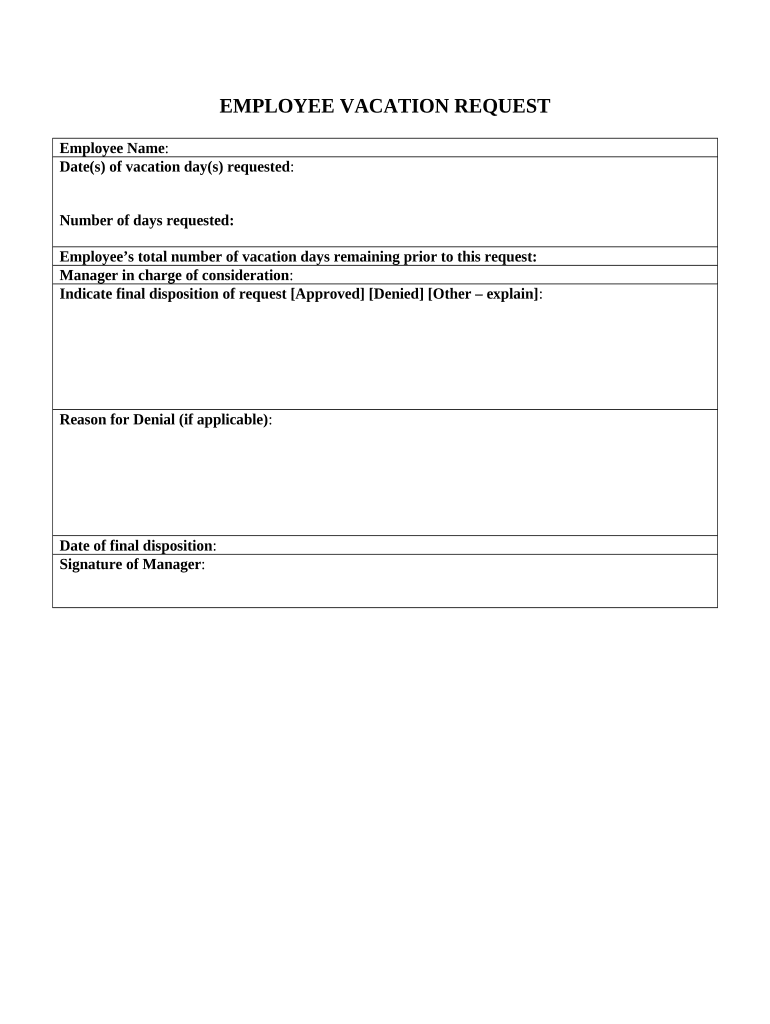
Requested Dates

Clearly marked start and end dates using MM/DD/YYYY; specify partial-day requests and whether dates are inclusive or exclusive.

Leave Type

Select vacation, PTO, unpaid leave, or sick time so accruals and payroll treatment are applied correctly.

Coverage Plan

Designate a backup person or note task handoffs to reduce disruption and clarify manager expectations during absence.

Manager Approval

A signed or e-signed approval block with date and comments documents authorization and provides an audit trail.

Payroll Notes

Optional field for payroll codes, overtime exceptions, or pay adjustments tied to the approved time off.

Required Data Elements at a Glance

Employee Name: Exact legal name
Employee ID: Payroll identifier
Department: Team or unit
Dates Requested: MM/DD/YYYY range
Leave Type: Vacation, PTO, unpaid
Approval: Manager signature/date

Common Mistakes to Avoid

  • Entering ambiguous dates (e.g., 'first week of June') instead of specific MM/DD/YYYY ranges causes scheduling and payroll confusion.
  • Using nicknames or abbreviated names that do not match payroll records can delay processing and require manual reconciliation.
  • Failing to identify backup coverage forces managers to delay approval or deny requests when business continuity is uncertain.
  • Submitting after payroll cutoffs or blackout windows often means the time off will not be applied to the requested pay period.

Risks and Consequences of Incorrect Requests

Payroll Errors: Incorrect pay or missed accruals
Scheduling Conflicts: Overstaffing or understaffing risk
Policy Violations: Denial or corrective action
Record Disputes: Harder to resolve without audit trail
Compliance Exposure: State payout rules may apply
Operational Risk: Project delays or client impact

Timelines and Processing Expectations

Set clear internal deadlines so employees and managers understand lead time and payroll constraints.

Submission Lead Time:

Company policy often requires 2–4 weeks notice for planned vacation.

Manager Review Period:

Managers should respond within 48–72 hours of receipt.

Payroll Cutoff:

Requests after payroll cutoffs may apply to the next pay period.

Minimum Notice:

Some roles require minimum notice (e.g., 7 days) for approval.

Blackout Dates:

Certain business-critical periods may prohibit vacation.

eSignature Vendor Pricing and Feature Snapshot

Compare common eSignature plan starting prices and select features relevant to processing Employee Vacation Request Forms.

signNow DocuSign Adobe Sign PandaDoc HelloSign
Starting Price $8/user/mo $15/user/mo $14/user/mo $19/user/mo $15/user/mo
Free Trial 7-day free trial Varies by vendor Varies by vendor Varies by vendor Varies by vendor
Bulk Send Yes Yes Yes Yes No
Audit Trail Yes Yes Yes Yes Yes
HIPAA Compliant Yes Yes Yes No No
Envelope Cap No envelope cap 100 envelopes/user/year Varies Varies Varies

Frequently Asked Questions

Answers to common questions about completing, submitting, and changing vacation requests.


Need help? Contact support

be ready to get more
Join over 28 million airSlate SignNow users