Establishing secure connection…Loading editor…Preparing document…

Letter Requesting Information on Bill Increase

This template is fully customizable. Edit the text, fill out the fields, and send it for signature. Give it a try!
Letter Requesting Information on Bill Increase

What this Letter Is and when to use it

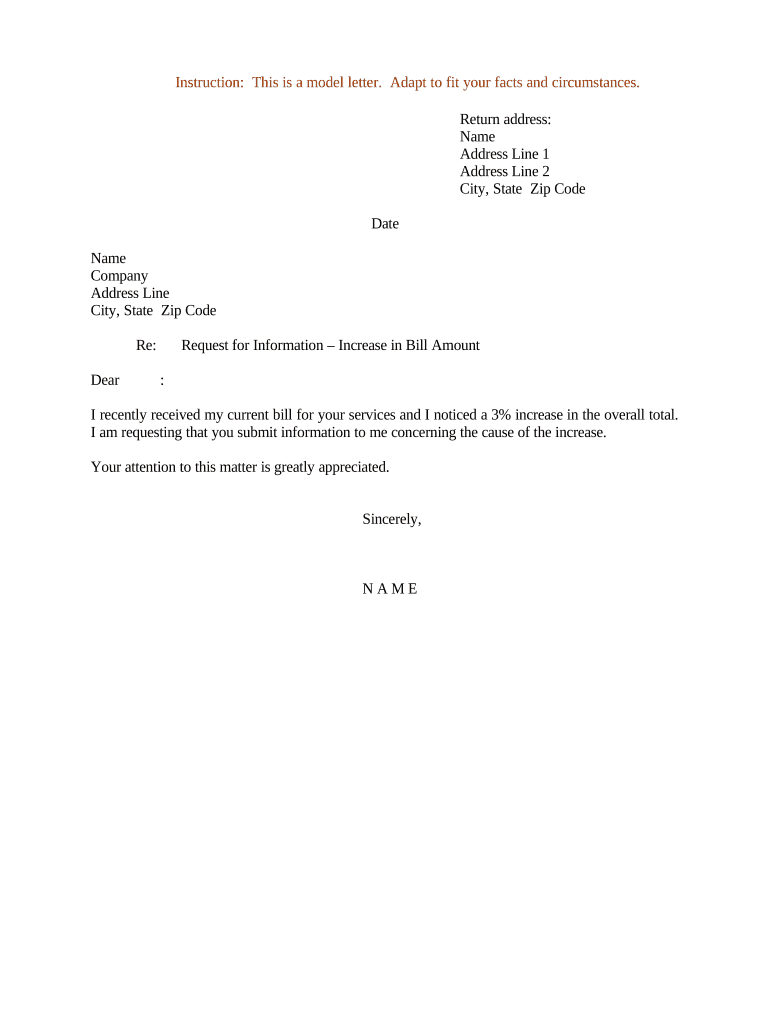
A Letter Requesting Information on Bill Increase is a formal written request sent to a utility, service provider, landlord, or vendor asking for an explanation of a recent billing increase. The letter documents the requester’s name, account or invoice number, the date and amount of the disputed increase, and a clear request for itemized charges, supporting evidence, and any adjustments. This letter creates a record of the request, establishes a timeline for follow-up, and can be used later in disputes, regulatory complaints, or collection-defense situations if the provider does not respond adequately.

Why sending a formal information request matters

A clear written request preserves your rights and creates an auditable paper trail, which is useful if the issue escalates to a regulator or collections dispute. It encourages the provider to review billing details and often prompts a faster resolution than informal inquiries.

Why sending a formal information request matters

Who typically sends this kind of letter

Consumers, business accounts payable staff, tenant representatives, and in-house billing teams commonly send formal requests when a charge or recurring increase seems unclear or sudden.

  • Individual consumers disputing a residential utility or subscription charge.
  • Business AP teams seeking itemized backing for a vendor rate change.
  • Property managers or tenants requesting explanation for increased rent or service fees.

Use the letter when an informal call or email produces no clear explanation, or when you need a dated, signed record to support further dispute steps.

Who can sign and submit this letter

Account Holder

The named account holder or authorized billing contact should sign the letter. If a company account is involved, an officer or delegated employee with authority over invoices should sign to ensure the provider treats the request as authorized.

Authorized Agent

A representative (attorney, accountant, property manager) may sign if the account holder provides written authorization. Attach a signed authorization or power of attorney to prove signing authority and avoid delays.

Core elements to include in a professional request

A complete letter should be concise, numbered, and contain identifying data so the provider can locate the account and respond without delay. Include specific questions and the relief you seek.

Account details

Provide the account number, customer or tenant name, billing address, and the contact phone/email so the provider can match the request to the correct account.
Charge summary

Specify the invoice date, the prior charge amount, the new amount, and the exact line or billing period you dispute to focus the provider’s review.

Requested documents

Ask for an itemized statement, meter readings (if applicable), date-stamped service logs, or pricing schedules that explain the increase.

Reason statement

Briefly state why you believe the increase may be incorrect, such as unexpected meter changes, contract terms, or lack of prior notice.

Response deadline

Set a reasonable deadline for reply (commonly 14–30 days) and mention that you will escalate to regulatory or collections review if unresolved.

Signature block

Include printed name, title (if company), date, and signature. Note any attached authorization if someone else signs on behalf of the account holder.

Step-by-step: prepare, send, and follow up

Follow these steps to create a clear, verifiable request and track the provider's response to preserve your dispute rights.

  • 01
    Draft the letter: Assemble account details, amounts, and requested documents in a short, numbered format.
  • 02
    Attach evidence: Include prior invoices, meter photos, or contract excerpts that support your question.
  • 03
    Send by recordable method: Use certified mail, email with read receipt, or an e-submission channel that preserves a timestamp.
  • 04
    Log responses: Record the provider's reply date and any promised actions; follow up if the deadline passes.

Typical routing and response process

Understanding each stage helps you know when to escalate and what documentation will be important if the dispute continues.

  • Receive and acknowledge: Provider logs request and issues an acknowledgment with a reference number.
  • Internal review: Billing or operations team examines meter data, contracts, and prior invoices.
  • Provider response: Provider sends explanation, itemization, or correction with dates and attachment references.
  • Escalation or closure: If unsatisfied, you may escalate to a regulator, file a formal complaint, or seek dispute resolution.

How to configure an online version of this letter

When using an e-form or template, configure fields and workflow settings so the provider receives complete, consistent information.

Field Configuration
Account number field Required; alphanumeric validation to avoid typos
Date fields MM/DD/YYYY format with calendar picker
Attachment uploader Allow PDF/JPEG up to 10 MB per file
Signature Require typed name + signature checkbox

Digital submission and signing requirements

Choose an e-submission method that produces a timestamped record and permits attachments for supporting documents.

  • File formats: Accept PDF and DOCX
  • Authentication: Email or SMS code sufficient for most consumer requests
  • Audit trail: Record IP, timestamp, and file hashes

Platforms that keep audit trails and secure storage simplify follow-up and support admissibility in disputes while meeting common U.S. e-signature standards such as ESIGN and UETA.

Common preparation mistakes to avoid

  • Leaving out the account number or using an old account alias, which delays provider matching and response.
  • Asking overly broad questions like 'explain this bill' without identifying the line item or date range.
  • Failing to attach prior bills or contract pages, forcing the provider to request more information.
  • Sending via an informal channel with no timestamp, which weakens your documented claim history.

Risks if the letter is incorrect or not followed up

Delayed resolution: Longer time to correct billing errors
Collection action: Unanswered disputes can lead to collections
Credit impact: Unresolved balances may affect credit reports
Loss of rights: Missing statutory dispute windows could forfeit remedies
Evidence gaps: Incomplete records weaken formal complaints
Higher costs: Interest or late fees may accrue

Comparison: typical eSignature vendor considerations for this letter workflow

Platform choice affects cost, audit trails, and HIPAA support. The table below summarizes starting price and common feature availability across vendors; signNow is listed first.

signNow DocuSign Adobe Sign PandaDoc HelloSign
Starting Price $8/user/mo $15/user/mo $14/user/mo $19/user/mo $15/user/mo
Free Trial 7-day trial Varies by vendor Varies by vendor Varies by vendor Varies by vendor
Bulk Send Yes Yes Yes Yes Varies by plan
Audit Trail Yes Yes Yes Yes Yes
HIPAA Compliant Yes Yes Yes No No
Envelope Cap No envelope cap 100 envelopes/user/year Varies by plan Varies by plan Varies by plan

Common questions about the Letter Requesting Information on Bill Increase

Answers to frequent user concerns about form content, timing, digital signing, and next steps if a provider does not respond.


Need help? Contact support

be ready to get more
Join over 28 million airSlate SignNow users