Establishing secure connection…Loading editor…Preparing document…

Motion to Set Aside

This template is fully customizable. Edit the text, fill out the fields, and send it for signature. Give it a try!
Motion to Set Aside

What a Motion to Set Aside Is and when it applies

A Motion to Set Aside is a court filing that asks a judge to vacate, annul, or otherwise undo a prior court order or judgment. Common uses include asking a court to set aside default judgments, judgments obtained by fraud, clerical errors, or orders entered without proper notice. The motion must identify the specific procedural or substantive grounds supporting relief and request a particular remedy, and it is resolved under court rules and controlling statutes that govern post-judgment relief.

Why filing a Motion to Set Aside can preserve your rights

A Motion to Set Aside restores a party’s opportunity to be heard, corrects procedural mistakes, and can undo unfair or voidable results without starting a new lawsuit.

Why filing a Motion to Set Aside can preserve your rights

Who typically prepares or files this motion

Courts and litigants rely on this motion when a prior judgment is alleged to be defective or obtained improperly.

  • Civil defendants seeking to vacate default judgments or default-based orders.
  • Criminal defendants requesting post‑conviction relief or sentence adjustments when appropriate.
  • Attorneys preparing procedural pleadings to preserve appeal rights and reopen the record.

Anatomy of a professional Motion to Set Aside

A compliant motion contains standardized parts so courts can process it quickly and parties can respond accurately.

Caption

Court name, case number, and party captions at the top of the first page to identify the matter and ensure the clerk assigns the motion correctly.
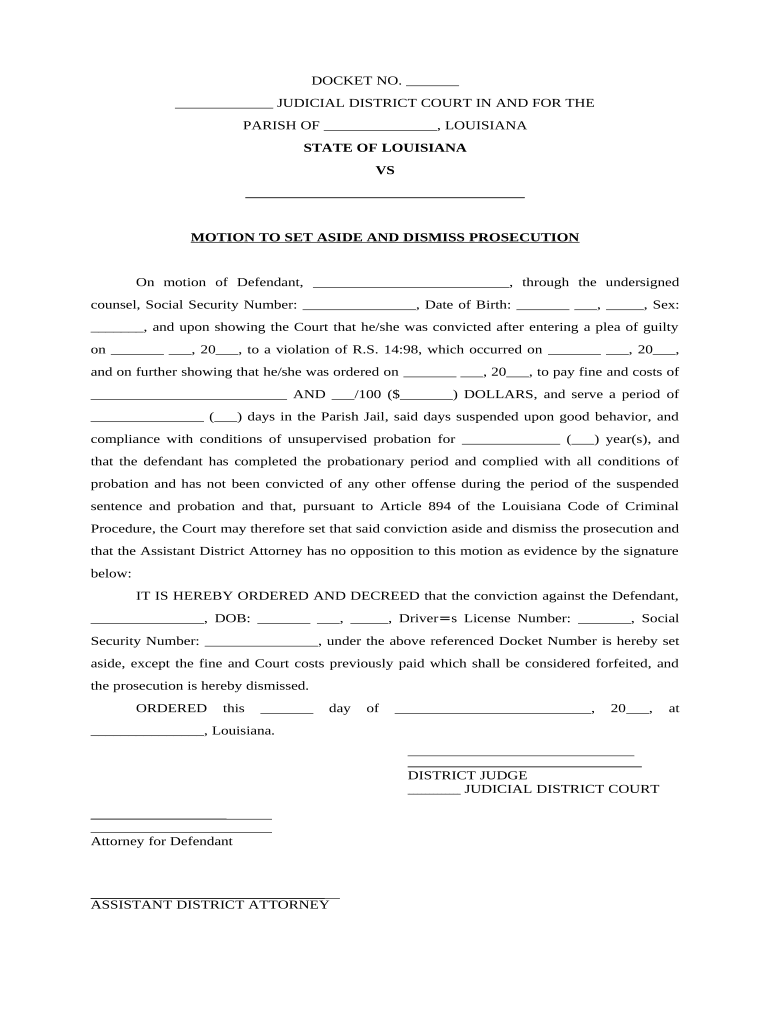
Title

A clear title such as 'Motion to Set Aside Judgment' stating the precise order or judgment the movant seeks to vacate and citing the rule or statute relied upon.

Statement of Facts

A concise chronology describing events that led to the judgment, dates, service attempts, and any excusable neglect or fraud supporting relief.

Legal Grounds

Specific legal basis (e.g., Fed. R. Civ. P. 60(b), state equivalent) with supporting case law or statutes explaining why relief is appropriate.

Relief Requested

A focused section stating the exact relief sought—vacatur, new trial, or dismissal of enforcement—and any prospective deadlines to reset.

Exhibits

Attached evidence (affidavits, service proofs, correspondence) labeled as exhibits and referenced in the factual narrative to avoid surprises at the hearing.

Essential data elements to include

Case Number: Court docket identifier
Parties: Full legal names
Court Name: Jurisdiction and division
Judgment Date: Date of challenged order
Attorney Contact: Bar number and contact
Attached Exhibits: List and reference

Step-by-step: preparing and filing the motion

Follow a consistent order to reduce procedural mistakes and speed court review.

  • 01
    Draft motion: Prepare caption, facts, grounds, and requested relief.
  • 02
    Attach exhibits: Include service proofs, affidavits, and supporting evidence.
  • 03
    Sign and verify: Sign as required by local rules or include counsel signature block.
  • 04
    File and serve: E-file with clerk and serve all parties per court rules.

Configuring an online completion and e‑file workflow

Map fields and routing so the motion is complete, signed, and properly routed to the court and opposing counsel.

Field Configuration
Upload Document PDF or DOCX formatted, include exhibit attachments.
Signer Authentication Email, SMS code, or stronger verification as court requires.
Signature Type Typed / digital signature per local e‑filing rules.
Routing Order Counsel signs, opposing served, then file to clerk.

Where and how to submit the motion

Choose the filing method required by the court: electronic filing, physical filing, or both when local rules mandate.

  • E‑file portal: Submit via the court’s e‑filing system where available.
  • Clerk’s office: File physically at clerk if e‑filing not accepted.
  • Service on parties: Serve opposing counsel according to civil procedure rules.
  • Certificate of service: Include a signed certificate showing how and when served.

Digital filing and eSignature considerations

Confirm the court’s local rules for electronic submissions and permitted signature types before sending signed documents.

  • Accepted formats: PDF and PDF/A are generally accepted
  • Authentication: Email and SMS are common verification methods
  • Integrations: Works with court e‑filing and document systems

Common timing rules and filing windows to watch

Timeliness is jurisdiction dependent; federal and state rules set different clocks for motions to set aside.

Federal Rule timing:

Fed. R. Civ. P. 60(c)(1) — reasonable time; certain grounds limited to one year

Rule 59 contrast:

Motion for new trial must be filed within 28 days under Fed. R. Civ. P. 59

State rules vary:

Many states have statutory or procedural deadlines; check local civil rules

Service deadlines:

Proof of service deadline follows local rules for opposing party notice

Emergency relief:

Seek expedited relief if enforcement would cause irreparable harm

Risks of filing an incomplete or untimely motion

Denial: Court may deny relief without considering merits
Sanctions: Court can impose monetary or procedural sanctions
Waiver: Failure to timely object may waive issues on appeal
Increased costs: Additional fees or attorney costs may accrue
Limited remedies: Some errors cannot be remedied after final judgment
Appeal complications: Improper filing can complicate appellate procedures

Common mistakes that cause delay or denial

  • Failing to attach proof of service or execution often results in clerks rejecting or judges denying the motion.
  • Relying on incorrect legal grounds or failing to connect facts to the applicable rule weakens chances for relief.
  • Submitting unsigned or improperly signed motions, or using the wrong signature method for the court, can void the filing.
  • Missing statutory or local procedural deadlines eliminates timely relief and can preclude later actions.

Representative use cases for a Motion to Set Aside

Two practical scenarios illustrate how the motion functions in real litigation contexts.

Vacating a default judgment

A small‑business defendant missed service due to an address error and default was entered

  • Movant presents sworn affidavit explaining excusable neglect
  • The court reopened the case after evidence showed timely defense and prejudice to the movant was minimal; matter returned to merits.

Correcting clerical errors

A judgment contained a numeric clerical mistake affecting damages calculation

  • Movant identifies the error and supplies supporting documentation
  • Court corrected the judgment to reflect the intended award without relitigating underlying facts, avoiding unnecessary appeal.

How a Motion to Set Aside compares with related post‑judgment remedies

Compare common post‑judgment options to choose the correct procedural route based on timing and desired outcome.

Criteria Motion to Set Aside Motion for New Trial
Purpose undo or vacate judgment obtain a new trial
Deadline reasonable time; certain grounds 1 year 28 days
Typical grounds mistake, fraud, clerical error legal error, newly discovered evidence
Result vacatur or reopening retrial or altered verdict

Typical eSignature vendor comparison for preparing and signing the motion

Platform choice affects cost, HIPAA options, bulk send capability, and whether envelope caps apply; signNow is listed first per vendor comparison conventions.

signNow DocuSign Adobe Sign PandaDoc HelloSign
Starting Price $8/user/mo $15/user/mo $14/user/mo $19/user/mo $15/user/mo
Free Trial 7-day free trial Varies by vendor Varies by vendor Varies by vendor Varies by vendor
Bulk Send Yes (Premium tier) Yes Yes Yes Yes
Audit Trail Yes Yes Yes Yes Yes
HIPAA Compliant Yes Yes Yes No No
Envelope Cap No cap 100 envelopes/user/year Varies Varies Varies

Frequently asked questions and troubleshooting

Answers to common questions about filing, signatures, timing, and supporting evidence for a Motion to Set Aside.


Need help? Contact support

be ready to get more
Join over 28 million airSlate SignNow users