Establishing secure connection…Loading editor…Preparing document…

Letter Requesting Waiver and Consent for Probate Proceedings

This template is fully customizable. Edit the text, fill out the fields, and send it for signature. Give it a try!
Letter Requesting Waiver and Consent for Probate Proceedings

What this Letter Is and When it’s Used

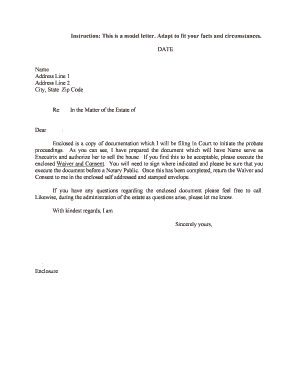
The Letter Requesting Waiver and Consent for Probate Proceedings is a written document used by an interested party to ask other heirs, beneficiaries, or interested persons to waive formal notice and to consent to informal or simplified probate steps. It typically identifies the decedent, the proposed administrator or personal representative, the estate case filing or intent to file, and the specific waiver or consents requested. The letter can speed administration where parties agree, but must accurately describe rights being waived and include clear signature, date, and authentication details to avoid later challenges.

Why a Waiver and Consent Letter Matters

A clear waiver and consent reduces procedural delays by documenting agreement among interested parties and may eliminate the need for formal notice or full court hearings. It preserves evidence of informed consent and can lower administrative cost and time when properly drafted and executed.

Why a Waiver and Consent Letter Matters

Who Typically Prepares and Signs These Letters

Use clear language and include contact details so the court can verify the consenting parties if needed.

  • Proposed Personal Representative — Often prepares or requests the letter to confirm consent and waive notices.
  • Beneficiaries and Heirs — Sign to acknowledge informed consent and waive rights to formal notice or hearing.
  • Estate Counsel or Notary — Drafts or notarizes the letter to ensure clarity and legal sufficiency.

Typical Signatories and Their Roles

Executor

An executor or proposed personal representative is usually the party requesting waiver and consent; their duty is to disclose material facts about the estate and to obtain valid signatures that the court will accept as evidence of informed consent.

Estate Attorney

An attorney frequently prepares the letter to ensure legal sufficiency and may advise signers on the consequences of waiving notice, help arrange notarization, and file the executed instrument with the probate court if required.

Essential Elements to Include in the Letter

A professional waiver and consent letter is concise but complete: it identifies parties, states the waiver requested, explains consequences, offers contact information, and provides signature and authentication lines.

Decedent Details

Full legal name, date of death, and last known residence; these facts tie the waiver to a specific estate and reduce ambiguity in court records.
Request Statement

A plain-language statement describing the exact waiver or consent requested (for example, waiver of formal notice of petition and consent to appointment of named personal representative).

Disclosure of Rights

A short explanation of rights being waived, including the right to receive formal notice and to object within statutory timeframes, so consent is informed and documented.

Signature Block

Printed name, signature, date, current address, and relationship to decedent for each consenting party; mismatched names or missing addresses can jeopardize enforceability.

Authentication

Notary acknowledgement or witness lines where state law or court practice requires them; remote online notarization may be acceptable where permitted.

Filing Note

A brief instruction indicating whether the executed letter will be filed with the probate court and where questions may be directed.

Step-by-Step: Prepare and Execute the Letter

Follow these sequential steps to draft, obtain consent, and provide enforceable documentation for probate.

  • 01
    Draft Letter: Prepare clear waiver and consent wording tied to the estate.
  • 02
    Share for Signature: Send to heirs or interested persons with instructions and deadlines.
  • 03
    Authenticate Signatures: Use notarization or required witnesses where state law demands.
  • 04
    File or Retain: File with probate court when appropriate or keep with estate records.

Digital Workflow Settings to Use When Collecting Consents

Configure your e-signature workflow to capture identity, timestamps, and an audit trail so the executed letter is court-ready.

Field Configuration
Signer Name Field Require exact legal name entry and lock after signing
Date Field Auto-fill MM/DD/YYYY with signer edit disabled
Notary Block Add an optional notary acknowledgment field for completed notarizations
Audit Trail Enable full audit trail capture (IP, timestamp, email)

Platform Capabilities to Support Valid Consents

Choose an eSignature solution that supports your required authentication level and retention practices for probate files.

  • Audit Trail: Capture IP and timestamp
  • Authentication: Email, SMS, or advanced methods
  • Document Formats: PDF, DOCX supported

Where to Send the Executed Letter

After execution, determine whether the letter will be filed in court, attached to a petition, or retained with estate records and provide copies to all interested parties.

  • Probate Clerk: File with the court if the waiver is intended to support a petition.
  • Estate File: Retain original in the decedent’s estate records.
  • Interested Parties: Provide copies to beneficiaries and counsel.
  • Notary or Registrar: Record notarization evidence where required.

Practical Tips to Improve Validity and Acceptance

Follow these best practices to reduce challenges and ensure the waiver is reliable for court review.

Verify Signer Identity
Confirm each signer’s identity using government ID, in-person verification, or a reliable electronic authentication method; mismatches between ID and signature block frequently lead courts to require additional proof.
Use Plain Language
Draft the waiver and consent in clear, unambiguous terms describing rights surrendered and actions consented to so signers understand what they are agreeing to and judges can readily interpret intent.
Include Contact Details
Provide current addresses, phone numbers, and counsel contact information for each signer; courts and interested parties need reliable contacts for follow-up or service of process.
Retain Original Copies
Keep the original signed and notarized document in the estate file and preserve electronically with metadata and an audit trail to support authenticity if disputes arise.

Common Mistakes That Cause Rejection or Delay

  • Using informal language that fails to specify which notices or rights are waived, creating ambiguity for the court and opposing parties.
  • Missing or mismatched signer names or dates, which can cause the court to question whether the waiver applies to the estate.
  • Failing to notarize or obtain required witnesses where state law or local court practice requires authentication for waivers.
  • Not providing copies to all interested parties, leading to claims of lack of notice and potential reopening of probate steps.

Consequences of an Improper or Invalid Letter

Probate Delay: Extended administration
Challenge Risk: Increased litigation
Cost Exposure: Higher attorney and court fees
Invalid Waiver: Court may reject consent
Creditor Claims: Delayed notice may affect claims
Ethical Risks: Counsel may face duties issues

Timing Expectations and Typical Deadlines

Probate timelines vary by state; parties should act promptly and be aware of statutory objection and creditor claim periods.

File Petition Promptly:

File the probate petition soon after death to start the administration process; courts may set hearing dates quickly.

Objection Periods:

Objection windows commonly range from 30 to 120 days depending on jurisdiction and how notice was handled.

Creditor Notice Windows:

Creditors often have 3–6 months to present claims after notice or publication, varying by state law.

Notarization Timing:

Notarize signatures before filing when a jurisdiction requires an acknowledgement or self-proving affidavit.

Retention Deadlines:

Keep executed documents until statute of limitations and audit periods expire, commonly three years or longer.

Comparing eSignature Options for Collecting Waivers and Consents

Platforms differ on price, bulk-send features, and compliance. signNow is listed first for straightforward comparison of starting price and core capabilities.

signNow DocuSign Adobe Sign PandaDoc HelloSign
Starting Price $8/user/mo $15/user/mo $14/user/mo $19/user/mo $15/user/mo
Free Trial 7-day free trial Varies Varies Varies Varies
Bulk Send Yes Yes Yes Yes No
Audit Trail Yes Yes Yes Yes Yes
Envelope Cap No cap 100 envelopes/user/year Varies Varies Varies

Frequently Asked Questions About Waiver and Consent Letters

Answers to common practical and legal questions when preparing or accepting a waiver and consent for probate proceedings.


Need help? Contact support

be ready to get more
Join over 28 million airSlate SignNow users