Establishing secure connection…Loading editor…Preparing document…

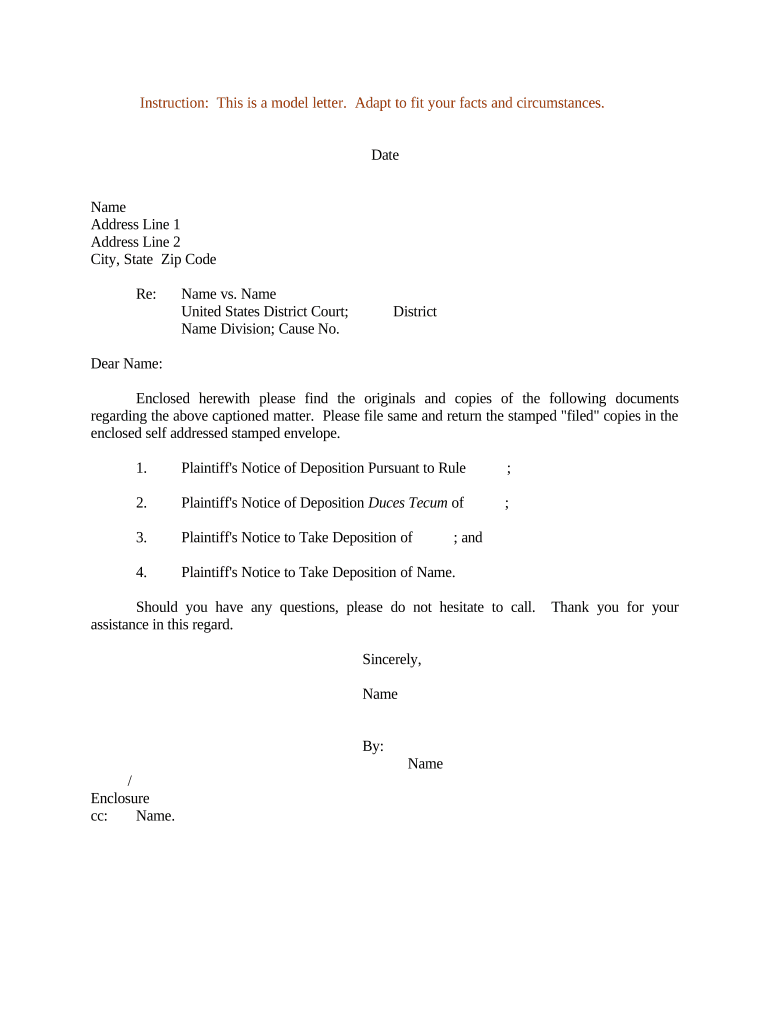
Letter Regarding Notice of Deposition

This template is fully customizable. Edit the text, fill out the fields, and send it for signature. Give it a try!
Letter Regarding Notice of Deposition

What a Letter Regarding Notice of Deposition Is

A Letter Regarding Notice of Deposition is a formal written notice served to a witness or party informing them of an upcoming deposition, including the date, time, location, scope of topics, and any required document production. Under the Federal Rules of Civil Procedure (see Rule 30(b)(1)), notices must provide reasonable time and detail so the deponent can prepare. Notices may accompany subpoenas when a nonparty is compelled to appear; state and local court rules can add service or timing requirements.

Why a Clear Deposition Notice Matters

A well-drafted notice reduces disputes over scope, timing, and service, and helps ensure admissible testimony by giving the deponent adequate preparation time.

Why a Clear Deposition Notice Matters

Who Prepares and Receives These Notices

Legal teams, litigants, process servers, and court clerks routinely prepare or receive deposition notices during discovery.

  • Defense and plaintiff counsel preparing witness lists and topics prior to deposition.
  • In-house legal or compliance teams coordinating document collection and witness availability.
  • Process servers or clerks handling service and proof of service for the notice.

Nonparty witnesses may receive subpoenas alongside notices; always confirm the correct service method under local rules.

Core Elements to Include in the Letter

A professional notice combines factual clarity with formal service details so courts and opposing parties can verify proper notice and attendance.

Case Caption

Full case title and docket number as filed in the court where the case is pending; ensures the notice is associated with the correct matter.
Recipient Details

Name, role (party or nonparty witness), and contact/service address so the notice can be served and proof of service recorded.

Date and Time

Specific calendar date and start time; include time zone for remote depositions or multi-jurisdictional cases.

Location or Remote Link

Physical address with room or courtroom, or clear remote conferencing instructions and platform details.

Topics/Scope

A concise list or attachment describing topics under FRCP 30(b)(6) or 30(b)(1), enabling preparation and objections.

Document Requests

If documents are required at the deposition, list the items or attach specific exhibit requests with production deadlines.

Required Information and Standard Field Checklist

Case Caption: Case title and docket number
Court Name: Jurisdiction and division
Deponent Name: Full legal name
Date/Time: MM/DD/YYYY and time zone
Location: Address or virtual link
Service Method: How notice was delivered

Step-by-Step: Preparing the Notice

Follow these steps in sequence to draft, approve, serve, and document a deposition notice accurately and in compliance with procedural rules.

  • 01
    Draft Notice: Assemble case caption, time, scope, and document list.
  • 02
    Internal Review: Have counsel verify scope and service method.
  • 03
    Serve Notice: Deliver via permitted method and record proof of service.
  • 04
    Confirm Receipt: Obtain acknowledgements and schedule logistics.

How to Configure an Online Notice Workflow

When completing the notice online, confirm authentication, recording, document handling, and reminder settings to match procedural needs.

Action Configuration
Authentication Method Email link plus optional SMS code
Document Template Use a saved Notice of Deposition template
Recording Requirement Enable A/V capture if required by court
Reminder Schedule Send 3 days and 24 hours before

Where to Send or File the Notice

Decide whether to serve directly, file with the court, or use a process server depending on the deponent's status and local rules.

  • Serve Parties: Email counsel and serve opposing parties according to local rules.
  • Serve Nonparties: Use a subpoena and process server when necessary.
  • File with Court: File only if local rules require or when seeking court enforcement.
  • Archive Proof: Save proof of service and delivery receipts for the record.

Technical Considerations for eSubmission and Remote Depositions

Confirm file formats, integrations, and security controls before distributing the notice or related exhibits electronically.

  • File formats: PDF, DOCX, and native exhibit files supported
  • Integrations: Works with Google Workspace, Salesforce, NetSuite
  • Security: TLS 1.2/1.3 in transit; AES-256 at rest

Ensure your platform captures audit trails (timestamps, IP, and signer identity) and preserves copies for retention requirements and potential motions.

Timing and Deadline Considerations

Observe federal and local procedural rules; 'reasonable notice' is required under Rule 30(b)(1), and many courts set local minimums or require advance coordination.

Reasonable Notice:

Federal Rule 30(b)(1) requires reasonable written notice to all parties

Subpoena Service:

Nonparty subpoenas require service methods set by local rules

Exhibit Exchange:

Courts often expect exhibits exchanged ahead of the deposition

Remote Logistics:

Provide access instructions in advance and confirm compatibility

Objection Deadline:

Opposing counsel may object to scope; act promptly to meet meet-and-confer timelines

Common Mistakes to Avoid When Drafting a Notice

  • Using an incorrect case caption or docket number that causes clerical misfiling and delays in enforcement or scheduling.
  • Failing to include time zone for remote depositions, producing confusion and potential appearance disputes across jurisdictions.
  • Requesting overly broad topics without specificity, which prompts objections and meet-and-confer disputes that delay the deposition.
  • Neglecting to serve nonparty subpoenas properly, resulting in motions to quash and additional expense for re-service.

Consequences of an Incorrect or Improper Notice

Motion to Quash: Court may invalidate service
Sanctions: Costs or fees may be ordered
Delay: Proceedings and discovery timeline extended
Evidentiary Risk: Testimony or exhibits may be excluded
Service Defect: Requires re-service and additional cost
Contempt Exposure: Rare, but possible for willful noncompliance

Illustrative Examples of Electronic Notice Use

These examples show how organizations use electronic workflows and secure platforms to distribute notices and manage proofs of service.

Optica Ventures LLC

A small legal services firm standardized notice templates for discovery

  • Used email delivery and tracked receipt in an audit log
  • "The interface is simple and easy-to-use for our team; more importantly, it is just as easy for our customers."

Martin Properties

A regional real estate company moved exhibits and deposition notices online

  • Enabled remote delivery and consolidated exhibit packages
  • "I can process and execute all of these documents online with 100% compliance and built-in security. Whether on mobile or working offline, I can get forms back to their necessary parties efficiently."

Vendor Pricing and Feature Snapshot for eSign Platforms

Comparison of starting price and common capabilities across providers; signNow appears first. Feature availability and plan details vary by vendor and tier.

signNow DocuSign Adobe Sign PandaDoc HelloSign
Starting Price $8/user/mo $15/user/mo $14/user/mo $19/user/mo $15/user/mo
Free Trial 7-day free trial Varies by vendor Varies by vendor Varies by vendor Varies by vendor
Bulk Send Yes (Premium) Yes Yes Yes No
Audit Trail Yes Yes Yes Yes Yes
Envelope Cap No envelope cap 100 envelopes/user/year Varies by plan Varies by plan Varies by plan

Frequently Asked Questions About Deposition Notices

Answers to common procedural and technical questions when preparing or serving a Letter Regarding Notice of Deposition.


Need help? Contact support

be ready to get more
Join over 28 million airSlate SignNow users