Establishing secure connection… Loading editor… Preparing document…
Navigation

Fill and Sign the Security Appeal Form

Fill and Sign the Security Appeal Form

How it works

Open the document and fill out all its fields.
Apply your legally-binding eSignature.
Save and invite other recipients to sign it.

Rate template

4.6
43 votes
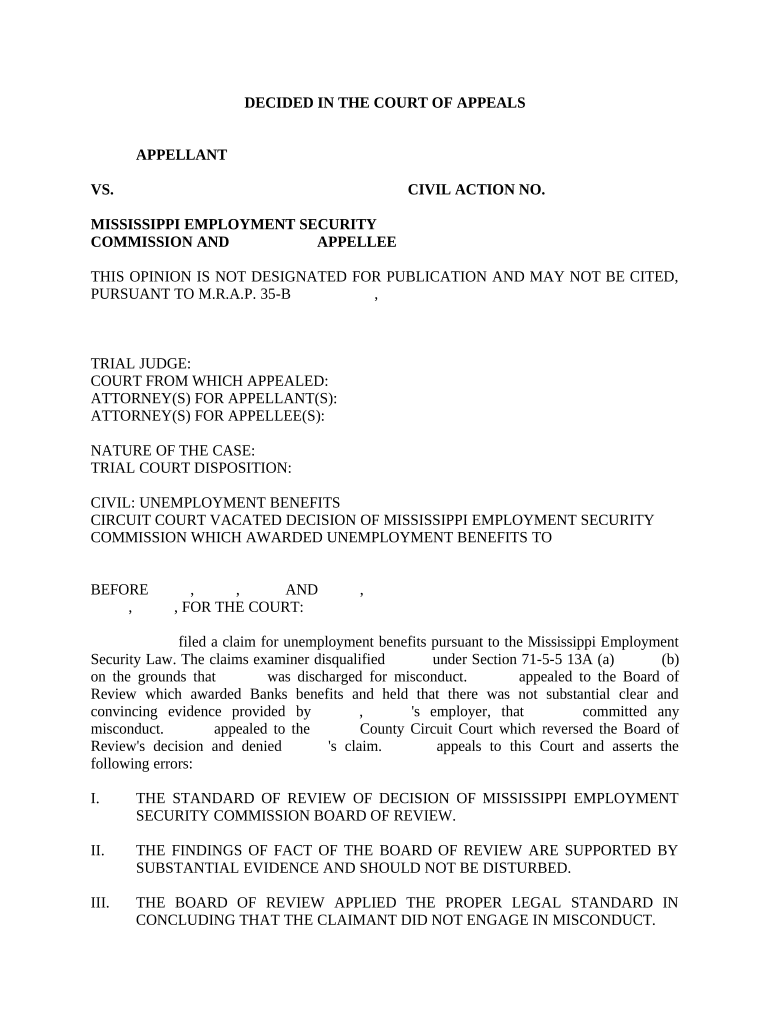
DECIDED IN THE COURT OF APPEALS       APPELLANT VS. CIVIL ACTION NO.       MISSISSIPPI EMPLOYMENT SECURITY COMMISSION AND       APPELLEE THIS OPINION IS NOT DESIGNATED FOR PUBLICATION AND MAY NOT BE CITED, PURSUANT TO M.R.A.P. 35 - B             ,       TRIAL JUDGE:       COURT FROM WHICH APPEALED:       ATTORNEY(S) FOR APPELLANT(S):       ATTORNEY(S) FOR APPELLEE(S):       NATURE OF THE CASE:       TRIAL COURT DISPOSITION:       CIVIL: UNEMPLOYMENT BENEFITS CIRCUIT COURT VACATED DECISION OF MISSISSIPPI EMPLOYMENT SECURITY COMMISSION WHICH AWARDED UNEMPLOYMENT BENEFITS TO       BEFORE       ,       ,       AND       ,             ,       , FOR THE COURT:       filed a claim for unemployment benefits pursuant to the Mississippi Employment Security Law. The claims examiner disqualified       under Section 71 - 5 - 5 13A (a)       (b) on the grounds that       was discharged for misconduct.       appealed to the Board of Review which awarded Banks benefits and held that there was not substantial clear and convincing evidence provided by       ,       's employer, that       committed any misconduct.       appealed to the       County Circuit Court which reversed the Board of Review's decision and denied       's claim.       appeals to this Court and asserts the following errors: I. THE STANDARD OF REVIEW OF DECISION OF MISSISSIPPI EMPLOYMENT SECURITY COMMISSION BOARD OF REVIEW. II. THE FINDINGS OF FACT OF THE BOARD OF REVIEW ARE SUPPORTED BY SUBSTANTIAL EVIDENCE AND SHOULD NOT BE DISTURBED. III. THE BOARD OF REVIEW APPLIED THE PROPER LEGAL STANDARD IN CONCLUDING THAT THE CLAIMANT DID NOT ENGAGE IN MISCONDUCT. Finding that the circuit court was in error, we reverse and reinstate the Board of Review's award of benefits. FACTS On             ,       , United Auto Workers Local 1956 commenced a strike against       when collective bargaining failed. After the strike,       alleged that       , an employee on strike, threw tacks under non - striking employees cars and kicked a vehicle.       was terminated due to this alleged conduct. On             ,       ,       filed a claim for unemployment benefits with the Mississippi Employment Security Commission. On             ,       , the claims examiner disqualified       under section 71 - 5 - 513A (a) (b) on the grounds that Banks was discharged for misconduct.       appealed to the appeals referee who awarded       benefits and held that there was not substantial clear and convincing evidence provided by       ,       's employer, that       committed any misconduct.       appealed to the board of review which adopted the findings of fact and opinion of the referee.       appealed the board of review's decision to the       County Circuit Court which denied       's claim. Subsequently,       appealed to this Court. In awarding benefits to       , the Board of Review adopted the findings of the appeals referee who held as follows: The claimant was employed approximately       years, last working as an Assembler A with       ,       , Mississippi. His/Her last day of work was on             ,       . The employees as       of       went on labor strike effective       a.m./p.m. on             ,       . While on strike, the employees set up a picket line at the plant's entrances. The claimant acted as a strike captain during this process. The employer began to receive complaints from nonstriking employees that their vehicles were being vandalized. Some acts of vandalism involved tacks in the tires of employees, broken windshields, as well as cut tires. To monitor the striking workers, the employer had security guards video tape the picketers. During this tape session, the employer witnessed the claimant bending down and motioning as to throw tacks in the pathway of departing employees. Furthermore, the employer believed that the tapes showed claimant kicking the vehicle of a nonstriking employee. In viewing the videotape, claimant does bend down and he/she made a motion as if to throw tacks. However, there is no visible evidence that claimant had tacks in his/her hand or that he/she threw tacks in the pathway of the vehicles. In the incident where claimant allegedly kicked the vehicle, the tape does show that claimant made a kicking motion at a passing vehicle. However, it is difficult to tell if claimant actually struck the vehicle with this motion. If claimant did, in fact, come in contact with the vehicles, the alleged kick was nothing more than a touch. There was no visible damage nor sound from the alleged kick. Based upon the evidence in the tape, the employer dismissed claimant for misconduct associated with the picket line and strike activities. . . In this case, the Referee is of the opinion that there was not substantial clear and convincing evidence provided by the employer to show that claimant threw tacks in the pathway of vehicles of the nonstriking employees nor has it been shown the claimant maliciously or intentionally damaged a nonstriking employee's vehicle with the kick. The testimony as well as recorded evidence does show the claimant was dissatisfied with the fact that many of the employees chose not to stand together with the striking union members. However, this dissatisfaction within itself would not measure to the level of misconduct within the meaning of the law. The decision of the Claims Examiner is, therefore, cancelled. In reversing the Board of Review the circuit court made three particular findings we need to note for a review of the law applicable to this case. First, the circuit court held that "the findings of fact as determined by the appeals referee are supported by the evidence and will not be disturbed." Next, later in its option, the circuit court stated that       "was found by the commission to have engaged in conduct during the course of the strike designed to dissuade employees and visitors from entering the employer's plant." Finally, the circuit court held that: The referee seems to place much weight on the fact that the proof is scant on the extent of the actual damage caused by       . The referee's approach misses the mark. It is not the damage caused by the claimant's conduct, but the conduct itself that disqualifies him/her from receiving benefits. The claimant's actions were meant to be intimidating gestures and threats of property damage to non - striking fellow employees and visitors to the employer's plant. The actions were designed to interfere with and otherwise injure the business of the employer; or in the language of Wheeler, the conduct evidenced a willful and wanton disregard of the employer's interest and a gross disregard for the standard of behavior that the employer had a right to expect from its employee. LAW The three assignments of error argued here are interrelated and will be addressed collectively.       asserts that the scope of review by the circuit court is limited, and that if the facts are supported by substantial evidence, absent fraud, then the jurisdiction in any judicial proceeding is confined to questions of law. Mississippi Code Annotated Section 71 - 5 - 31, in pertinent part, provides the standard of review for this Court: In any judicial proceedings under this section, the findings of the board of review as to the facts, if supported by evidence and in the absence of fraud, shall be conclusive, and the jurisdiction of said court shall be confined to questions of law. See Also Mississippi Employment Sec. Commission V. Percy, 641 So. 2d 1172 (Miss. 1994). The board of review must be affirmed absent substantial evidence to support its factual findings or misapplication of the law.       is correct in this regard.       agrees with this scope of review. The Mississippi Supreme Court has defined misconduct as: Conduct evincing such willful and wanton disregard of the employer's interest as is found in deliberate violations or disregard the standards of behavior which the employer has a right to expect from his employee. Also, carelessness and negligence of such degree, or recurrence thereof, as to manifest culpability, wrongful intent or evil design, and showing an intentional or substantial disregard of the employer's interest or of the employee's duties and obligations to his employer, came within the term. Mere inefficiency, unsatisfactory conduct, failure in good performance as the result of inability or incapacity, or inadvertences and ordinary negligence in isolated incidents, and good faith errors in judgment or discretion were not considered 'misconduct' within the meaning of the statute. Shannon Eng'g & Constr. V. Mississippi Employment Sec. Comm.:, 549 So. 2d 446, 448 - 49 (Miss. 1989). The conduct "must be harmful to the employers interest." Wheeler v. Ariola, 408 So. 2d 1381 (Miss. 1982). The employer has the burden of establishing a claimants misconduct by "substantial, clear, and convincing evidence." Shannon Eng'g & Construction, 549 So. 2d at 450. The circuit court held that the appeals referee's findings of fact were supported by the evidence and would not be disturbed, but further held that the board incorrectly interpreted the applicable law as to the definition of misconduct. No witness testified that       had tacks on his/her person or attempted to throw them under the wheels of passing vehicles.       specifically denied the allegation. Likewise, no witness testified that       kicked any passing vehicle. Again,       denied this allegation. The trial court's assertion in its opinion that the commission found       to have engaged in conduct designed to dissuade employees and visitors from entering the employer's plant is not supported by a plain reading of the commission's findings. Although we agree with the trial court's conclusion that conduct itself and not the amount of damage caused is what disqualifies a claimant from receiving benefits, the commission did not find sufficient bad conduct such as to evince a willful and wanton disregard of the employer's interest or a gross disregard for the standard of behavior that the employer had right to expect from its employee. Simply stated, although as the finder of fact our opinion may have differed from the commission, neither the trial court nor this court is at liberty to substitute our conclusions as to the facts or what the facts show. In reaching our decision, we need to address two other points       raised in this appeal. After the hearing before the appeals referee and before the opinion by the commission,       sought to have the record supplemented by an affidavit of one witness and the deposition of another witness, both of whom would allegedly directly implicate       in misconduct. Supplementation was denied. This was well within the commission's discretion. As       correctly points out, Section 71 - 5 - 523 of the Mississippi Code gives the commission the power to affirm, modify or set aside any decision based on evidence previously submitted or direct the taking of additional evidence or permit the parties to initiate further action. After       appealed the board's decision to the circuit court, one side of the four tapes that were used to record the hearing before the appeals referee was missing.       argues that this testimony requires this Court to "affirm the circuit court, vacate the Mississippi Employment Security Commission's determination and issue a determination of non - chargeability."       asserts that the part missing from the tape would only be significant if the proof that was missing would have changed the decision of the board.       also argues that       failed to demonstrate any specific missing proof which would make a difference in the board's decision. The missing testimony appears to have been limited to part of       's testimony. The findings of facts were adopted by the circuit court and there does not appear to be any material testimony or facts missing for resolution of this case.       argues that because there is missing testimony, this Court must affirm the circuit court's decision.       cites Melody Manor Convalescent Center V. Mississippi State Department of Health, 546 So. 2d 972 (Miss. 1989) for the proposition that the board merely "rubber - stamped" the appeals referee's decision because this portion of the record was missing and such action constitutes arbitrariness and capriciousness. In that case, there was no discussion of missing portions of a record. The court merely stated that an appellate court will overturn an administrative agency where it acts arbitrarily or capriciously. The Mississippi Supreme Court has not specifically addressed this issue but similar cases provide a guide. In Shelton V. Kindred, 279 So. 2d 642, 644 (Miss. 1973) the court held that in the absence of a record, "it must be presumed that the rulings of the trial court were correct, and such presumption will prevail, unless the actual record supports the contrary view." See also Kirk V. Koch, 607 So. 2d 1220, 1223 (Miss. 1992) (appellate court will not disturb a judgment based on allegations not supported by the record); Jackson Opera House Co. V. Cox, 192 So. 293 (Miss. 1939) (notes of stenographer stricken and thus Mississippi Supreme Court must presume that the evidence warranted trial court's decision); Hume V. Inglis, 122 So. 535 (Miss. 1929) (see below). The record must be adequate to show that reversible error was committed below. Queen V. Queen, 551 So. 2d 197, 199 (Miss. 1989) (citing Moawad V. State, 531 So. 2d 632 (Miss. 1988); The commission in its brief requested that we strike that portion of       's brief wherein it characterized the commission as a "rubber stamp." We agree wit the commission; consider it done. Williams V. State, 522 So. 2d 201, 209 iss. 1988)). Failure to provide a transcript could have the effect of requiring this Court to presume the evidence was legally adequate for the decision below. Queen, 551 So. 2d at 199 (citing Wade V. Wade, 419 So. 2d 584, 585 (Miss. 1982). In Queen, the appellant failed to present the Supreme Court of Mississippi with a transcript. Queen at 201. The Mississippi Supreme Court held that it could not consider on appeal any objection to alimony as the Court could not determine whether the appellant properly objected to consideration of alimony by the chancery court at trial or whether the chancery court failed to sustain his objection, if any. 1-1 In Williams, the appellant failed to present a transcript to the Mississippi Supreme Court. Williams V. State, 522 So. 2d 201, 209 (Miss. 1988). The Mississippi Supreme Court held that it could not consider whether a statement made by the prosecutor in closing was improper. Moreover, where the record is absent or inadequate, the Mississippi Supreme Court has held that there are three options: (1) "if it appears from the record that there is vital error in the proceedings, regardless of and whatever may have been shown by" the portions missing then reversal will result; (2) affirm the case upon the presumption that the trial court is correct and that the portions of the record which are missing were necessary to support the judgment below; and (3) reverse in order to conduct another trial so this Court can obtain a complete record. Hume V. Inglis, [22 So. 535 (Miss. 1929). Thus, this Court could presume in the absence of a record that the evidence presented to the trial court, which was sitting as an appellate court, was sufficient to sustain the judgment of the commission. Since there appears to be no direct case law on this specific issue, the Mississippi Employment Security Commission's brief cites Goodwill Industries, Inc. V. Industrial Claim Industrial Claim Appeals Office, 862 P.2d 1042 (Cob. App. 1993) for the proposition that if the relevant portions of the transcript are sufficient to allow review of the issue on appeal, then the record is sufficient and remand is unnecessary. The Goodwill court further noted that the employer failed to describe the nature of the testimony missing from the record and "the reason why the failure to have this testimony included for review is prejudicial to its case." Goodwill Industries of Colorado Springs, Inc. V. Industrial Claim Appeals Office, 862 P.2d at 1046.       cites Harp V. Department of the Army, 791 F.2d 161 (Fed. Cir. 1986) for the proposition that although the entire tape of the hearing was lost and there was no transcript, the claimant failed to demonstrate any particular testimony which was not considered or misused which might have caused a different result. We believe Goodwill and Harp to be good authority. The record before us, and before the trial court below, and the commission is adequate to reader a decision, and       fails to point out any particular testimony, which could or would have caused the commission to reach a difference result. We have considered       's other arguments and citations in its brief and need not further address the same in view of our already state opinions. THE JUDGMENT OF THE CIRCUT COURT OF       COUNTY IS REVERSED AND THE BOARD OF REVIEW'S ORDER REINSTATED. APPELLEE IS TAXED WITH COSTS OF APPEAL.       ,       ,       ,       ,       ,       ,       ,       AND       ,       ,       .       , NOT PARTICIPATING.

Practical advice on preparing your ‘Security Appeal Form’ online

Are you weary of the inconvenience of managing paperwork? Look no further than airSlate SignNow, the premier electronic signature solution for individuals and entities. Bid farewell to the lengthy process of printing and scanning documents. With airSlate SignNow, you can smoothly fill out and sign paperwork online. Utilize the extensive features incorporated into this user-friendly and economical platform to transform your approach to document management. Whether you need to approve forms or gather signatures, airSlate SignNow manages it all with ease, requiring just a few clicks.

Adhere to this comprehensive guide:

  1. Sign in to your account or register for a complimentary trial with our service.
  2. Click +Create to upload a file from your device, cloud storage, or our form library.
  3. Open your ‘Security Appeal Form’ in the editor.
  4. Click Me (Fill Out Now) to finalize the document on your end.
  5. Add and assign fillable fields for other participants (if necessary).
  6. Continue with the Send Invite settings to solicit eSignatures from others.
  7. Save, print your copy, or convert it into a reusable template.

Don’t fret if you need to collaborate with others on your Security Appeal Form or send it for notarization—our solution provides everything you need to achieve such tasks. Create an account with airSlate SignNow today and enhance your document management to a new level!

Here is a list of the most common customer questions. If you can’t find an answer to your question, please don’t hesitate to reach out to us.

Need help? Contact Support

The best way to complete and sign your security appeal form

Save time on document management with airSlate SignNow and get your security appeal form eSigned quickly from anywhere with our fully compliant eSignature tool.

How to Sign a PDF Online How to Sign a PDF Online

How to complete and sign documents online

Previously, working with paperwork took pretty much time and effort. But with airSlate SignNow, document management is fast and easy. Our robust and easy-to-use eSignature solution allows you to effortlessly fill out and eSign your security appeal form online from any internet-connected device.

Follow the step-by-step guide to eSign your security appeal form template online:

  • 1.Sign up for a free trial with airSlate SignNow or log in to your account with password credentials or SSO authentication.
  • 2.Click Upload or Create and add a file for eSigning from your device, the cloud, or our form library.
  • 3.Click on the file name to open it in the editor and use the left-side toolbar to fill out all the blank fields accordingly.
  • 4.Place the My Signature field where you need to eSign your form. Provide your name, draw, or import a picture of your regular signature.
  • 5.Click Save and Close to accomplish editing your completed form.

As soon as your security appeal form template is ready, download it to your device, save it to the cloud, or invite other individuals to electronically sign it. With airSlate SignNow, the eSigning process only requires several clicks. Use our robust eSignature tool wherever you are to manage your paperwork efficiently!

How to Sign a PDF Using Google Chrome How to Sign a PDF Using Google Chrome

How to complete and sign documents in Google Chrome

Completing and signing paperwork is easy with the airSlate SignNow extension for Google Chrome. Adding it to your browser is a fast and efficient way to manage your forms online. Sign your security appeal form template with a legally-binding electronic signature in a couple of clicks without switching between tools and tabs.

Follow the step-by-step guidelines to eSign your security appeal form template in Google Chrome:

  • 1.Go to the Chrome Web Store, locate the airSlate SignNow extension for Chrome, and add it to your browser.
  • 2.Right-click on the link to a form you need to eSign and select Open in airSlate SignNow.
  • 3.Log in to your account using your password or Google/Facebook sign-in option. If you don’t have one, sign up for a free trial.
  • 4.Utilize the Edit & Sign toolbar on the left to complete your template, then drag and drop the My Signature field.
  • 5.Upload a photo of your handwritten signature, draw it, or simply type in your full name to eSign.
  • 6.Verify all information is correct and click Save and Close to finish modifying your form.

Now, you can save your security appeal form sample to your device or cloud storage, send the copy to other individuals, or invite them to eSign your document with an email request or a secure Signing Link. The airSlate SignNow extension for Google Chrome enhances your document workflows with minimum time and effort. Start using airSlate SignNow today!

How to Sign a PDF in Gmail How to Sign a PDF in Gmail How to Sign a PDF in Gmail

How to complete and sign forms in Gmail

Every time you get an email with the security appeal form for signing, there’s no need to print and scan a document or download and re-upload it to a different tool. There’s a much better solution if you use Gmail. Try the airSlate SignNow add-on to quickly eSign any paperwork right from your inbox.

Follow the step-by-step guidelines to eSign your security appeal form in Gmail:

  • 1.Visit the Google Workplace Marketplace and locate a airSlate SignNow add-on for Gmail.
  • 2.Set up the tool with a corresponding button and grant the tool access to your Google account.
  • 3.Open an email containing an attachment that needs approval and use the S symbol on the right sidebar to launch the add-on.
  • 4.Log in to your airSlate SignNow account. Opt for Send to Sign to forward the file to other parties for approval or click Upload to open it in the editor.
  • 5.Drop the My Signature field where you need to eSign: type, draw, or upload your signature.

This eSigning process saves efforts and only takes a couple of clicks. Utilize the airSlate SignNow add-on for Gmail to adjust your security appeal form with fillable fields, sign forms legally, and invite other parties to eSign them al without leaving your mailbox. Boost your signature workflows now!

How to Sign a PDF on a Mobile Device How to Sign a PDF on a Mobile Device How to Sign a PDF on a Mobile Device

How to complete and sign forms in a mobile browser

Need to quickly complete and sign your security appeal form on a mobile phone while working on the go? airSlate SignNow can help without needing to install extra software apps. Open our airSlate SignNow solution from any browser on your mobile device and create legally-binding electronic signatures on the go, 24/7.

Follow the step-by-step guide to eSign your security appeal form in a browser:

  • 1.Open any browser on your device and go to the www.signnow.com
  • 2.Sign up for an account with a free trial or log in with your password credentials or SSO option.
  • 3.Click Upload or Create and pick a file that needs to be completed from a cloud, your device, or our form collection with ready-to go templates.
  • 4.Open the form and fill out the empty fields with tools from Edit & Sign menu on the left.
  • 5.Put the My Signature area to the sample, then enter your name, draw, or add your signature.

In a few easy clicks, your security appeal form is completed from wherever you are. As soon as you're done with editing, you can save the document on your device, create a reusable template for it, email it to other individuals, or ask them to electronically sign it. Make your paperwork on the go prompt and productive with airSlate SignNow!

How to Sign a PDF on iPhone How to Sign a PDF on iPhone

How to complete and sign documents on iOS

In today’s business community, tasks must be accomplished quickly even when you’re away from your computer. With the airSlate SignNow app, you can organize your paperwork and approve your security appeal form with a legally-binding eSignature right on your iPhone or iPad. Set it up on your device to close deals and manage documents from anywhere 24/7.

Follow the step-by-step guide to eSign your security appeal form on iOS devices:

  • 1.Go to the App Store, search for the airSlate SignNow app by airSlate, and set it up on your device.
  • 2.Launch the application, tap Create to upload a template, and choose Myself.
  • 3.Select Signature at the bottom toolbar and simply draw your signature with a finger or stylus to eSign the form.
  • 4.Tap Done -> Save after signing the sample.
  • 5.Tap Save or use the Make Template option to re-use this document in the future.

This process is so straightforward your security appeal form is completed and signed within a few taps. The airSlate SignNow app works in the cloud so all the forms on your mobile device are kept in your account and are available any time you need them. Use airSlate SignNow for iOS to improve your document management and eSignature workflows!

How to Sign a PDF on Android How to Sign a PDF on Android

How to complete and sign paperwork on Android

With airSlate SignNow, it’s easy to sign your security appeal form on the go. Install its mobile app for Android OS on your device and start enhancing eSignature workflows right on your smartphone or tablet.

Follow the step-by-step guide to eSign your security appeal form on Android:

  • 1.Navigate to Google Play, find the airSlate SignNow application from airSlate, and install it on your device.
  • 2.Sign in to your account or register it with a free trial, then import a file with a ➕ option on the bottom of you screen.
  • 3.Tap on the imported file and choose Open in Editor from the dropdown menu.
  • 4.Tap on Tools tab -> Signature, then draw or type your name to eSign the template. Fill out empty fields with other tools on the bottom if needed.
  • 5.Utilize the ✔ key, then tap on the Save option to end up with editing.

With an easy-to-use interface and full compliance with main eSignature standards, the airSlate SignNow app is the best tool for signing your security appeal form. It even operates without internet and updates all document modifications once your internet connection is restored and the tool is synced. Complete and eSign documents, send them for eSigning, and make re-usable templates whenever you need and from anyplace with airSlate SignNow.

Sign up and try Security appeal form
  • Close deals faster
  • Improve productivity
  • Delight customers
  • Increase revenue
  • Save time & money
  • Reduce payment cycles