Establishing secure connection…Loading editor…Preparing document…

Application for Street Name Change

This template is fully customizable. Edit the text, fill out the fields, and send it for signature. Give it a try!
Application for Street Name Change

What the Application for Street Name Change Is

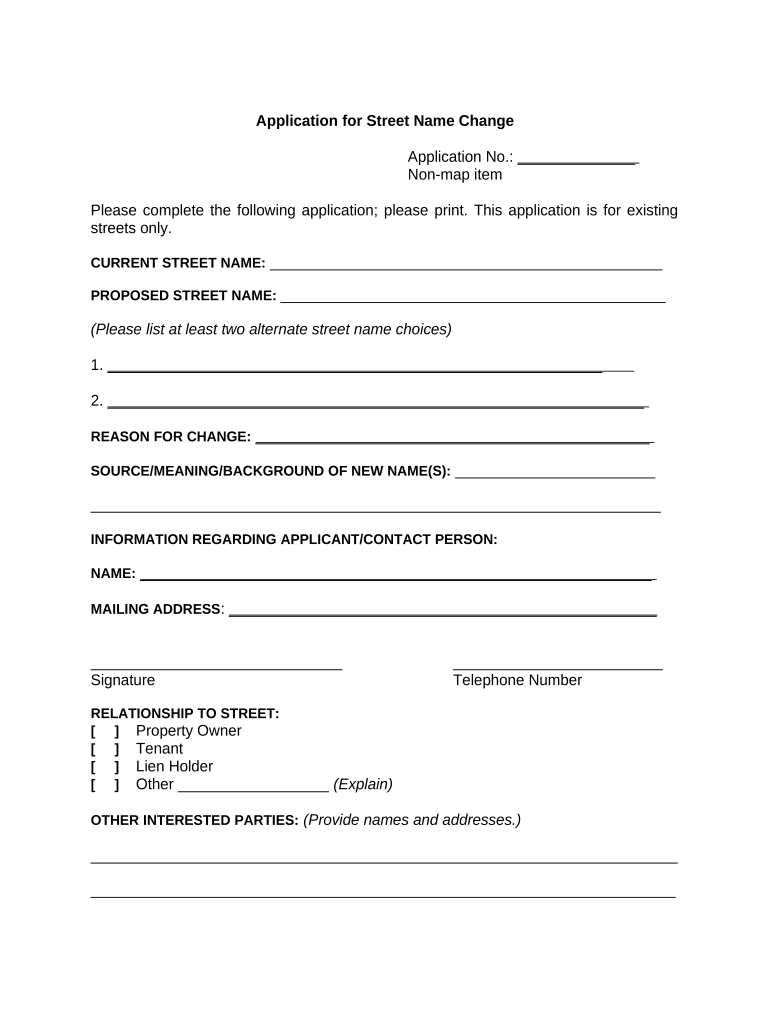
An Application for Street Name Change is a municipal or county filing used to request the official renaming of a public street, roadway, or alley. The form identifies the current and proposed names, the property parcels affected, contact details for the applicant, reasons for the change, required owner or resident consent, and any supporting exhibits such as maps, signatures, and historical documentation. Local ordinances typically set the procedural steps: public notice, hearings, agency review, and final legislative or administrative approval.

Why a Clear, Complete Application Matters

A well-prepared application prevents delays, ensures legal compliance, and provides the record trail needed for municipal approval, emergency-services updates, and postal and utility coordination.

Why a Clear, Complete Application Matters

Who Typically Files or Reviews These Applications

Several stakeholder groups initiate and process street name change requests at the local level.

  • Municipal staff and planning departments who check ordinance compliance and route the application through required reviews.
  • Neighborhood associations or residents who petition for commemorative or corrective name changes and gather required consents.
  • Property owners, developers, or historical commissions who submit documentation, maps, and justifications for the proposed name.

The process often requires coordination among applicants, municipal clerks, public works, and emergency services to finalize the change.

Step-by-Step: Completing the Application

Follow these sequential steps to prepare and submit a complete street name change application to your local authority.

  • 01
    Gather details: Collect current name, proposed name, parcel numbers, and a map.
  • 02
    Document support: Assemble owner consents, historical justification, and any required exhibits.
  • 03
    Complete form: Fill each required field accurately and attach signatures or notarizations as needed.
  • 04
    File and follow-up: Submit to the clerk, monitor notices, and attend any public hearings.

How to Configure an Online Application Workflow

When digitizing the submission process, set up fields, routing, and notifications to match local procedural steps and evidence requirements.

Field Configuration
Required Fields Mark applicant, current/proposed name, parcel ID, and map as mandatory.
Routing Route to planning, public works, and clerk in sequence for review.
Notifications Enable email updates for applicants and scheduled hearing notices.
Attachments Allow PDF, JPG, and DOCX uploads for maps and consent forms.

Typical Municipal Process Flow

Most jurisdictions follow a predictable sequence from intake through final approval.

  • Intake: Clerk accepts the application and verifies completeness.
  • Notice: Public notice requirements are posted per local ordinance.
  • Hearing: Council or committee holds a public hearing for comment.
  • Decision: Legislative or administrative action approves or denies the request.

Digital Filing and Format Considerations

Electronic submissions should use secure file formats and integrate with municipal record systems where possible.

  • File Formats: Accept PDF/A, DOCX, and JPG for maps and supporting documents.
  • Integration: Link to records or GIS systems via platforms that integrate with GIS and cloud storage.
  • Authentication: Use email confirmation, SMS codes, or stronger authentication when required.

Platform choices should preserve audit trails, support easy exports for public records, and comply with applicable electronic-records law.

Typical Deadlines and Timeframes to Expect

Timelines depend on local ordinances, notice periods, and council schedules; plan ahead for required public comment and agency reviews.

Application Intake Deadline:

Check local filing cutoffs for agenda placement, often 2–6 weeks before the hearing.

Public Notice Period:

Commonly 10–30 days for mailed or posted notices prior to hearing.

Public Hearing Date:

Scheduled based on legislative calendar; could be weeks to months after intake.

Appeal Window:

Local codes may allow appeals within 15–30 days of decision.

Effective Date:

Often set by ordinance or upon official recording and notification completion.

Key Milestones from Filing to Finalization

Track these milestone stages to manage notifications, hearing prep, and post-approval updates.

01

Submission Received

Clerk logs application and confirms completeness; missing items flagged.

02

Notice Published

Public notice is posted and mailed according to ordinance timelines.

03

Public Hearing

Testimony and official comments are collected and recorded.

04

Final Record Update

Approved changes are recorded, and GIS/utility databases are updated.

Common Pitfalls That Cause Delays

  • Incomplete parcel or assessor data submitted, leading to verification hold and resubmission requests.
  • Missing owner consent for privately initiated changes, which triggers denial or extra hearings.
  • Inadequate map scale or unclear exhibit labeling, causing GIS or engineering review failure.
  • Late or improper public notice that invalidates the hearing and requires rescheduling.

Risks and Consequences of an Incorrect Application

Administrative Delay: Longer processing times
Hearing Reschedule: Extra public hearing required
Application Rejection: Formal denial recorded
Legal Challenge: Possible court appeal
Address Confusion: Emergency-service impact
Additional Costs: Extra filing or legal fees

Key Components of a Professional Application Package

A complete package combines factual data, legal consents, technical exhibits, and municipal confirmations to simplify review and approval.

Completed Application

Signed form listing current and proposed names, applicant, and contact details with clear, typed entries.
Legal Description

Assessor parcel numbers or legal descriptions for every affected property to ensure accurate jurisdictional review.

Scaled Map

A legible, scaled map or GIS extract showing the subject segment, intersections, and nearby landmarks.

Owner/Resident Consent

Signed consent forms or notarized affidavits from impacted property owners per local rule.

Historical or Safety Justification

A concise statement supporting the change: historical significance, safety reasons, or community benefit.

Supporting Exhibits

Additional materials such as mailing lists, photo documentation, or committee minutes attached for context.

Essential Data Elements Required on the Form

Applicant: Full legal name
Contact: Address and email
Parcel: Assessor number
Current Name: Existing street name
Proposed Name: Exact new spelling
Signatures: Applicant and owner signatures

eSignature Pricing Comparison for Form Submission

Comparing baseline eSignature pricing and compliance features relevant to municipal application workflows; signNow is listed first per vendor data.

signNow DocuSign Adobe Sign PandaDoc HelloSign
Starting Price $8/user/mo $15/user/mo $14/user/mo $19/user/mo $15/user/mo
Free Trial 7-day free trial Varies by vendor Varies by vendor Varies by vendor Varies by vendor
Bulk Send Yes (Business Premium) Varies by plan Varies by plan Varies by plan Varies by plan
Audit Trail Yes Yes Yes Yes Yes
HIPAA Compliant Yes (BAA available) Varies by plan Varies by plan Varies by plan Varies by plan

Real-World Examples of Digital Signing in Administrative Workflows

These examples show how organizations use digital signatures to speed approvals and maintain compliant records in public-sector or property workflows.

Optica Ventures

The interface is simple and easy-to-use for our team.

  • Digital signing reduced in-person exchanges for applicants.
  • Optica streamlined municipality-facing document exchange and shortened turnaround for developer-requested administrative filings.

Martin Properties

I can process and execute all of these documents online with 100% compliance.

  • Mobile and offline signing supported field staff.
  • The firm consolidated application packets and reduced manual submission errors when coordinating with local clerks.

Practical Tips for Accurate, Efficient Applications

Adopt consistent practices to reduce review cycles and expedite approval.

Verify Parcels
Confirm assessor numbers and legal descriptions with the county assessor before filing to avoid mismatches.
Prepare Clear Maps
Include a labeled, scaled map that shows the exact street segment and intersecting roads.
Collect Consent Early
Gather property-owner signatures and contact information before formal submission to prevent delays.
Preserve Audit Trails
Use platforms that capture timestamps, signer attribution, and change history for public record needs.

Frequently Asked Questions About the Application

Answers to common procedural and technical questions encountered when preparing and submitting a street name change application.


Need help? Contact support

be ready to get more
Join over 28 million airSlate SignNow users