Set up a merchant account for your organization with signNow, a secure and compliant eSignature solution designed to meet diverse industry needs across the United States.
What it means to set up a merchant account for your organization
Setting up a merchant account for your organization establishes the ability to accept electronic payments, manage settlements, and reconcile transactions under a single business profile. The process typically involves selecting a payments processor, completing an application with business and bank details, verifying identity and tax information, and configuring payment methods such as credit card, ACH, or mobile wallets. Proper setup also integrates settlement timing, chargeback handling, and reporting preferences into your accounting systems so funds move from customer payments to your bank account reliably.
Why organizations choose to set up a merchant account
A merchant account centralizes payment acceptance, reduces manual processing, and improves cash flow visibility while enabling multiple payment methods and automated reconciliation for modern business operations.
Common challenges when establishing a merchant account
Lengthy underwriting can delay service; prepare accurate business and banking documentation to avoid hold-ups.
Managing chargebacks and disputes requires clear refund and documentation policies to limit financial exposure.
Integration complexity with existing accounting or CRM systems can require developer resources and testing.
Pricing and fee structures vary; compare interchange, assessment, and processor markups to estimate costs accurately.
Key user roles involved in merchant account setup
Finance Manager
The Finance Manager collects required business and bank documentation, reviews fee schedules, configures settlement accounts, and confirms reconciliation processes to ensure accurate cash flow and reporting.
IT Administrator
The IT Administrator integrates the merchant gateway with e-commerce platforms, CRM, or accounting software, secures API keys, and tests transaction flows to ensure reliable authorization and settlement.
Who typically relies on merchant accounts
Small and medium businesses, nonprofits, and enterprises all use merchant accounts to accept card and digital payments as part of day-to-day operations.
Retailers with point-of-sale systems needing card settlement and reconciliation.
Online businesses processing recurring payments or one-time card transactions.
Service providers accepting invoices and corporate card payments from clients.
Proper configuration aligns payment flows with banking and accounting workflows, reduces manual effort, and supports reliable reporting and compliance.
be ready to get more
Choose a better solution
Core tools to support merchant account operations
Choose features that streamline payments, secure cardholder data, and automate reconciliation so teams spend less time on manual processing and more on core business activity.
Payment Gateway
A gateway routes customer card details to networks and issuers, provides authorization responses, supports integration via APIs or hosted pages, and can offer built‑in fraud screening and tokenization to reduce exposure to cardholder data.
Recurring Billing
Automated subscription management supports scheduled charges, proration, and retry logic for failed payments, reducing manual intervention and improving revenue predictability for services billed on a recurring basis.
Reporting Dashboard
Consolidated transaction reports with settlement reconciliation, fee breakdowns, and chargeback tracking enable finance teams to reconcile deposits, review processor charges, and export data to accounting systems.
Developer APIs
APIs allow integration with e-commerce, CRM, or mobile apps to enable programmatic authorizations, refunds, webhooks for event notifications, and flexible payment flows tailored to your platform.
How online merchant accounts operate end to end
Understanding the transaction flow clarifies where authentication, authorization, settlement, and reporting occur between customer, gateway, processor, and bank.
Authorization: Card details are sent to issuer for approval.
Capture: Approved transactions are captured for settlement.
Settlement: Funds are transferred to your acquiring bank.
Reconciliation: Transactions are matched to bank deposits and fees.
Collect signatures
24x
faster
Reduce costs by
$30
per document
Save up to
40h
per employee / month
Step-by-step: set up a merchant account for your organization
Follow these core steps to establish merchant services and connect them to your operations while maintaining compliance and reconciliation controls.
01
Select provider: Compare fees, features, and contract terms.
02
Gather documents: Prepare EIN, bank account, owner IDs, and business records.
03
Complete application: Submit required business and processing information.
04
Integrate systems: Connect gateway to website, POS, and accounting software.
be ready to get more
Why choose airSlate SignNow
Free 7-day trial. Choose the plan you need and try it risk-free.
Honest pricing for full-featured plans. airSlate SignNow offers subscription plans with no overages or hidden fees at renewal.
Enterprise-grade security. airSlate SignNow helps you comply with global security standards.
Recommended workflow settings when configuring payments
These baseline workflow settings help ensure predictable processing, notification cadence, and settlement behavior during regular operations.
Workflow Setting and Default Configuration
signNow
DocuSign
Settlement Schedule
Daily
Retry Attempts for Failed Charges
3 attempts
Chargeback Notification
Immediate alert
Daily Reconciliation Export
Enabled
Webhook Event Types
Payment
Refund
Chargeback
Device and platform considerations for account setup
Merchant account setup can be initiated from web portals, mobile apps, or via API integrations depending on the provider and your technical requirements.
Web console:Modern browsers supported
Mobile app:iOS and Android
API access:RESTful endpoints
For enterprise integrations, plan secure API key management, staging environments, and end-to-end testing on desktop and mobile to verify tokenization, webhooks, and reconciliation before moving to production.
Security controls to consider for merchant accounts
PCI DSS:Card data standard
Tokenization:Removes raw card numbers
TLS Encryption:Secures data in transit
Two-factor Access:Protects admin logins
Fraud Monitoring:Detects suspicious activity
Access Logging:Records administrative actions
Industry examples of merchant account use
Different sectors configure merchant accounts to match transaction volumes, compliance needs, and settlement timing for predictable operations.
Retail Chain
A multi-location retailer consolidated card processing under a single merchant account to centralize settlement and reporting for inventory and POS systems
Implemented EMV and terminal tokenization for card security
Reduced reconciliation time through daily settlement exports to accounting
Resulting in faster month-end close and clearer sales visibility across stores.
Online Subscription Service
A SaaS company created a merchant account and gateway integration to accept recurring credit and ACH payments securely
Configured automated retries and dunning workflows for failed charges
Improved customer retention with predictable billing and integrated subscription reports
Leading to steadier monthly revenue and simplified financial forecasting.
Best practices for secure and accurate merchant account setup
Implement consistent procedures and security controls during setup to reduce operational risk and improve the reliability of payment processing and reconciliation.
Maintain accurate and current business documentation
Keep EIN, ownership records, banking details, and contact information up to date with your payments provider to avoid underwriting delays and unexpected account holds during high-volume activity.
Enforce least-privilege access for payment administration
Restrict administrative privileges to specific finance and IT roles, use unique accounts for each user, and enable two-factor authentication to limit the impact of credential compromise.
Use tokenization and avoid storing raw card data
Where possible employ gateway tokenization for saved payment methods, and delegate card storage to PCI-compliant processors to reduce your compliance scope and exposure.
Document chargeback and refund policies clearly
Publish transparent refund procedures, maintain transaction and delivery records, and implement automated dispute workflows to reduce chargeback risk and improve resolution speed.
If an application is rejected for insufficient documentation, review the processor's checklist, provide clear copies of EIN and ownership records, and confirm bank account details match legal business name to enable re-submission without delay.
When transactions decline without clear issuer messages, check gateway logs for AVS and CVV responses, verify merchant account processing region settings, and ensure test versus production API keys are not mixed.
Collect comprehensive evidence including signed receipts, delivery confirmation, and communication logs, then submit within the processor's dispute window and document outcomes for adjustments to dispute handling processes.
Compare daily settlement reports against bank deposits, subtract processing fees and reserve holds, and consult processor fee schedules to reconcile differences and identify timing gaps or withheld reserves.
Confirm endpoint URLs are reachable, check TLS certificates, validate request signatures where used, and review retry logic for event delivery to ensure reliable webhook processing for payment events.
Implement stricter fraud scoring, require AVS/CVV checks, enable velocity limits and 3D Secure where available, and review refund and customer verification policies to reduce dispute frequency and associated costs.
Feature availability across major eSignature and payment vendors
Compare core capabilities relevant to accepting payments and integrating signed payment authorizations with merchant account workflows.
Pricing varies by volume, feature set, and contract length; compare entry-level and enterprise options for accurate cost estimates.
Pricing Plans and Limits
signNow (Recommended)
DocuSign
Adobe Acrobat Sign
Dropbox Sign
PandaDoc
Entry-level monthly cost
From $8 per user
From $10 per user
From $9.99 per user
From $15 per user
From $19 per user
Enterprise plan availability
Yes with custom terms
Yes with custom terms
Yes with custom terms
Yes with custom terms
Yes with custom terms
API rate limits
Varies by plan
Varies by plan
Varies by plan
Varies by plan
Varies by plan
Bulk send limits
High-volume options
High-volume options
Limited
Available
Available
Included templates and storage
Unlimited templates
Templates included
Templates included
Templates included
Templates included
How to set up a merchant account in airSlate SignNow
airSlate SignNow allows signers to make payments while completing your documents. As an Organization’s Admin, you can connect your airSlate SignNow account to one of the supported payment systems.
Before you proceed to set up a merchant account, make sure you have a valid payment account on Stripe or CardConnect to be able to accept payments.
Find the Merchant Account settings in the Admin Panel
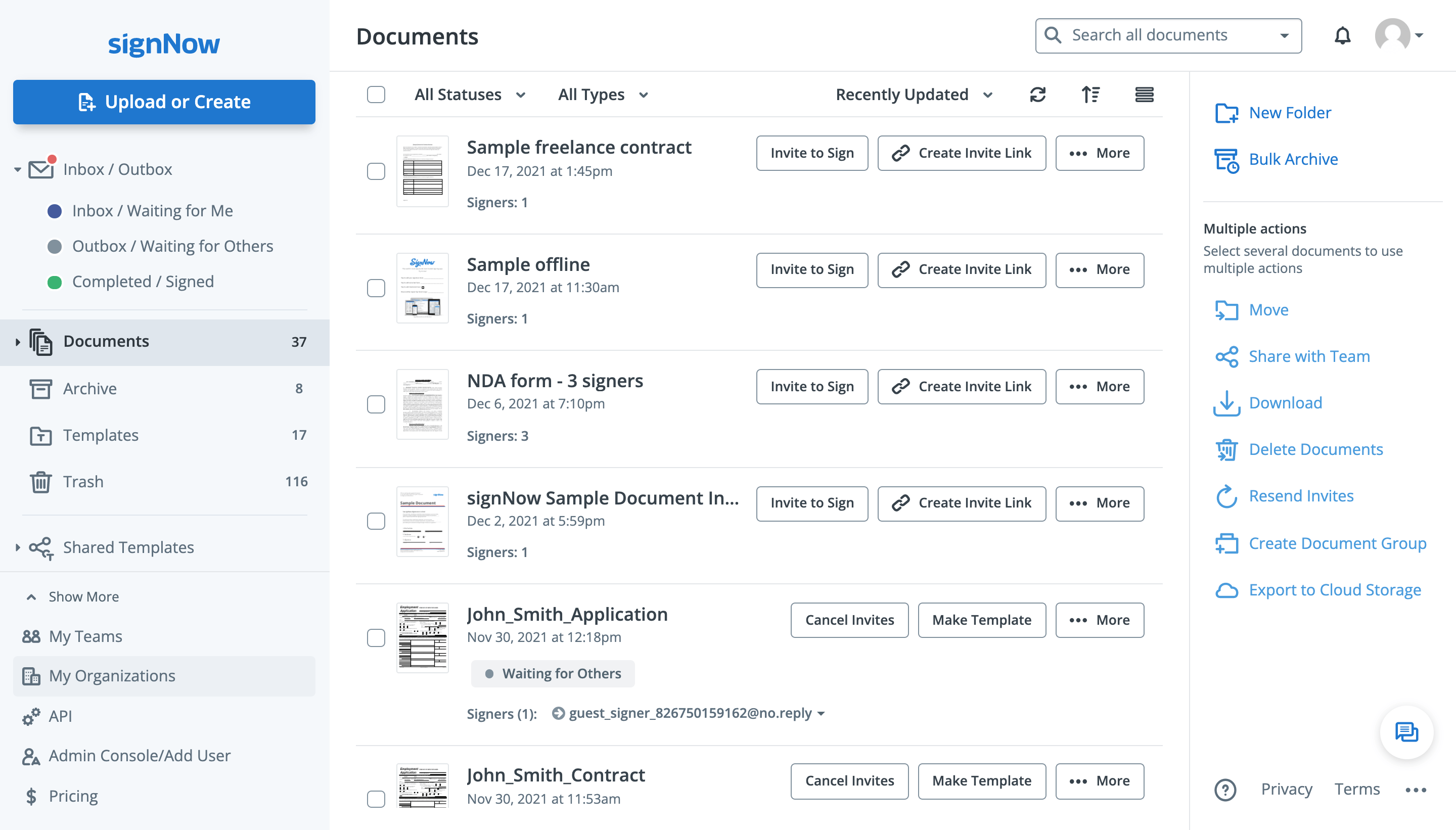
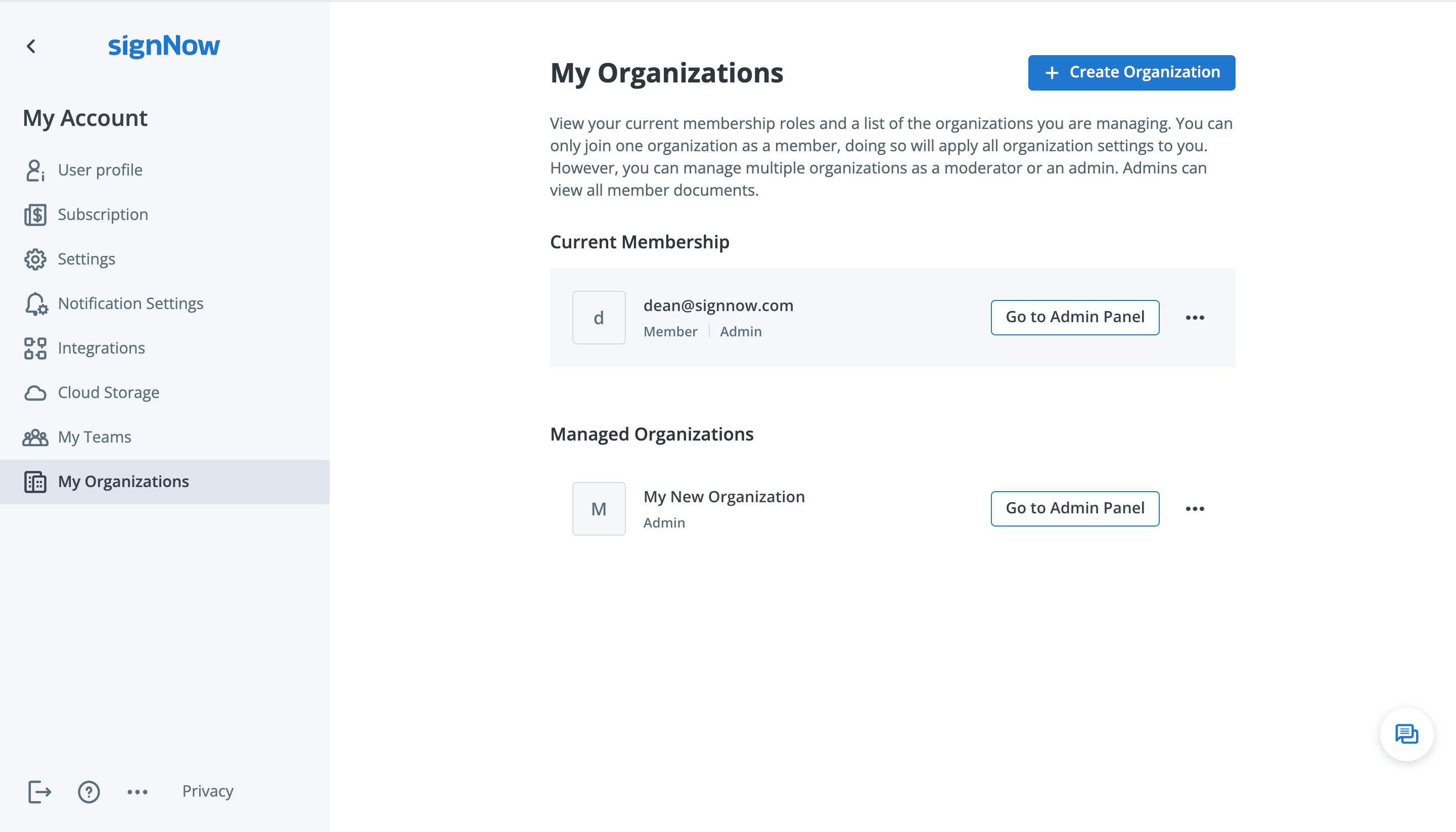
Log in to your airSlate SignNow account as an Admin. Go to My Organizations in the sidebar on the left (or in your account settings).
Click Go to Admin Panel next to your Organization. The Admin Panel features the Merchant Account tab, where Admins can manage payment systems.
Connect a merchant account
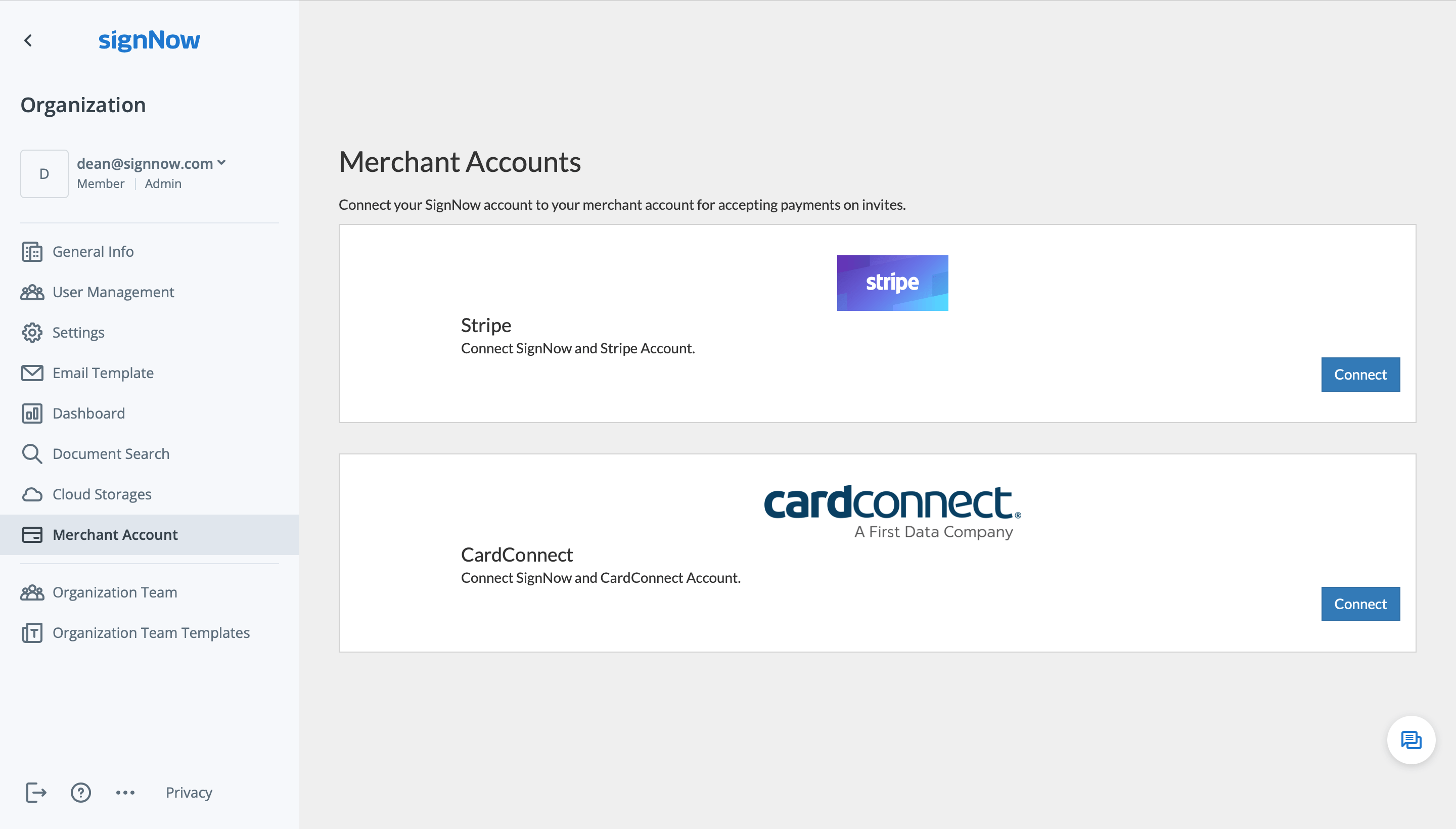
Open the Merchant Account tab in the Admin Panel. airSlate SignNow allows you to receive payments via Stripe and CardConnect. Select your preferred payment system and click Connect.
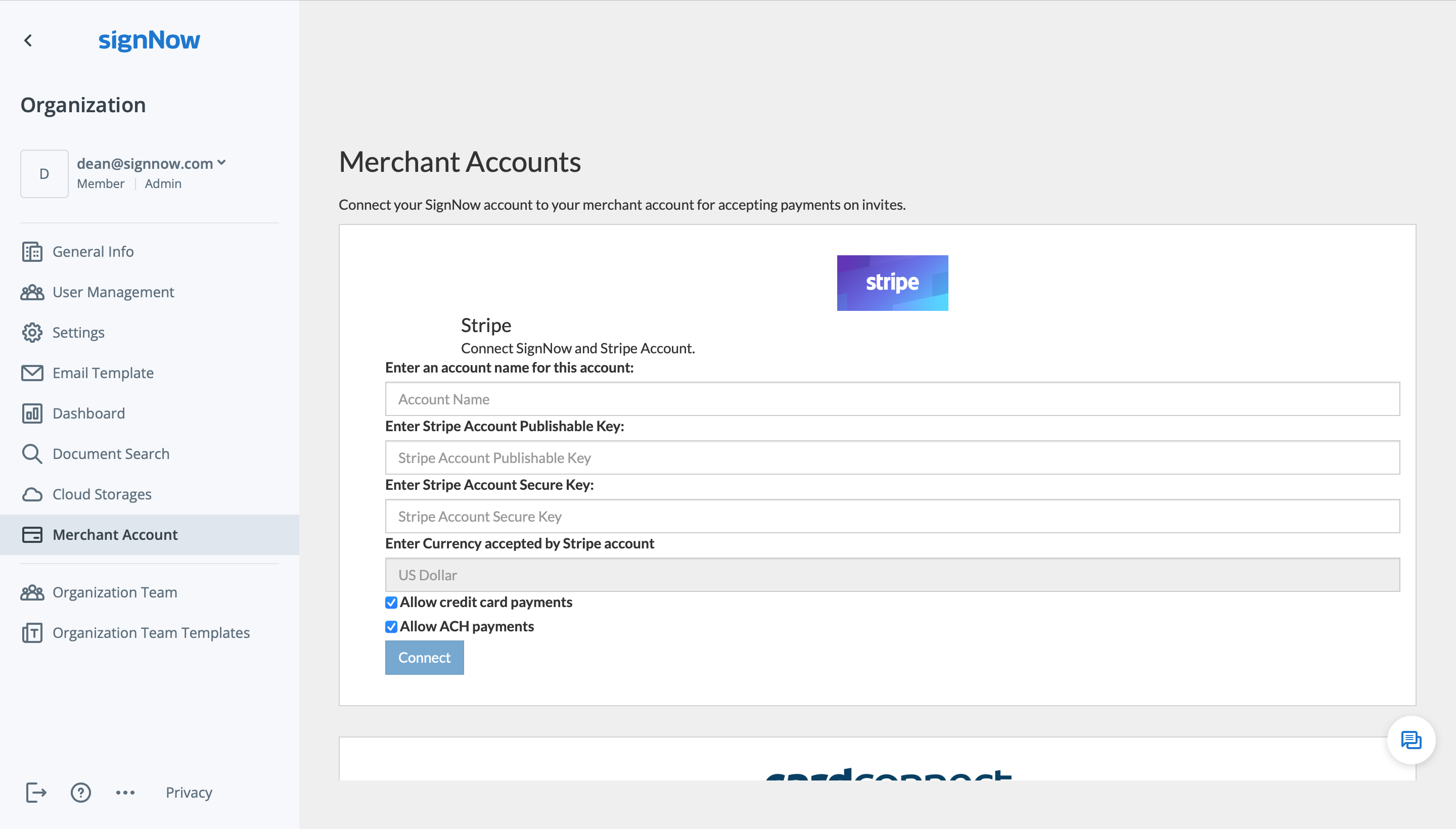
Enter your account name, payment system credentials, and select your preferred currency. Then, click Connect.
Once your payment account is set up, you can request payments from signers upon submitting your documents.
We use cookies to improve security, personalize the user experience, enhance our marketing activities (including cooperating with our 3rd party partners) and for other business use. Click here to read our Cookie Policy. By clicking “Accept“ you agree to the use of cookies. ... Read moreRead less