Establishing secure connection…Loading editor…Preparing document…

Complaint Against Commissioner of Social Security

This template is fully customizable. Edit the text, fill out the fields, and send it for signature. Give it a try!
Complaint Against Commissioner of Social Security

What this Complaint document is and when it's used

A Complaint Against Commissioner of Social Security is a formal written submission used to challenge an administrative decision, to request review of agency action, or to report concerns about the Commissioner’s handling of a specific matter. Depending on the objective it may initiate an administrative review, prompt an internal agency response, or be the precursor to seeking judicial review in federal court under 42 U.S.C. §405(g). The document typically summarizes factual background, identifies the decision or conduct at issue, states the legal or regulatory basis for the complaint, and requests specific relief or corrective action.

Why a clear, properly completed complaint matters

A concise, well‑organized complaint protects your procedural rights, focuses review on the controlling facts and law, and reduces the chance of procedural rejection. Proper formatting and complete supporting evidence help decision‑makers assess the merits quickly and preserve options for further administrative or judicial review.

Why a clear, properly completed complaint matters

Who prepares and files this complaint

Parties who commonly prepare this complaint include claimants, representatives, attorneys, and agency staff who need an official record of objection or request for corrective action.

  • Claimants or appellants submitting a challenge to a benefits determination or agency action; typically unrepresented or represented individuals seeking review.
  • Attorneys or accredited representatives acting on behalf of a claimant and preparing a formal legal statement and supporting exhibits.
  • Agency personnel, ombuds, or inspectorate staff documenting internal concerns, procedural errors, or referral material for oversight bodies.

Typical filers and their roles

Claimant — Individual

An individual challenging a benefits decision or administrative action; provides personal identifiers, case numbers, and firsthand statements of facts. May attach medical records, prior appeal decisions, and signed declarations to substantiate the claim.

Representative — Attorney

A licensed attorney or accredited representative files on behalf of a claimant, supplies a notice of appearance or power of attorney, cites legal authorities, and prepares a record that supports potential administrative or judicial review.

Essential information to include

Claimant Name: Full legal name
Claimant ID: Social Security number or SSN suffix
Case Number: Appeals/claim ID
Date of Decision: MM/DD/YYYY
Relief Requested: Specific remedy
Representative: Name and contact

Immediate risks from an incomplete or incorrect complaint

Dismissal Risk: Missing essentials can lead to administrative rejection
Waiver of Issues: Failure to state issues may forfeit arguments on appeal
Delay: Incomplete evidence prolongs processing
Lost Deadlines: Untimely filing may bar review
Privacy Exposure: Improper data handling risks HIPAA issues
Costs: Court filing or counsel fees may apply

Common drafting and submission mistakes

  • Omitting the precise decision date or case number, which prevents staff from locating the administrative record and may cause dismissal or delay.
  • Failing to describe the specific relief requested and the legal basis, leaving the complaint vague and making it harder for reviewers to act.
  • Submitting unsigned or undated complaints, or using initials instead of a full signature, which can invalidate the filing as not properly executed.
  • Relying on unsupported assertions without attaching relevant documents (medical records, prior notices) so the complaint cannot be substantiated.

Realistic examples of complaint use

Two concise scenarios show how a Complaint Against Commissioner of Social Security may be structured and supported in practice.

Disability Appeal — Individual

A claimant summarizes denial of disability benefits and attaches recent medical records and treating physician statements.

  • Key point: include chronological medical timeline.
  • The complaint requests reconsideration, cites evidentiary gaps in the decision, and asks for a new medical testimony or remand for further development of the record.

Procedural Error — Representative

An attorney files a complaint alleging procedural irregularities in processing and incorrect application of policy.

  • Key point: attach procedural notices and hearing transcript excerpts.
  • The complaint demands administrative correction, identifies specific policy citations, and preserves the record for possible judicial review under 42 U.S.C. §405(g).

Step-by-step: complete the complaint accurately

Follow these steps in order to prepare a clear, compliant complaint that preserves rights and supports a coherent administrative review.

  • 01
    Gather records: Collect decisions, notices, medical and supporting documents
  • 02
    Draft facts: Write a concise, chronological statement of events
  • 03
    State relief: Specify the remedy or corrective action sought
  • 04
    Sign and date: Ensure claimant or representative signs with date

Where the complaint goes and how it moves

A complaint may be handled administratively, routed within agency review channels, or become part of a record for judicial review; routes vary by desired outcome.

  • Agency Intake: Submit to the agency intake or regional office for initial review
  • Administrative Review: Agency specialists review facts, policy application, and evidence
  • Appeals Path: If unresolved, matter may proceed to formal appeal channels
  • Judicial Review: After administrative exhaustion, file in federal court under 42 U.S.C. §405(g) if necessary

Core components of a professional complaint package

Include these six elements to ensure the complaint is complete, testable, and ready for administrative or judicial consideration.

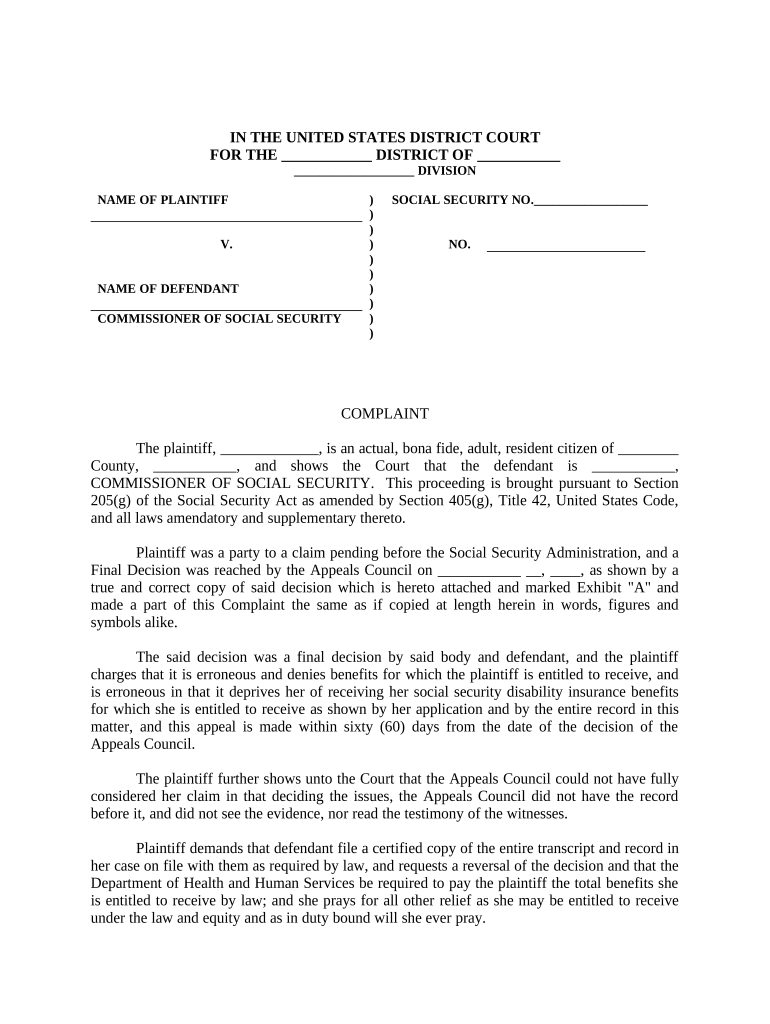
Caption

A clear caption lists the parties, case or claim number, and the document title so reviewers can place the filing in the correct administrative or court file.
Statement of Facts

A chronological narrative of key dates, events, and decisions that led to the complaint; focus on material facts relevant to the disputed determination.

Legal Basis

Cite statutes, regulations, or policies alleged to have been misapplied or violated; concise legal grounding helps reviewers identify the controlling standards.

Relief Requested

Describe the exact corrective action, relief, or remand you're requesting so the agency knows the desired outcome and can evaluate remedies.

Evidence Index

Attach and index supporting documents (medical records, notices, transcripts) with page references to make fact-checking efficient during review.

Signature & Verification

A dated signature and verification statement affirming the truth of the facts; if a representative signs, include a signed authorization or power of attorney.

Practical tips for a clear and defensible complaint

Adopt concise drafting habits and strict document control to reduce processing friction and protect appeal rights.

Use a consistent chronology
Present facts in a short, dated timeline; cross-reference exhibits and avoid long, anecdotal narratives that obscure critical legal points.
Label and paginate exhibits
Number attachments, create an exhibit index, and reference exhibit numbers in the narrative to speed reviewer verification and minimize requests for resubmission.
Confirm signature authority
If an attorney or representative files the complaint, attach a notice of appearance or signed authorization to avoid challenges to standing or filing validity.
Keep copies and logs
Retain original signed copies, delivery receipts, and an internal filing log to document mailing dates, contacts, and acknowledgements for potential later review.

Timing considerations and typical deadlines

Timely filing and observance of administrative deadlines preserve rights; confirm any agency‑specific time limits that apply to appeals or complaints.

Initial Filing Deadline:

Check agency rules; many administrative appeals have strict short windows

Response Time:

Agencies generally acknowledge and set response windows (varies by program)

Administrative Exhaustion:

Complete required internal appeals before seeking judicial review

Federal Court Filing:

If applicable, file under 42 U.S.C. §405(g) after exhaustion; observe district court filing deadlines

Record Retention:

Keep originals until final resolution and any applicable appeal periods expire

Digital submission and platform compatibility

Use secure platforms that support PDF and DOCX formats, strong authentication, and auditable signing events when submitting complaint packages electronically.

  • Integrations: Salesforce | NetSuite | Google Workspace | Microsoft 365 supported by many eSignature platforms
  • Formats: PDF, DOCX, and searchable PDF recommended for exhibits and text extraction
  • Authentication: Email link, SMS code, or advanced signer authentication per case sensitivity

Confirm the receiving agency accepts electronic submissions and check required authentication levels; preserve a tamper‑evident copy and an audit trail for the record.

How to configure an online complaint workflow

Set up fields, signer roles, and automated routing to ensure complete submissions and an auditable trail when using an eSignature platform.

Field Configuration
Document Type Complaint template with caption and exhibits section
Authentication Email + SMS or advanced verification for sensitive filings
Attachments Require indexed exhibits and file size limits
Notifications Auto-notify reviewers and record delivery confirmations

eSignature vendor pricing and compliance snapshot (signNow listed first)

Compare basic price points and key compliance features to choose a platform for preparing and submitting complaint packages electronically; signNow appears first in the table.

signNow DocuSign Adobe Sign PandaDoc HelloSign
Starting Price $8/user/mo $15/user/mo $14/user/mo $19/user/mo $15/user/mo
Free Trial 7-day free trial Trial available Trial available Limited trial Limited trial
Bulk Send Yes Yes Yes Yes No
Audit Trail Yes Yes Yes Yes Yes
HIPAA Compliant Yes Yes Yes No No

Frequently asked questions and troubleshooting

Answers to common questions about preparing, signing, and submitting a Complaint Against Commissioner of Social Security, and steps to resolve common processing problems.


Need help? Contact support

be ready to get more
Join over 28 million airSlate SignNow users