Establishing secure connection…Loading editor…Preparing document…

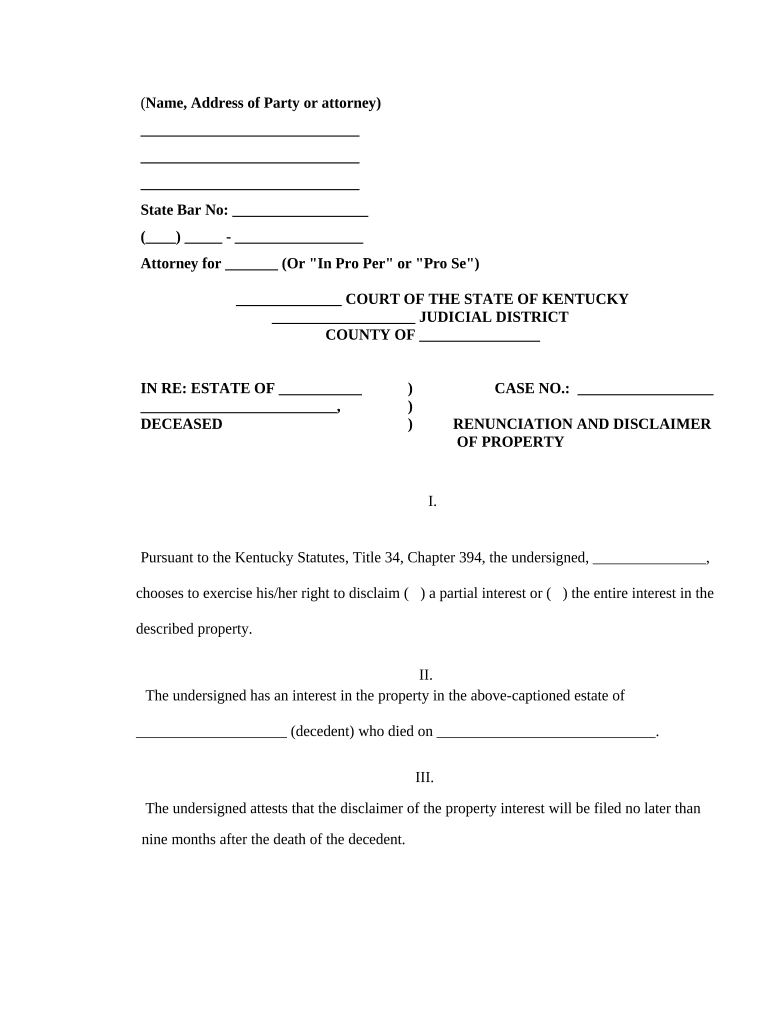
Kentucky Renunciation and Disclaimer of Property

This template is fully customizable. Edit the text, fill out the fields, and send it for signature. Give it a try!
Kentucky Renunciation and Disclaimer of Property

What the Kentucky Renunciation and Disclaimer of Property Is

The Kentucky Renunciation and Disclaimer of Property is a formal, written declaration used when a person elects not to accept an interest in real or personal property they would otherwise receive. Common contexts include disclaiming an inheritance, refusing a devise under a will, or redirecting intestate shares. When executed according to applicable law, a valid disclaimer treats the interest as never accepted and allows alternative distribution per the governing instrument or statute. Electronic execution is often permitted under the federal ESIGN Act (15 U.S.C. ch. 96) and state UETA frameworks, though testamentary exceptions may apply.

Why a Formal Renunciation or Disclaimer Matters

A completed renunciation clarifies intent, prevents unintended acceptance of property, and triggers statutory distribution rules. Proper form and timing preserve tax and probate consequences and reduce litigation risk.

Why a Formal Renunciation or Disclaimer Matters

Who Typically Prepares and Signs This Document

The document is used by private individuals and their counsel in estate and property matters.

  • Heirs or beneficiaries seeking to avoid property acceptance and transfer rights to other beneficiaries.
  • Executors, personal representatives, or estate attorneys preparing estate administration paperwork.
  • Trustees or fiduciaries advising beneficiaries about tax or creditor implications of acceptance.

Parties often consult probate counsel to ensure the renunciation meets statutory form and timing requirements.

Core Components of a Professional Disclaimer Document

A complete renunciation should be concise, unambiguous, and contain identified parties, a clear statement of refusal, and distribution consequences.

Identifying Parties

Full legal names and relationships of the disclaimant and the person or estate whose interest is being disclaimed.
Clear Statement

An explicit sentence stating the disclaimant irrevocably renounces or disclaims the specified property or interest.

Property Description

Sufficient detail to identify the asset—parcel numbers, account numbers, or precise testamentary bequest language.

Effective Date

Date of execution and statement when the disclaimer takes effect for distribution and tax purposes.

Distribution Result

Reference to how the interest passes—residuary clause, per stirpes/per capita rules, or statutory fallback.

Signatures & Acknowledgment

Signature block for disclaimant, date, and any required notary or witness language to validate execution.

Step-by-Step: Completing the Kentucky Renunciation

Follow these practical steps to prepare and execute a valid renunciation or disclaimer.

  • 01
    Confirm Eligibility: Verify the person has capacity and legal standing to disclaim.
  • 02
    Describe the Interest: Identify property precisely so the asset is unambiguous.
  • 03
    Draft Clear Language: Use an explicit, irrevocable renunciation statement.
  • 04
    Execute Properly: Sign before required witnesses or a notary as applicable.

How Execution and Transfer Typically Proceed

This sequence shows common routing from disclaimer to effect on distribution.

  • Prepare Document: Draft or use a statutory form with required elements.
  • Authenticate Signer: Verify identity with photo ID or notarization.
  • Record or Deliver: File with probate court or deliver to the estate representative.
  • Effect Distribution: Interest passes according to will, trust, or statute.

Configuring an Online Completion Workflow

Use a structured workflow so all parties sign in order and required fields are completed.

Field Configuration
Signer Order Set disclaimant first, then estate representative reviewer.
Required Fields Make names, property description, and date mandatory.
Authentication Require ID verification or two-factor signer authentication.
Retention Automatically store signed PDF and audit trail.

Technical Options for eExecution and Delivery

Electronic completion is widely used but must meet authentication and retention standards.

  • Document Format: PDF or DOCX preferred for reliable records
  • Authentication: Email + SMS OTP or stronger methods
  • Audit Trail: Record IP, timestamp, and signer actions

Choose platform settings that provide tamper-evident signatures and long-term record access for probate review.

Key Risks and Legal Consequences to Watch For

Invalid Disclaimer: May be declared ineffective
Unintended Acceptance: Treated as acceptance by courts
Tax Consequences: Affects gift and estate tax positions
Creditor Claims: Creditors may challenge transfers
Recording Errors: Missed recording can create disputes
Late Execution: Timing rules may invalidate disclaimer

Common Preparation Mistakes to Avoid

  • Using vague language that fails to identify the specific interest and asset creates ambiguity and increases litigation risk.
  • Signing without required notarization or witnesses in jurisdictions that demand them can render the disclaimer ineffective.
  • Failing to check tax consequences — disclaimers can trigger gift, generation-skipping, or estate tax issues if not timed properly.
  • Not recording or delivering the signed disclaimer to the estate representative or clerk can prevent it from taking effect.

Practical Tips for Accurate and Efficient Completion

Follow these best practices to reduce risk and speed processing.

Use Clear, Irrevocable Language
Draft the disclaimer with unambiguous phrasing that expressly states the interest is renounced irrevocably to avoid later interpretation disputes.
Confirm Local Formalities
Verify whether the county or state requires notarization, witnesses, or recording and follow those steps before filing or relying on the document.
Coordinate with Estate Counsel
Ask an attorney to confirm distribution consequences and any tax impacts so beneficiaries understand the downstream effects of renunciation.
Keep a Tamper-Evident Record
Retain the signed document plus a time-stamped audit trail (if e-signed) and a recorded copy where applicable for probate review.

Real-World Scenarios Where Disclaimers Are Used

Two common scenarios show how a renunciation can change estate outcomes.

Estate Redistribution

A beneficiary declines a specific bequest to avoid administrative burdens

  • This redirects the asset to the residuary beneficiaries
  • The disclaimer prevented the beneficiary from acquiring obligations tied to the property and simplified distribution without formal probate litigation.

Tax or Creditor Avoidance

An heir renounces a cash inheritance to avoid gift tax complications

  • The transfer passes to the next-in-line heir by statute
  • As a result, the estate’s taxable base changed and the disclaimant was not treated as having received a taxable transfer.

Who Has Authority to Sign

Beneficiary / Heir

A named beneficiary or heir with legal standing may sign a renunciation, provided they have capacity and are not subject to undue influence; signature transfers effect only if executed per jurisdictional formalities.

Personal Representative / Executor

An executor may receive and record disclaimers and confirm distribution results, but an executor does not disclaim on behalf of a beneficiary; beneficiaries must execute their own renunciations.

eSignature Vendor Comparison for Completing Disclaimers

Pricing and core capabilities for common eSignature vendors. signNow is listed first per vendor comparison conventions.

signNow DocuSign Adobe Sign PandaDoc HelloSign
Starting Price $8/user/mo $15/user/mo $14/user/mo $19/user/mo $15/user/mo
Free Trial 7-day free trial Varies by vendor Varies by vendor Varies by vendor Varies by vendor
Bulk Send Yes Yes Yes Yes No
Audit Trail Yes Yes Yes Yes Yes
HIPAA Compliant Yes Yes Yes No No
Envelope Cap No cap 100 envelopes/user/year Varies Varies Varies

FAQs and Troubleshooting for Kentucky Renunciations

Answers to common questions that arise during preparation, execution, and filing of disclaimers.


Need help? Contact support

be ready to get more
Join over 28 million airSlate SignNow users