Establishing secure connection…Loading editor…Preparing document…

Oklahoma Hearing Order

This template is fully customizable. Edit the text, fill out the fields, and send it for signature. Give it a try!
Oklahoma Hearing Order

What an Oklahoma Hearing Order Is and when it’s used

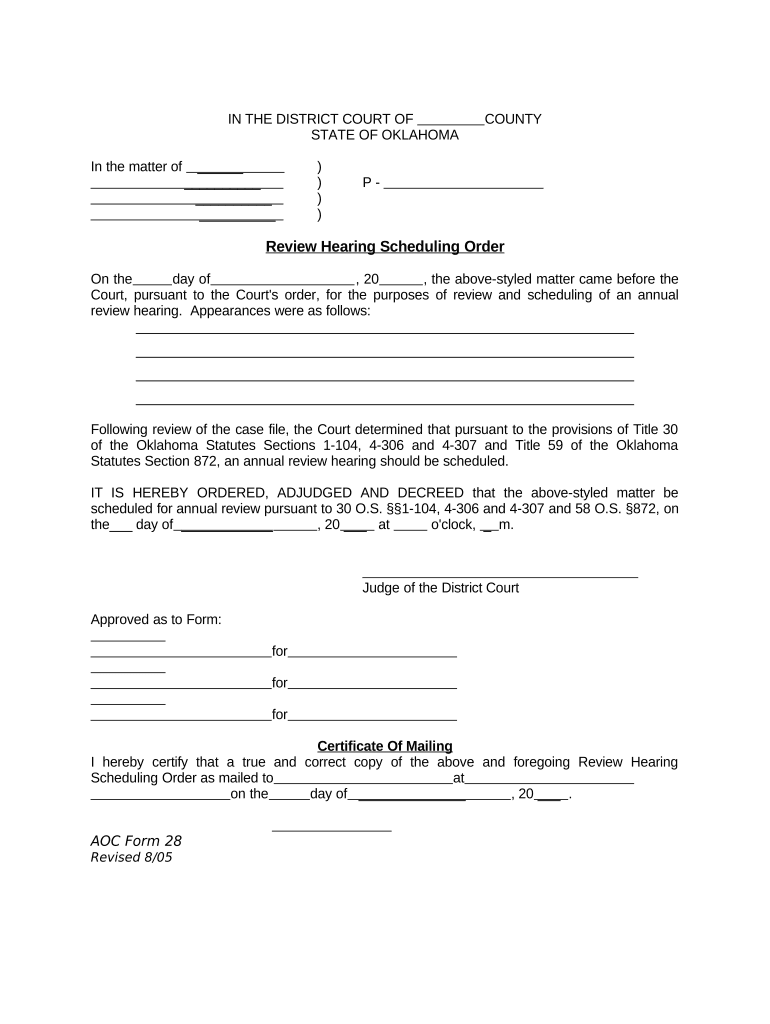
An Oklahoma Hearing Order is a court-issued document that formally schedules and documents a hearing in an Oklahoma state court or administrative tribunal. It identifies the case caption and number, parties, the judge or hearing officer, the subject or relief to be considered, the date, time, and physical or virtual location, and any specific pre-hearing requirements. Hearing orders direct parties on service, submission deadlines for exhibits or briefs, and consequences for failure to appear. Local court rules determine form, required signatures, and acceptable filing or e‑service methods.

Why a clear, correct hearing order matters

A properly prepared Oklahoma Hearing Order ensures all parties receive notice, understands the hearing scope, and can comply with submission and service rules. Clear orders reduce procedural disputes, limit grounds for post-hearing challenges, and help the court manage its docket efficiently.

Why a clear, correct hearing order matters

Who prepares, files, and relies on a hearing order

Parties to litigation, their attorneys, and court personnel all interact with the hearing order during case processing.

  • Litigants and their counsel who must know hearing logistics and submission deadlines.
  • Court clerks and judges who issue, enter, and docket the order.
  • Government agencies or administrative law judges needing formal notice and record.

Step-by-step: preparing and filing an Oklahoma Hearing Order

Follow this sequence to create, approve, and submit a hearing order that complies with typical Oklahoma court practices.

  • 01
    Draft the Order: Populate caption, case number, parties, hearing purpose, and required deadlines.
  • 02
    Confirm Scheduling: Coordinate with the court calendar or clerk to reserve the date and time.
  • 03
    Obtain Signature: Submit the draft to the judge or hearing officer for review and signature.
  • 04
    File and Serve: File with the court clerk and serve all parties per local rules and ESIGN/UETA allowances.

Typical workflow for electronic completion and service

This simple workflow shows the e‑document path from drafting to service using modern court filing and e‑service options.

  • Create Document: Draft order in court-approved format (PDF or preferred template).
  • Place Signature Fields: Add judge and clerk signature blocks or eSignature placeholders as required.
  • File Electronically: Upload to the court's eFiling portal or e-service system following file size and format rules.
  • Serve Parties: Use court-authorized e-service, mail, or in-person service as local rules direct.

Key settings for online customization and eSubmission

When preparing the order for digital signing and eFiling, configure these settings to match court and local practice.

Field Configuration
File Format PDF/A preferred; verify court portal requirements.
Signature Type Judge signature may be scanned wet-ink or verified eSignature depending on court policy.
Authentication Use court-required signer authentication (email, SMS, or stronger methods).
Retention and Archive Save final signed PDF and native source in a secure archive when filed.

Technical considerations for eSigning and court eFiling

Confirm the file types, signer authentication, and audit trail requirements the receiving court or tribunal requires before submission.

  • Supported Formats: PDF, DOCX where allowed; courts often require PDF final filings.
  • Authentication Methods: Email link, SMS code, or stronger KBA per court rule.
  • Integrations: Works with common systems like Microsoft 365, Google Workspace, and court eFiling portals.

Common timing rules and typical notice periods

Hearing-related deadlines vary by court and case type. Confirm the local rules for specific deadlines and required lead times.

Notice Period:

Typically 7–30 days' notice for non-emergency hearings, depending on local and case-type rules.

Filing Before Hearing:

Exhibits and pre-hearing briefs often due several days before the hearing—check local practice.

Continuance Requests:

File motions to continue as early as possible; some courts require specific supporting affidavit timing.

Service Deadlines:

Service methods and timing may vary—allow extra time for mail service.

Virtual Access Notice:

Provide virtual link and access instructions well in advance for remote hearings.

Key milestones from scheduling to final order

Sequential milestones show how the process typically unfolds from scheduling through entry of the final order.

01

Scheduling Confirmed

Court assigns date and time and directs notice requirements.

02

Draft Order Prepared

Parties or clerk prepare the written order for judge signature.

03

Order Signed

Judge or hearing officer signs the order, making it official.

04

Entry and Service

Clerk enters order in docket and serves all parties per rule.

Security and compliance considerations for hearing orders and attachments

Encryption: TLS 1.2/1.3 in transit; AES-256 at rest
Audit Trail: Detailed signing log with IP, timestamp, and event history
Regulatory Coverage: Compliant with ESIGN and UETA for legal enforceability
HIPAA Support: BAA available for health-related records when required
Certifications: SOC 2 Type II and ISO 27001 aligned controls
Accessibility: WCAG-compliant viewer and mobile support

Consequences of incorrect or late hearing orders

Default Judgment: Adverse judgment for non-appearance
Motion Denial: Relief may be denied for missed submissions
Sanctions: Court fines or cost-shifting sanctions
Contempt: Potential contempt for failure to comply
Service Defect: Order may be voidable for improper service
Appeal Limits: Procedural defects can limit appellate relief

Common mistakes to avoid when preparing the order

  • Using an incorrect case number or caption can delay docket entry and confuse parties about applicability.
  • Failing to confirm the judge’s availability or court calendar before setting a date leads to continuances and scheduling conflicts.
  • Omitting clear service instructions or the method of electronic notification can result in improper service and procedural challenges.
  • Not specifying whether the hearing is in person or remote (and failing to provide access details) causes sign-in problems and missed appearances.

Comparing eSignature vendor basics for hearing orders and court workflows

Basic vendor criteria for secure eSigning, bulk distribution, and compliance support. signNow is listed first for consistent comparison formatting.

signNow DocuSign Adobe Sign PandaDoc HelloSign
Starting Price $8/user/mo $15/user/mo $14/user/mo $19/user/mo $15/user/mo
Free Trial 7-day free trial Varies by vendor Varies by vendor Varies by vendor Varies by vendor
Bulk Send Yes (tiered) Varies by plan Varies by plan Varies by plan Varies by plan
Audit Trail Yes Yes Yes Yes Yes
Envelope Cap No cap 100 envelopes/user/year limit Varies Varies Varies

Frequently asked questions about Oklahoma Hearing Orders

Answers to common procedural and eFiling questions to prevent refusal or delay when submitting a hearing order.


Need help? Contact support

be ready to get more
Join over 28 million airSlate SignNow users