Establishing secure connection…Loading editor…Preparing document…

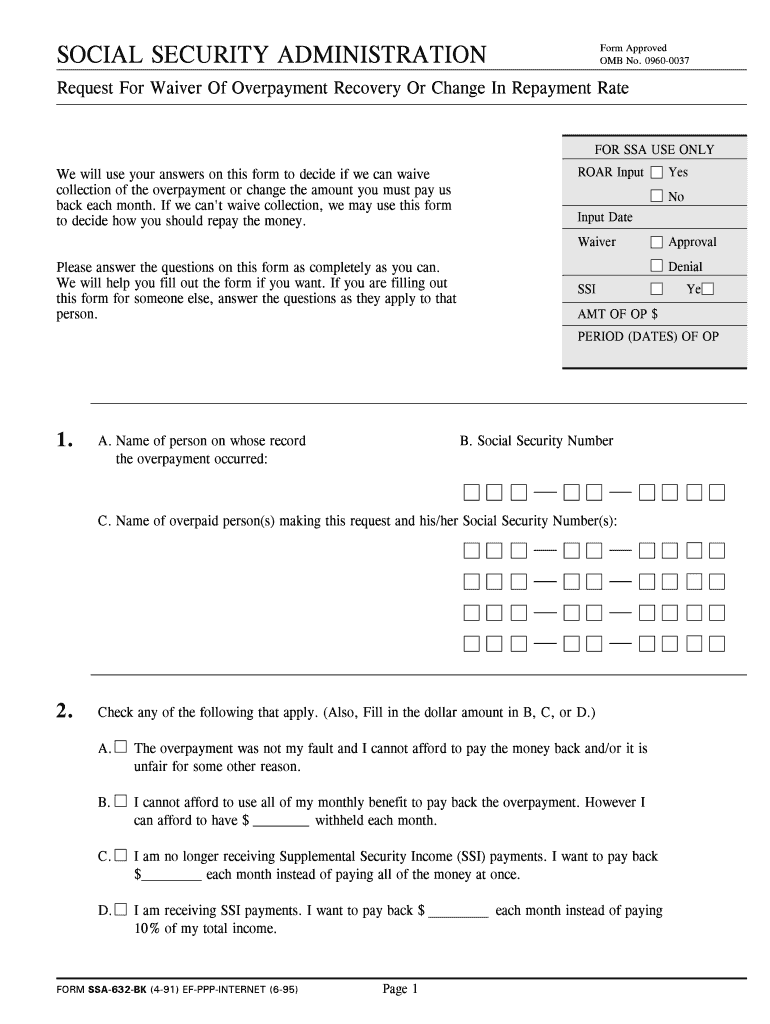
Request for Waiver of Overpayment Recovery

This template is fully customizable. Edit the text, fill out the fields, and send it for signature. Give it a try!
Request for Waiver of Overpayment Recovery

What a Request for Waiver of Overpayment Recovery Is

A Request for Waiver of Overpayment Recovery is a formal written petition submitted to the paying agency asking that collection or recoupment of a previously paid amount be cancelled or waived. It explains why recovery would be inequitable or contrary to the public interest, provides supporting evidence, and requests administrative relief from offsets or repayment schedules.

Why filing a waiver request matters

A properly prepared waiver can stop collection actions, prevent income offsets, and avoid ongoing interest or penalties. It documents the claimant’s circumstances and provides the agency a factual basis to grant administrative relief under applicable statutes.

Why filing a waiver request matters

Who typically files or responds to these requests

These requests are used by individuals, representatives, and agency staff to resolve contested overpayments.

  • Individuals disputing an administrative overpayment or seeking hardship relief.
  • Authorized representatives such as attorneys, benefits advocates, or family members with a power of attorney.
  • Agency caseworkers and hearings officers who review and decide waiver requests.

The document format and supporting evidence expectations vary by agency; include proof of financial hardship or factual errors when applicable.

Step-by-step: completing and submitting the waiver

Follow these sequential steps to prepare a complete Request for Waiver of Overpayment Recovery before submitting to the responsible agency.

  • 01
    Gather records: Collect notices, payment records, and proof of hardship or error.
  • 02
    Draft statement: Write a clear factual narrative explaining why recovery is unjust or harmful.
  • 03
    Attach evidence: Include labeled supporting documents and exhibits referenced in the statement.
  • 04
    Submit and confirm: Send to the agency address or e‑filing portal and obtain proof of receipt.

How the agency reviews a waiver request

Understanding the agency review sequence helps you provide the information decision-makers need at each stage.

  • Intake: Agency logs the request and assigns a case number.
  • Initial review: Staff checks completeness and requests any missing documents.
  • Substantive evaluation: Caseworker evaluates legal and factual grounds for waiver.
  • Decision: Agency grants, denies, or proposes alternative repayment arrangements.

Configuring an online waiver workflow

Set up a digital workflow so the form, attachments, and signatures are routed correctly and stored securely.

Field Configuration
Upload form PDF or DOCX; enable required fields and validation.
Add signers Specify claimant and representative roles with email addresses.
Authentication Choose email link, SMS code, or stronger ID verification.
Submission Configure final delivery to agency email or secure upload.

Technical and platform considerations for eSubmission

Electronic submission requires secure storage, audit trails, and reliable signer authentication to meet legal standards.

  • Document formats: PDF and DOCX are commonly accepted.
  • Authentication: Email/SMS codes or knowledge-based checks.
  • Integrations: CRM and case management system connectors.

Platforms that support TLS encryption, audit trails, and accepted eSignature legal frameworks (ESIGN/UETA) typically meet agency eSubmission requirements.

Typical timing and deadline guidance

Waiver filing deadlines vary by agency and program; always check the agency notice for the exact deadline and appeal windows.

Agency notice deadline:

Check the notice for the specific filing window; it controls timeliness.

Common windows:

Some programs allow 30–60 days; others use longer administrative appeal periods.

Extensions:

Agencies may grant extensions for good cause or hardship.

Receipt vs postmark:

Confirm whether agency requires received-by date or postmark date.

Follow-up timing:

Expect initial intake acknowledgment within 14–30 days in many programs.

Key milestones in the waiver process

A high-level milestone sequence shows what to expect from filing through final agency action.

01

File Request

Submit complete waiver packet to the agency.

02

Acknowledgment

Agency issues intake confirmation and case number.

03

Review Period

Agency examines facts, requests clarifications, or seeks additional proof.

04

Final Determination

Decision to grant, deny, or modify repayment terms is issued.

Common pitfalls to avoid when preparing the request

  • Missing or inconsistent identification (name, SSN, case number) that prevents matching the request to the agency file.
  • Failing to include required supporting documents such as pay stubs, medical bills, or bank statements to substantiate hardship claims.
  • Submitting a vague explanation of hardship without quantifying monthly income, expenses, or specific inability to repay.
  • Using incorrect dates or arithmetic errors in the overpayment calculation that trigger requests for clarification.

Potential consequences of an incomplete or incorrect request

Offset Recovery: Agency may resume offsets immediately.
Interest Accrual: Interest may continue to accrue on outstanding balance.
Collection Actions: Referral to collections or tax refund offset possible.
Denial: Request may be denied for lack of evidence.
Appeal Limits: Late or defective filings can forfeit appeal rights.
Credit Impact: Some collections may affect credit if referred externally.

Essential information to include on the form

Claimant Name: Full legal name
Identifier: SSN or agency ID
Overpayment Amount: Exact USD amount
Date of Notice: MM/DD/YYYY
Case Number: Agency reference number
Evidence List: Attached supporting files

Core sections to include in a professional waiver request

A clear structure improves reviewability: include identification, chronology, legal basis, financial statement, supporting evidence, and signature.

Identification

Claimant details, contact information, and agency case or claim number for accurate matching.
Chronology

A concise timeline of events leading to the alleged overpayment with dates and references.

Legal Basis

State the statutory or regulatory reason for waiver (error, undue hardship, or other applicable grounds).

Financial Statement

Itemize income, expenses, and assets to document inability to repay without hardship.

Supporting Evidence

Attach labeled documents (paystubs, medical bills, correspondence) referenced in the narrative.

Signature Block

Signature, date, and contact information for the claimant or authorized representative.

Comparing eSignature pricing and feature considerations

Pricing and features vary across eSignature vendors; signNow appears first for reference and includes core functionality used for administrative submissions.

signNow DocuSign Adobe Sign PandaDoc HelloSign
Starting Price $8/user/mo $15/user/mo $14/user/mo $19/user/mo $15/user/mo
Free Trial Yes, 7-day trial Yes Yes Yes Yes
Bulk Send Yes Yes Yes Yes No
Audit Trail Yes Yes Yes Yes Yes
Envelope Cap No cap 100 envelopes/user/year Varies by plan Varies by plan Varies by plan

Examples: how organizations handle waiver workflows

Real-world examples show practical assembly of waiver packets and digital workflows used by organizations.

Optica Ventures — COO

The interface is simple and easy-to-use for our team; more importantly, it is just as easy for our customers.

  • We centralized waiver templates to remove variation across staff.
  • Centralized templates reduced back-and-forth and improved completeness during intake, shortening review cycles and reducing resubmission requests.

Fertility Centers of Illinois — Founder

The team was responsive and the API supported integration with our case management system.

  • We automated evidence collection and signature routing.
  • Automating the workflow reduced manual handling and provided consistent audit trails for each waiver, supporting internal compliance reviews.

Practical tips for accurate and efficient completion

Follow these recommendations to minimize processing delays and preserve appeal rights.

Verify identity details
Confirm claimant name, SSN/ID, and case numbers match agency records to avoid matching delays.
Be specific and documentary
Cite specific dates, amounts, and attach labeled evidence to substantiate hardship or factual errors.
Track submission
Obtain and retain proof of receipt, email confirmations, or e‑file transaction IDs.
Use secure eSignature
Choose platforms that provide audit trails and compliant authentication when submitting electronically.

Who signs and who can file on behalf of the claimant

Agency Official

Caseworkers, adjudicators, and their supervisors may prepare, review, or request additional evidence and make determinations on waiver eligibility in accordance with agency policy and statute.

Claimant Representative

An attorney or authorized representative may file on behalf of the claimant with written authorization or power of attorney and should include proof of representation.

Frequently asked questions about waiver requests and electronic submission

Answers to common questions help avoid procedural errors and explain when electronic signatures are acceptable.


Need help? Contact support

be ready to get more
Join over 28 million airSlate SignNow users