Establishing secure connection… Loading editor… Preparing document…
Navigation

Fill and Sign the Retained Income Trust Form
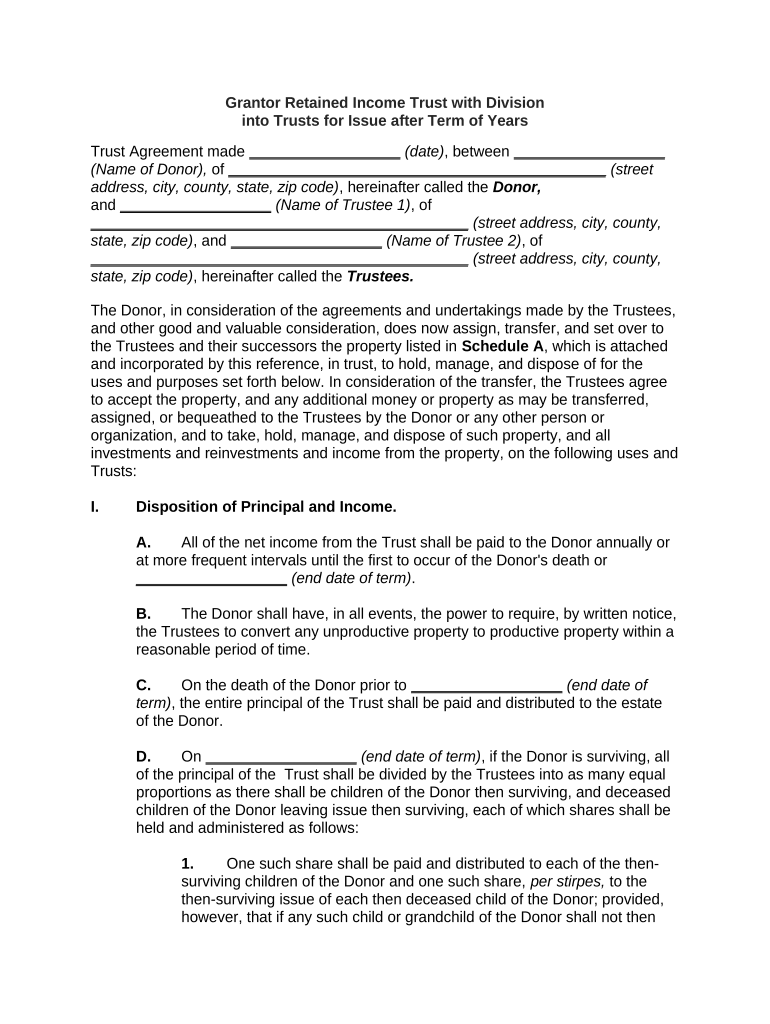
Fill and Sign the Retained Income Trust Form

How it works

Open the document and fill out all its fields.
Apply your legally-binding eSignature.
Save and invite other recipients to sign it.

Rate template

4.5
50 votes
Grantor Retained Income Trust with Division into Trusts for Issue after Term of Years Trust Agreement made __________________ (date) , between __________________ (Name of Donor), of _____________________________________________ (street address, city, county, state, zip code) , hereinafter called the Donor, and __________________ (Name of Trustee 1) , of _____________________________________________ (street address, city, county, state, zip code) , and __________________ (Name of Trustee 2) , of _____________________________________________ (street address, city, county, state, zip code) , hereinafter called the Trustees . The Donor, in consideration of the agreements and undertakings made by the Trustees, and other good and valuable consideration, does now assign, transfer, and set over to the Trustees and their successors the property listed in Schedule A , which is attached and incorporated by this reference, in trust, to hold, manage, and dispose of for the uses and purposes set forth below. In consideration of the transfer, the Trustees agree to accept the property, and any additional money or property as may be transferred, assigned, or bequeathed to the Trustees by the Donor or any other person or organization, and to take, hold, manage, and dispose of such property, and all investments and reinvestments and income from the property, on the following uses and Trusts: I. Disposition of Principal and Income. A. All of the net income from the Trust shall be paid to the Donor annually or at more frequent intervals until the first to occur of the Donor's death or __________________ (end date of term) . B. The Donor shall have, in all events, the power to require, by written notice, the Trustees to convert any unproductive property to productive property within a reasonable period of time. C. On the death of the Donor prior to __________________ (end date of term) , the entire principal of the Trust shall be paid and distributed to the estate of the Donor. D. On __________________ (end date of term) , if the Donor is surviving, all of the principal of the Trust shall be divided by the Trustees into as many equal proportions as there shall be children of the Donor then surviving, and deceased children of the Donor leaving issue then surviving, each of which shares shall be held and administered as follows: 1. One such share shall be paid and distributed to each of the then- surviving children of the Donor and one such share, per stirpes, to the then-surviving issue of each then deceased child of the Donor; provided, however, that if any such child or grandchild of the Donor shall not then have attained the age of _______ (18/21) years, the share or partial share which would otherwise be paid and distributed to the child or grandchild of the Donor (but not the share or partial share of any issue of any deceased grandchild of the Donor, which share shall be paid and distributed to the issue free of trust) shall be designated with the name of the child or grandchild and shall continue to be held as a separate and distinct Trust and Trust fund for the following uses and purposes: a. With respect to each such Trust, the Trustees may, from time to time in their sole and absolute discretion, pay or distribute to any one or more then living of the group consisting of the child or grandchild with whose name the Trust is designated, the spouses and issue of the child or grandchild, and the parent of the grandchild such part of the net income of the Trust as they may deem appropriate. b. When any child or grandchild of the Donor with whose name such a Trust is designated shall have attained the age of _______ (18/21) years, the entire remaining corpus of the Trust designated with the name of the child or grandchild, together with any and all accrued, accumulated, and undistributed income shall be paid and distributed to the child or grandchild, as the case may be. c. If any child of the Donor with whose name such a Trust is designated shall die prior to the termination of the Trust leaving issue then surviving, the entire corpus of the Trust shall be divided into as many equal shares as there shall be children of the child of the Donor then surviving and deceased children of the child of the Donor leaving issue then surviving. One such share shall be paid and distributed to each of the then-surviving children of the child of the Donor (being grandchildren of the Donor) and one such share, per stirpes, to the then-surviving issue of each then deceased child of the child of the Donor; provided, however, that if any child of the child of the Donor shall not then have attained the age of _______ (18/21) years, the share which would otherwise be paid and distributed to the grandchild of the Donor shall be designated with the name of the grandchild and shall continue to be held as a separate and distinct Trust and Trust fund for the same uses and purposes as provided above for a Trust for a grandchild of the Donor whose parent predeceased the Donor and the spouse of the Donor. d. If any grandchild of the Donor with whose name such a Trust is designated shall die prior to the termination of the Trust leaving issue then surviving, the entire corpus of the Trust designated with the name of the grandchild shall be paid and distributed to the estate of the grandchild. e. If any child of the Donor with whose name such a Trust is designated shall die prior to the termination of the Trust leaving no issue then surviving, the entire corpus of the Trust shall be divided into equal shares, and one such share shall be paid and distributed to each then surviving brother or sister of the child, and one such share, per stirpes, to the then-surviving issue of each then deceased brother or sister of the child or grandchild; provided, however, that if a Trust created by this Article designated with the name of any such person should then be in existence, the share or partial share which otherwise would be paid and distributed to that person shall instead be added to and become a part of the corpus of the Trust. 2. Net income not required to be paid or distributed from any Trust created by this Section I may be added to any subsequent income payment from the Trust. Until distributed, accumulated income shall be regarded for all purposes under this Trust as corpus of the respective trusts created by this Section I . 3. If, prior to the time that any Trust fund shall be set up for and designated with the name of any person under the foregoing provisions, or any addition shall be made to any such fund, or any other fund or share of any other fund shall become payable to him or her or to a Trust for his or her benefit under the provisions of this Agreement, the person shall have arrived at the age when a mandatory partial or total distribution to him or her is required under the terms of this Agreement, then the person's fund or share of any other fund promptly shall be partially or totally paid and distributed to that person in the same proportions as required by the mandatory provisions. E. If at any time there shall be no issue of the Donor then surviving, the entire corpus of all trusts created by this Section I, including any and all accrued, accumulated, and undistributed income, shall be paid and distributed to the persons then living who would have been the next of kin of the Donor, if the Donor had died at the time or times of such payment and distribution, under the then-existing laws of __________________ (name of state) relating to the distribution of intestate personal property, in the proportions prescribed by such laws; provided, however, that for purposes of this paragraph, the parents of the Donor shall be deemed to have predeceased the Donor. F. With respect to any Trust or Trust fund created under this Section I , the Trustees may pay to or apply for the benefit of any beneficiary currently eligible to receive the income or any part of it arising from any such Trust fund such amounts out of the principal of the Trust fund as the Trustees in their absolute discretion, shall deem requisite or expedient by reason of accident, illness, general need, insufficiency of income, or other economic, political, or tax emergency or adversity for the care, maintenance, comfort, support, education, travel, and other benefits or necessities of the beneficiary or any legal dependent of the beneficiary. The receipt of any Trust beneficiary for, or other evidence of application for the benefit of the beneficiary of, any payment of income or corpus shall fully discharge the Trustees from any liability in connection with same. G. The provisions made for the beneficiaries of any Trust created in this Section I , whether in respect of income or principal, are intended for the personal protection and welfare of the beneficiaries, and their rights or interests under such Trusts shall not be assignable or subject to anticipation, hypothecation, or seizure by legal process. When and if the Trustees shall have notice or shall believe that the rights or interests of any beneficiary in and to any part of the income of any Trust fund from which the beneficiary is eligible to receive income have been or may be diverted, whether by voluntary act or legal process, the Trustees may in their sole discretion, instead of paying or distributing the income to the beneficiary, expend the same for the support, maintenance, education, comfort, welfare, and necessities of the beneficiary. Whenever the Trustees shall be satisfied in their own judgment that the payments to the beneficiary of the income may be made without danger of its being so diverted, the Trustees may resume the outright payment and distribution of income directly to the beneficiary. If payment is withheld from the income otherwise payable to any beneficiary, it may, unless otherwise disbursed as provided above, be added to any subsequent payment to the beneficiary, or be made a part of the principal of his or her Trust fund. The power conferred on the Trustees to withhold payment of income to any beneficiary shall not be exhausted by the use of the power, but shall be continuing. If payments of income to any beneficiary shall have been resumed, the Trustees may discontinue the payments if they shall have reason to believe such action necessary. The judgment of the Trustees in reference to the matters referred to in this paragraph shall be conclusive and free from question by any one or in any court. Nothing contained in this Agreement shall be construed to extend the ultimate term of the Trusts. H. The whole or any part of the income or principal payable under this Agreement to any beneficiary who is a minor, or who, in the opinion of the Trustees, is incapacitated through illness, age, or other cause, may in lieu of being paid directly to the beneficiary, be paid to or applied by the Trustees for the benefit of such party or parties, at such time or times, and in such manner as the Trustees deem advisable, including, but not limited to, the making of direct payments of the beneficiary's expenses, or by the making of payments to the beneficiary's guardian, or to the person with whom the beneficiary may be making his or her home, or to any other person or party deemed appropriate by the Trustees. In each case, the receipt of any person or party to whom payment is made or entrusted shall be a complete discharge of the Trustees concerning the payment. I. Any of the trusts created under this Section I may be terminated, in whole or in part at any time, if such action is deemed advisable and for the best interests of the Trust or trusts, or the beneficiaries of the same, whether by reason of economic, tax, or political emergency or for any other reason whatsoever (including the determination that the corpus of the Trust is so small as to make the efficient management of it impractical) in the sole discretion of the Trustees whose judgment shall be conclusive and free from question by anyone or in any court. In the event of such termination, the principal of each Trust so terminated, together with the accrued, accumulated, and undistributed income of the trust, shall be paid over and distributed to that person with whose name the Trust is designated. II. Additions to Trust. The Donor or any other person or organization may at any time give, transfer, or bequeath to this Trust or to any separate trust fund created under this Agreement, either by inter vivos transfer or testamentary disposition, additional money or property of any kind acceptable to the Trustees. In that event such additional property shall become a part of the Trust or Trust fund to which it is given and shall be divided, allocated, administered, and distributed as if it had originally been a part of the same. III. Income and Principal. A. All questions relating to the ascertainment of income and principal and the allocation of receipts and disbursements between income and principal shall be resolved by the Trustees in accordance with the terms of the Uniform Principal and Income Act from time to time in effect in __________________ (name of state) , or if the Act should be abolished, then in accordance with the terms of the Act as it was last in effect in __________________ (name of state) ; provided, however, that the Trustees may withhold from amounts otherwise payable as income under the Act a reasonable allowance for depreciation or depletion on property subject to depreciation or depletion, and may set up a reserve for depreciation or depletion, all under generally accepted accounting principles. B. In making any division or apportionment under the provisions of Section I for the purpose of creating any fund or share of any fund, or for any other purpose of whatsoever nature, the Trustees shall have the power to make such division or apportionment in money or in kind, or partly in money and partly in kind, including securities, real property and undivided interests in real or personal property, making the necessary equalizations, if any, in cash, the values to be determined by the Trustees, whose judgment as to such values shall be binding and conclusive on all parties in interest. IV. Irrevocability. Except as provided in Section I, it is the intention of the Donor that this instrument shall constitute an irrevocable gift in trust of all property at any time held under it, any and all rights, title, and reversionary interest in the property, of any kind or description, which the Donor now has or may subsequently acquire, either by operation of law or otherwise (other than those rights and interests which are specifically reserved to the Donor) are now renounced and relinquished forever. Any future gift of property to this trust, whether by the Donor or any other person, shall likewise be irrevocable. Any right, title, or reversionary interest in the property, of any kind or description, which the Donor may have or subsequently acquire, by operation of law or otherwise, shall, by the making of the gift to this Trust, be likewise renounced and relinquished forever. If at any time of the failure of any present or future gift under this Agreement, the property comprising the gift shall then be paid to and among the persons then living who, if the Donor had died then, would have been the next of kin of the Donor (other than the parents of the Donor) under the then-existing laws of __________________ (name of state) relating to the distribution of intestate personal property, in the proportions described by the laws of distribution. V. Perpetuities Savings Provision. Notwithstanding any other provision of this Trust Agreement, with respect to the time of the termination of any Trust created by this Trust Agreement, if on the expiration of the period of __________________ (number) years and __________________ (number) months immediately following the death of the last survivor of the Donor and her issue living on the day preceding the date of the execution of this Trust Agreement, any Trust created by this Agreement, or any part of any such trust, shall then remain in existence, then such Trust or part of it shall then terminate, and the corpus or part shall promptly be paid and distributed to the person with whose name the Trust is designated. VI. Powers of Trustees. Subject only to the provisions and limitations set forth in this Agreement, the Trustees and any successor Trustees, shall have in general the power to do and perform any and all acts and things in relation to this Trust in the same manner and to the same extent as an individual might or could do with respect to his or her own property. No enumeration of specific powers in this Agreement shall be construed as a limitation on the foregoing general powers. The powers, or any of them, conferred on the Trustees shall not be exhausted by any use of them, but each shall be continuing. The Trustees are especially authorized and empowered in their sole discretion: ______________________________________________________ (Description of Trustees powers) . VII. Counterparts. This Agreement may be executed in any number of counterparts, any one of which shall constitute the agreement between the parties. VIII. Governing Law. This Trust shall at all times be governed by the laws of __________________ (name of state) . IX. Bond; Corporate Trustee. A. No bond or surety or security of any kind shall be required of any Trustee at any time appointed or acting under this Agreement. No Trustee shall be liable for any cause or in any event for the Trustee's own willful malfeasance or bad faith. B. All discretionary powers and duties vested in any corporate trustee under this Agreement may be exercised on its behalf from time to time as occasion shall arise by its governing board, or by an appropriate committee, or by any of its principal officers or Trust officers. Any corporate trustee shall be entitled to compensation at the prevailing rate for the administration of trusts of this nature. X. Construction. The word Trustees shall mean the Trustee or Trustees for the time being whether designated in this Agreement or later appointed. The word issue as used in this Agreement shall mean the lawful blood descendants in any degree of the ancestor designated, and an adopted child and the adopted child's lawful blood descendants shall be construed in this instrument as the lawful blood descendants of the adopting parent or parents. The word parent or parents , child or children, sister or sisters, and other words of similar import, shall include any person holding such relationship by reason of adoption. Unless the context requires otherwise, all words used in this Agreement in any gender shall extend to and include all genders; all words used in the singular number shall extend to and include the plural; and all words used in the plural number shall extend to and include the singular. XI. Amendment or Revocation. This Trust Agreement may, at any time, be altered, amended, changed, supplemented, or revoked, in whole or in part, or terminated, in whole or in part, by the unanimous written consent of the Donor and all of the Trustees. In the event of revocation or termination, in whole or in part, the assets of the Trust fund or portion of the same, as the case may be, shall be paid and distributed to the Donor. WITNESS our signatures as of the day and date first above stated. ________________________ (Signature of Donor ________________________ (Printed Name of Donor) ________________________ (Signature of Trustee 1) ________________________ (Printed Name of Trustee 1) ________________________ (Signature of Trustee 2) ________________________ (Printed Name of Trustee 2) (Acknowledgments) (Attachment of schedule)

Practical advice on preparing your ‘Retained Income Trust’ online

Are you fed up with the inconvenience of dealing with paperwork? Look no further than airSlate SignNow, the leading eSignature solution for individuals and small to medium-sized businesses. Bid farewell to the lengthy process of printing and scanning documents. With airSlate SignNow, you can effortlessly complete and sign documents online. Make use of the extensive features packed into this user-friendly and cost-effective platform and transform your document management strategy. Whether you need to sign forms or gather signatures, airSlate SignNow manages it all effortlessly, requiring just a few clicks.

Follow this comprehensive guide:

  1. Log into your account or start a free trial with our service.
  2. Select +Create to upload a file from your device, the cloud, or our template collection.
  3. Open your ‘Retained Income Trust’ in the editor.
  4. Click Me (Fill Out Now) to complete the form on your side.
  5. Add and designate fillable fields for others (if necessary).
  6. Proceed with the Send Invite options to request eSignatures from others.
  7. Download, print your copy, or convert it into a reusable template.

Don’t fret if you need to collaborate with your teammates on your Retained Income Trust or send it for notarization—our platform has you equipped with everything you require to accomplish such tasks. Sign up with airSlate SignNow today and elevate your document management to new levels!

Here is a list of the most common customer questions. If you can’t find an answer to your question, please don’t hesitate to reach out to us.

Need help? Contact Support

The best way to complete and sign your retained income trust form

Save time on document management with airSlate SignNow and get your retained income trust form eSigned quickly from anywhere with our fully compliant eSignature tool.

How to Sign a PDF Online How to Sign a PDF Online

How to fill out and sign paperwork online

Previously, dealing with paperwork required lots of time and effort. But with airSlate SignNow, document management is fast and easy. Our robust and user-friendly eSignature solution enables you to easily fill out and eSign your retained income trust form online from any internet-connected device.

Follow the step-by-step guide to eSign your retained income trust form template online:

  • 1.Sign up for a free trial with airSlate SignNow or log in to your account with password credentials or SSO authorization option.
  • 2.Click Upload or Create and import a form for eSigning from your device, the cloud, or our form library.
  • 3.Click on the file name to open it in the editor and use the left-side toolbar to fill out all the blank areas properly.
  • 4.Drop the My Signature field where you need to approve your sample. Provide your name, draw, or import a photo of your regular signature.
  • 5.Click Save and Close to finish editing your completed document.

After your retained income trust form template is ready, download it to your device, save it to the cloud, or invite other individuals to eSign it. With airSlate SignNow, the eSigning process only takes a few clicks. Use our powerful eSignature solution wherever you are to handle your paperwork productively!

How to Sign a PDF Using Google Chrome How to Sign a PDF Using Google Chrome

How to fill out and sign documents in Google Chrome

Completing and signing paperwork is simple with the airSlate SignNow extension for Google Chrome. Installing it to your browser is a quick and beneficial way to manage your paperwork online. Sign your retained income trust form template with a legally-binding electronic signature in just a few clicks without switching between programs and tabs.

Follow the step-by-step guidelines to eSign your retained income trust form in Google Chrome:

  • 1.Navigate to the Chrome Web Store, locate the airSlate SignNow extension for Chrome, and add it to your browser.
  • 2.Right-click on the link to a form you need to approve and select Open in airSlate SignNow.
  • 3.Log in to your account with your password or Google/Facebook sign-in option. If you don’t have one, sign up for a free trial.
  • 4.Use the Edit & Sign toolbar on the left to complete your template, then drag and drop the My Signature field.
  • 5.Add a photo of your handwritten signature, draw it, or simply type in your full name to eSign.
  • 6.Make sure all data is correct and click Save and Close to finish editing your paperwork.

Now, you can save your retained income trust form sample to your device or cloud storage, send the copy to other people, or invite them to electronically sign your document via an email request or a secure Signing Link. The airSlate SignNow extension for Google Chrome improves your document processes with minimum effort and time. Try airSlate SignNow today!

How to Sign a PDF in Gmail How to Sign a PDF in Gmail How to Sign a PDF in Gmail

How to complete and sign paperwork in Gmail

When you receive an email containing the retained income trust form for signing, there’s no need to print and scan a document or download and re-upload it to a different tool. There’s a better solution if you use Gmail. Try the airSlate SignNow add-on to rapidly eSign any documents right from your inbox.

Follow the step-by-step guide to eSign your retained income trust form in Gmail:

  • 1.Go to the Google Workplace Marketplace and look for a airSlate SignNow add-on for Gmail.
  • 2.Install the tool with a related button and grant the tool access to your Google account.
  • 3.Open an email containing an attached file that needs approval and use the S key on the right panel to launch the add-on.
  • 4.Log in to your airSlate SignNow account. Opt for Send to Sign to forward the file to other people for approval or click Upload to open it in the editor.
  • 5.Put the My Signature field where you need to eSign: type, draw, or import your signature.

This eSigning process saves time and only takes a couple of clicks. Take advantage of the airSlate SignNow add-on for Gmail to update your retained income trust form with fillable fields, sign forms legally, and invite other people to eSign them al without leaving your inbox. Enhance your signature workflows now!

How to Sign a PDF on a Mobile Device How to Sign a PDF on a Mobile Device How to Sign a PDF on a Mobile Device

How to complete and sign forms in a mobile browser

Need to quickly fill out and sign your retained income trust form on a mobile phone while working on the go? airSlate SignNow can help without the need to install extra software programs. Open our airSlate SignNow solution from any browser on your mobile device and create legally-binding eSignatures on the go, 24/7.

Follow the step-by-step guide to eSign your retained income trust form in a browser:

  • 1.Open any browser on your device and go to the www.signnow.com
  • 2.Sign up for an account with a free trial or log in with your password credentials or SSO option.
  • 3.Click Upload or Create and add a file that needs to be completed from a cloud, your device, or our form library with ready-to go templates.
  • 4.Open the form and fill out the blank fields with tools from Edit & Sign menu on the left.
  • 5.Place the My Signature area to the form, then enter your name, draw, or upload your signature.

In a few easy clicks, your retained income trust form is completed from wherever you are. When you're done with editing, you can save the document on your device, create a reusable template for it, email it to other people, or ask them to electronically sign it. Make your documents on the go speedy and efficient with airSlate SignNow!


How to Sign a PDF on iPhone How to Sign a PDF on iPhone

How to fill out and sign paperwork on iOS

In today’s corporate environment, tasks must be accomplished quickly even when you’re away from your computer. Using the airSlate SignNow mobile app, you can organize your paperwork and approve your retained income trust form with a legally-binding eSignature right on your iPhone or iPad. Install it on your device to conclude agreements and manage documents from anywhere 24/7.

Follow the step-by-step guide to eSign your retained income trust form on iOS devices:

  • 1.Open the App Store, find the airSlate SignNow app by airSlate, and set it up on your device.
  • 2.Open the application, tap Create to upload a template, and select Myself.
  • 3.Opt for Signature at the bottom toolbar and simply draw your signature with a finger or stylus to eSign the form.
  • 4.Tap Done -> Save after signing the sample.
  • 5.Tap Save or utilize the Make Template option to re-use this paperwork in the future.

This process is so simple your retained income trust form is completed and signed in just a couple of taps. The airSlate SignNow application works in the cloud so all the forms on your mobile device are kept in your account and are available whenever you need them. Use airSlate SignNow for iOS to enhance your document management and eSignature workflows!


How to Sign a PDF on Android How to Sign a PDF on Android

How to fill out and sign documents on Android

With airSlate SignNow, it’s easy to sign your retained income trust form on the go. Install its mobile application for Android OS on your device and start boosting eSignature workflows right on your smartphone or tablet.

Follow the step-by-step guidelines to eSign your retained income trust form on Android:

  • 1.Navigate to Google Play, search for the airSlate SignNow application from airSlate, and install it on your device.
  • 2.Sign in to your account or register it with a free trial, then import a file with a ➕ option on the bottom of you screen.
  • 3.Tap on the uploaded file and select Open in Editor from the dropdown menu.
  • 4.Tap on Tools tab -> Signature, then draw or type your name to electronically sign the template. Complete blank fields with other tools on the bottom if required.
  • 5.Utilize the ✔ key, then tap on the Save option to end up with editing.

With a user-friendly interface and total compliance with major eSignature standards, the airSlate SignNow application is the best tool for signing your retained income trust form. It even works without internet and updates all form changes once your internet connection is restored and the tool is synced. Complete and eSign forms, send them for approval, and generate multi-usable templates whenever you need and from anyplace with airSlate SignNow.

Sign up and try Retained income trust form
  • Close deals faster
  • Improve productivity
  • Delight customers
  • Increase revenue
  • Save time & money
  • Reduce payment cycles







