Establishing secure connection…Loading editor…Preparing document…

Letter Requesting Waiver of Further Accountings in Guardianship

This template is fully customizable. Edit the text, fill out the fields, and send it for signature. Give it a try!
Letter Requesting Waiver of Further Accountings in Guardianship

What the Letter Requesting Waiver of Further Accountings in Guardianship Is

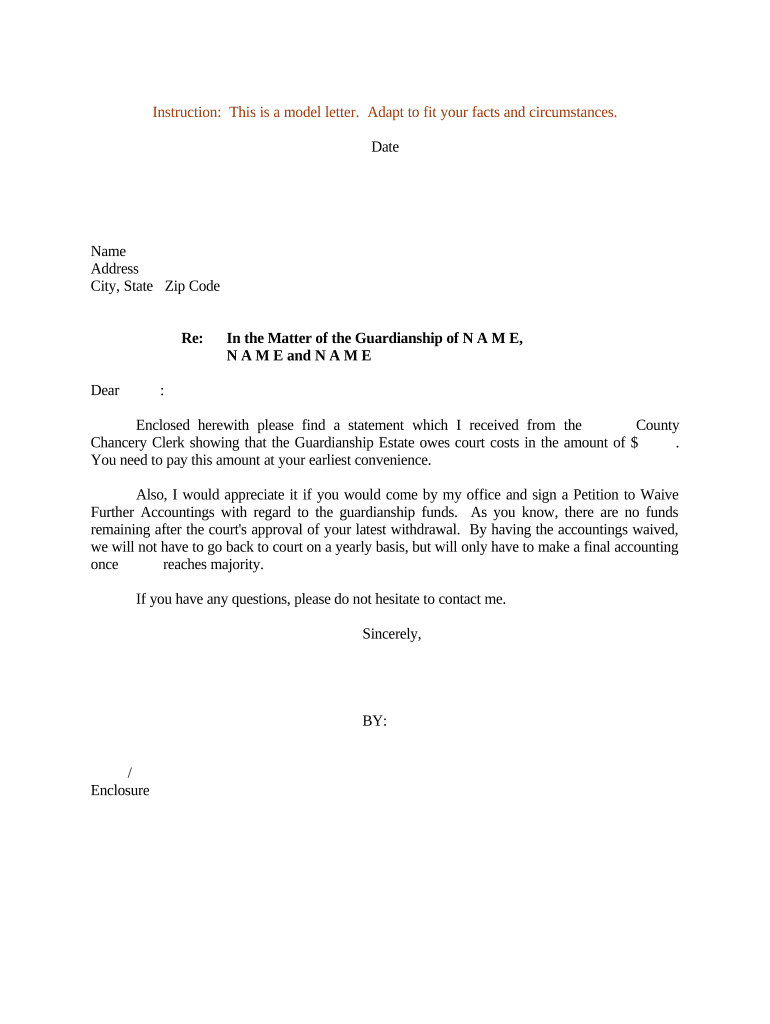
A Letter Requesting Waiver of Further Accountings in Guardianship is a formal written request submitted to the probate or guardianship court asking the judge to excuse the guardian from preparing or filing additional periodic accountings. The letter typically identifies the guardian, the protected person (ward), the case caption and number, a statement of prior accountings or final accounting, the legal rationale for the waiver, and any consents from interested persons. Courts retain discretion to accept, modify, or deny waivers based on statutory requirements, the ward’s interests, and evidence presented.

Why a Waiver Letter Matters and Its Legal Basis

A properly drafted waiver letter can reduce administrative burden, limit repeated financial disclosures, and clarify the guardian’s obligations while protecting the ward’s interests. Electronic signing and filing are generally recognized under the ESIGN Act (15 U.S.C. ch. 96) and state UETA laws, but final acceptance rests with the local court and applicable guardianship statutes.

Why a Waiver Letter Matters and Its Legal Basis

Who Typically Prepares and Receives This Letter

The letter is most often prepared by a guardian or the guardian’s attorney and addressed to the probate court and interested parties.

  • Guardian or successor guardian — prepares and signs the request for relief.
  • Guardian's attorney — drafts legal justification and certifies service on interested parties.
  • Interested persons (heirs, conservator, court investigator) — receive notice and may object or consent.

Essential Parts of a Professional Waiver Letter

A clear, court-ready letter follows local caption rules, states the waiver requested, and documents facts and consents. Attach supporting records and provide a certificate of service.

Court Caption

Include the court name, county, caption, and case number exactly as on prior filings so the clerk can associate the request with the guardianship file.
Guardian Identification

Identify the guardian by full legal name, address, and relationship to the ward; include the guardian’s appointment date and reference to the order of appointment.

Accounting History

Summarize prior accountings filed, dates of approval, and whether a final accounting was previously accepted by the court to justify seeking a waiver.

Waiver Statement

A concise request for waiver of future accountings and the legal basis or facts supporting the request, including any statutory citations or case law if applicable.

Consents and Notices

Declare whether interested persons consent to the waiver and include signed consent forms or evidence of service if available; note any objections received.

Certificate of Service

State how and when notice was provided to interested persons (mail, email, e-filing) and attach the proof of service or affidavit of mailing.

Step-by-Step: How to Prepare and Submit the Letter

Follow a fixed sequence to draft, sign, serve, and file the waiver request to meet court notice requirements and avoid procedural defects.

  • 01
    Draft: Assemble case caption, prior accounting summary, waiver rationale, and attached consents.
  • 02
    Review: Have counsel or court clerk review local formatting and notice rules before finalizing.
  • 03
    Sign: Sign physically or e-sign following the court’s accepted methods and any state ESIGN/UETA rules.
  • 04
    File and Serve: File with the court clerk and serve all interested persons using approved service methods.

Configuring an Electronic Submission Workflow

If you plan to prepare and send the letter electronically, configure authentication, notarization needs, and retention settings before initiating signatures.

Field Configuration
Authentication Level Email link | SMS code | ID verification
File Format PDF/A recommended for court filings
Notarization Select RON or in-person per local rule
Retention Setting Enable audit trail and long-term storage

Where to File and How to Serve Interested Parties

Choose the court clerk’s accepted filing channel and a legally recognized service method to preserve due process and avoid objections.

  • Court Filing: File via court electronic filing system or deliver to clerk’s office.
  • Clerk Acceptance: Confirm the clerk accepts electronic submissions and whether a cover sheet is required.
  • Service Method: Serve by certified mail, personal delivery, or permitted e-service.
  • Proof of Service: Attach affidavit of service or certificate proving delivery.

Distribution Options and Technical Considerations

Use distribution methods that are accepted by the court and that provide verifiable evidence of delivery and receipt.

  • Email Delivery: Convenient; verify court acceptance for service by email.
  • E-Filing Portals: Preferred for direct court submission and docketing.
  • Certified Mail: Traditional method accepted by all courts.

Typical Timelines and Court Processing Expectations

Timelines vary by county and case complexity; plan for court scheduling and notice periods when determining when to file a waiver request.

Notice Period:

Provide notice per local rules; some courts require 14–30 days for interested parties to respond.

Clerk Review:

Initial clerk processing may take days to weeks depending on workload.

Hearing Scheduling:

If the court sets a hearing, expect scheduling 4–12 weeks after filing in many jurisdictions.

Response Time:

Interested parties typically have a statutory or local-rule window to object once served.

Final Order:

Court issues an order granting or denying waiver following review or hearing.

Key Milestones from Draft to Court Order

Track milestones so the guardian can demonstrate compliance with notice rules and court procedure during the waiver process.

01

Draft and Review

Complete draft and confirm local formatting and notice requirements.

02

Service of Notice

Serve interested parties and file proof of service with the court.

03

Clerk Acceptance

Monitor clerk’s acceptance and correct any filing deficiencies.

04

Court Ruling

Receive order granting, modifying, or denying the waiver request.

Common Mistakes to Avoid When Preparing a Waiver Letter

  • Using an incorrect court caption or case number, which can cause the clerk to misfile or reject the submission.
  • Failing to list or properly serve all interested persons, resulting in delayed rulings or rehearing requests.
  • Submitting vague or unsupported factual assertions instead of attaching prior accountings or evidentiary documents.
  • Assuming electronic filing is accepted in all counties; not confirming local clerk policies can invalidate service.

Risks and Consequences of an Incorrect or Improper Waiver Request

Rejection by Court: Court may reject the request for noncompliance.
Requirement to File: Court can order continued accountings despite a request for waiver.
Sanctions: Possible procedural sanctions for false statements.
Delayed Closure: Improper notice can delay final case resolution.
Accounting Liability: Guardian remains liable for undisclosed financial issues.
Record Retention: Failure to retain documents can obstruct future audits.

Practical Examples of When a Waiver Letter Is Used

Two illustrative scenarios show how the letter can streamline case administration when circumstances warrant reduced reporting.

Situation: Elderly Ward with Fixed Income

Guardian documents stable assets and prior approved accountings

  • Interested parties consent in writing
  • Court accepts waiver when risks of future mismanagement are low and notice requirements are met.

Situation: Small Estate, Final Accounting Completed

Guardian files final accounting and seeks waiver for future reports

  • No objections from heirs and proof of distribution attached
  • Court issues order closing ongoing accounting requirements.

eSignature Pricing and Feature Comparison for Filing and Serving the Letter

Comparing common eSignature vendors and core considerations for using digital tools to sign, notarize, and deliver guardianship waiver letters.

signNow DocuSign Adobe Sign PandaDoc HelloSign
Starting Price $8/user/mo $15/user/mo $14/user/mo $19/user/mo $15/user/mo
Free Trial 7-day free trial, no credit card Varies by vendor Varies by vendor Varies by vendor Varies by vendor
Bulk Send Yes Yes Yes Yes No
Audit Trail Yes Yes Yes Yes Yes
HIPAA Compliant Yes Yes Yes No No

Frequently Asked Questions About Waiver Letters and Electronic Submission

Answers to common questions about validity, filing, signatures, service, and how to handle objections in guardianship waiver matters.


Need help? Contact support

be ready to get more
Join over 28 million airSlate SignNow users