Validate eSignature Form Online
Make the most out of your eSignature workflows with airSlate SignNow
Extensive suite of eSignature tools
Robust integration and API capabilities
Advanced security and compliance
Various collaboration tools
Enjoyable and stress-free signing experience
Extensive support
Keep your eSignature workflows on track
Our user reviews speak for themselves












Award-winning eSignature solution




How to Authenticate eSignature Form Online
To authenticate eSignature form online, airSlate SignNow offers an effective and user-friendly platform that streamlines the signing procedure. With its robust features, you can effortlessly oversee your documents while ensuring adherence to compliance and security. Let's delve into the step-by-step method to begin with airSlate SignNow.
Steps to Authenticate eSignature Form Online
- Open your web browser and go to the airSlate SignNow homepage.
- Create a complimentary account or log in if you already possess one.
- Select the document you wish to sign or send for signatures and upload it to the platform.
- If you intend to use this document again, consider saving it as a reusable template.
- Access your uploaded document and personalize it by adding fillable fields or inserting required information.
- Sign your document and add signature fields for recipients as necessary.
- Click on Continue to set up the eSignature invitation and dispatch it.
In summary, airSlate SignNow facilitates the authentication of eSignature forms online with its extensive feature set and user-friendly interface. The platform is crafted to provide exceptional value for businesses of all sizes, particularly SMBs and Mid-Market companies.
Initiate your free trial today and discover the convenience of airSlate SignNow for your document signing requirements!
How it works
Rate your experience
-
Best ROI. Our customers achieve an average 7x ROI within the first six months.
-
Scales with your use cases. From SMBs to mid-market, airSlate SignNow delivers results for businesses of all sizes.
-
Intuitive UI and API. Sign and send documents from your apps in minutes.
A smarter way to work: —how to industry sign banking integrate
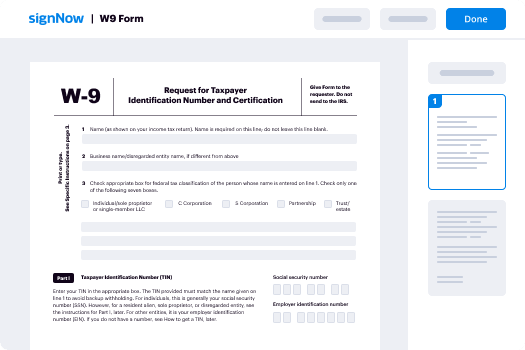
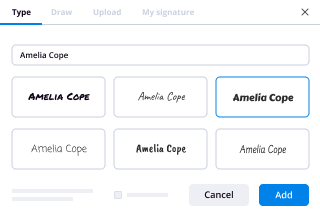
How to eSign and complete a document online
Document management isn't an easy task. The only thing that makes working with documents simple in today's world, is a comprehensive workflow solution. Signing and editing documents, and filling out forms is a simple task for those who utilize eSignature services. Businesses that have found reliable solutions to functionality e signature validate form online don't need to spend their valuable time and effort on routine and monotonous actions.
Use airSlate SignNow and functionality e signature validate form online online hassle-free today:
- Create your airSlate SignNow profile or use your Google account to sign up.
- Upload a document.
- Work on it; sign it, edit it and add fillable fields to it.
- Select Done and export the sample: send it or save it to your device.
As you can see, there is nothing complicated about filling out and signing documents when you have the right tool. Our advanced editor is great for getting forms and contracts exactly how you want/need them. It has a user-friendly interface and full comprehensibility, providing you with total control. Sign up right now and start increasing your electronic signature workflows with convenient tools to functionality e signature validate form online on-line.
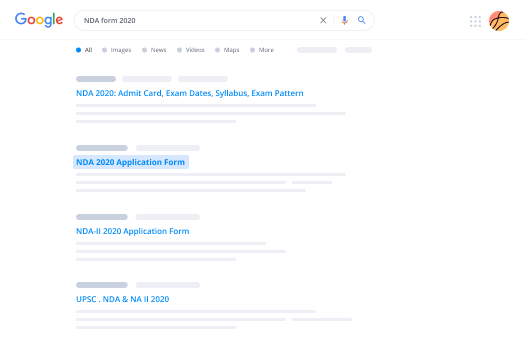
How to eSign and complete forms in Google Chrome
Google Chrome can solve more problems than you can even imagine using powerful tools called 'extensions'. There are thousands you can easily add right to your browser called ‘add-ons’ and each has a unique ability to enhance your workflow. For example, functionality e signature validate form online and edit docs with airSlate SignNow.
To add the airSlate SignNow extension for Google Chrome, follow the next steps:
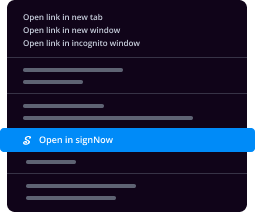
- Go to Chrome Web Store, type in 'airSlate SignNow' and press enter. Then, hit the Add to Chrome button and wait a few seconds while it installs.
- Find a document that you need to sign, right click it and select airSlate SignNow.
- Edit and sign your document.
- Save your new file to your account, the cloud or your device.
Using this extension, you eliminate wasting time on monotonous assignments like saving the file and importing it to an electronic signature solution’s collection. Everything is easily accessible, so you can easily and conveniently functionality e signature validate form online.
How to digitally sign forms in Gmail
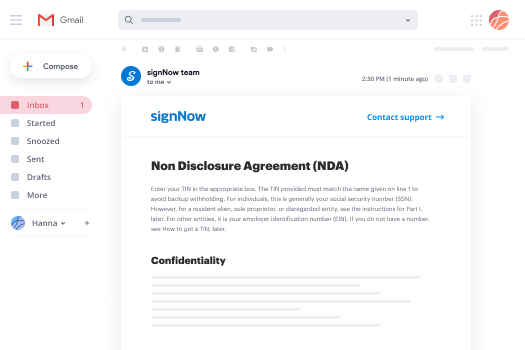
Gmail is probably the most popular mail service utilized by millions of people all across the world. Most likely, you and your clients also use it for personal and business communication. However, the question on a lot of people’s minds is: how can I functionality e signature validate form online a document that was emailed to me in Gmail? Something amazing has happened that is changing the way business is done. airSlate SignNow and Google have created an impactful add on that lets you functionality e signature validate form online, edit, set signing orders and much more without leaving your inbox.
Boost your workflow with a revolutionary Gmail add on from airSlate SignNow:
- Find the airSlate SignNow extension for Gmail from the Chrome Web Store and install it.
- Go to your inbox and open the email that contains the attachment that needs signing.
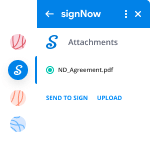
- Click the airSlate SignNow icon found in the right-hand toolbar.
- Work on your document; edit it, add fillable fields and even sign it yourself.
- Click Done and email the executed document to the respective parties.
With helpful extensions, manipulations to functionality e signature validate form online various forms are easy. The less time you spend switching browser windows, opening several accounts and scrolling through your internal records seeking a document is more time to you for other significant assignments.
How to safely sign documents using a mobile browser
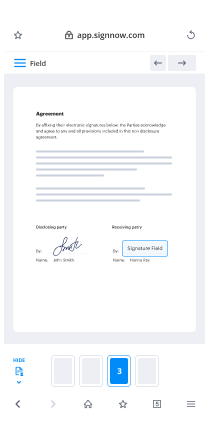
Are you one of the business professionals who’ve decided to go 100% mobile in 2020? If yes, then you really need to make sure you have an effective solution for managing your document workflows from your phone, e.g., functionality e signature validate form online, and edit forms in real time. airSlate SignNow has one of the most exciting tools for mobile users. A web-based application. functionality e signature validate form online instantly from anywhere.
How to securely sign documents in a mobile browser
- Create an airSlate SignNow profile or log in using any web browser on your smartphone or tablet.
- Upload a document from the cloud or internal storage.
- Fill out and sign the sample.
- Tap Done.
- Do anything you need right from your account.
airSlate SignNow takes pride in protecting customer data. Be confident that anything you upload to your account is secured with industry-leading encryption. Automated logging out will protect your user profile from unauthorised access. functionality e signature validate form online from the phone or your friend’s phone. Protection is crucial to our success and yours to mobile workflows.
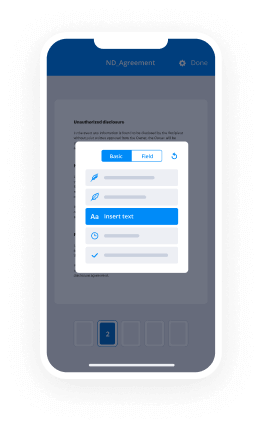
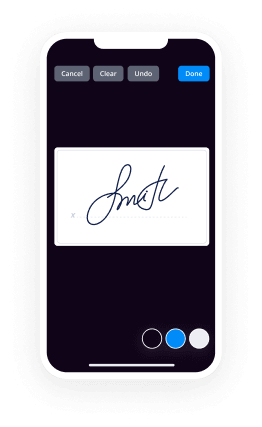
How to digitally sign a PDF on an iOS device
The iPhone and iPad are powerful gadgets that allow you to work not only from the office but from anywhere in the world. For example, you can finalize and sign documents or functionality e signature validate form online directly on your phone or tablet at the office, at home or even on the beach. iOS offers native features like the Markup tool, though it’s limiting and doesn’t have any automation. Though the airSlate SignNow application for Apple is packed with everything you need for upgrading your document workflow. functionality e signature validate form online, fill out and sign forms on your phone in minutes.
How to sign a PDF on an iPhone
- Go to the AppStore, find the airSlate SignNow app and download it.
- Open the application, log in or create a profile.
- Select + to upload a document from your device or import it from the cloud.
- Fill out the sample and create your electronic signature.
- Click Done to finish the editing and signing session.
When you have this application installed, you don't need to upload a file each time you get it for signing. Just open the document on your iPhone, click the Share icon and select the Sign with airSlate SignNow button. Your sample will be opened in the application. functionality e signature validate form online anything. In addition, using one service for your document management requirements, things are faster, better and cheaper Download the application right now!
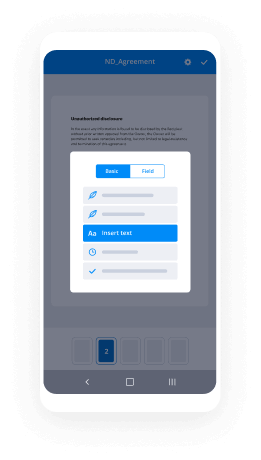
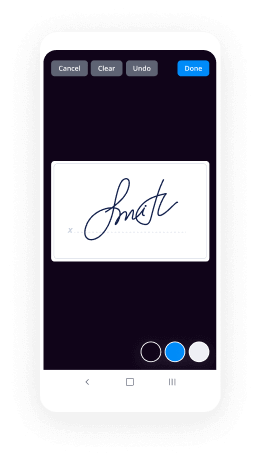
How to electronically sign a PDF document on an Android
What’s the number one rule for handling document workflows in 2020? Avoid paper chaos. Get rid of the printers, scanners and bundlers curriers. All of it! Take a new approach and manage, functionality e signature validate form online, and organize your records 100% paperless and 100% mobile. You only need three things; a phone/tablet, internet connection and the airSlate SignNow app for Android. Using the app, create, functionality e signature validate form online and execute documents right from your smartphone or tablet.
How to sign a PDF on an Android
- In the Google Play Market, search for and install the airSlate SignNow application.
- Open the program and log into your account or make one if you don’t have one already.
- Upload a document from the cloud or your device.
- Click on the opened document and start working on it. Edit it, add fillable fields and signature fields.
- Once you’ve finished, click Done and send the document to the other parties involved or download it to the cloud or your device.
airSlate SignNow allows you to sign documents and manage tasks like functionality e signature validate form online with ease. In addition, the security of your information is priority. Encryption and private web servers can be used for implementing the latest capabilities in data compliance measures. Get the airSlate SignNow mobile experience and operate more proficiently.





FAQs
-
How can I validate eSignature forms online using airSlate SignNow?
To validate eSignature forms online with airSlate SignNow, simply upload your document and apply eSignatures as needed. Our platform ensures that each signature is legally compliant and verifiable. After signing, you can easily access the validation feature to confirm the authenticity of the eSignature.
-
What are the pricing plans for validating eSignature forms online?
airSlate SignNow offers competitive pricing plans that cater to different business needs. Our plans include features for validating eSignature forms online, with options ranging from basic to advanced functionalities. You can choose a plan that fits your budget and requirements, ensuring you get the best value for your investment.
-
What features does airSlate SignNow offer for validating eSignature forms online?
airSlate SignNow provides a robust set of features for validating eSignature forms online, including real-time tracking, audit trails, and signature verification. These features guarantee that your documents are secure and compliant with legal standards. Our user-friendly interface makes it easy to manage and validate your eSignatures efficiently.
-
What benefits does airSlate SignNow provide for businesses looking to validate eSignature forms online?
By using airSlate SignNow to validate eSignature forms online, businesses can streamline their document workflows and improve efficiency. Our platform enhances security, reduces turnaround time, and ensures compliance with legal requirements. This results in increased productivity and confidence in your electronic transactions.
-
Can I integrate airSlate SignNow with other applications to validate eSignature forms online?
Yes, airSlate SignNow offers seamless integrations with various applications and platforms to enhance your workflow. You can easily connect with CRM systems, project management tools, and cloud storage solutions to validate eSignature forms online. This integration capability helps you maintain a smooth and efficient process across your business operations.
-
Is it easy to validate eSignature forms online for non-technical users?
Absolutely! airSlate SignNow is designed with user-friendliness in mind, making it easy for non-technical users to validate eSignature forms online. Our intuitive interface and step-by-step guidance ensure that anyone can manage and validate signatures without needing extensive technical knowledge.
-
What security measures does airSlate SignNow implement for validating eSignature forms online?
airSlate SignNow prioritizes the security of your documents by implementing advanced encryption and secure servers. When you validate eSignature forms online, you can trust that your data is protected against unauthorized access. Our compliance with industry standards ensures that all electronic signatures are legally binding and secure.
-
Is an e-signature legally valid and treated as valuable as an original signature in the court of law in India?
Everyone knows that India is becoming digital and great initiatives have been taken by our PM. E-Signatures are legally valid in India, and businesses can use it without any doubt.Requirements for validityThe Information Technology Act, 2000 provides for the adoption of e signatures and acknowledges two forms of e-signs as having similar legal acceptance as pen-and-paper signatures. These forms specifically acknowledged under the IT Act include:E signatures which incorporate an Aadhaar ID with an electronic Know-Your-Customer (eKYC) method.Digital signatures which are created by an “asymmetric crypto-system and hash function”. For such signatures, the signer is usually issued a long-term certificate-based digital identity number, stored on a USB token, which is used to place a sign on a document.For the above forms of electronic signatures to be legitimate, they must satisfy these further conditions.The signatory of the e signature must be uniqueAt the point of signing, the signatory should be in control of the data employed to generate the e-sign.Any tamper with the signature, or the form to which the signature is placed, must be easily detectable.There must be an audit trail of procedures followed during the signing process.Signer certificates should only be granted by the signNowing Authority.If all these conditions are followed, then there is an obvious legal belief in favor of the legality of any document signed using e-signatures.However there are some documents which Indian law prohibits to be signed electronically. Here is the list of it.Any document listed by the government of India on the official gazettePower of attorneyTrust deedsA will and other forms of testamentary dispositionNegotiable documents such as bills of exchange, drafts, promissory notes and moreDocuments involving any sale of immovable property such as real estateTo learn more about technical and legal overview of electronic signatures in India, Read this article - Electronic Signatures India - Technical & Legal Overview | signNow
-
What are the biggest problems with digital or e-signatures?
[full disclosure: I’m VP Digital Transformation at Solutions Notarius Inc., a company that supplies electronic and digital signature solutions]Great question. I perceive the biggest challenges in relation to electronic and digital signatures to be:Not understanding the function of a signature and therefore what e-signatures are. In the physical world, people intuitively understand what a signature is in its manuscript form, whereas in the electronic world, e-signatures encompass a much wider range of possible forms, from email signature blocks to voice recordings to secured online session date (when you click « I accept ») to images of manuscript signatures to cryptographically protected digital signatures. A signature is a permanent mark that is unique, exclusively used and traceable to a person and affixed on static information with implied or expressed intention. Everything in the electronic world that fulfils that function is a signature.Not understanding that e-signatures are a means to an end / that end is legal reliability. Whenever you are applying a signature to something, especially documents, it is to create evidence of a transaction. The degree to which that evidence will possess the following four reliability attributes will affect the probative value of the evidence: identity (certainty of the identity of signers), integrity (certainty of no undetected changes to document / information signed), authenticity (all that is required to prove identity and longevity is embedded in the document itself) and longevity (document or information signed can be opened, read and authenticated for at least its retention period).Not understanding that there is no such thing as “universally legally valid e-signatures”. People often ask “are electronic signatures legal and are they recognized by courts”? Ascertaining the legality of a form of signature calls for a 4 step analysis, always. First, what is the applicable jurisdiction for a specific or category of information / documents? Some contracts for example include a forum conveniens clause which make applicable the laws of a specific jurisdiction. Second, in that jurisdiction, what are the form requirements for signing those documents? Form requirements may include signing before a Commissioner of oaths and some statutes even prescribe the use of paper (!) in some cases. Third, absent specific form requirements, what is the general default legal regime that governs e-signatures for that type of documents in that jurisdiction? Fourth, is the e-signature solution you plan to use / have used will meet statutory functional requirements? So, in conclusion and from the previous 4 step analysis, it should be clear there cannot possibly be any e-signature solution that is universally legally valid for all types of documents in all jurisdictions.Administrative Adoption. When UNCITRAL e-commerce model laws where adopted worldwide in the period 1998–2008, it created a vexing situation where e-signatures were legal but not administratively adopted. Even if a statute proclaims as a general rule, for example, that “you cannot deprive of legal effect a document that is electronically signed solely on the basis that it is electronic”, administrations such as governments and banks, when they insist on receiving and processing paper documents, are maintaining a barrier to the adoption of e-signatures that e-commerce statutes were supposed to help take down.Not understanding that e-signatures are not all equal when assessing reliability. To assess the reliability of a particular e-signature, one has to assess identity (is the identity of signers reliable? why?), integrity (are changes to the document correctly invaluable dating associated e-signatures? can the original document signed be retrieved notwithstanding changes?), authenticity (is all necessary information to prove identity and integrity embedded in the document - in which case the document is a proof; or not - in which case it is merely a commencement of proof) and longevity (is the document signed and preserved in a logical format - for example ISO 19005 PDF/A with PAdES LTV signatures) - that will ensure it remains readable and verifiable for as long as required?). The word of e-signatures, when it comes to understanding the range of reliability offered - or lack thereof! - is severally lacking in its general knowledge of what makes an e-signature reliable. For example, an signNow Self-Sign certificate that is auto-generated by a user is great for integrity but worthless for identity because the user can declare whatever identity they choose in the certificate.There are other problems and challenges of course but the above are top of mind challenges I see and encounter all the time.
-
Do agreements signed online by EchoSign or signNow have the same legal position as signed by hand?
Online signature software such as EchoSign or signNow use electronic signatures, also known as digital signatures.Most countries now have legislation that provide for the use of electronic signatures.However, these countries may have slightly different requirements for what constitutes a legally binding electronic signature.The United Nations has attempted to provide some unifying features through the UNCITRAL Model Law on Electronic Signatures 2001 but this model law has only been adopted in 32 states including the UK, China, Mexico and India.In the UK, the Electronic Communications Act 2000 was enacted to comply with the UNCITRAL Model Law but it has now been replaced by Europe’s Electronic Identification and Authentication Services Regulation (910/2014/EC)(eIDAS) which came into force on July 1 2016.This new law applies to all EU member states, but since BREXIT, it is uncertain whether the UK will continue with eIDAS.The eIDAS states that only "qualified electronic signatures" will be mutually accepted by all the EU member states. A qualified electronic signature must be uniquely linked to the signer and based on a qualified electronic certificate that is issued by an approved authority.In the USA, the Electronic Signatures in Global and National Commerce Act (ESIGN, 2000) and the Uniform Electronic Transactions Act (UETA, 1999) give similar recognition to online signatures as paper signatures.Under these two acts, the term "electronic signature" means an electronic sound, symbol, or process, attached to or logically associated with a contract or other record and executed or adopted by a person with the intent to sign the record.Briefly, the following requirements must be met for an electronic signature to be valid:The signer intended to sign, consented to the use of electronic records for the transaction and did not withdraw his or her consent.The electronic transaction system must keep a record of how the signature was created or make a textual or graphic statement that must be attached to the agreement.The signer must have received a copy of the UETA consumer consent disclosures.The electronic signature records must be capable of being retained and accurately reproduced later by all parties. In other words, all parties must be allowed to reprint the agreement and the signatures if they want to.In Canada, electronic signatures are governed by the Personal Information Protection and Electronic Documents Act (PIPEDA, 2000). A secure electronic signature must be:Unique to the person signing.The person signing has sole control over the signing process and his or her identify can be verified.The electronic signature is linked to an electronic document in a way that any attempt to change the document can be determined.In general, there's a lot of similarity in requirements governing electronic signatures, mainly because this is necessary to promote the growth of international e-commerce and trading.However, to avoid uncertainty, you should always state in your agreement which country’s law applies to the agreement. If there was going to be a dispute later on, you then know which country’s law will apply to the agreement and what the likely result will be.Also, even though you sign an agreement online using these software, ensure that you print a copy of the agreement and the signatures and keep these paper copies for your own records.For more info, you can check out our article on 4 tools to sign NDA agreements electronically.Credits: Icon "edit" by Chameleon Design from the Noun Project.
-
How do digital signatures and electronic signatures differ?
Many people think that electronic signatures are the same as digital signatures but that is not the case. In fact, digital signatures are a highly secured way to implement electronic signatures.Digital signatures use a public and private key generation framework, signature algorithm and a verification algorithm to match public and private keys and validate the authenticity of electronic signatures.Ever since the passing of the E-Sign Act in 2000, electronic signatures have acquired as much weight as the traditional wet or ink signature. As a result, electronic signatures have become widely used to conduct business online. This term is quite broad however, and not all electronic signatures constitute as digital signatures, which are guaranteed to fulfill the requirements decreed by the E-Sign Act. These terms include:– The customer’s intent to sign, as well as the consent to sign electronically– The software’s ability to maintain document integrity through unique identifiers– The company’s responsibility to retain all documents for legal purposesWhat does it mean? In a nutshell, every document requiring a digital signature has, in effect, a unique key attached to it. This is done using a public key infrastructure (PKI). Public key is generated & attested by the operator of the PKI called a Certificate Authority, and is held by the document owner, who can then pass on copies to his or her clients. Once the client signs, a unique key (private key) message becomes embedded inside the document. If anyone tries to tamper with the document, the software algorithm will detect it and invalidate the document.Due to increased identity theft in recent years, it has become ever more important for documents to be signed under a watchful eye, whether that be through digital or in-person witnesses. Companies that value your security will enact several layers of protection to ensure that every document is using digital signatures and is legally secure. At signNow, we use industry-standard encryption, time stamps, in-document visibility control, and e-mail authentication to discourage electronic forgery. signNow complies with the E-Sign Act, as well as UETA, HIPAA, and more.
-
When will the JEE Mains form out?
Hello Candidates,The National Testing Agency has released the JEE Main 2020 Application Form. The Online Registration Form is released for the January Session. Candidates can click on the link below to apply for the JEE Main 2020.The JEE Mains Form is released on 3rd September 2019 and the last date to submit the form is 30th September 2019. However, candidates can make the payment of the application form between 3rd September 2019 to 1st October 2019.You can make the payment of the application form through Credit Card/Debit Card/Paytm/UPI and Net Banking.The Application Form Correction will start from 11th October 2019 onwards. Candidates can get complete details of the JEE Main 2020 Dates and other related details here.Candidates must make sure that they have a valid e-mail id and password while applying for the JEE Main Entrance Exam.All the Best!!
-
When are digital signatures valid, and when are "wet signatures" required? Is there a difference between digital markup on PDF o
For the most part, signatures are not required at all to form a contract, nor are they part of rather legal arrangement between parties. Rather, they are proof that: * the two parties did in fact come to an agreement. Witnesses, communications records, the history of the parties’ acts, and many other things could prove this, but two parties engaging in a formal signing process is much more efficient and conclusive * the two parties intended to be bound to promises they were making each other, and it wasn’t just negotiation, chatter, offers, or statements of intent. Shaking hands, stomping three times on the ground, reciting a prayer, and other demonstrative acts would also work, but in most cases are not an accepted standard, and are harder to implement. * the parties are identified. This goes both to authenticity (the document is real and identity (the parties endorsing it are who they say they are, and are acting on their own behalf or on behalf of a business entity, client, or charge they represent). Other forms of ID, like notaries, witnesses, video records, could work, and documents and signatures can be forged, but a signature, properly authenticated, is simple low cost way to make contracts more trustworthy. Given that a signature isn’t really necessary at all, in principle at least there is not really any difference between a wet signature, a signature via a document service like signNow, a scanned PDF, clicking “I accept”, typing out “/s [signature]”, or any other means. Any requirement is not really based on fundamental principles, but the specific circumstances of the transaction. * Sometimes the parties insist on one particular type of signature before they will do business with each other. Banks and government agencies sometimes insist on a physical signature, or an online signature done through their own in-house system, in order to process a document. You can sometimes fool them with a good digital signature, and they’ll accept the document anyway, in which case no harm no foul. But they’re free to reject it. * Similarly, there may be a custom in a particular realm of business, law, or life. For example, many old school investors only trust wet signatures on paper, thought this is dying out as of the late 2010s. * It could be written into a contract, or an offer, or policy, etc., that only a particular mode of signing is valid. * In a few cases there is a legal requirement to have a wet ink signature, or at least a signature, depending on the specific law. In the United States (and probably many other places) real estate transfers, copyright licenses, wills, and other things require an actual signature. E-signature laws often specify that any kind of signature will do, as a default, unless the law specifically requires one kind of signature or another. There really aren’t any signature standards in the US, just like there’s no standard for how you’re supposed to shake hands or say “I do.” As Europeans like to do, the digital signature standards are much more specific over there. There’s probably an ISO (International Organization for Standardization [ https://www.quora.com/topic/International-Organization-for-Standardization ]) rule for how to wake up, pet your dog, and make coffee in the morning. But the US attitude is whatever does the job will work. FWIW, there is a custom of signing things in blue ink to demonstrate that it is a real signature. Red or green would do but they look a little silly on a contract. Thus, when I apply a digital signature to things I usually make it blue.
-
How do I transfer car ownership in Pune?
All RTO services are available online ( no need to catch Agent)Online Process:Before starting transfer process online, keep all the details of seller, buyer and vehicle details handy (like pan number, Aadhar number, address, engine number, chassis number, insurance details)1. Go to VAHAN 4.0 (Beta) , Select the state other than Delhi and add the vehicle registration number (i.e. MH1X99XX) and proceed.2. Go to Online Services >> Misc (Ownership transfer)3. Enter vehicle chassis number (last 5 digits) and mobile number to receive OTP4. After successful OTP verifcation it will navigate to ownership transfer form, fill all required details of seller, purchaser, and vehicle.5. Cross check the details and proceed further to payment page .6. Rs. 550/- is the fee for Car ownership transfer, it may differ for other type of vehicle7. Pay the fee online and it will generate Form 29, Form 30 and E-payment receipt (download all this forms, Form 29 requires two copies to be downloaded)8. Make signature of seller and buyer wherever mentioned on all of these forms.Considering vehicle belongs to same RTO, below documents are required_Signed Form 29, Form 30 and E-payment receiptId proof and Address proof of seller and buyer, if buyer does not have permanent address from Pune, he/she needs to provide registered rent agreement with police verification.Original RC document from sellerLatest PUC certificate from sellerPencil print of chassis(5 copies), you can find chassis number below driver seat.Insurance details copy from seller.One passport size photograph of buyer.Lastly visit RTO office along with all the mentioned documents and submit it.In next 4–7 days, your application of vehicle ownership transfer gets approved and transferred. (RTO will notify this through SMS).It will take 10 - 30 days for RC smart card to get delivered to your mentioned address.As RC smart card take time to get delivered, you can download your RC particulars online for Fee of 50Rs. (RC particulars is the document you can provide for insurance transfer and other vehicle related transactions also its valid document when you do not have the RC smart card)To downlaod RC particulars _1. Go to VAHAN 4.0 (Beta), Select the state other than Delhi and add the vehicle registration number (i.e. MH1X99XX) and proceed.2. Go to Online Services >> RC Particulars3. Enter vehicle chassis number (last 5 digits) and mobile number to receive OTP4. After successful OTP verification click on show details , it will show one form with restricted vehicle details.5. Below that form it will ask to pay Rs. 50/- 6. After successful online payment it will generate RC particular form which you can download and use it as valid RC document until you get RC smart card.(remember to download the RC particulars otherwise, next time also you need to pay Rs. 50/- to generate it again.)If you thought my answer was helpful, it would mean a lot to me if you could press the light blue upvote button below.
-
How do I change my mobile number in a PAN card?
You can change/update mobile number on Pan Card.Steps to Follow While Making Pan Card Correction:The Permanent Account Number (PAN), which is a unique 10-character alpha-numeric number, is mandatory to be quoted for filing of income tax returns (ITRs). All your financial transactions can only be processed if you have a PAN. All bank accounts and the Aadhaar identity card of an individual must be linked with PAN. PAN helps the tax department keep a tab on all your financial transactions and also helps it nab tax evaders.The government has made it mandatory to link Aadhaar - a 12-digit unique identity number given by the Unique Identification Authority of India - with the PAN card by Dec 31, 2017.How to make PAN Card correction onlineVisit the official website of the Income tax department :incometaxindiaefiling.gov.inClick on “Application type” and then select “PAN correction” from the drop down menu.The applicant is required to fill in his or her details like name, date of birth, email id, mobile number, nationality and the captcha code and then click on “submit”After submitting the information a token number will be generated which will also be required for future reference. It will be displayed both on the screen and also will be sent to the registered email id.After this provide the PAN number that needs to be corrected in the appropriate box and then provide your personal details and then click on “next”. The details will be updated in the income tax database.After this, a page will appear where the member is required to upload documents like address proof, proof of identity and age.If the member has mentioned his or her Aadhaar number then the scanned copy of the Aadhaar card along with supporting documents are mandatory. Likewise, if the Aadhaar is selected as a proof of identity or address proof then the Aadhaar number must be provided.After this, the entire application will appear on the screen to check all the details provided and changes must be before finally submitting it.to know more click on, how to make PAN Card correction online.
Trusted esignature solution— what our customers are saying


Get legally-binding signatures now!
Frequently asked questions
How do i add an electronic signature to a word document?
How to make a pdf editable for esign?
How to sign a n e-mail?
Get more for Validate eSignature Form Online
Find out other Validate eSignature Form Online
- Mn quitclaim deed 481377386 form
- Missouri quitclaim deed from corporation to corporation form
- Missouri wife form
- Missouri quitclaim deed from husband to himself and wife form
- Warranty deed form 481377391
- Quitclaim deed husband wife form
- Deed individual trust form
- Missouri deed form
- Missouri husband wife form
- Transfer death deed 481377397 form
- Mo uncontested form
- Missouri quitclaim deed from husband and wife to llc form
- Survivorship joint tenants form
- Missouri statutory form
- Mississippi warranty deed from husband and wife to a trust form
- Deed 481377405 form
- Mississippi warranty form
- Mississippi child support form
- Mississippi quitclaim deed form
- Ms divorce form