Establishing secure connection…Loading editor…Preparing document…

Georgia Notice of Contest of Claim of Lien

This template is fully customizable. Edit the text, fill out the fields, and send it for signature. Give it a try!
Georgia Notice of Contest of Claim of Lien

What the Georgia Notice of Contest of Claim of Lien Is

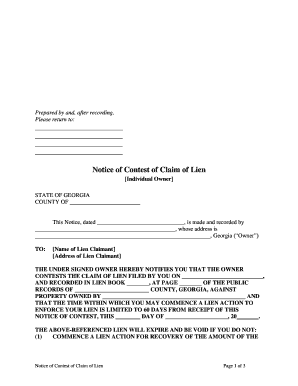
The Georgia Notice of Contest of Claim of Lien is a formal written response filed by a property owner, contractor, or other interested party to dispute a recorded claim of lien against real property in Georgia. The notice identifies the contesting party, explains the grounds for contest, references the recorded lien, and asks the county clerk or registry to note the dispute. Use of a Notice of Contest preserves the contesting party’s procedural position while the underlying dispute is resolved by negotiation, bonding, or court action, and it is typically governed by state lien and recording statutes.

Why a Notice of Contest Matters for Property Liens

Filing a clear, timely Notice of Contest protects interests by creating a public record of dispute, clarifying competing claims, and preserving rights to bond, litigate, or seek discharge under Georgia lien rules.

Why a Notice of Contest Matters for Property Liens

Who Commonly Prepares and Files This Notice

Typical filers include property owners disputing a lien, general contractors protecting payment rights, and lenders or title companies managing title exposure.

  • Property owners disputing the lien validity, seeking a public record of contest and to prompt resolution or bonding.
  • General contractors or subcontractors contesting competing liens or asserting priority concerns during close-out and payment.
  • Title companies and lenders filing to record objections and protect closing and lending decisions when a lien appears.

The notice is a procedural tool; it does not by itself decide the lien’s validity but it starts formal dispute handling that affects title and closing workflows.

Typical Authorized Signers

Property Owner

An individual owner or authorized corporate officer may sign. The signer should have authority under title documents or corporate resolution to act on behalf of the owner; mismatched signer names may complicate record acceptance.

Contractor Representative

A contractor’s officer, project manager, or attorney-in-fact can sign when authority is documented. For companies, include job title and corporate capacity line to show signing authority.

Step-by-Step: Completing and Filing the Notice

Follow these steps in order to prepare a compliant Notice of Contest and submit it to the correct recorder for the property.

  • 01
    Step 1: Verify recorded lien details and obtain a certified copy from the county recorder.
  • 02
    Step 2: Complete the notice fields with exact names, legal description, and recording references.
  • 03
    Step 3: Sign and date in the capacity indicated; attach supporting documents if required by local practice.
  • 04
    Step 4: File with the county clerk/recorder where the property is recorded and obtain a stamped copy for your file.

How the Contest Process Typically Progresses

A Notice of Contest triggers administrative and legal steps; understanding the typical flow helps manage title and settlement risk.

  • Record Match: Recorder links the contest to the recorded lien using instrument numbers and parcel identifiers.
  • Notice to Parties: Affected parties often receive notice from the recorder or via counsel to acknowledge the dispute.
  • Bonding or Litigation: Disputes may be resolved by posting bond, negotiated settlement, or court determination on lien validity.
  • Title Clearance: After resolution, recorder accepts discharge, release, or court order to clear title records.

Essential Parts of a Professional Notice of Contest

A professionally prepared notice combines precise identification, clear grounds, and proper execution to ensure the recorder and third parties can act on the dispute.

Identifying Information

Full legal names for the notice filer and the lien claimant plus corporate designation where applicable; this ensures the notice attaches to the correct recorded instrument and prevents mistaken identity in title searches.
Recorded Reference

Exact recording information — county, instrument number, book/page or recording date — to tie the contest to the precise recorded lien and avoid ambiguity during clerk indexing.

Property Description

Legal description or parcel ID identical to the lien document; omitting the legal description risks clerk rejection or mismatched indexing that undermines the notice effect.

Statement of Contest

A concise statement explaining the basis for dispute (payment, lack of privity, defective notice) that sets the factual/legal posture without extensive litigation briefing.

Capacity and Signature

Printed name, signer capacity, signature line, and date; include evidence of signing authority for entities (resolution, power of attorney) when applicable to prevent acceptance issues.

Supporting Attachments

Optional attachments such as payment evidence, contract excerpts, or bond deposits that substantiate the contest and streamline dispute resolution or clerk review.

Configuring an Online Workflow for the Notice

Set up an electronic workflow with appropriate fields and authentication to speed execution and maintain an audit trail.

Field Configuration
Contestant Name Required text field; auto-validate against ID
Recorded Reference Structured fields for county and instrument number
Legal Description Multi-line required; upload supporting PDF
Signature Block Signer name, capacity, and date fields

Digital Signing and File Format Considerations

Use a signing platform that supports PDF and DOCX inputs, creates an audit trail, and preserves signed document integrity.

  • File Types: PDF, DOCX, and TIFF supported
  • Audit Trail: Timestamps, IP, and action log
  • Integrations: Salesforce, NetSuite, Procore support

Ensure the platform you use produces a tamper-evident signed file and stores a reproducible record consistent with ESIGN and your county recorder requirements.

Key Risks and Consequences of an Incorrect Notice

Clerk Rejection: Misidentification may lead to refusal to record
Title Delay: Errors can delay closings and escalate costs
Waiver Risk: Improper execution may waive contest rights
Increased Litigation: Incomplete notices can prompt costly court actions
Additional Fees: Re-filing, amendments, or attorney costs may increase expenses
Bond Exposure: Bond requirements or forfeiture risk in some resolutions

Common Preparation Mistakes to Avoid

  • Using an incomplete legal description or only a street address, which can prevent matching to the recorded lien and invalidate the notice effect.
  • Entering inconsistent party names or abbreviations that differ from recorded instruments, causing clerk indexing errors and title confusion.
  • Failing to attach or reference the original recorded lien instrument, which makes it difficult for clerks and title examiners to correlate records.
  • Signing without documented authority for corporate signers or using initials when the recorder requires a full printed name and capacity line.

Timing Considerations and Local Deadlines

Deadlines for filing a Notice of Contest vary by state and county; confirm local rules and recorder timelines before preparing the document.

Prompt Action:

File promptly after discovering the claim to preserve priority and address title questions

County Rules:

Some counties set processing windows or require additional forms; check local clerk instructions

Bonding Periods:

If bond is required to discharge a lien, bonding timelines are governed by statute or clerk rules

Negotiation Time:

Early contest can speed negotiation or settlement prior to closing

Court Deadlines:

If litigation follows, court filing deadlines and service rules will apply

Key Milestones from Discovery to Resolution

A typical milestone sequence helps stakeholders plan title clearance, bonding, or litigation steps efficiently.

01

Discovery

Identify recorded lien and collect related contract and payment documents.

02

Prepare Notice

Draft the Notice with exact recording references and support evidence.

03

File and Serve

Record the notice with the county and serve interested parties as required.

04

Resolve or Litigate

Pursue bond, settlement, or court determination to clear or enforce lien rights.

Comparison: Typical eSignature Pricing and Features

Electronic signature platforms vary by price model and enterprise features; compare starting prices and compliance capabilities for high-volume document handling.

signNow DocuSign Adobe Sign PandaDoc HelloSign
Starting Price $8/user/mo $15/user/mo $14/user/mo $19/user/mo $15/user/mo
Free Trial Yes, 7-day No No No No
Bulk Send Yes Yes Yes Yes No
Audit Trail Yes Yes Yes Yes Yes
HIPAA Compliant Yes Yes Yes No No

Examples: How Notices of Contest Are Used in Practice

Representative scenarios show practical uses and outcomes when Notices of Contest are prepared carefully.

Title Company Use

A title company identifies a newly recorded lien during closing review

  • It requests a Notice of Contest from the owner to evidence dispute
  • The recorded notice allows the closing to proceed with escrowed resolution steps and reduces unexpected title claims.

Contractor Dispute

A subcontractor disputes another claim affecting payment priority

  • The contractor files a Notice of Contest with supporting invoices
  • The notice clarifies competing claims and prompts early bonding or negotiated settlement to avoid project delays.

Frequently Asked Questions and Practical Answers

Answers to common questions about validity, execution, and next steps when preparing a Georgia Notice of Contest of Claim of Lien.


Need help? Contact support

be ready to get more
Join over 28 million airSlate SignNow users