Establishing secure connection…Loading editor…Preparing document…

Mechanic Lien

This template is fully customizable. Edit the text, fill out the fields, and send it for signature. Give it a try!
Mechanic Lien

What a Mechanic Lien Is and when it applies

A Mechanic Lien is a statutory claim recorded against real property by a contractor, subcontractor, supplier, or laborer who has provided labor or materials but has not been paid. It creates a property encumbrance that can secure payment for construction-related work and, if enforced, may lead to foreclosure against the property to satisfy the debt. Mechanic Liens are created under state statute and timing, notice, and filing requirements vary by jurisdiction; careful compliance with the controlling state law is essential to preserve the lien right.

Why a Mechanic Lien matters to construction and property creditors

A Mechanic Lien provides legal leverage to recover unpaid sums, preserves priority against other creditors when properly perfected, and alerts buyers or lenders to outstanding claims. It is a primary remedy for unpaid contractors and suppliers who lack personal guarantees or timely payments.

Why a Mechanic Lien matters to construction and property creditors

Who commonly prepares and files Mechanic Liens

Typical parties who prepare or receive Mechanic Liens and why they use them.

  • General contractors and subcontractors who supplied labor or materials and need to secure payment.
  • Material suppliers and equipment lessors claiming unpaid invoices tied to a specific improvement.
  • Property owners and lenders who must review lien filings during closing or financing.

Use the Mechanic Lien only if you meet the statutory eligibility and notice requirements in the state where the property is located; filing without qualification can expose you to costs or sanctions.

Step-by-step: preparing and filing a Mechanic Lien

Follow these core steps to prepare, serve, and record a Mechanic Lien while preserving your statutory rights.

  • 01
    Confirm Eligibility: Verify you are a qualifying claimant under state statute.
  • 02
    Preserve Notices: Send pre-lien notices or preliminary notices when required by state law.
  • 03
    Complete Lien Form: Fill the lien with accurate names, description, and amount claimed.
  • 04
    File and Serve: Record with the county recorder and serve copies per statute.

How the Mechanic Lien process typically flows

This high-level flow shows the main actions from unpaid work to lien enforcement.

  • Unpaid Work: Services or materials delivered; invoice remains unpaid.
  • Notice Stage: Send preliminary or notice to owner where required.
  • Filing Stage: Record lien in county land records.
  • Enforcement: If unpaid, pursue foreclosure or negotiate settlement.

Digital workflow essentials for completing a Mechanic Lien

Set up an efficient online workflow to reduce errors and speed filing; map each configuration to an action below.

Field Configuration
Claimant Name Auto-fill from company profile
Property Description Attach deed or tax parcel ID
Signature Require eSignature + identity verification
Record Copy Generate PDF for county recording

Technical considerations for eSigning and eFiling a Mechanic Lien

Use secure eSignature and document management tools that support required file formats and authentication.

  • File Types: PDF or PDF/A for stable, accepted record
  • Signer Authentication: Email + SMS or knowledge-based verification
  • Integrations: Connectors for cloud storage and county portals

Choose a platform that provides a tamper-evident audit trail and supports secure downloads for county filing and stakeholder distribution.

Common pitfalls to avoid when preparing a Mechanic Lien

  • Missing statutory deadlines caused by late preliminary notices or delayed last work date.
  • Incorrect owner or property description that leads to rejection at recording or unenforceability.
  • Claim amount errors or failing to itemize contested charges properly.
  • Failing to serve required copies on owners, lenders, or general contractors as state law requires.

Essential elements included in a professional Mechanic Lien

A valid Mechanic Lien contains specific components that establish identity, scope, and legal basis for the claim.

Claimant Information

Full legal name, business entity type, contact and mailing address for notices and service.
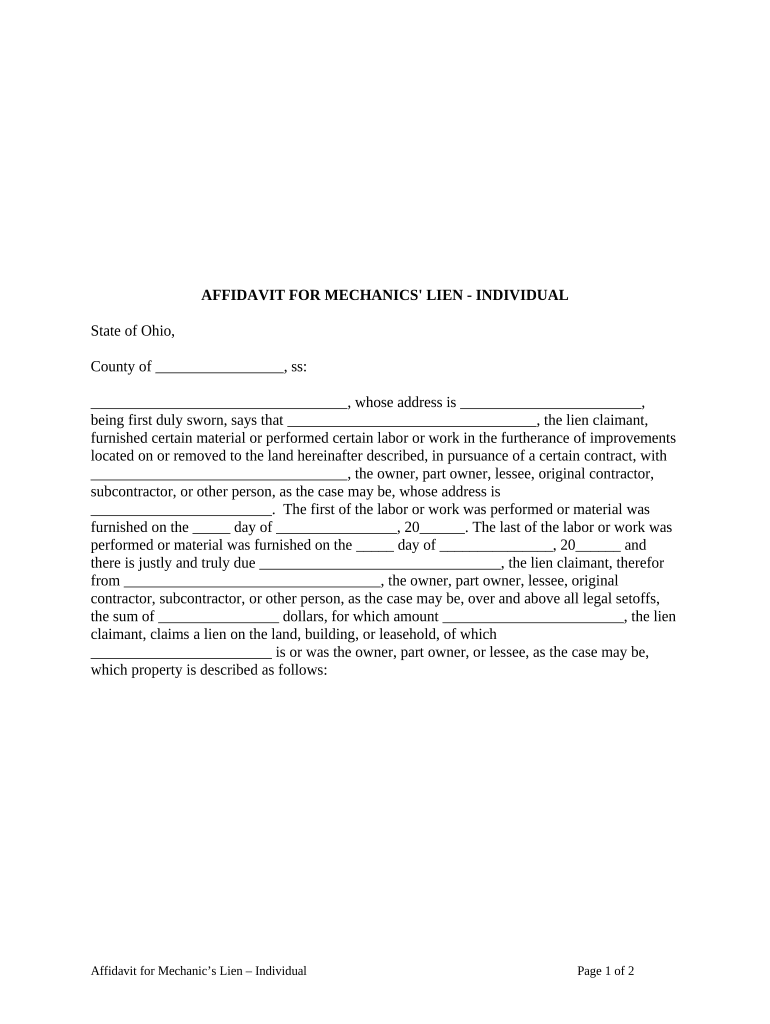
Property Identification

Precise legal description, parcel/tax ID, and commonly the street address for cross-reference.

Owner of Record

Name of the recorded owner exactly as county records show to ensure proper notice.

Contract and Work Details

Summary of the contract, scope of labor or materials provided, and material dates.

Amount Claimed

Specific unpaid amount, interest, retainage, and any offsets or credits noted.

Signature and Verification

Signed by claimant or authorized agent; include notarization if the state requires it.

Data points the form collects and why they matter

Claimant Name: Identifies the party asserting the lien
Property Description: Specifies the encumbered real estate
Amount Claimed: Defines the financial demand
Dates of Work: Establishes timing for deadlines
Owner Name: Directs service and notice
Signature Block: Creates attribution and intent to assert lien

Consequences of incorrect or improperly filed Mechanic Liens

Loss of Lien Rights: Failing to meet filing or notice rules can bar enforcement
Liability for Costs: Improper filings may expose claimant to court-ordered payment of costs
Sanctions and Damages: Some states allow damages for malicious or frivolous liens
Priority Loss: Late filing can reduce priority behind other secured creditors
Recording Rejection: Defective descriptions may be rejected by county clerk
Title Impediments: Unresolved liens can delay property sale or refinancing

Typical deadlines and timing to watch for with Mechanic Liens

Deadlines vary by state; common deadlines include notice timing, last date to file after last work, and statute of limitations for enforcement.

Preliminary Notice:

Often 20–90 days from first furnishing; state-specific

Filing Deadline:

Typically 30–180 days after final date of work, depending on state

Service Requirement:

Some states require serving owner or lender within specified days of filing

Enforcement Period:

Time to bring foreclosure action commonly 1–2 years from filing

Retention of Records:

Maintain documents for at least 3–7 years after resolution

Key milestones from unpaid work to enforcement

A sequential view of the major milestones that preserve lien rights and move a claim toward resolution.

01

First Furnishing

Date claimant first supplied labor or materials; starts many notice clocks.

02

Preliminary Notice Sent

When required, send to owner/lender within statute window to preserve rights.

03

Final Work Date

Establish the last date of performance that triggers filing deadlines.

04

Record Lien

File the lien with the county recorder to perfect the claim.

eSignature vendor comparison for Mechanic Lien workflows

Compare common plan-level characteristics that affect high-volume lien preparation, distribution, and secure signing. signNow appears first for reference.

signNow DocuSign Adobe Sign PandaDoc HelloSign
Starting Price $8/user/mo $15/user/mo $14/user/mo $19/user/mo $15/user/mo
Free Trial 7-day free trial Yes Yes Yes Yes
Bulk Send Yes Yes Yes Yes No
Audit Trail Yes Yes Yes Yes Yes
HIPAA Compliant Yes Yes Yes No No

Frequently asked questions about Mechanic Liens

Answers to common questions about eligibility, deadlines, filing locations, and digital signing for Mechanic Liens.


Need help? Contact support

be ready to get more
Join over 28 million airSlate SignNow users