Establishing secure connection…Loading editor…Preparing document…

Letter Regarding Memorandum Opinion on Summary Judgment Motion

This template is fully customizable. Edit the text, fill out the fields, and send it for signature. Give it a try!
Letter Regarding Memorandum Opinion on Summary Judgment Motion

What the Letter Regarding Memorandum Opinion on Summary Judgment Motion Is

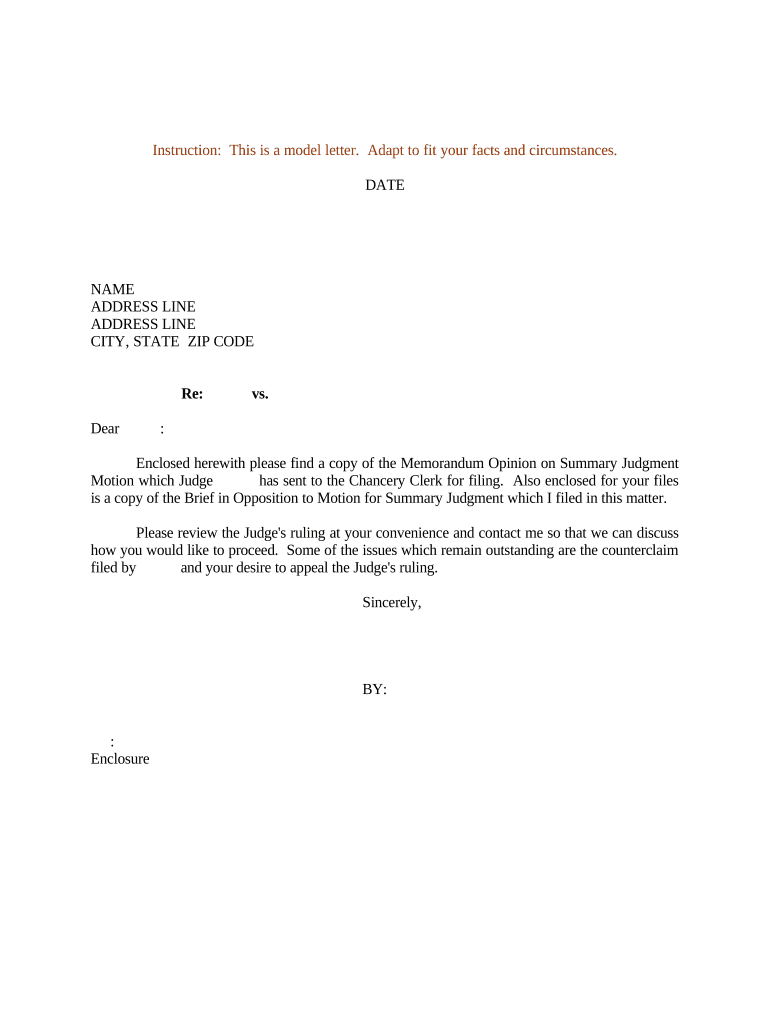
A Letter Regarding Memorandum Opinion on Summary Judgment Motion is a formal, court-directed communication submitted after a judge issues a memorandum opinion resolving a summary judgment motion. The letter summarizes the court’s ruling, explains the decision’s practical effect on remaining claims or defenses, and requests specific clerical or case-management actions such as entry of judgment, scheduling further proceedings, or proposing redactions. It is addressed to the clerk and served on all parties, and it should be concise, reference the opinion precisely, and attach or cite the opinion and any relevant docket entries for clarity and recordkeeping.

Why This Letter Matters for Case Management and Record Clarity

Submitting a clear, correctly framed letter helps the clerk process the case efficiently, preserves the record for potential appeal, and reduces the risk of administrative errors.

Why This Letter Matters for Case Management and Record Clarity

Who Typically Prepares and Receives This Letter

Lead counsel, supervising attorneys, or litigation paralegals usually prepare the letter and serve it to the court and opposing counsel.

  • Lead counsel — Prepares the legal summary and certifies accuracy to the court.
  • Court clerk — Receives and docket-stamps the submission and routes follow-up actions.
  • Opposing counsel — Receives service and may respond or propose further steps.

After service, the letter becomes part of the official docket and should be retained according to applicable retention rules.

Who Signs and Authorizes the Letter

Litigation Counsel

The supervising attorney of record signs the letter, certifies service, and confirms factual statements are accurate and consistent with the memorandum opinion.

Court Clerk

The clerk does not sign but receives and files the letter, enters docket notations, and effectuates any administrative actions requested by the submitting party.

Step-by-Step: Preparing and Submitting the Letter

Follow these core steps to draft, review, and submit a compliant letter after a memorandum opinion resolves summary judgment.

  • 01
    Review Opinion: Confirm the opinion’s conclusions, docket number, and any deadlines it induces.
  • 02
    Draft Letter: Summarize holdings, list affected claims, and state the precise action you request.
  • 03
    Internal Review: Have supervising counsel verify accuracy and ensure service list is complete.
  • 04
    File and Serve: File with the clerk via court e-filing and serve all parties per local rules.

Routing: Where the Letter Goes and How It Moves Through the Court

Understand the typical routing so you address the right office and use accepted delivery channels when submitting the letter.

  • Clerk’s Office: File the letter with the court clerk using the court’s required format and e-filing procedures.
  • Opposing Counsel: Serve opposing counsel by the method required in the local rules, often through CM/ECF or email if permitted.
  • Judge’s Chambers: Clerk may forward the letter or an advisory to the judge; include proposed orders if appropriate.
  • Docket: The clerk will docket the letter and attach it to the memorandum opinion entry for the record.

Online Workflow Settings for Drafting and eFiling

Configure a digital workflow that captures required fields, applies templates, and prepares the file for court e-filing and service.

Field Configuration
Template Use a standard letter template with prefilled caption and signature block.
Attachments Attach the memorandum opinion PDF and any proposed orders or redactions.
Signing Method Select permitted e-signature type and include consent notice if consumer-facing.
Service List Populate e-service addresses for CM/ECF or authorized email recipients.

Technical and Platform Considerations for eSubmission

Courts and opposing parties may require specific file formats, authentication strength, or e-filing provider compatibility when accepting electronic letters.

  • File formats: PDF/A, PDF, DOCX, and OCR-capable PDFs supported
  • Integrations: Salesforce, NetSuite, Google Workspace, and Microsoft 365 integrations
  • Authentication: Email, SMS, KBA, or SSO authentication available

Confirm the court’s e-filing rules and any authentication expectations before submission to avoid rejection or processing delays.

Comparing eSignature and eSubmission Tools for Completing the Letter

Pricing and feature differences matter when choosing a platform for preparing and signing legal letters; signNow is listed first for direct comparison.

signNow DocuSign Adobe Sign PandaDoc HelloSign
Starting Price $8/user/mo $15/user/mo $14/user/mo $19/user/mo $15/user/mo
Free Trial 7-day free trial Varies by plan Varies by plan Varies by plan Varies by plan
Bulk Send Yes Yes Yes Yes Varies by plan
Audit Trail Yes Yes Yes Yes Yes
HIPAA Compliant Yes Yes Yes No No
Envelope Cap No cap 100 envelopes/user/year Varies by plan Varies by plan Varies by plan

Essential Components to Include in a Professional Letter

Each element below ensures the court, parties, and the record can identify the opinion, understand its effect, and act without further clarification.

Header

Begin with the court name, full case caption, and docket number so the clerk immediately associates the letter with the correct matter and opinion.
Opinion Reference

Cite the memorandum opinion by docket entry number and date and attach a PDF copy or provide the precise citation for the reporter or electronic repository.

Holding Summary

Provide a neutral, one- to two-paragraph summary of the court’s holdings and which claims or defenses were resolved in whole or part.

Effect on Case

Explain practical consequences such as what remains to be litigated, whether entry of judgment is appropriate, and whether trial or other proceedings are needed.

Requested Relief

State the exact clerical or case-management action requested, for example entry of final judgment, dismissal language, or scheduling proposals.

Certificate of Service

Include a service statement detailing how and when all parties were served and provide the filer’s contact and signature block.

Practical Tips for Accurate and Efficient Letter Preparation

Adopt these practices to reduce errors, speed processing, and preserve appellate rights in post-opinion handling.

Use a Standard Template
Maintain a template with caption, signature block, and a preformatted summary section to ensure consistency and reduce drafting time while capturing required details.
Verify Dates and Docket Numbers
Cross-check the opinion date, docket entry number, and any cited orders; incorrect docket references can impede clerk processing and confuse the record.
Keep Tone Neutral
Present the court’s findings factually and avoid advocacy in the letter itself; substantive disagreements belong in formal motions or briefs.
Preserve Appeal Deadlines
Note that appeal timing runs from the entry of final judgment; do not concede or alter appeal rights in clerical letters.

Sample Scenarios Showing How the Letter Is Used

These short scenarios illustrate common practical uses of the letter after a summary judgment memorandum opinion.

Civil Rights Action

A federal judge granted summary judgment on two of five claims and denied it on three claims.

  • The plaintiff’s remaining claims proceed to trial.
  • Counsel submitted a concise letter requesting partial entry of judgment as to the resolved claims and proposing a short scheduling order for remaining discovery and trial preparation.

Contract Dispute

The court’s opinion resolved liability but reserved damages for trial.

  • Liability found, damages unresolved.
  • The defendant filed a letter asking the clerk to enter partial judgment on liability while proposing dates for a bifurcated damages trial and attaching the opinion and proposed order.

Common Preparation Pitfalls to Avoid

  • Omitting the opinion’s docket number or date, which can cause clerks to misfile or delay processing while they identify the correct opinion.
  • Using argumentative language that disputes the opinion rather than accurately reporting its holdings, which can prompt the court to treat the submission as a motion.
  • Failing to attach or properly reference the memorandum opinion, forcing clerks or opposing counsel to locate the decision independently.
  • Neglecting to serve all required parties or to certify service, which can lead to procedural defects and possible re-noticing.

Risks of an Incorrect or Untimely Letter

Delays: Case processing delays
Sanctions: Potential Rule 11 or fee sanctions
Record Gaps: Impaired appellate record
Misentry: Incorrect docket entries
Confidentiality: Unnecessary disclosure risk
Rejection: Court may refuse filing

Time-Sensitive Deadlines and How They Relate to the Letter

Key deadlines tied to a memorandum opinion influence when to file the letter and whether additional motions or notices are required.

Appeal Window:

Notice of appeal generally due 30 days after entry of final judgment (Fed. R. App. P. 4(a)(1)(A)

Motion for Reconsideration:

Local rules set timeframes; check the governing rule for your district before filing.

Entry of Judgment:

A letter requesting entry should be filed promptly after the opinion to avoid delay in closing resolved claims.

Service Timing:

Serve the letter contemporaneously with filing to preserve notice and avoid service disputes.

Record Retention:

Retain the filed letter and opinion per retention policies to support any later appellate or administrative review.

Key Milestones from Opinion to Case Update

Track these sequential milestones to ensure timely submission, service, and administrative follow-up after the court’s opinion.

01

Opinion Issued

Court files the memorandum opinion and it appears on the docket.

02

Draft Letter

Counsel prepares a concise letter summarizing holdings and requested clerk actions.

03

File & Serve

Submit the letter to the clerk and serve opposing parties per local rules.

04

Clerk Action

Clerk dockets the letter and processes any requested administrative entries.

Frequently Asked Questions About the Letter and Its Use

Answers to common questions about purpose, filing method, signature authority, and electronic submission of the letter.


Need help? Contact support

be ready to get more
Join over 28 million airSlate SignNow users