Establishing secure connection…Loading editor…Preparing document…

Agreement to Devise or Bequeath Property

This template is fully customizable. Edit the text, fill out the fields, and send it for signature. Give it a try!
Agreement to Devise or Bequeath Property

What an Agreement to Devise or Bequeath Property Is and When It’s Used

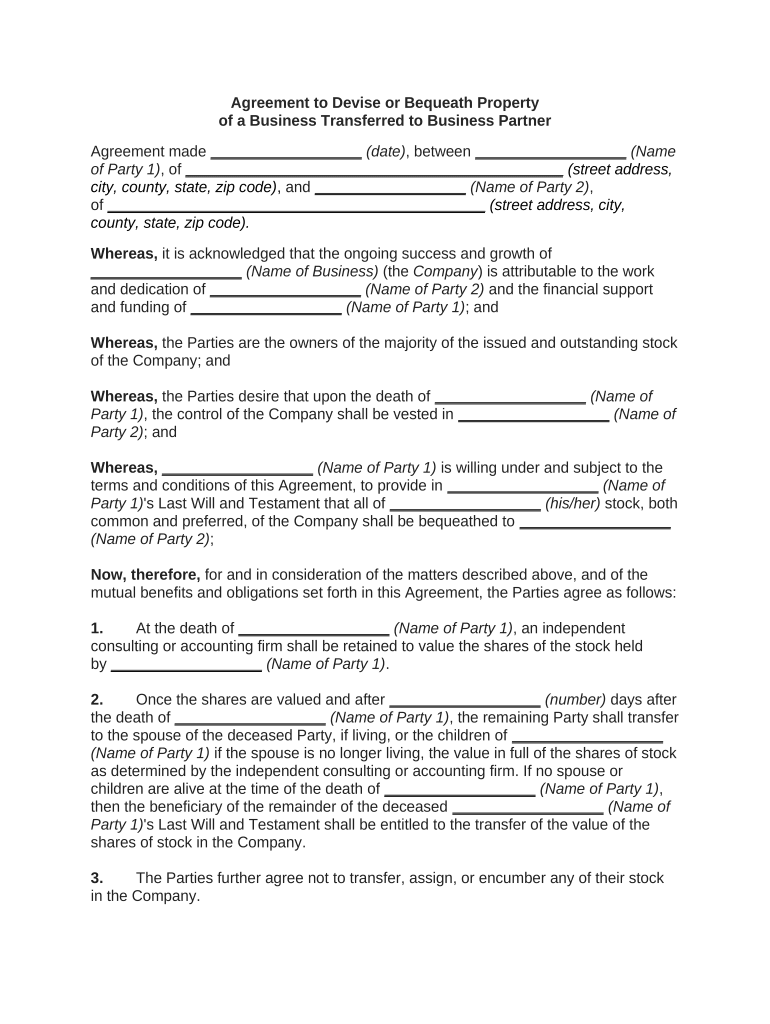
An Agreement to Devise or Bequeath Property is a legal instrument by which a person (or parties) contractually agree to transfer real or personal property by will or other testamentary disposition. It can document the donor’s intent, specify the property and beneficiary, and record any conditions attached to the devise or bequest. Because the subject matter overlaps with testamentary rights, these agreements must be drafted carefully to avoid creating an unenforceable testamentary transfer or unintentionally triggering probate complications.

Why such an agreement matters

This agreement creates clear expectations between the property owner and intended recipient, records material terms, and can reduce disputes after the owner’s death. It is useful when parties want a written commitment about a future devise or to memorialize consideration exchanged for a promise to leave property in a will.

Why such an agreement matters

Who typically completes this agreement and why

Parties use the signed agreement alongside wills, trusts, and probate filings to clarify obligations and reduce later litigation over testamentary intent.

  • Property owners and testators who want written proof of intended gifts and conditions.
  • Beneficiaries who require evidence to support expectations or succession planning.
  • Estate and probate attorneys drafting enforceable transfer language and coordinating with wills.

How to complete the agreement step by step

Follow this sequence to prepare, sign, and preserve a clear, enforceable agreement consistent with estate plans and probate rules.

  • 01
    Draft terms: Describe parties, property, conditions, and consideration in plain language.
  • 02
    Coordinate with will: Confirm will language matches the agreement to avoid conflicting dispositions.
  • 03
    Sign and authenticate: Obtain signatures, required witnesses, and notarization per state rules.
  • 04
    Store copies: Retain originals with estate counsel and provide copies to executor and beneficiary.

Essential parts of a professional Agreement to Devise or Bequeath Property

A complete agreement contains six core elements that together reduce ambiguity and support enforceability in probate or contract disputes.

Parties

Full legal names and contact details for the maker (testator) and beneficiary, plus any representatives or trustees, to establish who is bound by the agreement and who benefits.
Property

Precise description of the item or parcel, including legal description for real estate or serial numbers for tangible items, so the subject of the devise is indisputably identified.

Promise terms

Clear statement whether the property will be devised by will, codicil, trust, or other instrument and any conditions precedent or subsequent that affect the transfer.

Consideration

If the beneficiary provides value, describe the consideration and timing; if gratuitous, state that no consideration was exchanged to avoid ambiguity.

Execution formalities

Signature lines, date, witness attestations, and notary acknowledgment as required by the governing state to validate the agreement's form.

Dispute resolution

Governing law, venue, and any arbitration or mediation clauses to guide resolution of disagreements about the agreement or testamentary intent.

Key legal and security considerations to record

Intent to sign: Documented signer intent
Consent to e-records: Consumer disclosures if required
Attribution: Clear signature attribution
Retention: Ability to reproduce record
Notarization: Notary acknowledgment if required
Witnesses: State-specific witness count

Consequences and legal risks of an incorrect or incomplete agreement

Invalid transfer: Agreement may be treated as unenforceable if it effectively functions as an unsworn will.
Probate disputes: Conflicting documents can trigger will contests and litigation.
Tax exposure: Poor documentation can complicate estate tax valuation and reporting.
Ineffective e-sign: Electronic signing may be precluded if the instrument is a will or testamentary device.
Notary noncompliance: Missing notary or improper RON may void acknowledgment.
Witness defects: Incorrect witness count or ineligible witnesses can cause challenges.

Common preparation pitfalls to avoid

  • Using vague property descriptions such as 'my car' rather than VIN or title identification, which invites disputes and delays.
  • Failing to align will language with the agreement, causing inconsistent dispositions that can produce costly probate litigation.
  • Assuming electronic signatures are valid for testamentary transfers despite wills and codicils often being exceptions under ESIGN/UETA.
  • Omitting witness or notary steps required by the governing state, which can render the agreement ineffective at probate.

Where to file, send, or submit this agreement

Use these typical destinations to ensure proper routing after execution; follow local rules for recording or probate submission.

  • Executor / Trustee: Provide a signed copy to the named executor or trustee for inclusion in estate administration.
  • Estate attorney: Deliver originals to counsel for safekeeping and to integrate with wills or trusts.
  • Probate court: File as supporting evidence when probating the will if a dispute arises and local rules permit.
  • County recorder: Record deeds after probate when required by state recording rules to transfer real property title.

How to configure an online completion workflow

Set these fields and verifications when sending the agreement electronically to match legal and process requirements.

Field Configuration
Signature type Specify drawn or typed signature; consider digital signature if cryptographic assurance is required.
Authentication Use email plus SMS or KBA for higher signer identity assurance where permitted.
Witness fields Add conditional witness signature fields when state law requires witnesses.
Notary Enable RON or in-person notary field based on state notary rules.

Digital signing and format considerations

Ensure the platform can produce a tamper-evident final record, an audit trail, and the export formats needed for court or recorder submission.

  • File formats: PDF | DOCX | HTML
  • Integrations: Salesforce | NetSuite | Google Workspace
  • Notary support: Remote online notarization (RON) where state law allows

Timing considerations and typical milestones

There is no universal filing deadline for this agreement, but timing affects enforceability and probate interaction; plan execution consistent with estate documents.

Before death:

Execute while the maker is competent to avoid testamentary contest and capacity disputes.

Record after probate:

Deeds and title transfers are usually recorded after probate or other statutory transfer processes conclude.

Will update:

Update the maker's will promptly to reflect the agreement and avoid conflicts.

Statute concerns:

Be aware of state statutes of limitations for contract and probate contests.

Tax reporting:

Coordinate with tax advisor for estate or gift tax timing and reporting requirements.

Key milestones from execution to property transfer

Sequential stages show what typically occurs from signing through final title change.

01

Execution

Agreement signed, dated and notarized or witnessed per state rules.

02

Will coordination

Maker updates will or trust to reflect promised devise.

03

Death and probate

Executor opens probate and presents agreement as supporting evidence.

04

Title transfer

After probate, deed or transfer instruments are recorded to convey title.

Typical eSignature vendor pricing and feature snapshot relevant to estate documents

Compare common vendor price points and key features that matter for notarization, audit trails, and HIPAA or legal compliance; signNow is listed first by design.

signNow DocuSign Adobe Sign PandaDoc HelloSign
Starting Price $8/user/mo $15/user/mo $14/user/mo $19/user/mo $15/user/mo
Free Trial 7-day free trial Yes Yes Yes Yes
Bulk Send Yes Yes Yes Yes No
Audit Trail Yes Yes Yes Yes Yes
HIPAA Compliant Yes Yes Yes No No

Practical examples showing how parties use the agreement

These short examples illustrate typical scenarios where an agreement to devise or bequeath property clarifies expectations.

Family Property Promise

A parent promises a vacation property to a child in exchange for care during later years

  • Agreement specifies the care schedule and conditional remainder
  • The document was coordinated with the parent's will and executor to ensure consistent probate treatment and reduce testamentary contest risk.

Business Succession Bequest

An owner agrees to bequeath a minority interest to a long-time manager upon death

  • Agreement defines percentage, valuation method, and buyout rights
  • Counsel integrated the promise with buy-sell and trust documents so corporate transfer formalities and tax consequences were addressed.

Practical tips to ensure accuracy and enforceability

Adopt these practices to reduce later disputes and align the agreement with estate documents and local formalities.

Coordinate instruments
Have an attorney review the agreement alongside wills, trusts, and beneficiary designations to avoid contradictory language and probate challenges.
Use precise descriptions
Identify property with legal descriptions, VINs, or account numbers rather than informal labels to prevent ambiguity at transfer.
Follow execution rules
Comply with state witness, notary, and RON requirements at signing to preserve evidentiary value.
Keep originals safe
Store signed originals with counsel or the executor and keep certified electronic copies with audit trails for reproducibility.

Frequently asked questions about Agreement to Devise or Bequeath Property

Answers to common legal and practical questions about form validity, signing, and interaction with wills and probate.


Need help? Contact support

be ready to get more
Join over 28 million airSlate SignNow users